

 Jun 26 2011, 09:04 AM, updated 14y ago


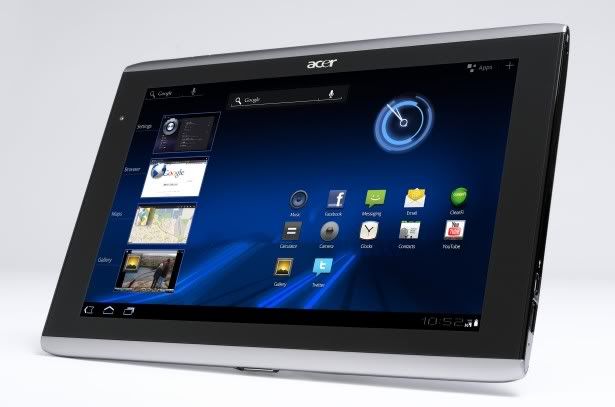
RRP: RM1599 (inclusive Sleeve)
Warranty: 1 year from Acer (if buy from Senq/Sen Heng and member can get 2 years warranty & extendable)
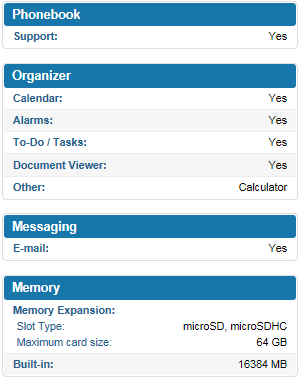
Specs (from Phonearena):
» Click to show Spoiler - click again to hide... «



Accessories:
» Click to show Spoiler - click again to hide... «
Case:
PDair.com
PDair.com
Sites Review:
» Click to show Spoiler - click again to hide... «
Users Review / Users Comparison:
» Click to show Spoiler - click again to hide... «
QUOTE(alexzai @ May 20 2011, 11:49 PM)
Here is my Conclusion for EEE Pad and Iconia Tab
Iconia Tab Feature :
*Solid Body
*Come with USB port , Micro SD slot with protective cover , Micro USB slot to connect to PC , Micro HDMI Port ( i think only SONY has the cable for it )
*LED Flash light
Battery Life 8 hours *
Price : RM1599 ( with protective case )
EEE Pad Feature :
*Thin & Nice
*IPS Panel
*Speaker at the side nice for watching video
*Does not have LED Flash light for camera
*Battery Life 8 hours *
*+QWERTY keyboard (Easy typing for the older people)
*Extended Battery Life to 16 hours with keyboard
*USB Port & Micro SD slot is with the keyboard
Price : RM1499 (without keyboard) RM1799 (with keyboard)
The price is slightly different in the middle. 1499 ~ 1799. if you looking for more reliable i would go for Acer(since all the hardware you need is already built in). If you looking for Styling or longer battery life i would go for Asus with the keyboard. Or you can get it without keyboard cause it is Thin & Light and nice looking(just to bring in and bring out to surf internet , watch video , listening music).

Iconia Tab Feature :
*Solid Body
*Come with USB port , Micro SD slot with protective cover , Micro USB slot to connect to PC , Micro HDMI Port ( i think only SONY has the cable for it )
*LED Flash light
Battery Life 8 hours *
Price : RM1599 ( with protective case )
EEE Pad Feature :
*Thin & Nice
*IPS Panel
*Speaker at the side nice for watching video
*Does not have LED Flash light for camera
*Battery Life 8 hours *
*+QWERTY keyboard (Easy typing for the older people)
*Extended Battery Life to 16 hours with keyboard
*USB Port & Micro SD slot is with the keyboard
Price : RM1499 (without keyboard) RM1799 (with keyboard)
The price is slightly different in the middle. 1499 ~ 1799. if you looking for more reliable i would go for Acer(since all the hardware you need is already built in). If you looking for Styling or longer battery life i would go for Asus with the keyboard. Or you can get it without keyboard cause it is Thin & Light and nice looking(just to bring in and bring out to surf internet , watch video , listening music).
QUOTE(benny888 @ May 22 2011, 11:18 AM)
http://technidroid.com/reviews/acer-iconia...us-transformer/
THE VERDICT:
The Transformer is a tablet that shows so much promise that I REALLY want to like it. It has a top-notch screen, adequate sound, and is equipped with some nice touches in added features. The downside at this point is that it just doesn’t seem polished and fully ready for the market, due to its bugs and features that simply aren’t working properly, the camera being the primary culprit. I try and use it, but become frustrated by the issues it’s currently having.
The Acer Iconia A500, however, seems quite polished and performs wonderfully in comparison. It has a very good scree
n, dynamite sound for a tablet, and everything works together quite harmoniously, including the full sized USB 2.0 port.
At the current moment, the Acer Iconia A500 is a much better overall value in my opinion.
THE VERDICT:
The Transformer is a tablet that shows so much promise that I REALLY want to like it. It has a top-notch screen, adequate sound, and is equipped with some nice touches in added features. The downside at this point is that it just doesn’t seem polished and fully ready for the market, due to its bugs and features that simply aren’t working properly, the camera being the primary culprit. I try and use it, but become frustrated by the issues it’s currently having.
The Acer Iconia A500, however, seems quite polished and performs wonderfully in comparison. It has a very good scree
n, dynamite sound for a tablet, and everything works together quite harmoniously, including the full sized USB 2.0 port.
At the current moment, the Acer Iconia A500 is a much better overall value in my opinion.
QUOTE(benny888 @ Jun 26 2011, 11:29 AM)
I have a handson test about half hour each only on the Transformer, Xoom and Iconia before deciding to buy the Iconia. I'd not say which is better . As in all gadgets, all has its pros and cons. We normally buy a specific one if we can accept its cons and find its pro is more important
I choose the Iconia : FULL USB port, micro SD and 32 GB memory - RM 1499 with free case n 2 years warranty
The Transformer has a nicer display ( not important feature as I find the Iconia is acceptable if you don't compare ). The USB and microSD is not on unit but on the keyboard dock. If I want to buy the Transformer I have to buy the keyboard dock - total costs RM 1799. I will not be using the keyboard at all as if I wish to carry a tablet with a keyboard, I am better off carrying my MacBook Air 11" which offers more solutions. So I will be wasting another RM 300 without any use. If I don't buy the keyboard dock, next time if I want to sell it - it'd be difficult as everyone expects to have the keyboard dock which is its major selling point
I choose the Iconia : FULL USB port, micro SD and 32 GB memory - RM 1499 with free case n 2 years warranty
The Transformer has a nicer display ( not important feature as I find the Iconia is acceptable if you don't compare ). The USB and microSD is not on unit but on the keyboard dock. If I want to buy the Transformer I have to buy the keyboard dock - total costs RM 1799. I will not be using the keyboard at all as if I wish to carry a tablet with a keyboard, I am better off carrying my MacBook Air 11" which offers more solutions. So I will be wasting another RM 300 without any use. If I don't buy the keyboard dock, next time if I want to sell it - it'd be difficult as everyone expects to have the keyboard dock which is its major selling point
Owner List pm me to be updated into the list :
» Click to show Spoiler - click again to hide... «
01 - exkaizen
02 - benny888
03 - mdnurman
04 - Jackdon/Jackson Oxonian
05 - Teng N
06 - waigsr
07 - hyperyouth_firepower
08 - mynameiskoko
09 - dejima
10 - mentality88
11 - soul_slasher85
12 - mcliong1
13 - HarrionX
14 - myhemay
15 - gnitney
16 - Ask_Yip
17 - limj881128
18 - bjbalangue
19 - oucheev
20 - boxer freak
This post has been edited by exkaizen: May 7 2012, 04:21 PM
02 - benny888
03 - mdnurman
04 - Jackdon/Jackson Oxonian
05 - Teng N
06 - waigsr
07 - hyperyouth_firepower
08 - mynameiskoko
09 - dejima
10 - mentality88
11 - soul_slasher85
12 - mcliong1
13 - HarrionX
14 - myhemay
15 - gnitney
16 - Ask_Yip
17 - limj881128
18 - bjbalangue
19 - oucheev
20 - boxer freak
This post has been edited by exkaizen: May 7 2012, 04:21 PM
 Quote
Quote


 0.0294sec
 0.67
0.67
 7 queries
 GZIP Disabled