Welcome Guest ( Log In | Register )

60 Pages  1 2 3 > » Bottom

Outline · [ Standard ] · Linear+

 Acer ICONIA A500 Official Thread V1, ICS OTA is now available!!!

views
     
TSexkaizen
post Jun 26 2011, 09:04 AM, updated 14y ago

An Area No Kishi !!!
******
Senior Member
1,555 posts

Joined: Aug 2005
From: Oslo, Norway
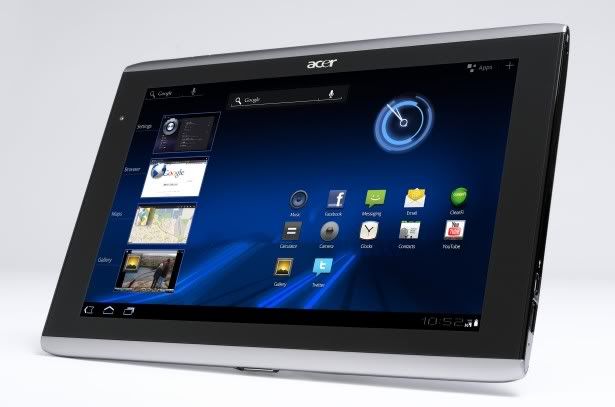
user posted image

RRP: RM1599 (inclusive Sleeve)
Warranty: 1 year from Acer (if buy from Senq/Sen Heng and member can get 2 years warranty & extendable)

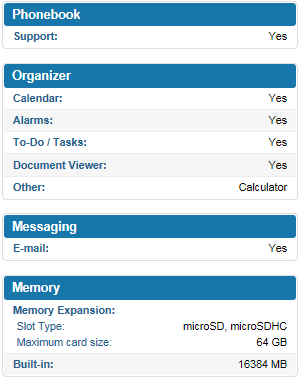
Specs (from Phonearena):
» Click to show Spoiler - click again to hide... «


Accessories:
» Click to show Spoiler - click again to hide... «


Sites Review:
» Click to show Spoiler - click again to hide... «

Users Review / Users Comparison:
» Click to show Spoiler - click again to hide... «


Owner List pm me to be updated into the list :
» Click to show Spoiler - click again to hide... «
TSexkaizen
post Jun 26 2011, 09:47 AM

An Area No Kishi !!!
******
Senior Member
1,555 posts

Joined: Aug 2005
From: Oslo, Norway
FAQ's:

Since ICONIA has full size USB port, are we able to plug-in 3G USB modem?
Yes, but depends on the USB modem model.
Please refer here for more info --> http://forum.xda-developers.com/showthread.php?t=1118639


Does ICONIA able to play 1080p videos?
Yes but only with Honeycomb 3.1

What is the best player to play movies
DicePlayer
» Click to show Spoiler - click again to hide... «


How dice player can read other storage/microsd card from the player without using file manager?
go to setting > list setting > media folder -> set as /mnt

When will ICONIA updated with Honeycomb 3.1?
Honeycomb 3.1 has been roll out 06/07/2011 through OTA
» Click to show Spoiler - click again to hide... «


I've changed to custom ROMS / leaked HC3.1 ROM but did not do any backup to revert to old version 1.139.04 to be able to received HC3.1. How Could I revert to 1.139.04?
There are 2 ways to revert:
1) Send to ACER service center HQ at Persiaran Sime UEP, Subang (this has been done by an ICONIA user in Facebook)
2) Follow this steps which I've tested and able to update HC3.1 OTA.
» Click to show Spoiler - click again to hide... «


This post has been edited by exkaizen: Aug 14 2011, 06:32 AM
TSexkaizen
post Jun 26 2011, 09:47 AM

An Area No Kishi !!!
******
Senior Member
1,555 posts

Joined: Aug 2005
From: Oslo, Norway
Others web forums/discussions related to ICONIA A500:
compiled by benny888
» Click to show Spoiler - click again to hide... «


Tips & Tricks:
compiled by benny888
» Click to show Spoiler - click again to hide... «


Custom ROM's for ICONIA A500:
compiled by benny888
» Click to show Spoiler - click again to hide... «


A quick guide on flashing rom ( more detail than what you can read at XDA ):
compiled by benny888

NOTE : you need to copy the downloaded rom zip file to the tablet INTERNAL SD card NOT external card

1. Download AcerRecoveryInstaller from Market . Launch the app

2. Switch off Iconia

3. Press down the vol button ( near the power switch ) and press the power button. You will see ACER splash screen and some small white words appearing at the top. Let go both buttons. The tab will boot into recovery mode

4. Select Backup/Restore - restore your present rom first

5. Using the vol buttons to scroll, select clear cache partition. Than scroll to Advanced , select clear dalvik cache

NOTE : Use POWER button to select your choices

5. NEXT Select install zip - follow the next step to select, browse using the vol up/down button to the rom zip file and press POWER button to select

IMPORTANT : It is important also to select clear data/factory reset if you are moving from one rom cook to another. If you are flashing first time, this is compulsory.

This post has been edited by exkaizen: Jun 29 2011, 03:43 PM
alisabki
post Jun 26 2011, 11:08 AM

Getting Started
**
Junior Member
68 posts

Joined: Jul 2010
From: Kota Bharu


hi, can u tell me why A500 is better than TF?
TSexkaizen
post Jun 26 2011, 11:14 AM

An Area No Kishi !!!
******
Senior Member
1,555 posts

Joined: Aug 2005
From: Oslo, Norway
QUOTE(alisabki @ Jun 26 2011, 11:08 AM)
hi, can u tell me why A500 is better than TF?
*
I don't have TF... but you can see at the first post... user review... happy.gif
benny888
post Jun 26 2011, 11:29 AM

Gadget Freak
Group Icon
Elite
27,801 posts

Joined: Jun 2007
From: Johor


QUOTE(alisabki @ Jun 26 2011, 11:08 AM)
hi, can u tell me why A500 is better than TF?
*
I have a handson test about half hour each only on the Transformer, Xoom and Iconia before deciding to buy the Iconia. I'd not say which is better . As in all gadgets, all has its pros and cons. We normally buy a specific one if we can accept its cons and find its pro is more important

I choose the Iconia : FULL USB port, micro SD and 32 GB memory - RM 1499 with free case n 2 years warranty

The Transformer has a nicer display ( not important feature as I find the Iconia is acceptable if you don't compare ). The USB and microSD is not on unit but on the keyboard dock. If I want to buy the Transformer I have to buy the keyboard dock - total costs RM 1799. I will not be using the keyboard at all as if I wish to carry a tablet with a keyboard, I am better off carrying my MacBook Air 11" which offers more solutions. So I will be wasting another RM 300 without any use. If I don't buy the keyboard dock, next time if I want to sell it - it'd be difficult as everyone expects to have the keyboard dock which is its major selling point
andy8274
post Jun 26 2011, 11:30 AM

Getting Started
**
Junior Member
166 posts

Joined: Nov 2005


great to have a better thread
mikeeeee
post Jun 26 2011, 12:14 PM

*~Tien9Chi~*
*******
Senior Member
3,026 posts

Joined: Oct 2004
From: KL, Penang & JB


QUOTE(benny888 @ Jun 26 2011, 11:29 AM)

The Transformer has  a nicer display ( not important feature as I find the Iconia is acceptable if you don't compare ). The USB and microSD is not on unit but on the keyboard dock.
This is not true, but TF does have microSD slot on the tablet itself. On the dock, and it have full size SDcard slot instead smile.gif
waigsr
post Jun 26 2011, 12:37 PM

Getting Started
**
Junior Member
87 posts

Joined: Jan 2011


i like this a500 base on the spec and price it is selling but then at 10.1 screen is a bit large to carry around beside the person. I just brought a SGS tab for my father as a present and after setting it up for senior citizen UI, i gave it to my father. The SGS tab size is is nice to carry around but it is getting a bit old school IMO. And SGS tab is the same price with A500 which is more advance not to mention android 3.1 .
Can u guys/user offer opinion whether it is troublesome to carry it around as normal use to support yr android phone or maybe i just have to wait for the SGS tab2 or the acer A101 which i feel maybe more convenient?
mdnurman
post Jun 26 2011, 12:39 PM

Enthusiast
*****
Senior Member
738 posts

Joined: Oct 2006


anyone still have problem self-shutdown after a long sleep?

i bought the iconia because of USB support and bigger memory 32gb compared to others plus all in one package plus senq price of rm1499 plus sleeve and warranty... dont want keyboard because olredi got sandy bridge i5 laptop.

using it for my expenses, Doc purposes, movie watching and angry bird.. hehehe
benny888
post Jun 26 2011, 01:56 PM

Gadget Freak
Group Icon
Elite
27,801 posts

Joined: Jun 2007
From: Johor


QUOTE(mdnurman @ Jun 26 2011, 12:39 PM)
anyone still have problem self-shutdown after a long sleep?

i bought the iconia because of USB support and bigger memory 32gb compared to others plus all in one package plus senq price of rm1499 plus sleeve and warranty... dont want keyboard because olredi got sandy bridge i5 laptop.

using it for my expenses, Doc purposes, movie watching and angry bird.. hehehe
*
Did you upgrade to 3.01 ( Acer_A500_1.141.04_COM_GEN1 ) : check it at settings/about tablet

If you have not , just do it at Settings/About tablet/System Update - the download will take about 15-20 mins
Before you do the update, make sure any original default apps which are removed/or freeze are installed back. If not you will not have a successful update

I did read some users having such shutdown issues and was solved with the update


Added on June 26, 2011, 1:57 pm
QUOTE(mikeeeee @ Jun 26 2011, 12:14 PM)
This is not true, but TF does have microSD slot on the tablet itself. On the dock, and it have full size SDcard slot instead smile.gif
*
Thanks for clarifying this point


Added on June 26, 2011, 2:00 pm
QUOTE(waigsr @ Jun 26 2011, 12:37 PM)
i like this a500 base on the spec and price it is selling but then at 10.1 screen is a bit large to carry around beside the person. I just brought a SGS tab for my father as a present and after setting it up for senior citizen UI, i gave it to my father. The SGS tab size is is nice to carry around but it is getting a bit old school IMO. And SGS tab is the same price with A500 which is more advance not to mention android 3.1 .
Can u guys/user offer opinion whether it is troublesome to carry it around as normal use to support yr android phone or maybe i just have to wait for the SGS tab2 or the acer A101 which i feel maybe more convenient?
*
Nothing beats the portability and convenience of the 7". The SGS tab is my highly recommended 7" tablet after comparing it with my other HTC Flyer 7". I only use the Iconia at home, mostly in bed before sleep - lazying at the sofa

This post has been edited by benny888: Jun 26 2011, 02:00 PM
waigsr
post Jun 26 2011, 02:22 PM

Getting Started
**
Junior Member
87 posts

Joined: Jan 2011


QUOTE(benny888 @ Jun 26 2011, 01:56 PM)
Did you upgrade to 3.01 ( Acer_A500_1.141.04_COM_GEN1 ) : check it at settings/about tablet

If you have not , just do it at Settings/About tablet/System Update - the download will take about 15-20 mins
Before you do the update, make sure any original default apps which are removed/or freeze are installed back. If not you will not have a successful update

I did read some users having such shutdown issues and was solved with the update


Added on June 26, 2011, 1:57 pm

Thanks for clarifying this point


Added on June 26, 2011, 2:00 pm
Nothing beats the portability and convenience of the 7". The SGS tab is my highly recommended 7" tablet after comparing it with my other HTC Flyer 7". I only use the Iconia at home,  mostly in bed before sleep - lazying at the sofa
*
Thanks Benny888 for your info .
I think i go out now to check out the tablets hands on to get the feel first b4 making any decision.
Teng N
post Jun 26 2011, 02:45 PM

New Member
*
Junior Member
12 posts

Joined: Apr 2011
@exkaizen - add me to user list please.

I choose iconia mainly to read news, threads, books, magazine, etc. As 10' vertical is just nice for reading. Some times I play media files mounting to USB, external harddrives.

Besides, when bore I play limited casual games such as air attacks, fruit ninja stuff.

The only complaint I have is its weight, as I read a lot so can imagine holding a 800gm electronic stuff too long.
andy8274
post Jun 26 2011, 02:49 PM

Getting Started
**
Junior Member
166 posts

Joined: Nov 2005


QUOTE(benny888 @ Jun 26 2011, 01:56 PM)
Did you upgrade to 3.01 ( Acer_A500_1.141.04_COM_GEN1 ) : check it at settings/about tablet

If you have not , just do it at Settings/About tablet/System Update - the download will take about 15-20 mins
Before you do the update, make sure any original default apps which are removed/or freeze are installed back. If not you will not have a successful update

I did read some users having such shutdown issues and was solved with the update


Added on June 26, 2011, 1:57 pm

Thanks for clarifying this point


Added on June 26, 2011, 2:00 pm
Nothing beats the portability and convenience of the 7". The SGS tab is my highly recommended 7" tablet after comparing it with my other HTC Flyer 7". I only use the Iconia at home,  mostly in bed before sleep - lazying at the sofa
*
wow...SGT is better than Flyer? why? hmm.gif
because of phone function?
benny888
post Jun 26 2011, 02:50 PM

Gadget Freak
Group Icon
Elite
27,801 posts

Joined: Jun 2007
From: Johor


QUOTE(Teng N @ Jun 26 2011, 02:45 PM)
@exkaizen - add me to user list please.

I choose iconia mainly to read news, threads, books, magazine, etc. As 10' vertical  is just nice for reading. Some times I play media files mounting to USB, external harddrives.

Besides, when bore I play limited casual games such as air attacks, fruit ninja stuff.

The only complaint I have is its weight,  as I read a lot so can imagine holding a 800gm electronic stuff too long.
*
I was holding a 1 kg ipad for 8 months. Than it was consider a light tablet.
Down the road probably in a year we will see 600 GM 10 inch tablets - the continual growth of miniaturisatiin
TSexkaizen
post Jun 26 2011, 02:52 PM

An Area No Kishi !!!
******
Senior Member
1,555 posts

Joined: Aug 2005
From: Oslo, Norway
QUOTE(andy8274 @ Jun 26 2011, 02:49 PM)
wow...SGT is better than Flyer? why?  hmm.gif
because of phone function?
*
IMHO, For me SGT better as it can play most of popular video codecs (its samsung excel point) and cheaper than flyer happy.gif. Phone function is a plus.
benny888
post Jun 26 2011, 02:56 PM

Gadget Freak
Group Icon
Elite
27,801 posts

Joined: Jun 2007
From: Johor


QUOTE(andy8274 @ Jun 26 2011, 02:49 PM)
wow...SGT is better than Flyer? why?  hmm.gif
because of phone function?
*
Flyer for those who love htc sense ui and its proprietary pen system, both I don't use at all. Also is more expensive. It is still officially selling for rm2499 vs rm1499 for Gtab. You can get AP sets about rm2k
basically beside these major difference, both performance about similar no significant differences
I don't find the flyer 1.5 ghz chip vs Gtab 1 ghz any difference. Maybe better for games but I don't play games
The phone function in the Gtab is indeed a bonus
At a price difference of rm1000 definately the tab is a better buy
Teng N
post Jun 26 2011, 03:05 PM

New Member
*
Junior Member
12 posts

Joined: Apr 2011
Despite the weight, I can now carry a moving library and book shelves. I have a study room full of books decorated in old British style. But over last few years I fly a lot so with this tab I am done after work in hotel. Plus no need to keep hardcopies which is burying my room. Plus point for oconia. is USB where I can move things easier.
andy8274
post Jun 26 2011, 03:11 PM

Getting Started
**
Junior Member
166 posts

Joined: Nov 2005


QUOTE(benny888 @ Jun 26 2011, 02:56 PM)
Flyer for those who love htc sense ui and its proprietary pen system, both I don't use at all. Also is more expensive.  It is still officially selling for rm2499 vs rm1499 for Gtab. You can get AP sets about rm2k
basically beside these major difference, both performance about similar no significant differences
I don't find the flyer 1.5 ghz chip vs Gtab 1 ghz any difference. Maybe better for games but I don't play games
The phone function in the Gtab is indeed a bonus
At a price difference of rm1000 definately the tab is a better buy
*
how about SGSII compare with SGT?
I don't love to play games too... laugh.gif
TSexkaizen
post Jun 26 2011, 03:13 PM

An Area No Kishi !!!
******
Senior Member
1,555 posts

Joined: Aug 2005
From: Oslo, Norway
QUOTE(Teng N @ Jun 26 2011, 03:05 PM)
Despite the weight, I can now carry a moving library and book shelves. I have a study room full of books decorated in old British style. But over last few years I fly a lot so with this tab I am done after work in hotel. Plus no need to keep hardcopies which is burying my room. Plus point for oconia. is USB where I can move things easier.
*
Yeah... been using komik apps for my manga collections... rclxms.gif

60 Pages  1 2 3 > » Top
 

Change to:
| Lo-Fi Version
0.0248sec    0.56    6 queries    GZIP Disabled
Time is now: 14th December 2025 - 11:49 AM