

 Jun 22 2011, 08:15 PM, updated 15y ago


Special Thanks and Credits To Moogle Stilzkin for Creating The Mechanical Keyboard Club.
First Thread V1:
QUOTE
Thread V2:
QUOTE
Anyone that wished to learn about Mechanical Keyboard can head over to The Ultimate Mechanical Keyboard Guide
Added on
Note : All Credits(Everything Including Picture) In This Part Belongs To List Of Users On Below
Credit:
Original Guide Created by Manyak on OCN
Frequent Update on Original Guide by Tator Tot on OCN
Alps Section thanks to ch_123 on OCN
Pictures of Switches in action are thanks to Lethal Squirrel on Geekhack
Pictures of Keycaps thanks to Ripster on OCN & Geekhack
Source : http://www.overclock.net/keyboards/491752-mechanical-keyboard-guide.html
Some of you guys might interested to know what's the difference between a membrane keyboard and a mechanical keyboard, well, the most important part that is easily noticeable would be the key switch. I'll provide some Image for better explanation, since they are better and easier to understand.
Membrane Keyboard Switches(Information taken from Wikipedia Membrane Keyboard)
Mostly Consist of 2 Types, One Rubber Dome And the other Scissor Switch.
Dome-switch


- Dome switch keyboards are a hybrid of flat-panel membrane and mechanical keyboards. They bring two circuit board traces together under a rubber or silicone keypad using either metal "dome" switches or polyester formed domes. The metal dome switches are formed pieces of stainless steel that, when compressed, give the user a crisp, positive tactile feedback. These metal types of dome switches are very common, are usually reliable to over 5 million cycles, and can be plated in either nickel, silver or gold. The rubber dome switches, most commonly referred to as polydomes, are formed polyester domes where the inside bubble is coated in graphite. While polydomes are typically cheaper than metal domes, they lack the crisp snap of the metal domes, and usually have a lower life specification. Polydomes are considered very quiet, but purists tend to find them "mushy" because the collapsing dome does not provide as much positive response as metal domes. For either metal or polydomes, when a key is pressed, it collapses the dome, which connects the two circuit traces and completes the connection to enter the character. The pattern on the PC board is often gold-plated.

Dome-switch in Action
- Both are common switch technologies used in mass market keyboards today. This type of switch technology happens to be most commonly used in handheld controllers, mobile phones, automotive, consumer electronics and medical devices. Dome switch keyboards are also called direct-switch keyboards.
Scissor-switch
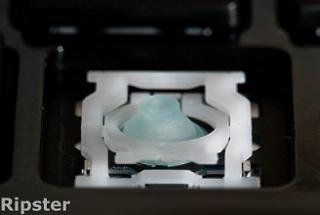
- A special case of the computer keyboard dome-switch is the scissor-switch. The keys are attached to the keyboard via two plastic pieces that interlock in a "scissor"-like fashion, and snap to the keyboard and the key. It still uses rubber domes, but a special plastic 'scissors' mechanism links the keycap to a plunger that depresses the rubber dome with a much shorter travel than the typical rubber dome keyboard. Typically scissor-switch keyboards also employ 3-layer membranes as the electrical component of the switch. These stabilizing scissor-like devices extend the lifespan of the membrane to as much as 10 million keystrokes. They also usually have a shorter total key travel distance (2 mm instead of 3.5 – 4 mm for standard dome-switch keyswitches). This type of keyswitch is often found on the built-in keyboards on laptops and keyboards marketed as 'low-profile'. These keyboards are generally quiet and the keys require little force to press.
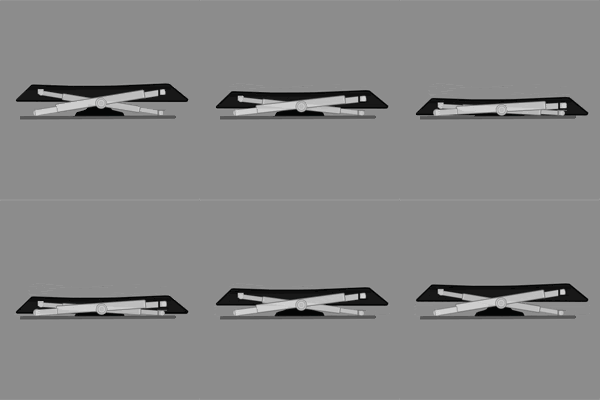
Scissor-switch in Action
- Scissor-switch keyboards are typically slightly more expensive. They are harder to clean (due to the limited movement of the keys and their multiple attachment points) but also less likely to get debris in them as the gaps between the keys are often less (as there is no need for extra room to allow for the 'wiggle' in the key as you would find on a membrane keyboard).
Mechanical Keyboard Switches
Introduction - A Switch is Not "Just a Switch"
- Many people ask for recommendations about switches without knowing exactly what they are looking for, but instead only with an idea of what their needs are. Fortunately, this is not always a problem because most mechanical switches will always feel nicer than rubber domes. However, the final choice is very important because a switch is not just a switch; it is the heart of what makes your keyboard have its feel and your personal tastes can make or break a keyboard for your uses. If you don't like the switch when you type on it, most likely, you won't ever like the keyboard.
Switches are generally rated by force using the weight measurement of Grams (g). Although force is more accurately described using Centinewtons (cN) However, 1g of weight applies about 1cN of downward force, so we can use "55g" when describing a 55cN-rated switch because that is sometimes easier to understand. For this fact; we'll use Grams as a measurement of force; though either term is correct.
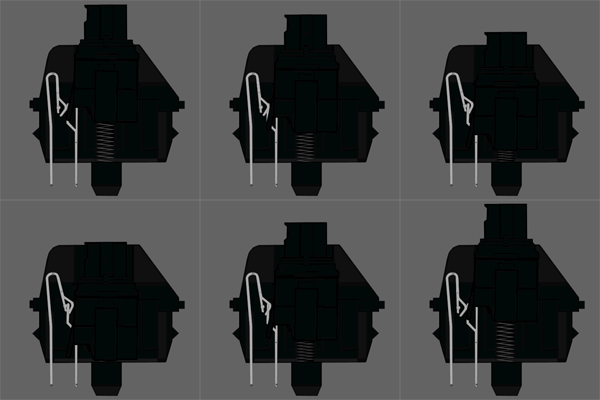
Type: Linear Switch
Link: Datasheet
Tactile: No
Clicky: No
Actuation Force: 60g (40g-80g overall) (Force Diagram)
Key Travel: 2mm to actuation, 4mm to bottom
- Cherry MX-Black switches are linear (non-tactile) switches, these are considered one of the best switch types for gaming. When gaming, having a tactile bump does absolutely nothing because you're going to be bottoming out anyway. So these give you a very smooth feel. The actuation and release points are at the exact same position as well. So games that require a lot of double tapping become easier than on any other keyswitch. However, most people don't enjoy typing on them that much do in part, to their linear nature.
If you're a person who tends to hit a wrong key every so often while gaming, these will be beneficial in that the high actuation force will help prevent many of those accidental presses.
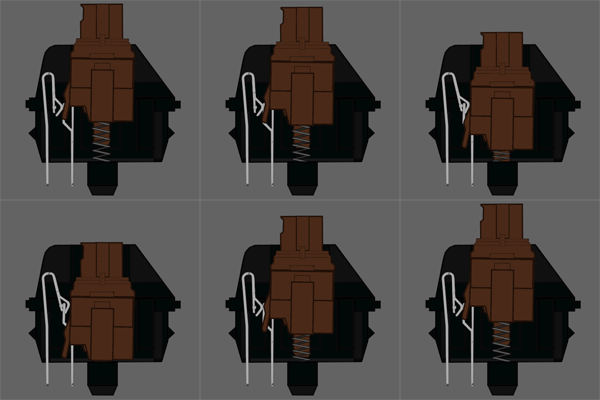
Type: Tactile Switch
Link: DataSheet
Tactile: Yes
Clicky: No
Actuation Force: 45g (55g Peak Force) (Force Diagram)
Key Travel: 2mm to actuation, 4mm to bottom
- Cherry MX Brown switches are considered a middle ground between typing and "gaming" switches. They have a light, tactile feel half way through the key press that lets you know the switch has activated. This gives you an indication of what you can release the switch. The switch is considered a middle ground because the reset point & actuation point are close enough together than you can "float" at that point, enabling you to double tap faster.
As a note: this switch actually has a peak force of 55G, it is 45G at the point of actuation. This is due to the design of the Cherry switch itself.
Cherry MX Blue Switches
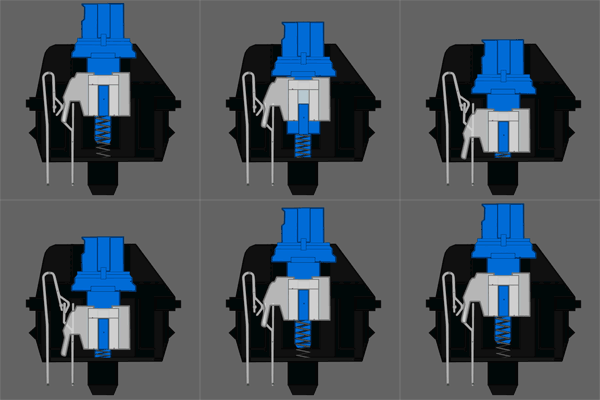
Type: Tactile & Clicky Switch
Link: DataSheet
Tactile: Yes, precise
Clicky: Yes
Actuation Force: 50g (60g Peak Force) (Force Diagram)
Key Travel: 2mm to actuation, 4mm to bottom
- Cherry MX Blue switches are the best cherry switch for typing. The tactile bump can easily be felt, and the resistance is similar to your average keyboard.
Although many people find them just fine for gaming, some don't like the fact that the release point is above the actuation point. This can cause some trouble with double-tapping. This is usually the case with someone who has experienced other mechanical switches before hand.
As a note: this switch actually has a peak force of 60g, it is 50g at the point of actuation. This is due to the design of the Cherry switch itself.
Cherry MX Clear Switches
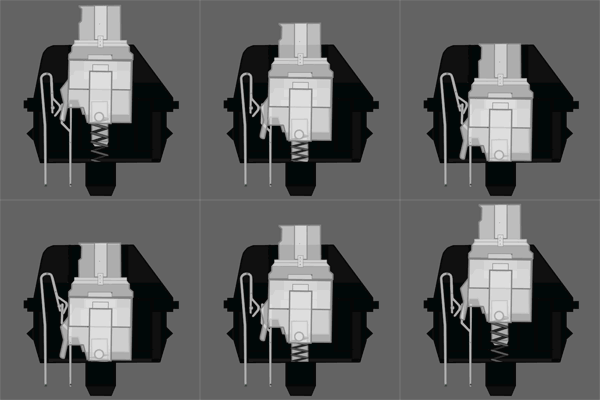
Type: Tactile Switch
Link: DataSheet
Tactile: Yes
Clicky: No
Actuation Force: 55g (65G peak force) (Force Diagram)
Key Travel: 2mm to actuation, 4mm to bottom
- Cherry MX Clear switches have often been called "stiffer browns" though some users note that they have more of a tactile feel than browns do. This really can be a subjective topic, though this is another switch that could be considered "ballanced." The force required is comparable to most rubber dome keyboards, with a nice tactile feedback to tell you the key has actuated. These switches are harder to find on keyboards.
As a note: this switch actually has a peak force of 65g, it is 55g at the point of actuation. This is due to the design of the Cherry switch itself.
Cherry MX Red Switches
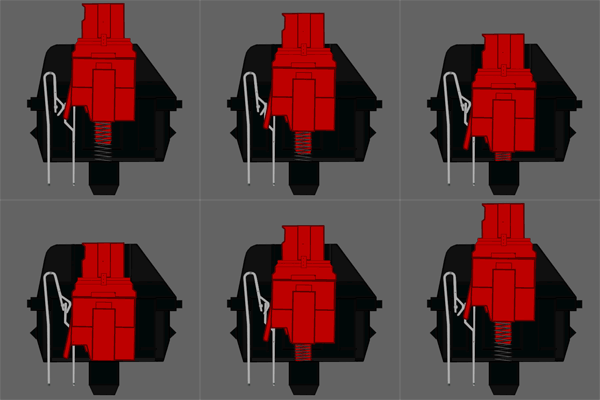
Type: Linear Switch
Link: DataSheet
Tactile: No
Clicky: No
Actuation Force: 45g (Force Diagram)
Key Travel: 2mm to actuation, 4mm to bottom
- Cherry MX-Red's are another switch that can be considered a "gaming" switch. It's essentially a lighter version of the MX Black, requiring less force to actuate. Most people do not find this switch that good for typing or gaming because it is so light. This switch is hard to find; and was reported as obsolete. Though some board makers still use it for Special Edition keyboards.
Buckling Spring Keyswitches
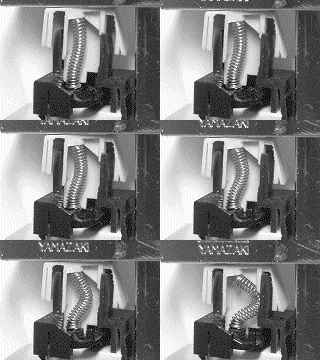
Type: Tactile & Clicky Mechanical Switch
Link: Patent
Tactile: Yes, very precise
Clicky: Yes, loud
Actuation Force: 65g-70g (Force Diagram)
Key Travel: 2.3mm to actuation, 3.7mm to bottom
- Buckling springs are pretty straightforward once you see them in action. After pushing the key down a certain distance the spring buckles under pressure, causing the hammer at the bottom to hit a membrane sheet and create an electrical contact. The buckling of the spring also provides tactile feedback and a satisfying click as it hits the shaft wall. And you might also notice through the force diagrams that this is the only mechanical switch where the tactile and audible feedback correspond to the exact moment the switch actuates.
Black Alps
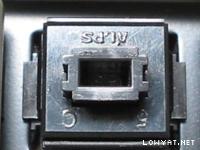
Type: Tactile Mechanical Switch
Tactile: Yes
Clicky: No
Actuation Force: Simplified 60g, Complicated 70g (Force Diagram)
Key Travel: 3.5mm
- Black Alps are one of the two most common Alps switch types. Many people do not like these switches due to the fact that they are stiff, bottom out hard, and tend to develop friction in the travel as they wear. Nonetheless, they are an improvement over most rubber dome keyboards.
There are two different types of Black Alps switch - an older type known as the "Complicated" due to the large number of parts in the switch, and a newer type known as the "Simplified", which was manufactured by Alps and some other companies. Complicated switches are common in many older keyboards, particularly the Dell AT101W, which is a very common mechanical keyboard from the 1990s.
The most well known Simplified Black switch is made by a company called Fukka, and was used in the ABS M1. The Fukka switch has less resistance, but many claim that it provides less solid tactility than the complicated switch.
White Alps

Type: Clicky & Tactile Mechanical Switch
Tactile: Yes
Clicky: Yes
Actuation Force: 60g-70g (Force Diagram)
Key Travel: 3.5mm
- White Alps are one of the most most common Alps switch types. These are far more popular than the Black switches due to more pronounced tactility, and the lower force requirements of some versions. Like the Black Alps, White Alps are much easier to bottom out on compared with other mechanical keyswitch designs.
As with the Black switch. there are Complicated and Simplified White switches. The two most popular Simplified White switches are the Fukka and the XM. The XM is almost universally considered to be a terrible switch, it was used on some older Filco Zero models, and some vintage keyboards. The Fukka switch is quite popular, and some people prefer them over the Complicated switch. It is used on some current production Alps keyboards such as current production Filco Zeros, Matias keyboards and some others. Complicated White switches were used on some well made keyboards from the 90s such as the Northgate and Focus keyboards.
There are also a variety of White Alps-like switches of varying quality. Some, like the SMK Monterey, are considered very pleasant to type on..
Topre Key Switches
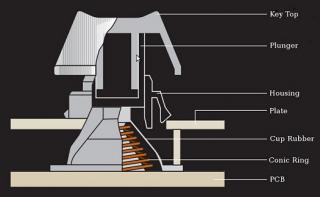
Type: Tactile Capacitive Switch
Link: Patent
Tactile: Yes
Clicky: No
Actuation Force: 30g, 35g, 45g, 55g depending on model (Force Diagram)
Key Travel: 4mm
- Topre switches are somewhat of a hybrid switch, and are capacitive by nature. The Topre mechanism uses a spring underneath a rubber dome, and the depression of the spring causes a change in capacitance between the underlying capacitor pads. With this change in capacitance; the switch activates.
Topre Switches are considered some of the finest switches available, as they offer a very enjoyable typing experience with a quieter experience compared to a Cherry MX, Alps, or Buckling Spring switch. The reason is Topre switches have the smoothest force gradient even compared to Linear switches like MX-Reds and MX-Blacks.
Added on
List Lowyat mechanical keyboard users:(listed by name followed by what keyboard brand/model they have) Credits To Moogle Stiltzkin For Creating the List.
Note : Users that wanted to have their name and keyboard added to the list, please pm me.
ABS
- OCN_fssbzz - ABS M1 (black ALPS)
- Cyclonechuah - ACER 6311-HU (ALPS switch)
- THEswordmaster - Cherry G80-3494 Lycus-2 Black (Cherry mx Red)
- OCN_fssbzz - Cherry G80-3494 Lycus-2 (Cherry mx Red)
- Squarebox - Cherry G80-3494 Lycus-2 (Cherry mx Red with White Rice's geekhack custom made doubleshot abs 108 key cap set installed )
- Squarebox - Cherry G80-3494 (Cherry Mx Red)
- Squarebox - Cherry G80-1950 (Cherry Mx Brown)
- Squarebox - Cherry G80-8113 (Cherry Mx Clear/white)
- Squarebox - Cherry G80-8113 (Cherry Mx Clear/white)
- Squarebox - Cherry G80-11900 (Cherry Mx Black)
- Squarebox - Cherry G80-11900 Custom Mod (Cherry Mx Brown, Blue, Black, Red)
- Moogle Stiltzkin - Cherry G80-1295 HAU NKRO (Cherry mx black, very rare vintage keyboard)
- alvin8866 - Das Ultimate
- OCN_fssbzz - DAS Silent Model S
- SSJBen - Das Model S Professional
- ganstream1 - Das Model S Professional
- Moogle Stiltzkin - Ducky DK-9008 laser etched PBT keycaps (Cherry Mx brown)
- Moogle Stiltzkin - Ducky DK-9008 Tiger Limited Edition (Cherry mx Brown, with a Cherry mx Clear spacebar)
- Cyclonechuah - Ducky DK-9008 Black On Black silkscreen abs keycaps (Cherry MX Black)
- OCN_fssbzz - Ducky DK-1087 (Cherry Mx brown)
- OCN_fssbzz - Ducky DK-9008 Special Edition Mix (black,blue,brown Cherry mx switches)
- cusx - Ducky DK-9008 (Cherry Mx brown)
- micdy - Ducky DK-9008 PBT laser etched key caps (Mixed black, blue and brown Cherry Mx switches)
- Squarebox - Ducky DK-9008 abs black on black (Cherry Mx blue)
- Sky.Live - Ducky DK-9008 ( Cherry Mx brown )
- Kepala Botak - Ducky DK-9008 ( Cherry Mx brown With PBT Keycaps )
- Xcen - Ducky DK-9008 (Cherry MX Blue with ABS blank caps.)
- VampHexia - Ducky DK-9008 ( Cherry Mx brown )
- ravewar - Ducky DK-1008L ( Cherry Mx brown )
- rockccf - Ducky DK-9008 ( Cherry Mx blue )
- angelofro - Ducky DK-9008 Tiger Limited Edition (Cherry mx Black)
- skincladalien - Ducky DK-1008 ( Cherry Mx Brown )
- kaiserreich - Ducky DK-9008 ( Cherry Mx Brown with ABS Blanks )
- larnelle - Ducky DK-9000 ( Cherry Mx Brown )
- westley0214 - Ducky DK-1008 ( Cherry Mx brown )
- seichirosano - Ducky DK-9000 ( Cherry Mx brown )
- storm88 - Ducky DK-1008 R2 ( Cherry Mx blue )
- guess19 - Ducky DK-9008S Shine ( Cherry Mx blue )
- unohoo22 - Ducky DK-9008S Shine ( Cherry Mx brown )
- alvin8866 - Filco Majestouch (Cherry Mx blue, with blank keys)
- Squarebox - Filco Majestouch "Otaku" (Cherry Mx Brown)
- Squarebox - Filco 2 Majestouch Tenkeyless (Cherry Mx Brown)
- willaw - Filco Zero (Fukkas switches)
- willaw - Filco Majestouch Tenkeyless (Cherry Mx Brown)
- Evo Fantasy - Filco Majestouch non-nkro (Cherry MX Brown)
- lew999999 - Filco Majestouch NKRO (Cherry MX Blue)
- zandara - Filco Majestouch NKRO (Cherry MX Brown)
- BlueBerry~ - Filco Majestouch Linear R Limited Edition (Cherry MX Red)
- BlueBerry~ - Filco Majestouch 2 NKRO (Cherry MX Blue)
- Slythape - Filco Majestouch 2 NKRO (Cherry MX Blue)
- kEazYc - Filco Majestouch AI FKBN104M-AI Blue (Cherry MX Brown)
- Slythape - Filco Majestouch 2 NKRO (Cherry MX Brown)
- paradis3lost - Filco Majestouch 2 NKRO (Cherry MX Blue)
- Volvagia356 - Filco Majestouch Ninja (Cherry MX Brown)
- eichi-sama - Filco Majestouch 2 NKRO (Cherry MX Brown)
- storm88 - Filco Majestouch NKRO (Cherry MX Blue)
- kianweic - Filco Majestouch 2 NKRO (Cherry MX Brown)
- kianweic - Filco Majestouch Linear R Limited Edition (Cherry MX Red)
- halllo81 - Filco Majestouch 2 Camouflage Edition (Cherry MX Brown)
- SheepMekk - Filco Majestouch 2 NKRO (Cherry MX Blue)
- 3010517 - Filco Majestouch Ninja ( Didn't Mention )
- Ic3pRInc3sSsIcA - GK-K8000 (Cherry Mx black)
- alvin8866 - Happy Hacking Keyboard Professional 2 (HHKB)
- PeaceCraft1989 - Happy Hacking Keyboard Professional 2 (HHKB)
- [Top-Gun] - HHKB
- willaw - IBM Model M (1988) (Buckling springs)
- Kaiserreich - IBM Model M 59G7980 'Lexmark' (1993) (Buckling spring)
- snipaboy - IONE Scorpius M10
- Cyclonechuah - Leopold FC200R Tenkeyless
- Cyclonechuah - Leopold FC500RR/EB (Cherry MX Red)
- zandara - Leopold FC500RR/EB (Cherry MX Red)
- Semisweet - Leopold FC500R/EB (Cherry MX Brown)
- Semisweet - Leopold FC500R/EB (Cherry MX Brown) (not copy paste error)
- jinhan108 - Leopold FC500RR/EB (Cherry MX Red)
- Sky.Live - Leopold FC500RR/EB (Cherry MX Red)
- xenodon - Leopold FC500R/EB (Cherry MX Brown)
- xenodon - Leopold FC500RR/EB (Cherry MX Red)
- SkYY - Leopold FC500R/EB (Cherry MX Brown)
- opalotion - Leopold FC500R/EB (Cherry MX Brown)
- Squarebox - Leopold FC500RR/EB (Cherry MX Red)
- boonykun - Leopold FC500RR/EB (Cherry MX Red)
- skye - Leopold FC500R/EB (Cherry MX Brown)
- angelofro - Leopold FC500RR/EB (Cherry MX Red)
- z3r0h - Leopold FC500RR/EB (Cherry MX Red)
- e1e7en - Leopold FC500R/EB (Cherry MX Brown)
- jian5481 - Leopold FC500R/EB (Cherry MX Brown)
- hitman66 - Leopold FC500RC/EB (Cherry MX Blue)
- RangerKarl - Leopold FC500RL/EB (Cherry MX Black)
- FlakCannon - Leopold FC500RC/EB (Cherry MX Blue)
- Heav3nCl0ud - Leopold FC500R/EB (Cherry MX Brown)
- n3wb13 - Leopold FC500R/EB (Cherry MX Brown)
- lucidlts - Leopold FC500RR/EB (Cherry MX Red)
- yimingwureze - Leopold FC500RR/EB (Cherry MX Red)
- Raki - Leopold FC500RR/EB (Cherry MX Red)
- lucidlts - Noppoo Choc Mini
- lucidlts - Noppoo Choc Pro 2
- willaw - Noppoo Choc Mini (Cherry MX Blue)
- willaw - Noppoo Choc Mini (Cherry MX Brown)
- willaw - Noppoo Choc Mini (Cherry MX Black)
- Squarebox - Noppoo Choc Mini (Cherry MX Brown)
- Squarebox - Mionix Zibal 60 (Cherry MX Black)
- lucidlts - PLU ML-G2000
- lucidlts - PLU ML-G3000 NKRO Edition (Cherry MX Brown)
- mikaelr - PLU ML-G2000 (Cherry MX Brown)
- low yat 82 - PLU ML-87
- lucidlts - PLUM MX104M (Cherry MX Red)
- sai86 - Black Widow Expert (Cherry Mx blue)
- blacktrix - Black Widow Ultimate (Cherry Mx blue)
- phantomash - Black Widow Ultimate (Cherry Mx blue)
- raynmay - Black Widow Ultimate (Cherry Mx blue)
- boiboi95 - Black Widow Ultimate (Cherry Mx blue)
- BlueBerry~ - Black Widow Ultimate (Cherry Mx blue)
- zandara - Black Widow Ultimate (Cherry Mx blue)
- davidlian - Black Widow Ultimate (Cherry Mx blue)
- axn992 - Black Widow Expert (Cherry Mx blue)
- Mr.Botz - Black Widow Ultimate (Cherry Mx blue)
- j.sun - Black Widow Ultimate (Cherry Mx blue)
- eichi-sama - Black Widow Expert (Cherry Mx blue)
- OCN_fssbzz - Rosewill RK9000
- BlueBerry~ - SteelSeries 7G (Cherry Mx black)
- AlexLai - SteelSeries 6Gv2 (Cherry Mx black)
- N1ck - SteelSeries 7G (Cherry Mx black)
- shawnlut - SteelSeries 6Gv2 (Cherry Mx black)
- victor2212 - SteelSeries 7G (Cherry Mx black)
- warlove3 - SteelSeries 7G (Cherry Mx black)
- aegis` - SteelSeries 7G (Cherry Mx black)
- Calvin Seak - SteelSeries 6Gv2 (Cherry Mx black)
- jay - SteelSeries 7G (Cherry Mx black)
- Cyclonechuah - SteelSeries 7G (Cherry Mx black)
- StratOS - SteelSeries 7G (Cherry Mx black)
- OCN_fssbzz - Steelseries 6Gv2 (Cherry Mx black)
- lucidlts - Steelseries 6Gv2 (Cherry Mx black)
- lucidlts - Steelseries 7G (Cherry Mx black)
- Squarebox - Steelseries 6Gv2 (Cherry Mx black)
- angelofro - Steelseries 6Gv2 Modded (Cherry Mx black + Brown + Clear + Red)
- rockccf - Steelseries 6Gv2 (Cherry Mx black)
- FullMetalBoy - Steelseries 6Gv2 (Cherry Mx black)
- alexander_romanov - SteelSeries 7G (Cherry Mx black)
- vincent5195 - SteelSeries 7G (Cherry Mx black)
- kianweic - Topre Realforce 103U (Black)
- Cyclonechuah - Topre Realforce 103U (Black)
- willaw - Unicomp SpaceSaver
- BlueBerry~ - ZOWIE CELERITAS (Cherry MX Brown)
This post has been edited by Cyclonechuah: Oct 27 2011, 05:32 PM
 Quote
Quote


 . I thought you were typing a lot of documents in the middle of the night. Who knows right?


 0.0444sec
 0.46
0.46
 7 queries
 GZIP Disabled