Welcome Guest ( Log In | Register )

Bump Topic Topic Closed RSS Feed
377 Pages « < 372 373 374 375 376 > » Bottom

Outline · [ Standard ] · Linear+

 Digital TV Station Malaysia, How do I tune to digital TV station?

views
     
ajay67
post Oct 25 2019, 09:26 AM

Look at all my stars!!
*******
Senior Member
2,960 posts

Joined: Jan 2003


QUOTE(wmfei @ Oct 25 2019, 01:15 AM)
May I know what is the reason if the decoder show signal quality = 0 but signal strength = 90%? Cannot get the signal even I try use indoor antenna and outdoor antenna. It is possible area cannot receive the signal? I check in the myfreeview website it does has coverage in Butterworth.

The decoder is from Shopee :https://shopee.com.my/MCMC-Approved-TVBox-Astro-Full-HD-1080P-HDTV-Decoder-TV-Decoder-Terrestrial-Receiver-TV-Box-Astro-Antenna-Compatible-i.141014052.2667290356
*
it is combination of quality antenna, cable, connection & right orientation.
wmfei
post Oct 25 2019, 03:24 PM

New Member
*
Junior Member
16 posts

Joined: Dec 2005
In this case, how can I know is the antenna issue or the area is lack of signal?
I use dvb t2 box and TV with build in tuner still the same.

QUOTE(ajay67 @ Oct 25 2019, 09:26 AM)
it is combination of quality antenna, cable, connection & right orientation.
*
ajay67
post Oct 25 2019, 03:43 PM

Look at all my stars!!
*******
Senior Member
2,960 posts

Joined: Jan 2003


QUOTE(wmfei @ Oct 25 2019, 03:24 PM)
In this case, how can I know is the antenna issue or the area is lack of signal?
I use dvb t2 box and TV with build in tuner still the same.
*
how about your neighbor? do they get signals?
if not, then need to call for mytv antenna installer for your area. normally they can bring a signal meter to check the strength & correct direction for your area, & can advice which antenna is suitable.
Skylinestar
post Oct 26 2019, 09:01 PM

Mega Duck
********
All Stars
10,473 posts

Joined: Jan 2003
From: Sarawak
i'm having problem here.
initially, i have great tv3 (666MHz) reception but extremely weak tv2 (698MHz) reception.
after i re-adjust the antenna and meddle with the cables and splitter (only 1 to join 2 cables), now i get great tv2 reception but loss tv3 reception.

any idea why? rclxub.gif
if i can get 698MHz, i should be getting 666MHz too because 666MHz is lower frequency and should be easier to pickup. now is the complete opposite. doh.gif

culain99
post Oct 26 2019, 09:39 PM

-----
*****
Junior Member
765 posts

Joined: Jun 2007
QUOTE(wmfei @ Oct 25 2019, 01:15 AM)
May I know what is the reason if the decoder show signal quality = 0 but signal strength = 90%? Cannot get the signal even I try use indoor antenna and outdoor antenna. It is possible area cannot receive the signal? I check in the myfreeview website it does has coverage in Butterworth.

The decoder is from Shopee :https://shopee.com.my/MCMC-Approved-TVBox-Astro-Full-HD-1080P-HDTV-Decoder-TV-Decoder-Terrestrial-Receiver-TV-Box-Astro-Antenna-Compatible-i.141014052.2667290356
*
QUOTE(Skylinestar @ Oct 26 2019, 09:01 PM)
i'm having problem here.
initially, i have great tv3 (666MHz) reception but extremely weak tv2 (698MHz) reception.
after i re-adjust the antenna and meddle with the cables and splitter (only 1 to join 2 cables), now i get great tv2 reception but loss tv3 reception.

any idea why?  :stars:
if i can get 698MHz, i should be getting 666MHz too because 666MHz is lower frequency and should be easier to pickup. now is the complete opposite.  :facepalm:
*
How many km to nearest transmitter station.?


Skylinestar
post Oct 27 2019, 10:23 AM

Mega Duck
********
All Stars
10,473 posts

Joined: Jan 2003
From: Sarawak
QUOTE(Skylinestar @ Oct 26 2019, 09:01 PM)
i'm having problem here.
initially, i have great tv3 (666MHz) reception but extremely weak tv2 (698MHz) reception.
after i re-adjust the antenna and meddle with the cables and splitter (only 1 to join 2 cables), now i get great tv2 reception but loss tv3 reception.

any idea why?  rclxub.gif
if i can get 698MHz, i should be getting 666MHz too because 666MHz is lower frequency and should be easier to pickup. now is the complete opposite.  doh.gif
*
QUOTE(culain99 @ Oct 26 2019, 09:39 PM)
How many km to nearest transmitter station.?
*
27km to sg besi transmitter.
culain99
post Oct 27 2019, 10:47 AM

-----
*****
Junior Member
765 posts

Joined: Jun 2007
QUOTE(Skylinestar @ Oct 27 2019, 10:23 AM)
27km to sg besi transmitter.
*
Either upgrade your antenna or try add usb powered signal amplifier. Search shopee, lazada for the amplifier. Outdoor antenna is the best.


https://i5.walmartimages.com/asr/c764d75c-2...50&odnBg=ffffff
Skylinestar
post Oct 27 2019, 11:13 AM

Mega Duck
********
All Stars
10,473 posts

Joined: Jan 2003
From: Sarawak
QUOTE(culain99 @ Oct 27 2019, 10:47 AM)
Either upgrade your antenna or try add usb powered signal amplifier. Search shopee, lazada for the amplifier. Outdoor antenna is the best.
https://i5.walmartimages.com/asr/c764d75c-2...50&odnBg=ffffff
*
But still doesn't explain why I can get 698MHz clearly but not 666MHz.
i found out splice like this causes too much signal loss cry.gif doh.gif or is my termination not good enough :confused:
user posted image

This post has been edited by Skylinestar: Oct 27 2019, 06:21 PM
culain99
post Oct 27 2019, 01:05 PM

-----
*****
Junior Member
765 posts

Joined: Jun 2007
I'm about 45km from transmitter station, indoor without amplifier 0 channels, with amplifier can get some channel. TV built in decoder, using that indoor flat antenna stick to highest window in my earlier post

joshhd
post Oct 27 2019, 06:06 PM

Look at all my stars!!
*******
Senior Member
7,792 posts

Joined: Dec 2014
From: Malaysia


QUOTE(Skylinestar @ Oct 27 2019, 11:13 AM)
But still doesn't explain why I can get 698MHz clearly but not 666MHz.
i found out splitter like this causes too much signal loss  cry.gif doh.gif  or is my termination not good enough  confused.gif
user posted image
*
This is not cable splitter. This is cable joiner. Joiner causes very very minimal signal loss, or you can say almost no loss. Or else, try use other cable joiner.
If you think your cable termination is not good enough, then check your cable's termination or re-do the termination of the cable.

QUOTE(Skylinestar @ Aug 5 2019, 10:31 AM)
The tower is on the opposite side of my house. Lazy to climb up to the rooftop to install mast and antenna. End up just put it at the car porch with cloth hanger, despite 180° opposite direction. (Tried rotating 180° and it seems to make no difference)
On my china tvbox, 80% strength at 698MHz. On Hisense TV, 50%. Silky smooth though.

Poorfag installation. Free from weather extreme.  tongue.gif
user posted image
*

Do you still put your UHF antenna like this? What a waste... Such many elements UHF antenna should be put at higher grounds. If lazy to put on rooftop, then at least put upstairs balcony, somewhere higher or something.
» Click to show Spoiler - click again to hide... «


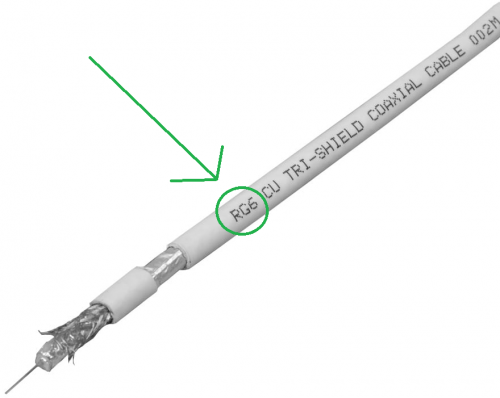
Are you using RG6 coaxial cable? Look through your cable and see if it has the label has the word "RG6" or "RG-6" or something similar labels like "RG-6/U" on the cable's PVC jacket like this:
user posted image
*Note: The "TRI-SHIELD" label is just a reference. Its fine if the cable is Dual Shield or Quad Shield.
If it's not RG-6, or other types of cables (especially thin looking cables like 3C-2V), just get it changed, and rewire your cabling to the new RG-6 coaxial cable.
RG-6 coaxial cable is also used for satellite TV reception, such as Astro.
Skylinestar
post Oct 27 2019, 06:13 PM

Mega Duck
********
All Stars
10,473 posts

Joined: Jan 2003
From: Sarawak
QUOTE(culain99 @ Oct 27 2019, 01:05 PM)
I'm about 45km from transmitter station, indoor without amplifier 0 channels, with amplifier can get some channel. TV built in decoder, using that indoor flat antenna stick to highest window in my earlier post
*
What amp do u use?
Skylinestar
post Oct 27 2019, 06:18 PM

Mega Duck
********
All Stars
10,473 posts

Joined: Jan 2003
From: Sarawak
QUOTE(joshhd @ Oct 27 2019, 06:06 PM)
This is not cable splitter. This is cable joiner. Joiner causes very very minimal signal loss, or you can say almost no loss. Or else, try use other cable joiner.
If you think your cable termination is not good enough, then check your cable's termination or re-do the termination of the cable.

Do you still put your UHF antenna like this? What a waste... Such many elements UHF antenna should be put at higher grounds. If lazy to put on rooftop, then at least put upstairs balcony, somewhere higher or something.
» Click to show Spoiler - click again to hide... «


Are you using RG6 coaxial cable? Look through your cable and see if it has the label has the word "RG6" or "RG-6" or something similar labels like "RG-6/U" on the cable's PVC jacket like this:
user posted image
*Note: The "TRI-SHIELD" label is just a reference. Its fine if the cable is Dual Shield or Quad Shield.
If it's not RG-6, or other types of cables (especially thin looking cables like 3C-2V), just get it changed, and rewire your cabling to the new RG-6 coaxial cable.
RG-6 coaxial cable is also used for satellite TV reception, such as Astro.
*
Will check out the termination.
Tried upstair balcony before. No difference from putting it on the ground floor. I wish I can put at rooftop, but don't have tall ladder and any tools and super tall mast to mount properly.
I already shifted the antenna outside a bit, next to my main gate. Previous antenna placement not good enough because signal loss if my opposite neighbor opens his house windows.

This post has been edited by Skylinestar: Oct 27 2019, 06:20 PM
culain99
post Oct 27 2019, 06:37 PM

-----
*****
Junior Member
765 posts

Joined: Jun 2007
QUOTE(Skylinestar @ Oct 27 2019, 06:13 PM)
What amp do u use?
*
Same type as Post #7470 photo, use power from usb charger
joshhd
post Oct 27 2019, 06:40 PM

Look at all my stars!!
*******
Senior Member
7,792 posts

Joined: Dec 2014
From: Malaysia


QUOTE(Skylinestar @ Oct 27 2019, 06:18 PM)
Will check out the termination.
Tried upstair balcony before. No difference from putting it on the ground floor.  I wish I can put at rooftop, but don't have tall ladder and any tools and super tall mast to mount properly.
I already shifted the antenna outside a bit, next to my main gate. Previous antenna placement not good enough because signal loss if my opposite neighbor opens his house windows.
*

If still the same, try power off all HDMI devices near your TV (meaning, all equipment that has HDMI output) such as Astro box, karaoke system, Android TV box, Bluray player, etc.
Or you can disconnect the HDMI cable from the equipment/device if not convenient to power off the particular device, but better is power off temporarily.

Some HDMI cables (especially cheap or can't determine good quality or not ones) are known for causing interference to certain UHF frequencies, hence disrupting reception on certain digital TV signals.
It is proven by some users that after powering off/unplug HDMI cable from the devices, it'll suddenly able to receive strong and stable digital TV signals. So I think no harm trying.

If you're using digital TV box to receive digital TV, try replace to another HDMI cable (look for good quality ones, not necessary expensive ones) and see if condition persists.

Let say if after turning off all HDMI devices, then you can get good signal from all 2 muxes, then try power on your HDMI devices one by one.
Then you know which HDMI cable that is connected to the device is causing interference to the TV reception.

This post has been edited by joshhd: Oct 27 2019, 06:43 PM
Skylinestar
post Oct 27 2019, 06:48 PM

Mega Duck
********
All Stars
10,473 posts

Joined: Jan 2003
From: Sarawak
QUOTE(joshhd @ Oct 27 2019, 06:40 PM)
If still the same, try power off all HDMI devices near your TV (meaning, all equipment that has HDMI output) such as Astro box, karaoke system, Android TV box, Bluray player, etc.
Or you can disconnect the HDMI cable from the equipment/device if not convenient to power off the particular device, but better is power off temporarily.

Some HDMI cables (especially cheap or can't determine good quality or not ones) are known for causing interference to certain UHF frequencies, hence disrupting reception on certain digital TV signals.
It is proven by some users that after powering off/unplug HDMI cable from the devices, it'll suddenly able to receive strong and stable digital TV signals. So I think no harm trying.

If you're using digital TV box to receive digital TV, try replace to another HDMI cable (look for good quality ones, not necessary expensive ones) and see if condition persists.

Let say if after turning off all HDMI devices, then you can get good signal from all 2 muxes, then try power on your HDMI devices one by one.
Then you know which HDMI cable that is connected to the device is causing interference to the TV reception.
*
Thanks for the tips.
I don't have any HDMI devices. Just a Hisense TV, placed next to my computer. But can interference affects one mux only? 100% quality on tv2 but 0% quality on tv3.

This post has been edited by Skylinestar: Oct 27 2019, 06:50 PM
joshhd
post Oct 27 2019, 07:12 PM

Look at all my stars!!
*******
Senior Member
7,792 posts

Joined: Dec 2014
From: Malaysia


QUOTE(Skylinestar @ Oct 27 2019, 06:48 PM)
Thanks for the tips.
I don't have any HDMI devices. Just a Hisense TV, placed next to my computer. But can interference affects one mux only? 100% quality on tv2 but 0% quality on tv3.
*

There is a possibility. Your computer, is it connected to HDMI cable too? Don't miss out that one...

It depends. That could be one of the reason why some viewers can only receive signals from either one of the 2 muxes.
Even if it's less than 30km line of sight away from transmitter, probably is due to geographical factor like hills, buildings or others.
You'll have to relocate the antenna to somewhere else in and out around your house to see which "sweet spot" can get adequate signals from both frequency muxes, such as a room the back of your house, or upstair's room facing the window or something.
Otherwise, just call MYTV to assign an installer to your house so they'll help you install it on your rooftop.

Or, use in-line amplifier, which I don't think it is the efficient way to solve the issue, considering that you're using a UHF antenna with so many elements yet your installation isn't standard and proper.
AV_2018
post Oct 27 2019, 07:32 PM

Casual
***
Junior Member
451 posts

Joined: Apr 2018
QUOTE(Skylinestar @ Oct 27 2019, 06:48 PM)
Thanks for the tips.
I don't have any HDMI devices. Just a Hisense TV, placed next to my computer. But can interference affects one mux only? 100% quality on tv2 but 0% quality on tv3.
*
Interference will affect the MUX that is the same frequency as the interfering signal. There should be low chance of interference if the signal strength of DVB-T2 signal is strong and a good, shielded and properly terminated RG6 cable is used for the antenna.
joshhd
post Oct 27 2019, 10:30 PM

Look at all my stars!!
*******
Senior Member
7,792 posts

Joined: Dec 2014
From: Malaysia


QUOTE(AV_2018 @ Oct 27 2019, 07:32 PM)
Interference will affect the MUX that is the same frequency as the interfering signal. There should be low chance of interference if the signal strength of DVB-T2 signal is strong and a good, shielded and properly terminated RG6 cable is used for the antenna.
*

All RG-6 cables are shielded, isn't it? It's either dual shield or quad shield. Are there un-shielded RG-6 cables out there anyway?
I wanna ask a very detail questions. Hope you don't mind:

1. Is there an easy way to identify if the HDMI cable is "sh*t quality" or very likely that it will cause RF interference which ultimately can affect DTT signals?

2. Is there any specific or approximate distance from the faulty HDMI cable that causes interference to the RG6 cable? 1 metre apart? 2 metres apart?

3. Which part of the RG6 cable are likely to cause harmful interference by HDMI first? Is it the F connector part that connects to digital TV box/IDTV or the outdoor UHF antenna? Or the RF interference can simply affect throughout the RG6 cable?

4. What if the HDMI cable that causes interference is positioned at very close to the outdoor UHF antenna? Will that affect the reception too?

5. Is there a way to "create a shield" to mitigate or avoid RF interference altogether for the user's existing faulty/poor quality HDMI cable?
AV_2018
post Oct 27 2019, 10:54 PM

Casual
***
Junior Member
451 posts

Joined: Apr 2018
QUOTE(joshhd @ Oct 27 2019, 10:30 PM)
All RG-6 cables are shielded, isn't it? It's either dual shield or quad shield. Are there un-shielded RG-6 cables out there anyway?

3. Which part of the RG6 cable are likely to cause harmful interference by HDMI first? Is it the F connector part that connects to digital TV box/IDTV or the outdoor UHF antenna? Or the RF interference can simply affect throughout the RG6 cable?

4. What if the HDMI cable that causes interference is positioned at very close to the outdoor UHF antenna? Will that affect the reception too?

*
Some cables might have poor quality shield but a proper RG6 cable should be ok. The shield has to be terminated properly too else it'll be less effective. The connector should be shielded as well.

3. Any poorly shielded part will potentialy let interference in. Poorly terminated shield is also an issue. The same principles apply to both the HDMI and RG6 shields.

4. Antenna whether indoor or outdoor can potentially pick up interference not only from HDMI but other sources.

I'm not expert in electromagnetic waves or interference so someone else might know better. Can't answer the other questions.

I can share my experience that using non-RG6 cable with indoor antenna placed near HDMI cable causes signal quality to drop. Changing cable position so that the HDMI cable is further away and not in parallel improves it slightly. Changing to RG6 with metal connectors and placing antenna further away produces 100% signal quality. No HDMI cables were changed. HDMI cables are NOT unknown brands with no HDMI logo type. Both the antenna cable and HDMI cable actually have ferrite beads as well which are supposed to suppress noise.

For outdoor antenna with 90% signal strength and connected with astro RG6 cable that has thick shield with metal connector, very near HDMI cables from PC and disc player doesn't seem to bother the signal quality at all. Stays at 100%.

But since I did not test different cables in exactly the same situations, can't pinpoint a specific factor for each result.

There are probably many factors here... The HDMI signal strength, HDMI cable length, HDMI shield quality, HDMI signal frequency/resolution, DVB-T2 signal strength, RG6 cable length, RG6 shield quality, DVB-T2 MUX frequency, placement of the cables etc. If the factors combine in certain combinations, interference may happen else it'll be okay.

For example, the following combinations will probably have interference issues.
- strong HDMI signal
- weak DVB-T2 signal
- BOTH antenna cable and HDMI cable poorly shielded
- cables placed near and parallel to each other
- the frequency of one of the harmonics of the HDMI signal for the currently transmitting resolution is being radiated by the cable and happens to overlap with the frequency of the DVB-T2 MUX being received.

Of couse anything else radiating similar frequencies to the DVB-T2 MUX other than HDMI will also cause interference. So it's easier to make the DVB-T2 signal more resistant by using good antenna and cables if possible instead of dealing one by one with the interference sources.

This post has been edited by AV_2018: Oct 27 2019, 11:25 PM

Skylinestar
post Oct 28 2019, 11:51 AM

Mega Duck
********
All Stars
10,473 posts

Joined: Jan 2003
From: Sarawak
QUOTE(joshhd @ Oct 27 2019, 07:12 PM)
Or, use in-line amplifier, which I don't think it is the efficient way to solve the issue, considering that you're using a UHF antenna with so many elements yet your installation isn't standard and proper.
*
not sure if this info helps: my cable run is about 70-80 feet.

377 Pages « < 372 373 374 375 376 > » Top
Topic ClosedOptions
 

Change to:
| Lo-Fi Version
0.0243sec    0.70    6 queries    GZIP Disabled
Time is now: 4th December 2025 - 08:49 PM