Welcome Guest ( Log In | Register )

Bump Topic Topic Closed RSS Feed

Outline · [ Standard ] · Linear+

 Sony Ericsson XPERIA ARC Official Thread V2, Most Stunning & Beautiful Android phone

views
     
pc-ox
post Oct 29 2011, 04:28 PM

Getting Started
**
Junior Member
174 posts

Joined: May 2010
From: Penang


QUOTE(armadasaxon @ Oct 29 2011, 12:26 PM)
anybody knows the link to sony app store?

looks something like this:
http://androidandme.com/2009/12/news/sony-...roid-app-store/
*
You can directly access through "PlayNow" store. Mostly are paid apps.

This post has been edited by pc-ox: Oct 29 2011, 04:45 PM


Attached thumbnail(s)
Attached Image
pc-ox
post Nov 2 2011, 04:18 PM

Getting Started
**
Junior Member
174 posts

Joined: May 2010
From: Penang


QUOTE(xyekit @ Nov 2 2011, 04:03 PM)
Looks like the protective metal bumpers I put on my Tamiya last time. The price just offsets all that beauty...

By the way could someone tell me where exactly I should look in the *#*#7378423#*#* option to match with the serial-number on the box to see if it was an original SE distributed by Dynamics?

** Don't have the physical phone now but want to know
*
The IMEI can be displayed on handsets by dialling *#06#. Make sure IMEI number match each other.
pc-ox
post Nov 6 2011, 12:20 PM

Getting Started
**
Junior Member
174 posts

Joined: May 2010
From: Penang


QUOTE(da drummer @ Nov 6 2011, 12:03 PM)
errr...how to use seus?need to dwnld seus?
*
Can download from Sony Ericsson website:-
http://www.sonyericsson.com/cws/support/mo...ax1?cc=my&lc=en
pc-ox
post Nov 15 2011, 12:51 PM

Getting Started
**
Junior Member
174 posts

Joined: May 2010
From: Penang


QUOTE(zerodesigner @ Nov 15 2011, 11:57 AM)
hi, Xperia arc user here also.. just updated my phone and recieved 3d camera application. still doesn't know what it does actually.
*
It enables you to shoot 3D images on the 2D camera using 3D sweep panorama function.
But you can’t play the images back in 3D on the phone, will display 3D effect using 3D TV or 3D monitor.
pc-ox
post Nov 21 2011, 01:26 PM

Getting Started
**
Junior Member
174 posts

Joined: May 2010
From: Penang


QUOTE(shah_ho_nam2 @ Nov 21 2011, 12:49 PM)
tried update software using pc companion. failed as server is always busy. then it said already latest. look at phone still 266 not 42

sad.gif
*
Try to update using SEUS:-
http://www.sonyericsson.com/cws/support/mo...ax1?cc=gb&lc=en

This post has been edited by pc-ox: Nov 21 2011, 01:32 PM
pc-ox
post Nov 21 2011, 04:38 PM

Getting Started
**
Junior Member
174 posts

Joined: May 2010
From: Penang


QUOTE(shah_ho_nam2 @ Nov 21 2011, 04:09 PM)
stuck here. what happen?  sad.gif

user posted image
*
You follow the instructions shown in the photo??
1. Turn off......
2. Connect....

You MUST follow the instructions, if not will stuck at the page only.
pc-ox
post Nov 21 2011, 04:55 PM

Getting Started
**
Junior Member
174 posts

Joined: May 2010
From: Penang


QUOTE(shah_ho_nam2 @ Nov 21 2011, 04:46 PM)
i follow every single instruction. even the 30secs waiting
*
Why your software version is 2.11.11.21? Should be version 2.11.10.7.
Just want to confirm, your computer access to internet connection during upgrading?
QUOTE
Update Service is an online application and needs access to the Internet when in use. The application is used for all the supported devices, whereas you only need to install the application once. Also, you never need to update the application. Every time you start the Update Service from your computer, the application accesses the Internet, checks for updates and installs available updates.


pc-ox
post Nov 21 2011, 05:03 PM

Getting Started
**
Junior Member
174 posts

Joined: May 2010
From: Penang


QUOTE(shah_ho_nam2 @ Nov 21 2011, 04:58 PM)
seriously i have no idea. now i turned it on and try SE PC companion. downloading
good thing it's a new phone so not much important data that i stored inside it

user posted image
*
Update firmware by using SEUS or PC companion will not lose your data in the phone.
I never encountered data loses using both method. But for play safe, I still backup my data before update firmware.

This post has been edited by pc-ox: Nov 21 2011, 05:06 PM
pc-ox
post Nov 21 2011, 06:04 PM

Getting Started
**
Junior Member
174 posts

Joined: May 2010
From: Penang


Sorry, shah_ho_nam2. I just check mine, the SEUS version is 2.11.11.21.

I tried PC Companion, currently it shown "Phone software update information currently not accessible". I think you need try next time.
pc-ox
post Nov 21 2011, 07:20 PM

Getting Started
**
Junior Member
174 posts

Joined: May 2010
From: Penang


QUOTE(shah_ho_nam2 @ Nov 21 2011, 06:47 PM)
yup that's the error i got from friday. or is it because pakistan lock everything?
*
I can used SEUS with no problem.
pc-ox
post Nov 23 2011, 01:00 PM

Getting Started
**
Junior Member
174 posts

Joined: May 2010
From: Penang


QUOTE(mnsnazri @ Nov 23 2011, 11:49 AM)
wanna ask question about gps...my arc using 2.3.4 android version and build number is 4.0.2.A.0.42

i try install papago x5 but it failed to copy some file when i tranfer the file..when the transfer is success..i try open the application but always pop up a message error to force close that app...i try using sygic aura but also failed when try to open the apps...

what should i do and right apps for gps to install in my arc?
*
My firmware version is 4.0.2.A.0.42 too. I'm able use Papago X5 with no problem.
Might your stock firmware corrupted or Papago X5 files corrupted.
You can try to repair your firmawre by using SEUS. Before repair, backup your phone data first in case something go wrong during repair process.
If you need new link for Papago X5 ( tongue.gif version), please PM me.

QUOTE(clutch31 @ Nov 23 2011, 12:11 PM)
Ok I'm assuming it's some kind of software not unlike PC Companion. Where to get it? Googling SEUS brings me to some SE phone catalogue and a bunch of Dr Seuss websites.
*
You can download SEUS from SE website:-
http://www.sonyericsson.com/cws/support/mo...ax1?cc=gb&lc=en

This post has been edited by pc-ox: Nov 23 2011, 01:04 PM
pc-ox
post Nov 23 2011, 01:11 PM

Getting Started
**
Junior Member
174 posts

Joined: May 2010
From: Penang


QUOTE(clutch31 @ Nov 23 2011, 01:06 PM)
Is that for X1 only or can it be used for Arc as well?
One more question in general: Will SEUS wipe the phone clean after the update? Must I backup all my stuff and then reinstall everything after the update?

I was using HTC previously and their FOTA was really, really easy.
*
Can use for Arc too.

No. SEUS or PC Companion will not wipe the phone data. But for play safe, better backup.

QUOTE(shah_ho_nam2 @ Nov 23 2011, 01:09 PM)
is your papago on free or paid version?
*
Cxxxk version. tongue.gif

This post has been edited by pc-ox: Nov 23 2011, 01:12 PM
pc-ox
post Nov 28 2011, 12:29 PM

Getting Started
**
Junior Member
174 posts

Joined: May 2010
From: Penang


QUOTE(metfan @ Nov 28 2011, 11:31 AM)
Guys,
Planning on buying Arc S.
So how do I differ Arc S and 'normal' Arc?
Any way to check?
Worry got con paying extra hundreds for 'normal' Arc.

Any help appreciated bro.
*
The physical look exactly same, can't differentiate.

The colour can give some clues, but not 100% correct. May be the seller change the chassis.
For Xperia Arc, available colour are "Midnight Blue" & "Misty Silver".
For Xperia Arc S, total 5 colour for selection, "Midnight Blue", "Misty Silver", "Pure White", "Gloss Black" & "Sakura Pink".

Another way is check the model number of Xperia Arc/Arc S.
Go to Setting --> About phone --> Model number
For Xperia Arc, model number is LT15i or LT15a.
For Xperia Arc S, model number is LT18i or LT18a.

If you go for ori set, make sure phone IMEI number match with box IMEI number. If the box printed with Arc S model and IMEI number match with phone IMEI number, then phone model is Xperia Arc S.
For Ap set, sometimes IMEI number different each other. So can't use this method.
Method to check phone IMEI number is dial *#06#.

If you worry been cheated, better go to Sony Ericsson retailers, but they sell ori set only.

This post has been edited by pc-ox: Dec 29 2011, 07:35 AM

pc-ox
post Nov 30 2011, 09:03 AM

Getting Started
**
Junior Member
174 posts

Joined: May 2010
From: Penang


QUOTE(kl920930 @ Nov 30 2011, 12:48 AM)
i just noticed my input dont have chinese for sms ~ how to enable the pinyin cn ?
*
At "Write message" box, touch and hold 1-2 sec. It pop up a window for selection, pick "Input method". Then select "Chinese keyboard" at "Select input method" window. Make sure change EN to CN at bottom of keyboard for Chinese input.


Attached thumbnail(s)
Attached Image Attached Image
pc-ox
post Nov 30 2011, 01:31 PM

Getting Started
**
Junior Member
174 posts

Joined: May 2010
From: Penang


QUOTE(kl920930 @ Nov 30 2011, 09:44 AM)
ok can ady ~ oldman here so outdated dono how to use phone ady  laugh.gif


Added on November 30, 2011, 10:18 amhow to install papago crac-k version ? i followed tis link

http://malfreemaps.com/viewtopic.php?f=28&...70016be07b27e8f

but how to search the root thingy ? i ady copied the files to sd card but kenot find in phone
*
You need a "file manager" app to browse your SD card, "file manager" app can get free from Market. After install "file manager", use the program and able to see "PAPAGO_X5SEA_0806_WWEMarket.apk" in SD card. Just click the file and it install automatically. Now Papago X5 should be able to use, but is trial version, will ask an activation code.
pc-ox
post Dec 4 2011, 12:01 AM

Getting Started
**
Junior Member
174 posts

Joined: May 2010
From: Penang


QUOTE(kl920930 @ Dec 3 2011, 11:47 PM)
im on 2.3.4 , how to do the internal function thingy ?
*
Press and hold "power" button on top of phone. Under "phone options", can use "Take screenshot".
pc-ox
post Dec 6 2011, 04:24 PM

Getting Started
**
Junior Member
174 posts

Joined: May 2010
From: Penang


QUOTE(art_535 @ Dec 6 2011, 04:00 PM)
hi there, new user arc s. ex-x10 mini user.
by the way, where can i get the 3D Panorama apps?
*
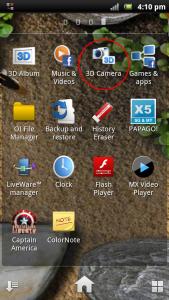
If you in firmware 2.3.4, there are built-in 3D panorama camera app.


Attached thumbnail(s)
Attached Image
pc-ox
post Dec 16 2011, 01:21 PM

Getting Started
**
Junior Member
174 posts

Joined: May 2010
From: Penang


QUOTE(jl_eleven @ Dec 16 2011, 10:25 AM)
New xperia arc LT15i user reporting.

I bought the thorus set from a forumer, i want to know do i need to register the warranty  online?

I have updated the firmware to 4.0.2.A.0.42 Android 2.3.4, my phone LED will turn green when the battery charge reaches 90%, it will keep charging until 100% if i leave the charges on. Is there any problem with my phone?

About the case, could u recommend any good soft case? I got a cheap silicon case but it peels off the side of the screen protector.
*
You don't need register online, just have to present the warranty card during warranty claim.

Your phone is OK. The LED will turn to green when charge to 90% and can continue charge until 100%, then will stop charge after full.


QUOTE(pityboi @ Dec 16 2011, 11:08 AM)
Yeah~ Thx.. I get it..

ystday i just get this arc S, then i charge until this morning (ard 8hours), when i switch on my phone, it only 96% ?? Why not is 100%??
*
Normally, new battery will take few charge cycle to reach optimum performance. It will consume more battery during fresh boot from power off. Phone still drain some battery for internal clock thingy although power off and plus battery will discharge itself when not in-charge. So, is normal for phone not reach 100% when turn on.

This post has been edited by pc-ox: Dec 16 2011, 03:33 PM
pc-ox
post Dec 16 2011, 03:57 PM

Getting Started
**
Junior Member
174 posts

Joined: May 2010
From: Penang


QUOTE(jl_eleven @ Dec 16 2011, 02:56 PM)
Do u guys notice the app running on background call "Play on Device"? Its sucking a lot of data. What is the app for? I have to manually go to manage application to stop it every few hours. Advanced task killer wouldn't kill it. How could I permanently stop it from running?
*
"Play on Device" is app for DLNA.

The Digital Living Network Alliance (DLNA) is tool to enable sharing of digital media between consumer devices such as computers, printers, cameras, hand phones, and other multimedia devices.
If you have LCD with DLNA certified or PlayStation 3, you can directly share photos, music and video between both devices (phone and LCD/PS3) through WIFI.

It's a stock app and can't uninstall it unless you root your phone.
pc-ox
post Dec 16 2011, 04:35 PM

Getting Started
**
Junior Member
174 posts

Joined: May 2010
From: Penang


QUOTE(jl_eleven @ Dec 16 2011, 04:19 PM)
But why does it just keep sending /receiving data and use up all my quota?
*
No unless you turn on "share content" under "connected devices". It just running background and allow faster load the app when in use.


Attached thumbnail(s)
Attached Image Attached Image

3 Pages < 1 2 3 >Top
Topic ClosedOptions
 

Change to:
| Lo-Fi Version
0.0482sec    0.26    7 queries    GZIP Disabled
Time is now: 8th December 2025 - 08:40 AM