Welcome Guest ( Log In | Register )

Bump Topic Topic Closed RSS Feed
8 Pages  1 2 3 > » Bottom

Outline · [ Standard ] · Linear+

 Acer TimelineX 3820TG & 4820TG V2, Owners and visitors discussion

views
     
TSkizwan
post May 23 2011, 12:19 AM, updated 15y ago

BÖw DÖwn TÖ LÖrd PringlËs
*****
Senior Member
826 posts

Joined: Jan 2009


user posted image
user posted image


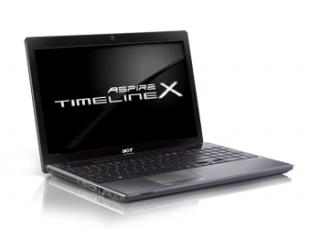
TimelineX 3820TG & 4820TG series notebooks have several specifications. Latest batch of TimelineX 3820TG & 4820TG have latest processor, for example Intel Core i5-460M. The specifications below doesn't mean all of the features will be available. For example, not all notebooks in the series have WWAN card. TimelineX is the best ultraportable computer in it class. In fact, TimelineX excel in both performance & battery life. For me, TimelineX notebook is pure pornography.

Acer Aspire 3820TG Notebook Specifications
  • Operating System
    • Genuine Windows® 7 Home Premium 64-bit
    • Genuine Windows® 7 Home Basic 64-bit
  • CPU and chipset
    • Intel® Core i7-620M processor (4 MB L3 cache, 2.66 GHz with Turbo Boost up to 3.33 GHz, DDR3 1066 MHz, 35 W), supporting Intel® 64 architecture, Intel® Smart Cache
    • Intel® Core i5-430M/i5-520M/i5-540M processor (3 MB L3 cache, 2.26/2.40/2.53 GHz with Turbo Boost up to 2.53/2.93/3.06 GHz, DDR3 1066 MHz, 35 W), supporting Intel® 64 architecture, Intel® Smart Cache
    • Intel® Core i3-330M/i3-350M processor (3 MB L3 cache, 2.13/2.26 GHz, DDR3 1066 MHz, 35 W), supporting Intel® 64 architecture, Intel® Smart Cache
    • Mobile Intel® HM55 Express Chipset
  • System memory
    • Dual-channel DDR3 SDRAM support:
      • Up to 4 GB of DDR3 system memory, upgradable to 8 GB using two soDIMM modules (for 64-bit OS)
  • Display
    • 13.3" HD 1366 x 768 pixel resolution, high-brightness (200-nit) Acer CineCrystal™ LED-backlit TFT LCD, supporting simultaneous multi-window viewing via Acer GridVista™
      Mercury free, environment friendly
      Super-slim design
      16:9 aspect ratio
  • Graphics
    • ATI Mobility Radeon™ HD 5650 with Switchable™ Graphics technology, up to 49015 MB of HyperMemory™ (1024 MB of dedicated DDR3 VRAM, up to 30676 MB of shared system memory), supporting Unified Video Decoder (UVD), OpenEXR High Dynamic-Range (HDR) technology, Shader Model 5.0, Microsoft® DirectX® 11, OpenGL® 3.1, OpenCL™ 1.1
    • ATI Mobility Radeon™ HD 5470 with Switchable™ Graphics technology, up to 35795 MB of HyperMemory™ (512 MB of dedicated DDR3 VRAM, up to 3067C6 MB of shared system memory), supporting Unified Video Decoder (UVD), OpenEXR High Dynamic-Range (HDR) technology, Shader Model 5.0, Microsoft® DirectX® 11, OpenGL® 3.1, OpenCL™ 1.1
      Dual independent display support
      16.7 million colors

      External resolution / refresh rates:
      • VGA port up to 2048 x 1536: 85 Hz
      • HDMI™ port up to 1920 x 1080: 60 Hz
      MPEG-2/DVD decoding
      VC-1 and H.264 (AVC) decoding
      Microsoft® DirectX® Video Acceleration (DXVA) application interface (API)
      HDMI™ (High-Definition Multimedia Interface) with HDCP (High-bandwidth Digital Content Protection) support
  • Audio
    • Dolby® Home Theater® v3 audio enhancement, featuring Dolby® Digital Live, Dolby® Pro Logic® IIx, Dolby® Headphone, Dolby® Natural Bass, Dolby® Sound Space Expander, Dolby® Inverse Filtering, Dolby® High Frequency Enhancer technologies
      High-definition audio support
      MS-Sound compatible
      Built-in microphone
  • Storage
    • Hard disk drive:
      • 160/250/320/500/640 GB or larger
    • Multi-in-1 card reader, supporting:
      • Secure Digital™ (SD)Card, MultiMediaCard (MMC), Memory Stick™ (MS), Memory Stick PRO™ (MS PRO), xD-Picture Card™ (xD)
  • Webcam
    • Acer Video Conference, featuring:
      • Acer Crystal Eye webcam with 1280 x 1024 resolution
  • Wireless and networking
    • WLAN:
      • Intel® Centrino® Ultimate-N 6300 a/g/n Wi-Fi CERTIFIED™ with Acer Nplify™, featuring MIMO technology
      • Acer InviLink™ Nplify™ 802.11b/g/n Wi-Fi CERTIFIED™
      • Acer InviLink™ 802.11b/g Wi-Fi CERTIFIED™
      • Supporting Acer SignalUp™ wireless technology
      WPAN: Bluetooth® 2.1+EDR
      WPAN: Bluetooth® 3.0+HS
      WWAN: UMTS/HSPA at 850/900/1900/2100 MHz and quad-band GSM/GPRS/EDGE at 850/900/1800/1900 MHz, upgradable to 7.2 Mb/s HSDPA and 5.7 Mb/s HSUPA
      LAN: Gigabit Ethernet, Wake-on-LAN ready
  • Privacy control
    • BIOS user, supervisor, HDD passwords
      Kensington lock slot
  • Dimensions and weight
    • 12.7 (W) x 9.25 (D) x 0.86/1.14 (H) inches (324 x 235 x 22/28.9 mm) with 6-cell battery pack 3.97 lbs. (1.80 kg) with 6-cell battery pack
    • 12.7 (W) x 9.25 (D) x 0.86/1.88 (H) inches (324 x 235 x 22/47.8 mm) with 9-cell battery pack 4.34 lbs. (1.97 kg) with 9-cell battery pack
  • Power adapter and battery
    • ACPI 3.0 CPU power management standard: supports Standby and Hibernation power-saving modes
    • Power adapter
      3-pin 90 W AC adapter:
      • 5.23 (W) x 2.32 (D) x 1.22 (H) inches (133 x 59 x 31 mm)
      • 0.86 lbs. (390 g)13 with 180 cm DC cable
    • Battery
      • 66.6 W 6000 mAh 6-cell Li-ion standard battery pack
      • 99 W 9000 mAh 9-cell Li-ion standard battery pack
    • Battery life: 8 hours14, 15, with 6 cell battery pack; 12 hours14, 15, with 9 cell battery pack
      ENERGY STAR®

Acer Aspire 4820TG Notebook Specifications
  • Operating System
    • Genuine Windows® 7 Home Premium 64-bit2 Genuine Windows® 7 Home Basic 64-bit
  • CPU and chipset
    • Intel® Core™ i7-620M processor (4 MB L3 cache, 2.66 GHz with Turbo Boost up to 3.33 GHz, DDR3 1066 MHz, 35 W), supporting Intel® 64 architecture, Intel® Smart Cache
    • Intel® Core i5-430M/i5-450M/i5-520M/i5-540M processor (3 MB L3 cache, 2.26/2.40/2.40/2.53 GHz with Turbo Boost up to 2.53/2.66/2.93/3.06 GHz, DDR3 1066 MHz, 35 W), supporting Intel® 64 architecture, Intel® Smart Cache
    • Intel® Core i3-330M/i3-350M/i3-370M processor (3 MB L3 cache, 2.13/2.26/2.40 GHz, DDR3 1066 MHz, 35 W), supporting Intel® 64 architecture, Intel® Smart Cache
    • Mobile Intel® HM55 Express Chipset
  • System Memory
    • Dual-channel DDR3 SDRAM support:
      • Up to 4 GB of DDR3 system memory, upgradable to 8 GB using two soDIMM modules
  • Display
    • 14" HD 1366 x 768 pixel resolution, high-brightness (200-nit) Acer CineCrystal™ LED-backlit TFT LCD
      Mercury free, environment friendly Super-slim design 16:9 aspect ratio
  • Graphics
    • ATI Mobility Radeon™ HD 5650 with Switchable™ Graphics technology, up to 4091 MB of HyperMemory™ (1024 MB of dedicated DDR3 VRAM, up to 3067 MB of shared system memory), supporting Unified Video Decoder (UVD), OpenEXR High Dynamic-Range (HDR) technology, Shader Model 5.0, Microsoft® DirectX® 11, OpenGL® 3.1, OpenCL™ 1.1
    • ATI Mobility Radeon™ HD 5470 with Switchable™ Graphics technology, up to 3579 MB of HyperMemory™ (512 MB of dedicated DDR3 VRAM, up to 3067 MB of shared system memory), supporting Unified Video Decoder (UVD), OpenEXR High Dynamic-Range (HDR) technology, Shader Model 5.0, Microsoft® DirectX® 11, OpenGL® 3.1, OpenCL™ 1.1 Intel® HD Graphics with 128 MB of dedicated system memory, supporting Microsoft® DirectX® 10 Dual independent display support
      16.7 million colors

      External resolution / refresh rates:
      • VGA port up to 2048 x 1536: 85 Hz
      • HDMI™ port up to 1920 x 1200: 60 Hz
      MPEG-2/DVD decoding WMV9 (VC-1) and H.264 (AVC) decoding Microsoft® DirectX® Video Acceleration (DXVA) application interface (API) HDMI™ (High-Definition Multimedia Interface) with HDCP (High-bandwidth Digital Content Protection) support
  • Audio
    • Optimized 3rd Generation Dolby® Home Theater® audio enhancement features, including Dolby® Digital Live, Dolby® Pro Logic® IIx, Dolby® Headphone, Dolby® Natural Bass, Dolby® Sound Space Expander, Dolby® Inverse Filtering, and Dolby® High Frequency Enhancer technologies High-definition audio support
      S/PDIF (Sony/Philips Digital Interface) support for digital speakers MS-Sound compatible
      Built-in microphone
  • Storage
    • Hard disk drive
      • 160/250/320/500/640/750 GB or larger hard disk drive
    • Multi-in-1 card reader, supporting:
      • Secure Digital™ (SD) Card, MultiMediaCard (MMC), Memory Stick™ (MS), Memory Stick PRO™ (MS PRO), xD-Picture Card™ (xD)
  • Optical media drive
    • 8X DVD-Super Multi double-layer drive:
      • Read: 24X CD-ROM, 24X CD-R, 24X CD-RW, 8X DVD-ROM, 8X DVD-R, 8X DVD+R, 6X DVD-ROM DL, 6X DVD-R DL, 6X DVD+R DL, 6X DVD-RW, 6X DVD+RW, 5X DVD-RAM
      • Write: 24X CD-R, 16X CD-RW, 8X DVD-R, 8X DVD+R, 4X DVD-R DL, 4X DVD+R DL, 6X DVD-RW, 8X DVD+RW, 5X DVD-RAM
  • Webcam
    • Acer Video Conference, featuring:
      • Acer Crystal Eye high-definition webcam, 1280 x 1024 resolution
      • Acer Crystal Eye webcam, 640 x 480 resolution
      • Acer Video Conference Manager Software, featuring Video Quality Enhancement (VQE) technology, supoprting 640 x 480 resolution online video calls
  • Wireless and networking
    • WLAN:
      • Acer InviLink™ Nplify™ 802.11b/g/n Wi-Fi CERTIFIED™
      • Acer InviLink™ 802.11b/g Wi-Fi CERTIFIED™
      • Supporting Acer SignalUp™ wireless technology
    • WPAN:
      • Bluetooth® 2.1+EDR
      • Bluetooth® 3.0+HS
    • WWAN:
      • UMTS/HSPA at 850/900/1900/2100 MHz and quad-band GSM/GPRS/EDGE at 850/900/1800/1900 MHz, upgradable to 7.2 Mb/s HSDPA and 5.7 Mb/s HSUPA (for 3G models)
    • LAN: Gigabit Ethernet, Wake-on-LAN ready
  • Privacy control
    • BIOS user, supervisor, HDD passwords Kensington lock slot
  • Dimensions and weight
    • 13.46 (W) x 9.64 (D) x 0.94/1.13 (H) inches (342 x 245 x 24/28.8 mm) 4.65 lbs. (2.11 kg) with 6-cell battery pack
  • Power adapter and battery
    • ACPI 3.0 CPU power management standard: supports Standby and Hibernation power-saving modes
    • 3-pin 90 W AC adapter:
      • 5.23 (W) x 2.32 (D) x 1.22 (H) inches (133 x 59 x 31 mm)
      • 0.86 lbs. (390 g) with 180 cm DC cable
    • 66.6 W 6000 mAh 6-cell Li-ion standard battery pack
      Estimated Battery life: 8.0 hours
    • 99.0 W 9000 mAh 9-cell Li-ion standard battery pack
      Estimated Battery life: 11.5
      ENERGY STAR®

3820TG + ATI Radeon HD 5470G Motherboard
» Click to show Spoiler - click again to hide... «


3820TG + ATI Radeon HD 5650/6550 Motherboard
» Click to show Spoiler - click again to hide... «


Useful Resources for Advanced Users
» Click to show Spoiler - click again to hide... «


CPU Overclock
» Click to show Spoiler - click again to hide... «


This post has been edited by kizwan: May 29 2011, 06:52 PM


Attached thumbnail(s)
Attached Image Attached Image
TSkizwan
post May 28 2011, 04:59 PM

BÖw DÖwn TÖ LÖrd PringlËs
*****
Senior Member
826 posts

Joined: Jan 2009


QUOTE(ngkhanmein @ May 28 2011, 04:44 PM)
kensington lock y i dun have? list got but i din receive.. call dell?
*
You don't really know what is Kensington lock looks like do you? It should be at the rear side, just near the LAN port.
TSkizwan
post May 29 2011, 01:22 PM

BÖw DÖwn TÖ LÖrd PringlËs
*****
Senior Member
826 posts

Joined: Jan 2009


QUOTE(ngkhanmein @ May 29 2011, 12:02 PM)
ya that right 1 but i thought it come with something like this.. http://www.google.com.my/imgres?imgurl=htt...iw=1366&bih=627
*
No, that's not included in the package. You'll probably will get it if you bought your notebook from computer shop & they give it as a gift. If bought it online from Dell, it's not included.

@cowithgun, can you post a screenshot of the SetFSB when you overclock the CPU? I want to add it in the first post. If you can run benchmarks with 3DMark06 or Vantage or 3DMark11, that will be great too (optional).
TSkizwan
post May 29 2011, 07:05 PM

BÖw DÖwn TÖ LÖrd PringlËs
*****
Senior Member
826 posts

Joined: Jan 2009


Thank you for the screenshots. Did you tried this?

To get better benchmark scores you'll need to overclock GPU too. When I overclock my Nvidia GT 335M, the 3DMark06 score increased 1000+ more. That with GPU alone.
TSkizwan
post May 29 2011, 10:07 PM

BÖw DÖwn TÖ LÖrd PringlËs
*****
Senior Member
826 posts

Joined: Jan 2009


QUOTE(hottemper @ May 29 2011, 09:22 PM)
doesn't overclock harm/reduce the hardware span life?
*
No, it doesn't reduce hardware life span. Even after overclock, the CPU or/and GPU still operate in their capability. Unless the BIOS is poorly written & the cooling system doesn't do it's job properly, there is no risk in damaging the hardware. There are protection mechanism built in BIOS & hardware that can prevent the damage from happening. Again, overclock only for advanced user.
TSkizwan
post May 30 2011, 02:46 PM

BÖw DÖwn TÖ LÖrd PringlËs
*****
Senior Member
826 posts

Joined: Jan 2009


QUOTE(cowithgun @ May 30 2011, 11:52 AM)
^ i know what i must do in the next election, do u?  rolleyes.gif
*
There is no different whoever we pangkah next election. We will always be a victim. I say all old people should retired & let young people take over. When I said young people, I mean young people. Not 50 or 40 but 35 years old. Start over with a clean slate. biggrin.gif
TSkizwan
post Jun 27 2011, 12:58 PM

BÖw DÖwn TÖ LÖrd PringlËs
*****
Senior Member
826 posts

Joined: Jan 2009


My new project. drool.gif
user posted image
user posted image
TSkizwan
post Jun 27 2011, 01:39 PM

BÖw DÖwn TÖ LÖrd PringlËs
*****
Senior Member
826 posts

Joined: Jan 2009


Hi Fstria. Yes, it is. New toy. If I have to go to meeting or out-station, I'll just disconnect the expresscard from the notebook.

This post has been edited by kizwan: Jun 27 2011, 01:39 PM
TSkizwan
post Jun 27 2011, 02:39 PM

BÖw DÖwn TÖ LÖrd PringlËs
*****
Senior Member
826 posts

Joined: Jan 2009


I'm using DIY kit. I bought the kit from HWtools.net. The graphics card is RM770, bought from hikari85@garage sales. PSU Corsair CX500 is RM225 bought from zhen^wei@garage sales too.
TSkizwan
post Jun 27 2011, 02:47 PM

BÖw DÖwn TÖ LÖrd PringlËs
*****
Senior Member
826 posts

Joined: Jan 2009


QUOTE(Fstria @ Jun 27 2011, 02:26 PM)
this is crossfirex 1 right? cos i last few mths ago my colleague asked me choose the spec for his sons.. i get around 2.2k w/o speaker only.. i pick powercolor HD5870 with around 450++ if no mistake.. i can't rmb exact price..
http://www.google.com.my/imgres?imgurl=htt...iw=1440&bih=779
but y different from urs? http://www.neoseeker.com/Articles/Hardware...s/hd5870launch/
*
Manufacturer produced several model of the same card. Like ATI HD 5870, all manufacturer at least produced two model; 1) standard HD 5870 & 2) overclocked version of HD 5870. Mine is standard. Basically both are based on same chipset. So, why not buy standard one & overclock yourself.

If you don't have any plan for SLI or CrossFireX, buy HD 5870, because it is slightly faster than HD 6870. If you plan to setup SLI & CrossFireX in the future (if you plan to buy one by one), buy HD 68xx cards.


Added on June 27, 2011, 2:52 pm
QUOTE(cowithgun @ Jun 27 2011, 02:39 PM)
the scoring is insane! as expected of a high end desktop card! i am considering buying HD5850 too! lowest i can find is RM455... wondering if 3820tg can do this?
*
Better get HD 5870. No one have tried this on TimelineX yet. Do 3820TG have ExpressCard slot? If not, can use mini-PCIe port. Depend on the mini-PCIe port configuration, you can setup x1, x2 or x4 link.

This post has been edited by kizwan: Jun 27 2011, 02:52 PM
TSkizwan
post Jun 27 2011, 03:04 PM

BÖw DÖwn TÖ LÖrd PringlËs
*****
Senior Member
826 posts

Joined: Jan 2009


Summary:-
  • x1 link with any ExpressCard slot or mini-PCIe port
  • x2 link with combination of port 1 & 2 or 3 & 4 or 5 & 6.
  • x4 link with port 1 & 2 & 3 & 4

Common problem:-
  • On some notebooks, manufacturer set TOLUD register too high. This can caused a problem. You'll can only use 2GB to 3GB of RAM.
  • To run comfortably & with 4GB or more RAM, the TOLUD register must be set to at least 3GB. Dell Studio 1555/1557/1558, Inspiron 1440 & Studio XPS 164x notebooks have low TOLUD.

For more information, go to:-
eGPU Experience
TSkizwan
post Jun 27 2011, 03:13 PM

BÖw DÖwn TÖ LÖrd PringlËs
*****
Senior Member
826 posts

Joined: Jan 2009


QUOTE(Fstria @ Jun 27 2011, 02:57 PM)
bro, thanks. but how to differentiate standard or OC 1? got a card 5870 eyefinity.. i not interested with sli or crossfirex now or future.. that's y i personally like this card cos affordable with not more than 500.. yaya if 6870 run dual got better performance.. but this card OC can't go further much if no mistake.. i curious y u dun pick asus 5870 instead of powercolor? LCS & PCS for wat actually & got what different with the performance? so u tried on 3820tg performance ok? everything stable smooth & silky? how the temp? + did u oc this card?

You'll know because the box will indicate whether the card is overclocked or not. For PowerColor, the LCS stand for Liquid Cooling Solution while PCS indicate the card is using customized FAN/cooling & PCS+ indicate the card is overclocked at factory. I chose PowerColor because I already bought many Asus graphic card in the past. tongue.gif
QUOTE(Fstria @ Jun 27 2011, 02:57 PM)

Added on June 27, 2011, 3:00 pm
bro how come u brought so mahal? shouldn't it not more than 500? or my colleague son grab 1 is fake?
*
I think you bought HD 5850 kot?


Added on June 27, 2011, 3:16 pm
QUOTE(Fstria @ Jun 27 2011, 03:07 PM)
conclusion, dell laptop a bit hard to play with this card lo?
*
No, low TOLUD is better. Higher is bad. So, Dell Studio 1555/1557/1558, Inspiron 1440 & Studio XPS 164x notebooks can use DIY external graphic card (eGPU) without any problem.

This post has been edited by kizwan: Jun 27 2011, 03:17 PM
TSkizwan
post Jun 27 2011, 03:24 PM

BÖw DÖwn TÖ LÖrd PringlËs
*****
Senior Member
826 posts

Joined: Jan 2009


QUOTE(cowithgun @ Jun 27 2011, 03:09 PM)
HD 5870 is better of coz! but it is also much more expensive, as 5850 only selling at RM455! biggrin.gif

3820tg does not have ExpressCard slot... may be i'll try using the mini-PCIe port for this in the future!

NICE MOD!
*
HD 5850 can too. Hehe. The kit I bought from HWtools.net is around USD 102. Around RM 300. I transfer the money from my bank account to PayPal account (instant transfer). Fast delivery too from Taiwan using FedEx (included in the price). So, total is around RM1225 (eGPU kit + PSU + HD5870). tongue.gif With HD 5850 can get under RM1k total.

Go to eGPU Experience. You can see list of tested notebooks.

This post has been edited by kizwan: Jun 27 2011, 03:30 PM
TSkizwan
post Jun 27 2011, 03:32 PM

BÖw DÖwn TÖ LÖrd PringlËs
*****
Senior Member
826 posts

Joined: Jan 2009


QUOTE(Fstria @ Jun 27 2011, 03:27 PM)
kizwan urs is LCS OR PCS?? apa perbezaan antara this 2??
*
Cooling. LCS use liquid for cooling. PCS use customized fan/heatsink.
TSkizwan
post Jun 27 2011, 03:34 PM

BÖw DÖwn TÖ LÖrd PringlËs
*****
Senior Member
826 posts

Joined: Jan 2009


QUOTE(lee_what2004 @ Jun 27 2011, 03:28 PM)
kizwan, but need external screen is it? Especially for SXPS16..
*
If the external graphic card is ATI, will need to use external monitor, regardless of notebooks brand/model. If you have notebook with Intel HD onboard (Intel 3000 or 4500), better get Nvidia graphic card because can use internal monitor & can activate optimus.

This post has been edited by kizwan: Jun 27 2011, 03:35 PM
TSkizwan
post Jun 27 2011, 03:39 PM

BÖw DÖwn TÖ LÖrd PringlËs
*****
Senior Member
826 posts

Joined: Jan 2009


QUOTE(Fstria @ Jun 27 2011, 03:33 PM)
so urs is??? then for me PCS sound better..
*
Mine is neither. Mine is standard HD 5870 with ATI standard fan design. Standard HD5870 & PCS HD5870 are the same except the FAN. I don't like PCS because the back of the card is naked. The standard have cover.

BTW, I never have problem with ASUS graphic card. The last card is ASUS ATI Radeon HD 2600 XT. I sold it including my PC to a friend.
TSkizwan
post Jun 27 2011, 03:42 PM

BÖw DÖwn TÖ LÖrd PringlËs
*****
Senior Member
826 posts

Joined: Jan 2009


QUOTE(Fstria @ Jun 27 2011, 03:36 PM)
i know can play on laptop screen but fps mayb not me optimize fully.. but still manageable!
*
The FPS can drop a little if there are to many data transferred from & to the graphic card through x1 link. But average FPS should be OK.
TSkizwan
post Jun 27 2011, 03:43 PM

BÖw DÖwn TÖ LÖrd PringlËs
*****
Senior Member
826 posts

Joined: Jan 2009


QUOTE(Fstria @ Jun 27 2011, 03:42 PM)
yaya pcs is bogel.. habuk tersebar nono for me.. dunno y 5870 LCS? ya asus is good.. but price of asus 5870 slightly mahal right?
*
If I'm not mistaken, ASUS have three model for HD5870 cards. Standard HD5870, overclocked HD5870 & RepublicOFGamers HD5870.
TSkizwan
post Jun 27 2011, 03:47 PM

BÖw DÖwn TÖ LÖrd PringlËs
*****
Senior Member
826 posts

Joined: Jan 2009


QUOTE(cowithgun @ Jun 27 2011, 03:42 PM)
NOT CHEAP! no wonder not many people doing it!

but it sure impressive to see the score coming out from a notebook!
*
For short run, yeah it's not cheap but for long run, it can consider cheap. In the future you just need to upgrade the graphic card but still using the same old notebook (RM400 to RM700, depend on whether you want casual or premium performance). tongue.gif
TSkizwan
post Jun 29 2011, 11:04 PM

BÖw DÖwn TÖ LÖrd PringlËs
*****
Senior Member
826 posts

Joined: Jan 2009


QUOTE(cowithgun @ Jun 28 2011, 03:12 PM)
@Fstria: u OC ur 5650 lar, dont go start a war!

but if not u, i dont think they will OC their 550m. kakakak  rclxms.gif

good to know the OC capability of 550m. it is getting close to 5650 OC, it is now less than 100 points biggrin.gif

550m (graphic = 1262) vs 5650m (graphic = 1352)

so, 5650 still rulez...  brows.gif

unfortunately, many people still think nVidia 540m and 550m like waaaaaay better than 5650... oh well, their lost...
*
That 3DMark 11 scores, right? Try play NFS Shift at the same settings & compare both FPS. biggrin.gif

8 Pages  1 2 3 > » Top
Topic ClosedOptions
 

Change to:
| Lo-Fi Version
0.0326sec    0.60    7 queries    GZIP Disabled
Time is now: 10th December 2025 - 03:37 PM