Welcome Guest ( Log In | Register )

7 Pages < 1 2 3 4 > » Bottom

Outline · [ Standard ] · Linear+

 NVIDIA Geforce GT540M POISON!, Gameplay Videos + Reviews

views
     
TSwilsonphua
post May 10 2011, 09:36 AM

Gear Up. Game On.
*******
Senior Member
2,152 posts

Joined: Nov 2008
QUOTE(cowithgun @ May 10 2011, 01:57 AM)
But I am running at DX11 and using High Res Texture too.  brows.gif All my gameplay are recorded in native res 1366x768. I heard driver 270 solve the poor performance of Dragon Age 2 in nVidia card.

http://forums.anandtech.com/showthread.php?t=2148492

Compare Dx11 (left) and Dx9 (right). Although the encoded movie in youtube is blur (left) compare to the screen capture in Dx9 (right), you can see the difference in my Champion Armor. Both using High Res texture. You also should see that the floor in Youtube movie is even sharper than the screen capture.

user posted image
*
Man, I can't even run DX11. Gotta try it now. Downloaded and installed the driver 270 but i havent played Dragon Age 2 yet.

QUOTE(ngkhanmein @ May 10 2011, 09:11 AM)
it called super street fighter 4!

got ssf4 : 3d edition

latest ssf4 : arcade edition

press F1 + numpad 7 ? press both in same time at where? option?
*
you mean you have super street fighter 4 in your laptop?

press them when you have the cheats..

http://www.cheathappens.com/show_download.asp?ID=25891
TSwilsonphua
post May 10 2011, 01:45 PM

Gear Up. Game On.
*******
Senior Member
2,152 posts

Joined: Nov 2008
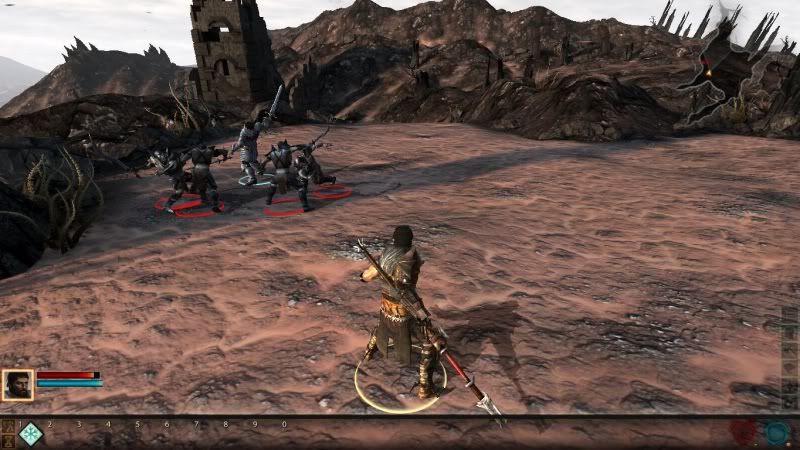
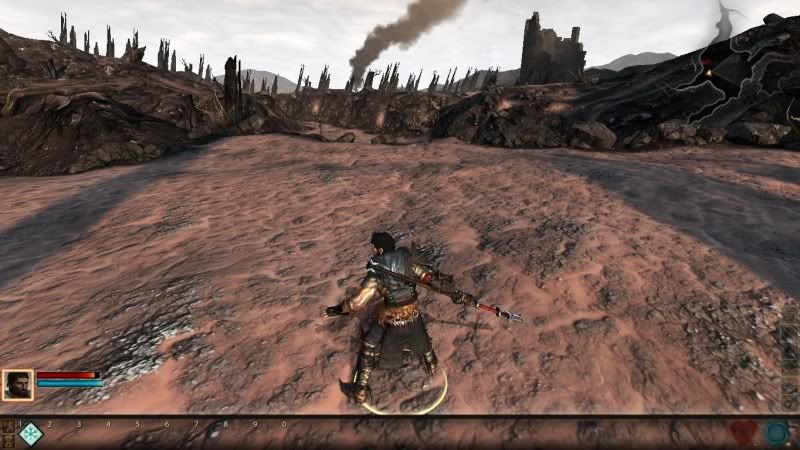
NEW GAMEPLAY VIDEOS. NOW WITH DIRECTX 11 ENABLED! drool.gif

Great thanks to @cowithgun. I have updated my Nvidia driver to version 270.61. Now, I can run Dragon Age 2 with DirectX11 enabled at medium settings, with 45 - 50 FPS without Fraps.


» Click to show Spoiler - click again to hide... «


Watch it in 720p HD, if not, you won't see the effect of DirectX 11.


The real graphics quality (just for drillz)

user posted image

user posted image

Now uploading Need For Speed Hot Pursuit with High Resolution Texture enabled!

TSwilsonphua
post May 13 2011, 07:35 PM

Gear Up. Game On.
*******
Senior Member
2,152 posts

Joined: Nov 2008
QUOTE(cowithgun @ May 13 2011, 12:24 PM)
@wilsonphua: is there any lag at all in cut-scene like what i experience in my video? my setting:

Graphic details: High setting
no AA
1366x768
Hi Res
DX11
V-Sync on.

Thanks for sharing.
*
Nope, no lag in the cutscenes. I can hardly see any screen tearing also.

My graphic settings:
1366x768
Texture detail = Medium
DX11
Vsync and all other graphic options like BLOOM, LIGHTING, AMBIENT OCCLUSION all TURNED OFF.

maybe u shud turn them off biggrin.gif

QUOTE(GreaseMonkey90 @ May 13 2011, 01:35 PM)
hmmm. pretty nice scores for the 540M
*
Thanks. But its not really that good for high resolution gaming...maybe for mid end games and for casual gaming, its good enough
TSwilsonphua
post May 13 2011, 08:38 PM

Gear Up. Game On.
*******
Senior Member
2,152 posts

Joined: Nov 2008
QUOTE(cowithgun @ May 13 2011, 08:30 PM)
I see. I was using the default High setting. As you can see the effect of lag in cut-scene is really minimal, so, i prefer to set it High for better quality. I also enabled Vsync because I dont like to see any screen tearing at all. It's a beautiful game.

What is your maximum Street Fighter 4 score if using the setting like mine? The benchmark in SF4 is really fun to watch, especially when they are in fast forward motion  thumbup.gif

Res: 1366x768
No AA
Variable frame rate
No V-Sync
Texture filter: Default
Everything else Highest.
Extra touch: Ink
*
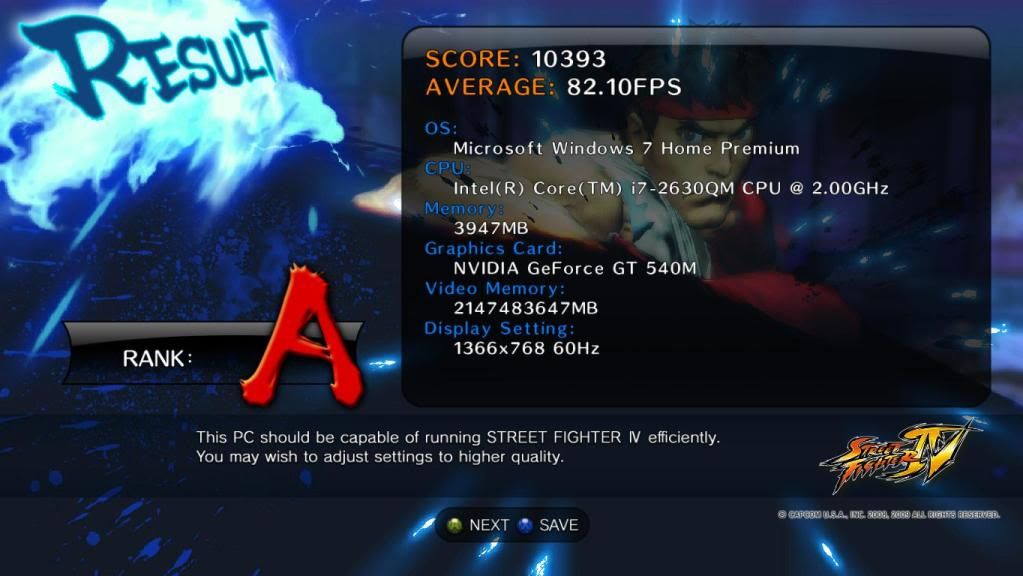
I set all my settings to highest. I max it. I run benchmark and the average FPS is 59.75FPS

how do u manage to get this? I run the benchmark, they only show videos, and they didnt give results like this one (your one)

» Click to show Spoiler - click again to hide... «

TSwilsonphua
post May 13 2011, 09:17 PM

Gear Up. Game On.
*******
Senior Member
2,152 posts

Joined: Nov 2008
QUOTE(cowithgun @ May 13 2011, 08:47 PM)
wait until it stop! what if you set the same setting? just want to see if performance of 540M against 5650M...
*
5650M still pawns. I used the same settings like you.


Anyway, I'm now doing some recording of Brink gameplay using my laptop. Its a really new game. Just released this morning.


user posted image
TSwilsonphua
post May 13 2011, 10:00 PM

Gear Up. Game On.
*******
Senior Member
2,152 posts

Joined: Nov 2008
QUOTE(cowithgun @ May 13 2011, 09:34 PM)
That's not fair, you have way more memory, if i count correctly, that is 2147 terebytes of graphic memory.  sweat.gif

I OC my 5650m, that's why it's a little higher. On stock clock, it is only 10206, which is still lower than GT540M. Will be interesting to find out if GT540M can out-perform 5650M after OC. I suspect (no mean to offense anyone) 5650 will still pawn... hope someone can proof me wrong.

Will be waiting for more gameplay from you.
*
I don't dare to overclock la..just bought this laptop two months ago. Actually less than 2 months. But I'd like to know how to overclock, just in case next time I wanna take risk overclocking it.

I'm now recording Brink and Dead Space 2 gameplay. Will upload them next Monday or maybe tomorrow.

I thought this thread is dead LOL.. rclxms.gif
TSwilsonphua
post May 14 2011, 09:35 AM

Gear Up. Game On.
*******
Senior Member
2,152 posts

Joined: Nov 2008
QUOTE(jedi_dc @ May 14 2011, 01:46 AM)
I suggest u try ur black ops with Vsync ON and AA to max, i'm sure u'll be able to still play smoothly with better graphics!

[attachmentid=2212735]
[attachmentid=2212737]

I maxed everything out, average of 40 to 60 FPS , 60 FPS is the limit as VSYNC is ON . it wont go higher than 60  smile.gif

Managed to play smoothly with temeperatures at peak 90'c

no problem playing for hours at all

ATI 6550M 1gb , on the Acer TimelineX 4820tg , Core i5 480M .

Stock clocks, i tried higher clocks for the GPU , but only a little increase in FPS around 43-60. 700/900 .

not to show off or anything, just proof that u can push ur graphics settings higher smile.gif

Running on CCC 11.3  brows.gif
*
Hey Akiraceo! So many STARS you have there! Anyway, I don't dare to max out cause the temperature gets very high.

Eh cant wait to go Curtin la

QUOTE(GreaseMonkey90 @ May 14 2011, 02:39 AM)
u can use MSI afterburner, riva tuner, etc.

you can also flash your card's bios by using the nibitor and the nvidia flash tool. make sure to back up your ori bios and then flash it in cmd.
*
I used Riva Tuner to overclock my old laptop with G105M. After that, I stop overclocking..

QUOTE(astria @ May 14 2011, 09:11 AM)
u won't believe how much is Brink over here...

AU$90... doh.gif doh.gif doh.gif doh.gif doh.gif
*
its expensive and not worth it

QUOTE(GreaseMonkey90 @ May 14 2011, 09:20 AM)
try to OC and beat his
brink had a bad review. g4tv gave it a 2/5    blink.gif
*
QUOTE(ngkhanmein @ May 14 2011, 09:22 AM)
i using same card with cowithgun lah.. got also same..

brink video games? nice?
*
Brink is nice, good graphics, but not worth the money u pay for the original. The reviews aren't that good.
TSwilsonphua
post May 14 2011, 09:47 AM

Gear Up. Game On.
*******
Senior Member
2,152 posts

Joined: Nov 2008
QUOTE(thieflord @ May 14 2011, 09:44 AM)
what gpu did u use? 540m or 5650m?
*
He's using 5650M

hmm...I'd love to know the performance of HD6770M GDDR5...should pawn like hell
TSwilsonphua
post May 14 2011, 10:33 AM

Gear Up. Game On.
*******
Senior Member
2,152 posts

Joined: Nov 2008
QUOTE(cowithgun @ May 14 2011, 10:27 AM)
Texture filter: DEFAULT (confirm got this setting!)
VSync OFF
Extra touch: INK
Varible frame rate
Anti aliasing: NO

doh.gif go benchmark now  blink.gif
*
do u mind to do a benchmark of your street fighter 4 on standard clock without OC? hehe
TSwilsonphua
post May 14 2011, 04:35 PM

Gear Up. Game On.
*******
Senior Member
2,152 posts

Joined: Nov 2008
user posted image

user posted image

user posted image

user posted image

Alright. Enough of the Drillz.

Anyway, here is a gameplay of Brink multiplayer with my Nvidia GT540M. This game has a lag issue but I haven't download the latest patch to fix it. Will download it soon and upload another video of Brink gameplay.


Graphic settings when recorded with FRAPS:
Resolution = 1280x720
Shadow quality = Medium
Texture quality = High
FPS = 30 - 40


Graphic settings when playing without FRAPS:
Resolution = 1360x768
Shadow quality = Medium
Texture quality = High
FPS = 40 - 70


IGNORE THE WHITE OUTLINE OF THE MAIN ENTRANCE OF THE CONTAINER CITY. It is just an objective indicator, not a graphic issue.
TSwilsonphua
post May 15 2011, 04:05 PM

Gear Up. Game On.
*******
Senior Member
2,152 posts

Joined: Nov 2008
QUOTE(AlexLai @ May 15 2011, 03:10 PM)
I'm now tempted to max OC and benchmark my GT335M to see how it compares to these big boys.  laugh.gif
*
hey bro. You're playing ur Black Ops on another system?


cause im thinking of saving money to build a desktop, i dont think my laptop can last long if i keep playing games with it LOL
TSwilsonphua
post May 15 2011, 11:15 PM

Gear Up. Game On.
*******
Senior Member
2,152 posts

Joined: Nov 2008
QUOTE(thieflord @ May 15 2011, 05:49 PM)
desktop is best when it comes to gaming
*
Desktop even pawns the consoles. Can upgrade some more

QUOTE(astria @ May 15 2011, 05:50 PM)
depends on how demanding u re...

Black Ops 1280x720, highest settings, no AA/AF the crap, HD4650, no problem at all...

but BF:BC2, that's another qn altogether... tongue.gif
*
BC2 is a different thing. Its requirement to run it smoothly is too high for a normal laptop..

QUOTE(AlexLai @ May 15 2011, 09:40 PM)
I'm playing Black Ops on my laptop. My much more powerful desktop is at home, gathering dust now. biggrin.gif
*
why not use ur desktop rather than collecting dust?

i want a desktop for gaming also no money...so sad...T.T
TSwilsonphua
post May 16 2011, 12:17 AM

Gear Up. Game On.
*******
Senior Member
2,152 posts

Joined: Nov 2008
QUOTE(cyewe @ May 15 2011, 11:18 PM)
i tried operation flashpoint @redriver with moderate graphics settings and i get crappy fps. the quality of the model and texture also crap but i still get low fps. im using ASUS A53SV with I5-2410M 4gb DDR3 and 1gb gt540m
*
There is always that one graphic setting which lowers the FPS tremendously. It is either SHADOWS, VSYNC, POST PROCESSING, AMBIENT OCCLUSION, AA, BLUR. You have to turn off those settings when you're gaming with a laptop.

so, I think you should try and put your graphic settings for Operation Flashpoint to the lowest and see how much fps you get.

If not, try and update your driver to driver 270.61 (helps a lot) http://www.nvidia.com/object/notebook-win7...hql-driver.html

Or, you could try other first person shooter games like Black Ops (needs quad core to support better)


QUOTE(AlexLai @ May 15 2011, 11:23 PM)
Convenience. I can bring my laptop around and game anywhere. I don't mind reducing my expectations but since I got what I paid for and more, no complaints there. No doubt the desktop is good for really intensive work but when I think about it, I felt like I wasted a lot of money on it since my laptop can do it just as well. Maybe I'll just use it as a Folding farm.
*
Btw, are you still studying or come out work oredi? If in college or university, laptop really helps a lot...thats the reason why i have to buy a laptop in the first place biggrin.gif
TSwilsonphua
post May 16 2011, 12:36 AM

Gear Up. Game On.
*******
Senior Member
2,152 posts

Joined: Nov 2008
QUOTE(AlexLai @ May 16 2011, 12:29 AM)
Still studying now. I need the mobility. But even now I feel my laptop is a bit too heavy. So maybe changing it soon. biggrin.gif
*
under any scholarship? I applied for JPA and I failed to get it. I'm so sad!

have to depend on my parents support cry.gif
TSwilsonphua
post May 16 2011, 11:26 AM

Gear Up. Game On.
*******
Senior Member
2,152 posts

Joined: Nov 2008
QUOTE(kailoonthedog @ May 16 2011, 01:56 AM)
Alright this might abit out of topic , anyway compare gt540m and gt550m which one is better in terms of performance and for OC??
*
You want to buy a gaming laptop right? I'd suggest a GTX460M rather than a GT550M...since u have the budget..
TSwilsonphua
post May 16 2011, 12:23 PM

Gear Up. Game On.
*******
Senior Member
2,152 posts

Joined: Nov 2008
QUOTE(kailoonthedog @ May 16 2011, 12:16 PM)
3k ++ and below 4k means got budget meh??I thought gaming laptop suppose to be above 5k
*
Not all gaming laptop above 5K lol....i think u can get M14x below 5k also
TSwilsonphua
post May 16 2011, 12:36 PM

Gear Up. Game On.
*******
Senior Member
2,152 posts

Joined: Nov 2008
QUOTE(kailoonthedog @ May 16 2011, 12:25 PM)
Above 4k my mum will kill me lol
*
hmm, I wanna ask something. You prefer laptop or desktop? Because even a RM2000 custom built desktop can easily pawn a RM6000 gaming laptop...
TSwilsonphua
post May 16 2011, 08:38 PM

Gear Up. Game On.
*******
Senior Member
2,152 posts

Joined: Nov 2008
QUOTE(kailoonthedog @ May 16 2011, 02:28 PM)
Yes actually i wanted to build a desktop myself , but too bad i need to go MMU to study if possible , and i scared i need to sometime go library bring laptop for discussion in group , so a desktop will make me inconvenient
*
same case here bro...i neep a laptop for university also laugh.gif

QUOTE(emperor_o4118 @ May 16 2011, 08:01 PM)
hey..i cant update my gt540 driver on asus a43sv..need help.=(
*
1. Download the driver here http://www.nvidia.com/object/notebook-win7...hql-driver.html

2. Start the .exe file that you've downloaded

3. It will help you to remove older files from the previous drivers

4. Restart your laptop

5. Try your games, should improve performance!
TSwilsonphua
post May 16 2011, 10:39 PM

Gear Up. Game On.
*******
Senior Member
2,152 posts

Joined: Nov 2008
Whats MSI afterburner? overclock programme?
TSwilsonphua
post May 17 2011, 11:32 AM

Gear Up. Game On.
*******
Senior Member
2,152 posts

Joined: Nov 2008
QUOTE(shinz @ May 17 2011, 05:37 AM)
anybody having issues with the 270 driver? Hon will crash on nvidia but works fine on intel hd3000
*
Nope. I'm using my GT540M to play Heroes of Newerth also. It didn't crash...

7 Pages < 1 2 3 4 > » Top
 

Change to:
| Lo-Fi Version
0.0286sec    0.39    7 queries    GZIP Disabled
Time is now: 8th December 2025 - 10:38 AM