as believe will take some times as customized version on GB for SGA required due to different hardware for different hp... just like customize Microsoft OS in the Recovery CD to suit with Dell or HP computers for 100% compatibility...
ya, thats right! so have to wait only, for official.
as believe will take some times as customized version on GB for SGA required due to different hardware for different hp... just like customize Microsoft OS in the Recovery CD to suit with Dell or HP computers for 100% compatibility...
ya, thats right! so have to wait only, for official.
QUOTE(Aquariusdenz @ Jul 12 2011, 12:42 PM)
i like this
just my 2 cents and used PC as example... maybe i wrong...
as info, froyo on SGA only can support 15fps for video recording, but GB on SGA can support 30fps... so wondering will GB stressing the hardware as OS double up the result... or some of the feature of GB no usable on SGA such as no front camera, etc... so the official GB for SGA may tuned and amended according to SGA's requirements... as believe the OS in our SGA is customized by Samsung, otherwise dont have the "samsung apps" inside there... dont flame me if wrong...
This post has been edited by gkl83: Jul 12 2011, 01:03 PM
Got my SGA back from Senheng yesterday, took them about 11 days to get my screen replaced. Ain't any dead pixel now (I think), though there are a few dust particles. Better than a dead pixel though.
I want to buy buy galaxy. but i have already monte then will be good deal to buy instead of monte....
Added on July 12, 2011, 3:57 pm
QUOTE(stupiak07 @ Apr 15 2011, 07:52 PM)
♠ ⟶ Samsung Galaxy Ace ⟵ ♠
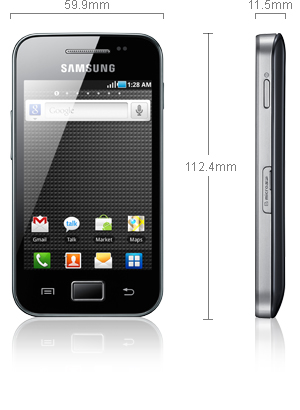
SAMSUNG GALAXY ACE s5830 SPECIFICATION
» Click to show Spoiler - click again to hide... «
» Click to show Spoiler - click again to hide... «
[b]Original Samsung Malaysia Electronics (SME) : RM 999 [1 Year warranty] Original SenQ / SengHeng : RM 999 [Up to 3 Years warranty, up to 36 months 0% interest installment plan] AP Set : RM 9xx The price should not more than RM1200 even the retail price by SME only RM999
Specs
» Click to show Spoiler - click again to hide... «
General: GSM 850/900/1800/1900 MHz, UMTS 900/2100 MHz, HSDPA 7.2 Mbps Form factor: Touchscreen bar phone Dimensions: 112.4 x 59.9 x 11.5 mm, 113 g Display: 3.5" 16M-color TFT capacitive touchscreen, 320 x 480 pixels (HVGA) CPU: Qualcomm QCT MSM7227-1 Turbo 800 MHz processor Memory: 158MB storage, microSD card slot, 278MB RAM OS: Android OS, v2.2 Froyo Camera: 5 megapixel auto-focus camera with face detection; QVGA video recording Connectivity: Wi-Fi b/g/n, Bluetooth 2.1 with A2DP, standard microUSB port, GPS receiver with A-GPS, 3.5mm audio jack, FM radio Misc: TouchWiz 3.0 UI, built-in accelerometer, multi-touch input, proximity sensor, Swype text input
Moar Pics
» Click to show Spoiler - click again to hide... «
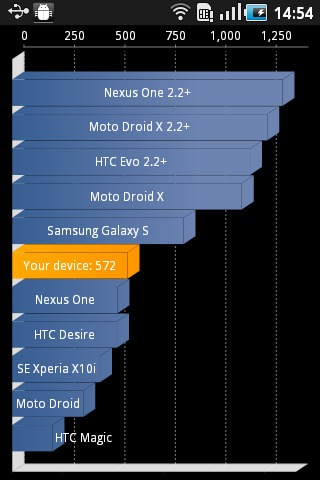
Stock Quadrant Score
» Click to show Spoiler - click again to hide... «
Size comparison with iPhone
» Click to show Spoiler - click again to hide... «
[size=7]Video Interface Preview
» Click to show Spoiler - click again to hide... «
SGA Scratch Test
» Click to show Spoiler - click again to hide... «
Warning: Please don't try this at home, even though it's gorilla glass but it still will get scratch. Try at your own risk
Gaming Gaming On SGA
» Click to show Spoiler - click again to hide... «
Lowyat.net User Reviews
» Click to show Spoiler - click again to hide... «
» Click to show Spoiler - click again to hide... «
1) Home -> Menu -> Settings -> Wireless & networks -> Mobile networks -> Access Points Name 2) Menu -> New APN Name = Maxis(3G) APN = unet Username = maxis MMSC = http://172.16.74.100:10021/mmsc MMS proxy = 202.75.133.49 MMS port = 80 APN type = default,mms (Others, leave blank)
DiGi APN
» Click to show Spoiler - click again to hide... «
1) Home -> Menu -> Settings -> Wireless & networks -> Mobile networks -> Access Points Name 2) Menu -> New APN Name : DiGi Internet APN: diginet MCC: 502 MNC: 16 APN Type: default (Others, blank)
DIGI MMS
» Click to show Spoiler - click again to hide... «
Celcom APN which one better black or white .........confused I have Monte. should i replace my monte with galaxy..
» Click to show Spoiler - click again to hide... «
1) Home -> Menu -> Settings -> Wireless & networks -> Mobile networks -> Access Points Name 2) Menu -> New APN Name: Celcom3G MMS Combo APN: celcom3g Proxy: Not Set Port: Not Set Username: Not Set Password: Not Set Server: Not Set MMSC: http://mms.celcom.net.my MMS proxy: 10.128.1.242 MMS port: 8080 MCC: 502 MNC: 19 Authentication: Not Set APN Type: Internet + MMS Thanks to uan for the update
Samsung Phone Secret Code
» Click to show Spoiler - click again to hide... «
*#*#4636#*#* - Phone Information *2767*3855# - Hard Reset *#*#7780#*#* - Factory Reset *#*#7594#*#* - Change End Call/Power Option *#*#197328640#*#* - Service Mode *#*#273283*255*663282*#*#* - File Copy Screen (Backup Media Files) *#*#526#*#* - WLAN Test *#*#232338#*#* - Shows WiFi MAC address *#*#1472365#*#* - GPS Test (eclair) *#*#3214789650#*#* - GPS Test (froyo) *#*#1575#*#* - Another GPS test *#*#232331#*#* - Bluetooth test *#*#232337#*# - Shows Bluetooth device address *#*#8255#*#* - GTalk Service Monitor
Codes to launch various Factory Tests:
*#*#0283#*#* - Packet Loopback *#*#0*#*#* - LCD test *#*#0673#*#* - Melody test *#*#0842#*#* - Device test (Vibration test and BackLight test) *#*#2663#*#* - Touch screen version *#*#2664#*#* - Touch screen test *#*#0588#*#* - Proximity sensor test *#*#3264#*#* - RAM version
Codes to get Firmware version information:
*#*#4986*2650468#*#* - PDA, Phone, H/W, RFCallDate *#*#1234#*#* - PDA and Phone *#*#1111#*#* - FTA SW Version *#*#2222#*#* - FTA HW Version *#*#44336#*#* - PDA, Phone, CSC, Build Time, Changelist number Source from XDA
This post has been edited by Jenny456: Jul 12 2011, 03:57 PM
anyone can teach me how to flash new 2.3.x ROM?? i m using 2.2.1 now with rooted....so how shud i do??? any sifu can teach me pls....n i would prefer the ROM was able to see chinese too..... 10q sifusss...... pls help.....
as info, froyo on SGA only can support 15fps for video recording, but GB on SGA can support 30fps... so wondering will GB stressing the hardware as OS double up the result... or some of the feature of GB no usable on SGA such as no front camera, etc... so the official GB for SGA may tuned and amended according to SGA's requirements... as believe the OS in our SGA is customized by Samsung, otherwise dont have the "samsung apps" inside there... dont flame me if wrong...
The Android OS is always customized by the phone manufacturer. That's why the same Android 2.2 Froyo (for example) looks different on different phones. The UI and apps are different, for example Samsung has My Files, HTC has Flashlight, LG has LAYAR, SE has Timescape, etc. The launcher is also different, Motorola has MotoBLUR, Samsung has TouchWiz, and so on. In other countries, even the telcos customize the OS, putting in more bloatware, disabling tethering, etc. That's why AT&T only just recently released 2.1 Eclair for SE X10!
Android with minimal customization by the manufacturer is called Vanilla UI. These usually offer the smoothest and fastest experience.
QUOTE(wanbob93 @ Jul 13 2011, 12:22 AM)
Does this phone has tethiring apps so that i can connect with tablet to use internet
Yes, personal hotspot is built into Android from Froyo onwards.
Erm, for me, this is what had happened to me for the past few days...
The wifi sleep setting was ON, my SGA was connected to my house's wifi.
Then, I went to my workplace(wifi still ON) and found out that my SGA was off, automatically, I guess it's because my SGA couldn't detect my house's wifi.
After switching it off and voila, everything's fine already
Better let the sleep policy off I guess...
what do you mean by wifi sleep stting was ON? does it mean in our SGA - wi-fi sleep policy - tick never? sorry, bit confuse...
Hmm.. I'm on CodeRom.V1b and when its on mobile data network, quite frequently message sending fails... Works fine on wifi though... Kinda sad since the phone has a data plan ..
Hmm.. I'm on CodeRom.V1b and when its on mobile data network, quite frequently message sending fails... Works fine on wifi though... Kinda sad since the phone has a data plan ..
or maybe try other Rom... Reset the APN still couldn't send message?
guy, my Ace is acting up lately.. my Ace fell on floor twice and it still work fine. But when on phone, all my apps deleted automatically except marketplace and basic apps. What make worried is.. my half picture is broken, cannot view on phone or laptop. How I can recover my broken picture into normal so I can view them again? Please reply ASAP because most my picture is related with work.. I cannot take same picture again


 Jul 12 2011, 11:06 AM


 Quote
Quote


 <<- Black ⎹ White->>




 0.0362sec
 1.54
1.54
 6 queries
 GZIP Disabled