QUOTE(Vbs @ Mar 27 2011, 04:32 PM)
Hi guys, I just have UniFi installed yesterday but have already encountered a problem. My dad and I use Dell Inspiron laptops that were bought back in 2008, and both of us could not connect to the internet as we can't detect the wifi signal. My netbook on the other hand, which we got last year, was able to connect through radio signal. If we were to use the LAN cable, we could connect (on the Dell lappies)
I did a thorough search and found out that my network adapter currently supports only up to 802.11g for radio mode, while the radio signal detected on my netbook shows 802.11n (UniFi router). I then updated my network driver and hardware, but to no avail.
I have an inkling that the cause is the radio mode incompatibility issue, but I've been trying to solve the problem for hours now.
Can anyone help?
1. the default wifi setup for the router should support b/g/n... however if you still unable to detect then perhaps you should try set it to b/g only...
2. if your wifi network adapter only support b/g then upgrading the driver won't make your adapter n... its the chip on the hardware...not software..
3. my current asus laptop was bought in late 2007 and i'm able to detect and connect to the unifi wifi router...
4. the other reason probably due to WPA2 security... some older laptops can not perform the necessary 'handshake'.... so downgrade to WPA or WEP (less secure)
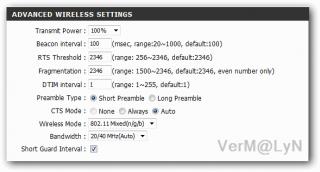

Added on March 27, 2011, 4:55 pmQUOTE(IwanAGP @ Mar 27 2011, 04:51 PM)
That is ur hardware limitation on your old laptops. I don't think 802.11n is supported by 2008 models. What you can do now, just get into the router config page,
type 192.168.0.1 in ur browser, id: operator, pass: h566UniFi->Advanced tab->Advanced wireless tab on the left->Change wireless mode to Mixed b/g/n->In addition, to ensure more stable connection, change the bandwidth to 20Mhz instead of 20Mhz/40Mhz auto.
If this doesn't solve your problem, in the wireless mode option, change it to 802.11 mixed (b/g) in which the wireless will be broadcast at G mode instead of N which is the speed of 54Mbps instead of 150/300Mbps on N mode. However, considering that the internet provided by unifi will only hit max 20Mbps on VIP20, it's sufficient to provide you full experience for you internet. If you want sharing from one laptop to another at N mode then you need to enable it. Since you said two of your laptops are 2008 models, it won't support N unless you get it an adapter or change its wireless card. You can't get connected to a N network by just updating the driver. It's hardware problem, not driver problem. Haha... Hope i helped you xD
My laptop bought in late 2007 and support n...
This post has been edited by VerM: Mar 27 2011, 04:55 PM 

 Mar 22 2011, 02:54 PM


 Quote
Quote Any idea what's the root password? lol.


 0.0521sec
 0.38
0.38
 8 queries
 GZIP Disabled