Outline ·
[ Standard ] ·
Linear+
Alienware Mothership v7, waiting for M14x and M18x !
|
GreaseMonkey90
|
 Mar 3 2011, 03:14 AM Mar 3 2011, 03:14 AM
|

|
crysis 2 is not a challenge to laptop GPUs. since it has been dumbdown for consoles. if you are getting 40-50fps on hardcore thn your fps is way above tht since the new drivers has not been released. really dissapointed with consolized crysis 2.
This post has been edited by GreaseMonkey90: Mar 3 2011, 08:40 AM
|
|
|
|
|
|
thilanesh
|
Mar 3 2011, 10:59 AM
|
Getting Started

|
you should
|
|
|
|
|
|
duabijitelur
|
Mar 3 2011, 11:37 AM
|
|
|
any one doing on-site screen protector 'slapping' service? pm me
i dun wan to do it myself as u know the bubbles... zz
|
|
|
|
|
|
duabijitelur
|
Mar 3 2011, 11:39 AM
|
|
|
QUOTE(xplodingplastix @ Mar 3 2011, 11:38 AM) my optx just arrived! 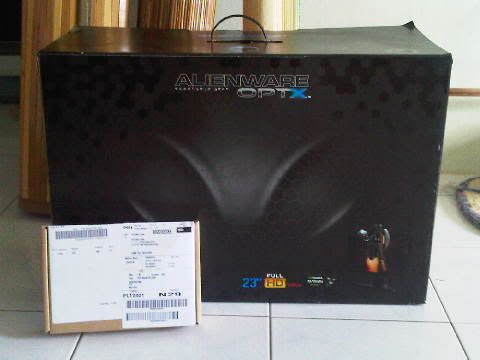 GRATZ!!!!! post some photos bro XD |
|
|
|
|
|
xplodingplastix
|
Mar 3 2011, 11:51 AM
|
Getting Started
|
QUOTE(duabijitelur @ Mar 3 2011, 11:39 AM) GRATZ!!!!! post some photos bro XD im at office, my gf send the pict. damn! so xcited, will update moar tonite. hehe |
|
|
|
|
|
TSMr.Docter
|
Mar 3 2011, 01:32 PM
|
|
|
QUOTE(xplodingplastix @ Mar 3 2011, 11:51 AM) im at office, my gf send the pict. damn! so xcited, will update moar tonite. hehe nice!  its 3D Ready right? |
|
|
|
|
|
wadelucy1987
|
Mar 3 2011, 01:36 PM
|
Getting Started
|
guys..m15x dun have HDMI port ?
|
|
|
|
|
|
alvinkhorfire
|
Mar 3 2011, 01:40 PM
|
Getting Started
|
wadelucy1987
Just plug the DisplayPort-to-HDMI cable to the DisplayPort on the left side of your M15x.
|
|
|
|
|
|
wadelucy1987
|
Mar 3 2011, 01:58 PM
|
Getting Started
|
u means i have to use converter convert back to VGA ??
|
|
|
|
|
|
Lil Kiasu
|
Mar 3 2011, 02:17 PM
|
|
|
QUOTE(wadelucy1987 @ Mar 3 2011, 01:58 PM) u means i have to use converter convert back to VGA ?? VGA edi have wad~  |
|
|
|
|
|
alvinkhorfire
|
Mar 3 2011, 02:18 PM
|
Getting Started
|
There is a horizontal slot between Gigabit Ethernet port and USB port on the left side of your M15x. That slot is DisplayPort. Plug the cable to that port and to another device with the HDMI port. VGA port is not required in this case.
|
|
|
|
|
|
wadelucy1987
|
Mar 3 2011, 02:40 PM
|
Getting Started
|
ya..Becuz i means i can't find the HDMI port..thx all..
Added on March 3, 2011, 2:50 pmbtw,the port beside the lan cable port is wat ?? can plug in HDMI cable ?
This post has been edited by wadelucy1987: Mar 3 2011, 02:50 PM
|
|
|
|
|
|
bluhound
|
Mar 3 2011, 05:18 PM
|
Getting Started
|
QUOTE(wadelucy1987 @ Mar 3 2011, 02:40 PM) ya..Becuz i means i can't find the HDMI port..thx all..
Added on March 3, 2011, 2:50 pmbtw,the port beside the lan cable port is wat ?? can plug in HDMI cable ? That port, next to the LAN port is a DisplayPort. You connect to an external screen using a DisplayPort cable. If you want to use a HDMI cable, you need to use the HDMI adapter provided in your accessories box. DisplayPort is chosen over HDMI because you need to pay royalty fees for any HDMI ports.... |
|
|
|
|
|
wadelucy1987
|
Mar 3 2011, 05:36 PM
|
Getting Started
|
ooo..i see..thx for explaning..
|
|
|
|
|
|
syafri88
|
Mar 3 2011, 06:07 PM
|
Getting Started
|
Guys, am in a bind here. I have installed 2 worlds and also played dead space 2. What I find most vexing is that the gameplay tends to stutter some of the time and makes for low fps.
Any advice on how to improve fps? Either by turning off some options? Bloom, shadow or HDR needs to be turned off?Or is there is a software to throttle the GPU all the time when playing a game?
Come on Alienware! Make it worth my money!
|
|
|
|
|
|
Lil Kiasu
|
Mar 3 2011, 06:10 PM
|
|
|
QUOTE(syafri88 @ Mar 3 2011, 06:07 PM) Guys, am in a blind here. I have installed 2 worlds and also played dead space 2. What I find most vexing is that the gameplay tends to stutter some of the time and makes for low fps.  Any advice on how to improve fps? Either by turning off some options? Bloom, shadow or HDR needs to be turned off?Or is there is a software to throttle the GPU all the time when playing a game?  Come on Alienware! Make it worth my money!  Throttling issues~  Only fix is Game Booster + MSI Afterburner... go download those freebies and use it to end your despair~  |
|
|
|
|
|
syafri88
|
Mar 3 2011, 06:16 PM
|
Getting Started
|
QUOTE(Lil Kiasu @ Mar 3 2011, 06:10 PM) Throttling issues~ Only fix is Game Booster + MSI Afterburner... go download those freebies and use it to end your despair~ Thanks for the advice!
Added on March 3, 2011, 6:20 pmQUOTE(Lil Kiasu @ Mar 3 2011, 06:10 PM) Throttling issues~ Only fix is Game Booster + MSI Afterburner... go download those freebies and use it to end your despair~ Nice on adding the emoticons. Question, the MSI afterburner only works for MSI card is it? Or any card? FYI, I am using GTX460M This post has been edited by syafri88: Mar 3 2011, 06:20 PM |
|
|
|
|
|
wadelucy1987
|
Mar 3 2011, 06:25 PM
|
Getting Started
|
Nope..MSI afterburner it works with ur gpu also..I have tried dead space 2...really awesome with my m15x..xD
|
|
|
|
|



 Quote
Quote







 0.0269sec
 1.34
1.34
 6 queries
 GZIP Disabled