Welcome Guest ( Log In | Register )

Bump Topic Topic Closed RSS Feed
26 Pages « < 18 19 20 21 22 > » Bottom

Outline · [ Standard ] · Linear+

 Sandy Bridge Overclocking V1, 2500K/2600K/2700K | LGA1155 P67.Z68.Z77

views
     
TSowikh84
post Oct 19 2011, 08:14 PM

i7 Clan
Group Icon
Elite
8,711 posts

Joined: Nov 2007
From: Butterworth, PG / Machang, Kelantan


QUOTE(Norazam @ Oct 19 2011, 07:54 PM)
now got stable oc at 5Ghz, with 1.5v vcore ok kaa??

if lower volt cannot passed prime95.. temp full load 75'c
*
Try VRM 500-550, i managed to get lower vcore with higher VRM.
TSowikh84
post Oct 23 2011, 10:21 AM

i7 Clan
Group Icon
Elite
8,711 posts

Joined: Nov 2007
From: Butterworth, PG / Machang, Kelantan


QUOTE(ashraful @ Oct 23 2011, 09:44 AM)
i have to ask.. to flash BIOS.. currently i am F4, can i jump flash to F7 or ihave to flas to F5 F6 and so on?

Thanks~!
*
jump directly from F4 to F7 or the latest is fine.
u can also downgrade to older version if u want.
TSowikh84
post Oct 23 2011, 06:26 PM

i7 Clan
Group Icon
Elite
8,711 posts

Joined: Nov 2007
From: Butterworth, PG / Machang, Kelantan


QUOTE(Mavrix @ Oct 23 2011, 02:41 PM)
Helo there..

Im new to Sandy Brigde proc..

Proc: i5 2500K
Cooler: Tuniq Tower 120 Extreme
Mobo: Asus P8Z68-V
Running at 4.3GHZ OC via Asus TurboV EVO apps.. and here's what i got:
» Click to show Spoiler - click again to hide... «


Someone suggest me to lower the BCLK fig due to might gonna hurt my proc.. so, any comments would be appreciated!  thumbup.gif
Meanwhile, gonna fork at google for OC tips on this Sandy chip..  sweat.gif

My target is to reach a stable speed of 4.5GHZ for daily usage.. not planning on booting 24/7 though!
*
Welcome to SB OC club!
The clickable bios interface is known as UEFI.
not all brands implement UEFI on their boards. To name a few, Asus, Asrock, MSI etc use UEFI; whereas Giga is using conventional BIOS, which is accessible by keyboard only.
Not only BCLK clocking would hurt ur CPU, any OC activity also might damage ur chip, or otger components ie mobo, DRAM, GC etc... BCLK frequency on SB is now tied together with PCIE, PCI hence make OCing a lil bit harder than previous platforms. U could raise BCLK just a few MHz so far i've seen 110MHz being the highest BCLK a SB chip can achieve. Max BCLK is highly depends on CPU & mobo. Some CPUs can do 108MHz but some chips are stuck at 107MHz only.
On SB it is very easy to do 4.5GHz or even 5.0GHz if ur cooling allowed. Just set multi 45x and bump up vcore if need and u are fine to get a stable machine.

TSowikh84
post Oct 23 2011, 09:04 PM

i7 Clan
Group Icon
Elite
8,711 posts

Joined: Nov 2007
From: Butterworth, PG / Machang, Kelantan


QUOTE(Boldnut @ Oct 23 2011, 07:06 PM)
Anyone know the stock VID for general 2500K?

the spec sheet in ark.intel.com doesnt show max Intel specified vcore.

http://ark.intel.com/products/52210

if I search old cpu which is a pentium Dual core E5800, its there.
http://ark.intel.com/products/42802/Intel-...-800-MHz-FSB%29
*
Stock VID is chip dependent but most ppl get 1.22v at default.
The lower VID the better the CPU can OC at lower vCore and cooler.
TSowikh84
post Oct 23 2011, 11:00 PM

i7 Clan
Group Icon
Elite
8,711 posts

Joined: Nov 2007
From: Butterworth, PG / Machang, Kelantan


QUOTE(amadzack @ Oct 23 2011, 10:57 PM)
the lowest voltage i can run with my 2600k 1.296v with 4.5ghz
is it safe to run 24/7?
http://valid.canardpc.com/show_oc.php?id=2053303
*
good enough if it's cool. smile.gif
so what's ur max temp?
TSowikh84
post Oct 23 2011, 11:49 PM

i7 Clan
Group Icon
Elite
8,711 posts

Joined: Nov 2007
From: Butterworth, PG / Machang, Kelantan


QUOTE(amadzack @ Oct 23 2011, 11:29 PM)
nomal usage 50c+
70c+ when 100%usage ><
*
quite fine for such frequency & vCore. nod.gif
as for me i would start to worry when the temp goes up to 90C.
avoid stressing the 2600K 5GHz HT @ 1.54v + as this might cause chip degradation.
TSowikh84
post Oct 24 2011, 06:51 AM

i7 Clan
Group Icon
Elite
8,711 posts

Joined: Nov 2007
From: Butterworth, PG / Machang, Kelantan


QUOTE(Mavrix @ Oct 24 2011, 12:39 AM)
Manage to get 4.5GHZ!

Temp seems to be fine i guess:
» Click to show Spoiler - click again to hide... «


Well i guess it good enough for daily usage for now.. myb gonna go further later on..  thumbup.gif
Comments are welcome here!  notworthy.gif

*i hope those pics are fine.. sweat.gif
*
well done & good chip! thumbup.gif

TSowikh84
post Oct 24 2011, 10:04 AM

i7 Clan
Group Icon
Elite
8,711 posts

Joined: Nov 2007
From: Butterworth, PG / Machang, Kelantan


QUOTE(Boldnut @ Oct 24 2011, 08:54 AM)
I know this question might too much to ask, because things cannot be predict in future, in ur experience, whats the max recommended VID for Long hours usage in long term? Like 12-16hours everyday, for next 7years+. (my sabertooth mobo is 5yrs warranty I am positive it can last another 2-3yrs if I take care of it sweat.gif)

and how to check my CPU max allowed VID(not my stock) if it is random base on chip.

EDIT this 2500K is a Jan 2011 chip. The very first batch., when Intel launch it I immediately buy.  smile.gif
*
Max allowed VID is 1.52v -->Reference

VID can be checked thru RealTemp
TSowikh84
post Oct 24 2011, 10:54 AM

i7 Clan
Group Icon
Elite
8,711 posts

Joined: Nov 2007
From: Butterworth, PG / Machang, Kelantan


QUOTE(Boldnut @ Oct 24 2011, 10:28 AM)
I guess according to the thread, the safe voltage without degradation is somewhere 1.35v-1.38v
*
I believe that's according to Intel's limit.!
If ppl follow this spec then better dont OC it. But thete must be a reason why Intel releases K series. If not for OC then what is it for?

Like mentioned earlier, degradation MIGHT only occur if u stress the CPU at 5GHz + HT at 1.54v+ for long hour so if u didnt play at this condition i dont see why u should worry.


TSowikh84
post Oct 25 2011, 07:31 PM

i7 Clan
Group Icon
Elite
8,711 posts

Joined: Nov 2007
From: Butterworth, PG / Machang, Kelantan


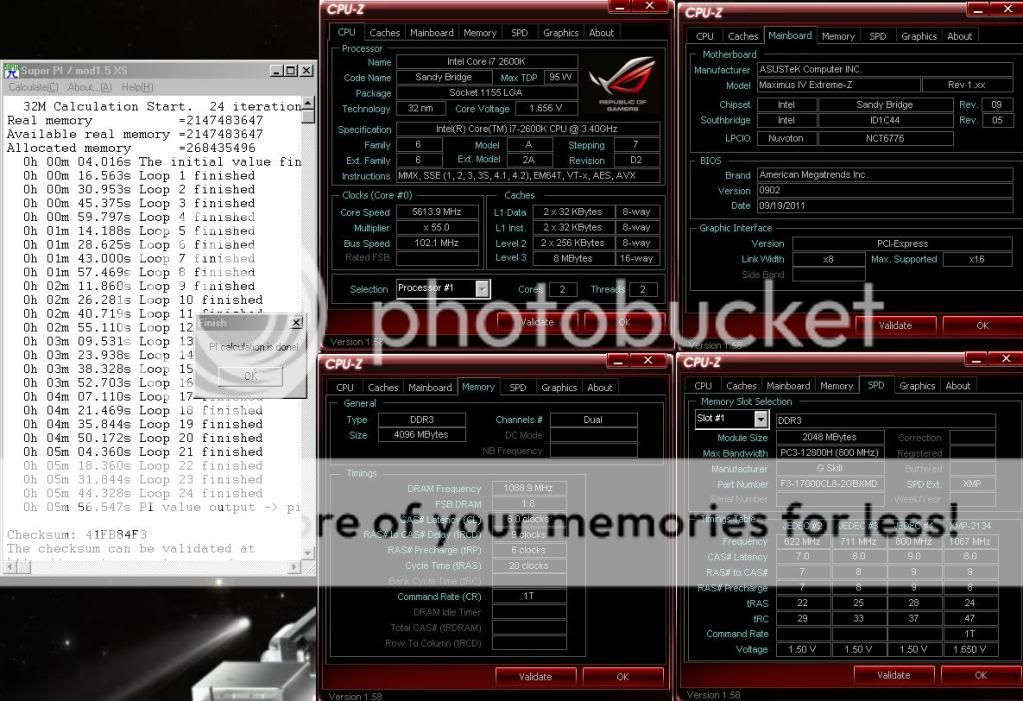
sub 6m thumbup.gif

user posted image

This post has been edited by owikh84: Oct 25 2011, 08:00 PM
TSowikh84
post Oct 25 2011, 11:21 PM

i7 Clan
Group Icon
Elite
8,711 posts

Joined: Nov 2007
From: Butterworth, PG / Machang, Kelantan


QUOTE(Mavrix @ Oct 25 2011, 09:57 PM)
Very2 good results there bro!

32M calculation in just 6min ar??
What the proc temps?? Under 60°C i guess?? On WC i see there..  thumbup.gif
*
SB needs at least 5.6GHz to finish in less than 6m.
Suicide run doesn't really need to observe temperature unlike 24/7.
But at this kind of speed and vcore my chip can easily hit 85C+
TSowikh84
post Oct 27 2011, 08:24 AM

i7 Clan
Group Icon
Elite
8,711 posts

Joined: Nov 2007
From: Butterworth, PG / Machang, Kelantan


QUOTE(rudolfjie @ Oct 27 2011, 01:58 AM)
What a great club..!
Hi everyone, i a newbie of i5 2500K

Just got my rigs few days ago, finally settle down all the cable management and software.. and it's time to OC kaw kaw !! brows.gif
Currently i'm using Asus P8P67 + 15 2500K, after reading the user manual, i decide to switch om the TPU button on the motherboard, and after log in to windows... drool.gif wuuulaaa...4.3Ghz without going to bios and set anything
Second stage, i try the TurboV auto tuning (from Asus), set extreme and go
after log in the windows, still 4.3Ghz, but wait a minute.....it increasing 1 multiplier each time, once it hit 4.8Ghz i decide to stop there, cos i can read the temperature goes up to 72C..

Now i wanna play around with manual (BIOS) OC, try few times, but unfortunately i got blue screen, dun understand y..
I set multiplier to 43 with BLCK 100.3, 1.2 Voltage and leave everything auto
still blue screen, any SIFU know why ah? sweat.gif
*
what's the BSOD code? (check 1st post)
sounds like insufficient vCore to me, the 1.2v u set is actually will go lower on load than set due to Load-line Calibration, LLC. (except for Extreme profile which load higher than set)
try bump up vCore a lil bit @ 1.25-1.35v for 4.3GHz etc
as for 4.8GHz u need to enable Internal CPU PLL overvoltage and higher vCore.

TSowikh84
post Oct 27 2011, 08:29 AM

i7 Clan
Group Icon
Elite
8,711 posts

Joined: Nov 2007
From: Butterworth, PG / Machang, Kelantan


QUOTE(sonicstream @ Oct 25 2011, 08:33 PM)
Omg  shocking.gif , what cooler did you use anyway.

BTW, this is my first over clocking so I won't go to such extreme with stock cooler. Sandy Bridge Overclocking Club? COUNT ME IN!!


Temperature at 53C is quite, acceptable. I adjusted the stock cooler fan speed to 100%. So quite an improved margin of cooling after all.

Specification ( briefly )
Asus p8z68-v
i7-2600k
Kingstom DDR3 1333 4GB

EDIT: I can't run this over clock on daily basis. See the log. Stock cooler  doh.gif
*
stock cooler better play @ 4.2GHz only.


Added on October 27, 2011, 8:34 am
QUOTE(ashraful @ Oct 27 2011, 08:25 AM)
BSOD have the code right? you have to know which one makes the blue screen.
maybe the vcore?

Anyway, have anybody has the problem of computer leaves blank display after standby? i have to off m computer manually with the button everytime....
Don't know what cause this....
*
it is a bug when Internal PLL Overvoltage is set to “Enabled”

QUOTE
The unfortunate side-effect is that resume from S3 sleep states is not possible when Internal PLL Overvoltage is set to “Enabled” - this is a hardware limitation, and only fixable by Intel.


This post has been edited by owikh84: Oct 27 2011, 08:34 AM
TSowikh84
post Oct 28 2011, 10:50 AM

i7 Clan
Group Icon
Elite
8,711 posts

Joined: Nov 2007
From: Butterworth, PG / Machang, Kelantan


QUOTE(rudolfjie @ Oct 28 2011, 10:41 AM)
Is'it a benchmarking software? will download and check
BTW i've check my BSOD, 00124 something, then i increase my voltage. It really works..credit to owikh84

Run Cinebench 11.5, with all CPU i got 7.06. Quite happy with the result

Grats!
Ocing a SB is pretty easy. if u increased just the multiplier only then there's nothing else than the vCore. thumbup.gif

acther is selling his SB rig HERE
omg... wat a damn nice combo drool.gif
TSowikh84
post Oct 29 2011, 06:25 AM

i7 Clan
Group Icon
Elite
8,711 posts

Joined: Nov 2007
From: Butterworth, PG / Machang, Kelantan


QUOTE(Mavrix @ Oct 29 2011, 01:24 AM)
Wau!! Damn right sir! 11k can get myself a 600cc sportbike! haha..  brows.gif
But the spec is.. sure is drooling!  drool.gif

*i'm running my rig for 3 days now (testing) and my average temp is on 39-41°C.. great temps for SB... sooooo satisfied!!! huhu. Planning to change the thermal paste with the Arctic Cooling MX-4 paste.. and see how is the performance..

Will update once it done!

I'm using MX-4 as well. It is a good TIM, easy to apply & performs great.
TSowikh84
post Oct 30 2011, 09:59 PM

i7 Clan
Group Icon
Elite
8,711 posts

Joined: Nov 2007
From: Butterworth, PG / Machang, Kelantan


QUOTE(Dura-Ace @ Oct 30 2011, 11:29 AM)
hi otai! notworthy.gif
new comer here. icon_question.gif

here my spec:

PROC : Intel® Core™ i5-2500K Processor 3.30 GHz
CPU COOLER :Prolimatech Megahalem push pull by CM fan
MOBO : Asus P8P67 Deluxe

above result r my 1-click oc via turbo V extreme mode tongue.gif . just wait the temp reach 60 deg, i stop the auto tuning just wanna play with low temp.
this setting have no problem with superPI, but BSOD when used prime..with code not enough vcore.dint plan to increase it coz 4sure the temp will increase too shakehead.gif

after 1-click oc, i try to refer at UEFI bios coz wan to know what its change in there, but nothing change..is it i dont know its already change or the bios never change?? icon_question.gif

» Click to show Spoiler - click again to hide... «

*
by rights the settings tuned by auto tuning tool will be used by the BIOS as well, regardless of stopped or successful.
anyway it's pretty easy to play with manual OC.

» Click to show Spoiler - click again to hide... «

TSowikh84
post Nov 2 2011, 08:24 PM

i7 Clan
Group Icon
Elite
8,711 posts

Joined: Nov 2007
From: Butterworth, PG / Machang, Kelantan


QUOTE(Norazam @ Nov 2 2011, 05:47 PM)
@owik84 do you oc 5ghz 24/7?

can the proc stand the oc for long time
*
Yes im on 5GHz HT 24/7
Dont worry CPU is one of the most durable part in the rig.
TSowikh84
post Nov 2 2011, 10:01 PM

i7 Clan
Group Icon
Elite
8,711 posts

Joined: Nov 2007
From: Butterworth, PG / Machang, Kelantan


QUOTE(stasio @ Nov 2 2011, 09:07 PM)
owikh,
please check this (ohh,you are on Z board)
maximus-iv-extreme-asus-2050
http://www.octeamdenmark.com/forums/attach...e-asus-2050.rar
-improved 3Dmark01 efficiency

source:
http://www.xtremesystems.org/forums/showth...l=1#post4986153
*
thanks stasio, i believe new bios will be released for Z as well soon.
TSowikh84
post Nov 4 2011, 11:23 PM

i7 Clan
Group Icon
Elite
8,711 posts

Joined: Nov 2007
From: Butterworth, PG / Machang, Kelantan


QUOTE(Mavrix @ Nov 4 2011, 01:13 PM)
I'm so phobia with BIOS update.. so scared gonna break my mobo like what i did to my ex- Asus P5NE-SLI.. suddenly dead after faill on updating..

But i guess newer mobo is free form this prob.. is Z68 has dual BIOS??  sweat.gif
*
depends on model.
not all mobo provides dual bios.
it is very important when something goes bad during OC.
TSowikh84
post Nov 10 2011, 06:44 AM

i7 Clan
Group Icon
Elite
8,711 posts

Joined: Nov 2007
From: Butterworth, PG / Machang, Kelantan


QUOTE(Dennos @ Nov 8 2011, 03:37 PM)
msia got 2700k@golden chip of 2600k?
*
haven't seen any 2700K in Msia yet. At above RM1k price tag, I don't think it is a best selling CPU.
There's nothing special about 2700K, other than the extra 100MHz speed over 2600K.
Same overclocking performance, hand picked best of the best chip is just a myth.
I would rather get a Costa Rica 2600K and OC like no rule. lolx

QUOTE(li_sap @ Nov 10 2011, 12:38 AM)
Gigabyte P67A-UD7 vs Asus Maximus IV Extreme.
-WHICH IS THE BEST AND GOOD PERFORMANCE?
-CAN GIVE THE PRICE?
*
I'd would grab the MIVE anytime. Prefer P67 coz it has separated VCCSA & VCCIO for best clocking.

MIVE is going for RM1.3k+ (Z68) & RM1.1k+ (P67)
afaik there's no more UD7 in the local market. unless if the shop still keep old stock.

MIVE vs UD7
SOS

26 Pages « < 18 19 20 21 22 > » Top
Topic ClosedOptions
 

Change to:
| Lo-Fi Version
0.0840sec    0.50    7 queries    GZIP Disabled
Time is now: 4th December 2025 - 10:00 PM