Welcome Guest ( Log In | Register )

Bump Topic Topic Closed RSS Feed
26 Pages « < 17 18 19 20 21 > » Bottom

Outline · [ Standard ] · Linear+

 Sandy Bridge Overclocking V1, 2500K/2600K/2700K | LGA1155 P67.Z68.Z77

views
     
TSowikh84
post Sep 23 2011, 10:50 AM

i7 Clan
Group Icon
Elite
8,711 posts

Joined: Nov 2007
From: Butterworth, PG / Machang, Kelantan


QUOTE(HSLimMic @ Sep 23 2011, 10:17 AM)
It's quite weird, i tried 5 runs on 8threads + max ram. it passes.
then I reformat my PC and raid my SSD (using the ISRT). then when I tried to copy files from my ext hard disk to my C:\ i get BSOD (124) <-- will raid causes OC unstable?

Now i pump the juice to 1.295 (re run the IBT at 8 threads + maximum; passes).

oh btw, my CPU PLL -> 1.75
Using LLC -> Level 2
*
Ive read some ppl said raid0 will actually give tension to CPU processing power and needs a slightly bump on vcore. Somehow i didn't test it personally so i cant clarify.

But ur running LinX just 5runs which is too short to conclude consistency between two loops.
TSowikh84
post Sep 23 2011, 12:42 PM

i7 Clan
Group Icon
Elite
8,711 posts

Joined: Nov 2007
From: Butterworth, PG / Machang, Kelantan


QUOTE(HSLimMic @ Sep 23 2011, 11:27 AM)
Please do advice on how many runs to ensure its stable? 74degree celsius on full load is it acceptable?
I used the raid for the ISRT only. hopefully pumping some juice is enough to settle this..
*
I'd say at least 50runs lol.
98c is max for SB so u got the idea there.
TSowikh84
post Sep 24 2011, 10:45 AM

i7 Clan
Group Icon
Elite
8,711 posts

Joined: Nov 2007
From: Butterworth, PG / Machang, Kelantan


QUOTE(lichyetan @ Sep 24 2011, 09:39 AM)
i just get back my mobo, cpu from rma after killing them during quest for 5ghz. now waiting ram to comeback while using value ram ...  laugh.gif
*
Water leakage??
No wonder u hv been silent for quite a while.
TSowikh84
post Sep 25 2011, 01:27 PM

i7 Clan
Group Icon
Elite
8,711 posts

Joined: Nov 2007
From: Butterworth, PG / Machang, Kelantan


QUOTE(Peculator @ Sep 25 2011, 11:05 AM)
Not sure whether this is the right thread to ask but how often for applying the thermal paste on CPU?
*
I will reapply TIM when,
1) change CPU
2) chance CPU cooler/ waterblock
3) change TIM brand
4) change mobo
No specific frequency.

Wrong thread btw.
TSowikh84
post Sep 26 2011, 12:58 PM

i7 Clan
Group Icon
Elite
8,711 posts

Joined: Nov 2007
From: Butterworth, PG / Machang, Kelantan


QUOTE(ericlooiz @ Sep 25 2011, 11:14 PM)
Hi overclockers , im new in overclocking and i wanna overclock my i5-2500k . my motherboard is msi p67a-c45 and psu is CORSAIR HX650W . Anyone can guide me how to read the 'prime95' and 'linx' thingy ? smile.gif
*
I am not going to teach u how to read but this is how u use these apps properly.
Close any other apps. Check task manager for amount of free memory.

Prime85:
Custom blend > free mem amount (from task manager) > min FFT 128k > OK
Run for 8 hours

LinX:
Make sure to use the latest LinX and win7 SP1.
Choose all memory size > 20-50 runs > START
The test will automatically stop once it's finish running.
the GFlops should be within 110-140 for each run. This is to indicate that ur CPU is not running at throttled condition while being stressed.

This post has been edited by owikh84: Sep 26 2011, 12:59 PM
TSowikh84
post Sep 26 2011, 03:38 PM

i7 Clan
Group Icon
Elite
8,711 posts

Joined: Nov 2007
From: Butterworth, PG / Machang, Kelantan


QUOTE(ericlooiz @ Sep 26 2011, 03:19 PM)
My free memory just 751 even though i turned off all my apps . is that ok ?
*
Try that 751, then look at task manager whether 90%+ of ram is used up or not.

U could disable some unwanted services running in the background to free up ram or use diagnostic mode:

START menu > Search > type "Run" > type "msconfig" > choose "Diagnostic startup > OK
reboot
TSowikh84
post Sep 27 2011, 09:25 AM

i7 Clan
Group Icon
Elite
8,711 posts

Joined: Nov 2007
From: Butterworth, PG / Machang, Kelantan


QUOTE(Dennos @ Sep 26 2011, 11:42 PM)
[attachmentid=2455198]

after some trial and error, finally manage to shave off igpu voltage with 0.01v offset.
Min is 0~0.007v.
*
Nice try dennis. Weird thing is we cannot disable iGPU completely on Z68 with just a simple "DISABLED" button in bios like HT etc. It is still running whenever the CPU is operating.

I believe by disabling this iGPU will help in reducing core temps & perhaps the vcore.
TSowikh84
post Sep 27 2011, 04:12 PM

i7 Clan
Group Icon
Elite
8,711 posts

Joined: Nov 2007
From: Butterworth, PG / Machang, Kelantan


QUOTE(Dennos @ Sep 27 2011, 04:06 PM)
can, disable the standby render as well.


Added on September 27, 2011, 4:06 pmjust above the lucid in bios.

i got 3w reduced from real temp reading. lolx
*
Ok will check this out later coz I googled that day ppl said iGPU cannot be disabled guess it's misleading.
TSowikh84
post Sep 27 2011, 04:22 PM

i7 Clan
Group Icon
Elite
8,711 posts

Joined: Nov 2007
From: Butterworth, PG / Machang, Kelantan


QUOTE(Dennos @ Sep 27 2011, 04:14 PM)
cannot make it to 0v, at least 0.007v, lolx

but AI warning keep on pop up, zzz
*
Means iGPU is not completepy turned off hmm.
U can disable that warning pop up in AI settings. It is very annoying.
TSowikh84
post Oct 3 2011, 11:41 PM

i7 Clan
Group Icon
Elite
8,711 posts

Joined: Nov 2007
From: Butterworth, PG / Machang, Kelantan


QUOTE(ChaosXfire @ Oct 3 2011, 10:53 PM)
hi there,
i need help, is it RAM GSkill Ripjaw-X F3-17000 CL9 suitable for my RIG
Proc      : i5 2500K
mobo    : Asrock Z68 Fatal1ty Gen3

I want to OC the RAM.
*
Ripjaws-X is designed to work perfectly on SB.
Among the best performance RAM in the market currently smile.gif
F3-17000 CL9 if it is 1.5v, u will have a lot of room for OC
TSowikh84
post Oct 5 2011, 05:28 PM

i7 Clan
Group Icon
Elite
8,711 posts

Joined: Nov 2007
From: Butterworth, PG / Machang, Kelantan


Nice chip jouathen, especially on air cooling only.

What's ur CPU batch code?
TSowikh84
post Oct 7 2011, 11:53 PM

i7 Clan
Group Icon
Elite
8,711 posts

Joined: Nov 2007
From: Butterworth, PG / Machang, Kelantan


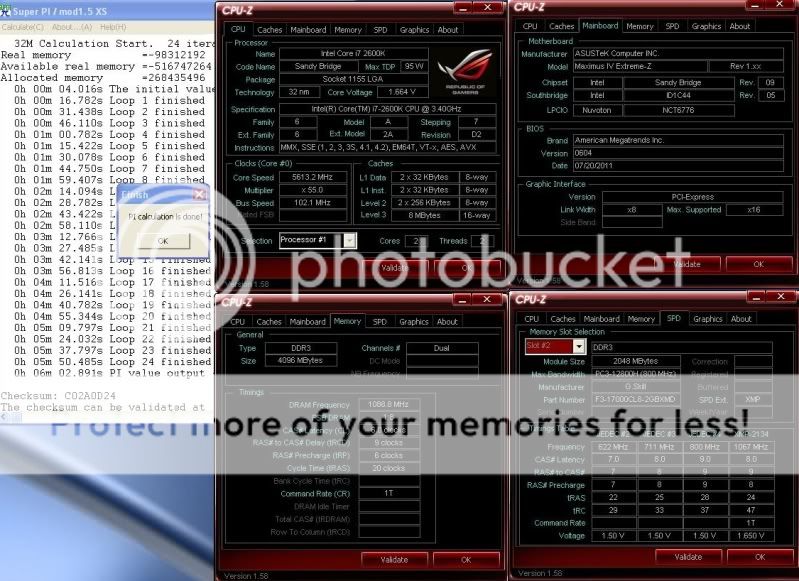
2600K @ 5.6GHz
MIVE-Z
GSkill Ripjaws-X 2176MHz 6-9-6-20-1T
WC


user posted image
TSowikh84
post Oct 8 2011, 01:03 AM

i7 Clan
Group Icon
Elite
8,711 posts

Joined: Nov 2007
From: Butterworth, PG / Machang, Kelantan


QUOTE(jouathen @ Oct 8 2011, 12:35 AM)
I use it in competition thumbup.gif
2600K @ 5.7GHz
ASUS P67 M4E
GSkill 2200 7-10-10-27 2GBX2 Kit
*
Nice clocks again jouathen!
the 2200 C7 kit I cant pull down the TRCD to 9, it's stuck at 10 sad.gif
TSowikh84
post Oct 10 2011, 05:35 PM

i7 Clan
Group Icon
Elite
8,711 posts

Joined: Nov 2007
From: Butterworth, PG / Machang, Kelantan


Wow i'm still playing with beta bios 902 now 706 comes out.

Afaik official bios doesn't have extreme OC option.
TSowikh84
post Oct 12 2011, 11:04 AM

i7 Clan
Group Icon
Elite
8,711 posts

Joined: Nov 2007
From: Butterworth, PG / Machang, Kelantan


QUOTE(kembar4 @ Oct 12 2011, 09:27 AM)
My Rig:

i5 2500k
Asus p8z68-v
4 GB Kingston Value Ram DDR3 1333Mhz x2
4 GB Kingston Server Value Ram ECC DDR3 1333Mhz x2 (Salvaged from my server)
Leadtek Winfast Nvidia GTX580
Coolermaster Silencio 550 Casing

Currently the i5 2500k is overclocked @ 4.2GHz @ 1.60 Volts

Prime95 running since 30 minutes ago (CPU @ 100%) + running a game

Temps @ Real Temp @ 59 59 62 59 (Celsius)

1 Front Artic F12 PWM fan
1 Rear Artic F12 PWM fan
2 Artic F12 PWM fan mounted on hyper 212 Plus cooler + MX-4 Thermal Compound

What do you guys think? Good?

** Trying to achieve a small OC rate + low Voltage
*
Vcore 1.6v?!! That's insanely high bro u dont need that much just for 4.2GHz unless u got the worst chip in the world.

My worst chip for such speed is 1.42v, better chip could do lower than this.

Edit: typo

This post has been edited by owikh84: Oct 12 2011, 02:33 PM
TSowikh84
post Oct 13 2011, 03:04 PM

i7 Clan
Group Icon
Elite
8,711 posts

Joined: Nov 2007
From: Butterworth, PG / Machang, Kelantan


QUOTE(kembar4 @ Oct 12 2011, 10:27 PM)
Btw, 4.5 GHz @ 1.195 Vcore as my picture above. Is it good or could I go lower?
*
Looks fine for such speed.
It is highly dependent on the natural behaviour of ur CPU. no one can tell u how low vcore can it stable unless u try ans error yourself.
TSowikh84
post Oct 16 2011, 10:30 PM

i7 Clan
Group Icon
Elite
8,711 posts

Joined: Nov 2007
From: Butterworth, PG / Machang, Kelantan


QUOTE(Norazam @ Oct 16 2011, 08:16 PM)
i still cannot do a  proper oc, too many setting in bios, amd is way easier, lol,
*
not stable? hmm.gif
recommend u to go through these posts for basic OC guides
Link 1
Link 2


Added on October 16, 2011, 10:39 pm
QUOTE(scriptkiddo @ Oct 16 2011, 05:54 PM)
hi guys i have some doubts here currently i overclocked my i5 2500k to 4.3Ghz on air, the details are below

BLCK Frequency = 100
Turbo Ratio = By All Cores(Can Adjust in OS)
Internal PLL Overvoltage = Enabled
Memory Frequency = 1066Mhz
EPU Power Saving Disabled

Load Line Calibration = Extreme
VRM Frequency = Auto
VRM Spectrum = Disabled
Phase Control = Extreme
Duty COntrol = T.Probe Thermal
CPU Current Capability = 100%

CPU Voltage = 1.35
DRAM Voltage = 1.51
VCCSA Voltage = 1.00
VCCIO Voltage = 1.10
CPU PLL Voltage = 1.90
PCH Voltage = Auto
CPU Spread Spectrum = Disabled

CPU C1E = Disabled
CPU C3 Report = Disabled
CPU C6 Report = Disabled

maximum on idle = 43-49-43-46
maximum on stress(In Place Large FFTs) = 64-72-68-65 (1hour 25 minutes)

im using Noctua NH-CH14 and Artic MX4, ive checked others have done better than this, so am i doin someting wrong? hoping to get some enlightment here sweat.gif
*

I have a few changes for u:

Internal PLL Overvoltage = Disable (u don't need this until 48X multi)
Load Line Calibration = Ultra High (change to Extreme if not stable)
VRM Frequency = Manual
VRM Fixed Freq Mode = 350
CPU PLL Voltage = 1.7-1.8v (1.9v is too high, lowering it will reduce core temps)


This post has been edited by owikh84: Oct 16 2011, 10:39 PM
TSowikh84
post Oct 17 2011, 06:54 PM

i7 Clan
Group Icon
Elite
8,711 posts

Joined: Nov 2007
From: Butterworth, PG / Machang, Kelantan


QUOTE(jeff88rey @ Oct 17 2011, 05:55 PM)
juz changed my board to asus p67pro.. having trouble to load windows after 5ghz.. any idea? does raid affect it?
*
enable int CPU PLL overvoltage?
I dont think raid will affect this.
TSowikh84
post Oct 17 2011, 11:35 PM

i7 Clan
Group Icon
Elite
8,711 posts

Joined: Nov 2007
From: Butterworth, PG / Machang, Kelantan


QUOTE(jeff88rey @ Oct 17 2011, 11:22 PM)
BLCK Frequency = 101
Turbo Ratio = By All Cores(Can Adjust in OS)
Internal PLL Overvoltage = Enabled
Memory Frequency = 2133Mhz
EPU Power Saving Disabled

Load Line Calibration = Ultra High
VRM Frequency = Manual@350
VRM Spectrum = Disabled
Phase Control = Extreme
Duty COntrol = extreme
CPU Current Capability = 130%

CPU Voltage = 1.51
DRAM Voltage = 1.60
VCCSA Voltage = auto
VCCIO Voltage = auto
CPU PLL Voltage = 1.77
PCH Voltage = Auto
CPU Spread Spectrum = enabled

CPU C1E = Disabled
CPU C3 Report = Disabled
CPU C6 Report = Disabled

any idea why cant boot windows?
*
i saw u're OCing ur DRAM from 1600 to 2133 which might be the failure point.
try relax all DRAM settings to default/auto
and now try running BCLK 100, multi 50X
TSowikh84
post Oct 17 2011, 11:56 PM

i7 Clan
Group Icon
Elite
8,711 posts

Joined: Nov 2007
From: Butterworth, PG / Machang, Kelantan


QUOTE(jeff88rey @ Oct 17 2011, 11:48 PM)
the ram default speed is 2133.. i upgraded the ram to ripjawsX 2133c9.. having limited spare time, so only short test.. what i hav tried so far is:

4.9ghz, able to boot in to windows, ran 10runs of linx
5.0ghz, 100 bclk@50x, able to boot to, ran 10 runs of linx
5.05ghz, 101@50x, vrm@500, llc@extreme, screen black after post..
*
what about 100x51 ? if cant this could tell that your CPU has hit its frequency wall = 5.0GHz
as for 101x50 @ 21.33x dram, try bump up vCore, vdimm, as well as VCCIO/SA
or try 101x50 @ auto 13.33x dram, leaving vdimm & VCCIO/SA to auto, just to error out the bad mem OC.

26 Pages « < 17 18 19 20 21 > » Top
Topic ClosedOptions
 

Change to:
| Lo-Fi Version
0.0492sec    0.25    7 queries    GZIP Disabled
Time is now: 7th December 2025 - 01:59 AM