
Welcome Guest ( Log In | Register )

Bump Topic Topic Closed RSS Feed
26 Pages « < 15 16 17 18 19 > » Bottom

Outline · [ Standard ] · Linear+

 Sandy Bridge Overclocking V1, 2500K/2600K/2700K | LGA1155 P67.Z68.Z77

views
     
TSowikh84
post Aug 29 2011, 03:45 PM

i7 Clan
Group Icon
Elite
8,711 posts

Joined: Nov 2007
From: Butterworth, PG / Machang, Kelantan


QUOTE(AlamakLor @ Aug 29 2011, 03:19 PM)
I'm getting weird shit error with prime. The more I test the quicker I get the errors.

I don't even know whether it is the ram or what not now lol
*
Auto mode is like that. U let mobo OC for u and generates random settings on every reboot hence random failure.

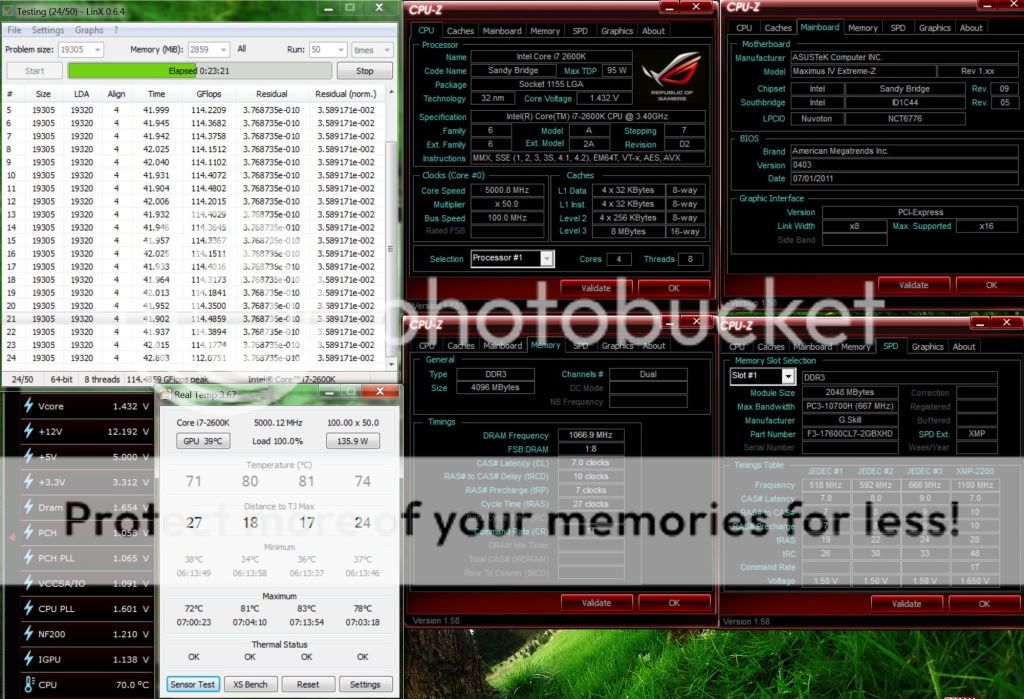
On the other hand to clock 5GHz, i must set VRM freq to 550MHz im order to get LinX stable at lower vcore (1.46v). 300 will get BSOD 124, and only passed with 1.52v on load. LLC 75% btw.

Very love this Costa Rica chip,
Internal CPU PLL OV can be disabled til 52X.
Max multi 57X (with extreme cooling only); 56X on water
Havent got time testing max BCLK yet but really worth the price ive paid for this goldie.

TSowikh84
post Aug 29 2011, 11:00 PM

i7 Clan
Group Icon
Elite
8,711 posts

Joined: Nov 2007
From: Butterworth, PG / Machang, Kelantan


QUOTE(AlamakLor @ Aug 29 2011, 04:05 PM)
no lar I'm not letting the mobo auto OC

5.1ghz still freaking priming

CPU Vcore: 1.455 (underload 1.448)
DDR Voltage: 1.55 (gave it +0.05)
VCCIO: 1.10 (underload 1.118)
CPU PLL: 1.725 (underload 1.720)

LLC: 75% (ultra high)
Current Protection: 140%
VRM Switching freq: 350
Phase Control: Extreme
PWM Mode: Extreme

If I set LCC to 100% I get vcore of 1.47 and that lasts 8 hours easily.

Ive never gotten BSOD when priming usually if it fails, it's only 4th core that fails. I only get BSOD x101 if I deliberately lower vcore to 1.3x when priming biggrin.gif

I'm doing custom blend now FFT 128 14745 MB Ram. How long do I need to run this? I usually do two sets - 1 x small FFT, 1 x blend. Blend would sometime fail, small FFT never fails
*
4 hours will do.
TSowikh84
post Aug 30 2011, 11:01 AM

i7 Clan
Group Icon
Elite
8,711 posts

Joined: Nov 2007
From: Butterworth, PG / Machang, Kelantan


QUOTE(AlamakLor @ Aug 30 2011, 12:58 AM)
6 hours so far

maybe ill just leave it overnight for this time. This is having my ram run at 1333 though


Added on August 30, 2011, 10:06 amFailed prime at 8hr mark again. I woke up and AI Suite was showing 0V on everything. I think AI suite is messed up, I'm now priming without it.

Continued priming at 2048 - 4096.
*
woot 2 prime95.exe's running at the same time?
It is reported that AI is messing up with realtemp, hwmonitor, etc...

===================================================================

2600K @ 5.1GHz HT Costa Rica
MIVE-Z
GSkill Ripjaws-X 2200C7 2x2GB @ 2133C7

» Click to show Spoiler - click again to hide... «


This post has been edited by owikh84: Aug 30 2011, 12:12 PM
TSowikh84
post Aug 30 2011, 06:25 PM

i7 Clan
Group Icon
Elite
8,711 posts

Joined: Nov 2007
From: Butterworth, PG / Machang, Kelantan


QUOTE(AlamakLor @ Aug 30 2011, 03:19 PM)
Yeah I keep a small FFT and blend running at the same time.

So I started to prime again from 2048k since 9am this morning. 2048k was where it previously failed. It's been 6 hours since then. So technically speaking I've passed 8 + 6 = 14 hours of priming and I think this time it should not fail again. This is done with AI Suite disabled. I think it's probably better to use RC BT to access TurboV for instant adjustment.

Nanti I see if I can match u gflops or not biggrin.gif btw, why is your temp so high? Is your ambient over 28C? Oh btw, you must have read this too, intel's datasheet for SB on PLL voltage range is 1.71 - 1.9 or something. I know we can run below 1.5V but perhaps it's better to put it at 1.71 at least.
*
ambient is 32C in a non-AC room, yes i don't have AC in my temporary house might get 1 later sweat.gif
the CPU PLL as long as it's above vcore u will be fine. biggrin.gif
yaya AI is buggy as hell, in fact it will hurt ur GFlops also.

Ur prime95 is old version which is quite fake for stressing SB. That's half stable.
Latest one supports AVX on Win7 SP1.
TSowikh84
post Aug 30 2011, 09:40 PM

i7 Clan
Group Icon
Elite
8,711 posts

Joined: Nov 2007
From: Butterworth, PG / Machang, Kelantan


QUOTE(AlamakLor @ Aug 30 2011, 08:34 PM)
KNN I turned off AI and it seems that I have no issue with prime. I even left voltage on Auto in Bios. But auto voltage sets vcore at 1.47V for 5.1 ghz.

Btw, I need to get AX1200 liao, dumping my hx850 in tradezone now. thumbup.gif


Added on August 30, 2011, 8:42 pmOk updated to v26. Re-priming until 8am tomorrow. I'm pretty sure 5.1ghz is stable at 1.465-1.47 this time. I will reduce the voltage and find the optimum setting later on.

Lamptron FC-8 is coming,

8 whopping fans @ 30W each. Now I can completely silent all the GT

Also repainted my Saitek Eclipse 2 to Matte black biggrin.gif
*
nice modded KB and good move on a superb PSU. thumbup.gif
are u on Win7 SP1? Pls share some LinX result as well smile.gif
TSowikh84
post Aug 31 2011, 11:58 PM

i7 Clan
Group Icon
Elite
8,711 posts

Joined: Nov 2007
From: Butterworth, PG / Machang, Kelantan


QUOTE(AlamakLor @ Aug 31 2011, 05:52 PM)
Don't know if this is a good idea, the temperature is extremely high on IBT Custom (almost all rams) sweat.gif

turn ON ur aircond bro as ur chip is toasting. sweat.gif
TSowikh84
post Sep 5 2011, 11:26 PM

i7 Clan
Group Icon
Elite
8,711 posts

Joined: Nov 2007
From: Butterworth, PG / Machang, Kelantan


QUOTE(Dennos @ Sep 5 2011, 11:12 PM)
Just disable the igpu LUCID thingy in bios, i notice immediate reduce of wattage as shown by real temp 3.67. And also the temp reduce 3'c during folding or 100% loaded in 8 threads with 4.5ghz@1.312v.
BTW the igpuv increases from 0.45 to 0.999v. And there is only one device selection in cpu-z.
This is the temp initially when i learned OC from Gurus Owi

nice sharing! thumbup.gif
TSowikh84
post Sep 6 2011, 09:08 PM

i7 Clan
Group Icon
Elite
8,711 posts

Joined: Nov 2007
From: Butterworth, PG / Machang, Kelantan


QUOTE(noobiehere123 @ Sep 6 2011, 01:02 PM)
hi this http://forum.lowyat.net/topic/1958355 or asus mive-z? which better for oc?
*
assume that P67 = Z68

There is a very good head-to-head tech comparison here:
MIVE vs UD7

In summary, though both are excellent boards, the Asus MIVE was preferred.
TSowikh84
post Sep 7 2011, 06:30 AM

i7 Clan
Group Icon
Elite
8,711 posts

Joined: Nov 2007
From: Butterworth, PG / Machang, Kelantan


QUOTE(hackcremo @ Sep 7 2011, 05:05 AM)
hey guys...i been running prime 95 BLEND nightly at 4.7 GHZ 2500K but wake up this morning saw my screen lock ups..No BSOD but simply hang with no display on screen..i do manually restart it and check back prime log, it hang start from 3am..before sleep, i saw my temp hover around 75-80..is this because of ram??
*
Could be a failed OC, CPU usage went down to 0% idle & ur PC turned into sleep mode if it was set to power saving mode with internal CPU PLL overvoltage enabled in BIOS.

Windows power option set to "High Performance", re run the prime.
Link
TSowikh84
post Sep 7 2011, 08:52 AM

i7 Clan
Group Icon
Elite
8,711 posts

Joined: Nov 2007
From: Butterworth, PG / Machang, Kelantan


QUOTE(hackcremo @ Sep 7 2011, 07:02 AM)
yup, i enable CPU PLL overvoltage at 1.7V to make sure i can boot into windows..will try your setting later..
my chip require a lot of vcore to make it stable..do still have costa rica 2600K..??
*
CPU PLL OV is either enabled or disabled only. Not that one which u can set value.

One unit of brand new sealed 2600K Costa is still available on hand.

QUOTE(Dennos @ Sep 7 2011, 07:44 AM)
costa rica chip is lower in vcore requirement, but has difficulty to go above 5ghz.

Am i wrong?


Added on September 7, 2011, 7:45 amsome lucky one can get bad ass costa rico chip with lower vcore requirement.
*

All 2600K's regardless of Costa & Malay i've tested so far could do 5GHz easily. Just that my bad luck is most of them very like to suck voltage so much, vcore 1.5v++. Gotta do with their VID.

Costa has higher possibility to get lower VID thus lower vcore and higher OC potential (higher max multi). But this kind of chip is not really have good temps.

Golden batch is 3103B3XX.


TSowikh84
post Sep 7 2011, 11:16 AM

i7 Clan
Group Icon
Elite
8,711 posts

Joined: Nov 2007
From: Butterworth, PG / Machang, Kelantan


QUOTE(Dennos @ Sep 7 2011, 09:03 AM)
Golden bath = 3103B375 ?
*
Yes, one of goldie..
TSowikh84
post Sep 7 2011, 12:58 PM

i7 Clan
Group Icon
Elite
8,711 posts

Joined: Nov 2007
From: Butterworth, PG / Machang, Kelantan


QUOTE(Dennos @ Sep 7 2011, 11:56 AM)
u really know to make me happy.  thumbup.gif  thumbup.gif

reading from real temp 3.67 at stock 3.4
*
Wow, no wonder i saw ur vcore and OC is quite decent.
So what max multi can u go into windows with internal CPU PLL OV disabled?
And whats ur max multi and MHz wall?
Congratz!
TSowikh84
post Sep 8 2011, 01:48 PM

i7 Clan
Group Icon
Elite
8,711 posts

Joined: Nov 2007
From: Butterworth, PG / Machang, Kelantan


QUOTE(jeff88rey @ Sep 8 2011, 12:30 PM)
headache wit this  rclxub.gif
*
Any difficulty??
nice clocks! thumbup.gif
TSowikh84
post Sep 8 2011, 10:44 PM

i7 Clan
Group Icon
Elite
8,711 posts

Joined: Nov 2007
From: Butterworth, PG / Machang, Kelantan


wrong thread sweat.gif

This post has been edited by owikh84: Sep 8 2011, 10:53 PM
TSowikh84
post Sep 9 2011, 11:08 AM

i7 Clan
Group Icon
Elite
8,711 posts

Joined: Nov 2007
From: Butterworth, PG / Machang, Kelantan


QUOTE(bad melatonin @ Sep 8 2011, 11:47 PM)
hi to all sifu, wanna ask smtg...
is d MSI Z68A-GD65 (G3) good overclocker? any1 own this mobo can share ur thought?
*
Go buy it and report ur feedback here hehe. Ive seen two guys use this board, louislkw and kuntawakaw.

Well for me Asus is the best brand u should go. Then choose the model which is suitable to u.

Second is ASrock.

It's all about BIOS when it comes to OC.


Added on September 10, 2011, 2:47 am
QUOTE(hackcremo @ Sep 8 2011, 10:56 PM)
my temp seem fluctuate..on the 1 core is lower compared to other 3 core..i think need to repaste and resit..
*
For some reason with SB, core 0 is always about 10 degrees less than the highest core. It is normal. nod.gif

This post has been edited by owikh84: Sep 10 2011, 02:47 AM
TSowikh84
post Sep 11 2011, 07:00 PM

i7 Clan
Group Icon
Elite
8,711 posts

Joined: Nov 2007
From: Butterworth, PG / Machang, Kelantan


QUOTE(Sey @ Sep 11 2011, 11:24 AM)
Hi all,

I just got my PC yesterday and decide to OC it a bit (not much just to 4ghz). I'm using an i5 2500k . I have come across one particular problem though. This happened right after the pc decided to go into 'hybrid sleep' mod  doh.gif .

I'm using the Asrock z68 extreme4 and the Asrock extreme tuning utility (AXTU), Core Temp and CPU-Z all show different CPU speeds/ratios.
Both the AXTU and Core Temp show the OC at 4Ghz without any fluctuation , i don't think this is right since i have Smartstep(or whats its name  laugh.gif ) enabled in bios and it should be dropping my speed on idle. Also the Vcore shown in the AXTU seems low (1.0xx). CPU-Z seems to be the most accurate one since its constantly changing my core speed.
Anyone know what the issue could be? . I've tried updating the bios to no avail. Also tried putting bios settings to defaults and it the Bios and CPU-Z showed fluctuations from 3.6 to 3.7 Ghz instead (how can this be when stock is 3.3  doh.gif )

» Click to show Spoiler - click again to hide... «


Thanks in advance!
*
Disable C-state ie C1E, C3/6 as well.
TSowikh84
post Sep 13 2011, 09:03 PM

i7 Clan
Group Icon
Elite
8,711 posts

Joined: Nov 2007
From: Butterworth, PG / Machang, Kelantan


vcore and temp improved abit with spread spectrum enabled.

user posted image
TSowikh84
post Sep 14 2011, 10:01 AM

i7 Clan
Group Icon
Elite
8,711 posts

Joined: Nov 2007
From: Butterworth, PG / Machang, Kelantan


QUOTE(a13solut3 @ Sep 14 2011, 09:40 AM)
» Click to show Spoiler - click again to hide... «


Wow, why your PC temp can reach that low? Water cooling or normal heatsink cooling?

This is my current specs. I don't know whether the temp is like this or I have made mistake somewhere.

Asrock P67 Pro 3
i5 2500k @ 4.6GHz / Spread Spectrum Enabled | TurboBoost Enabled (Apparently it won't go above stock without this enabled)
Sycthe Ninja 3 CPU Cooler with Arctic MX4 applied
4GB Kingston ValueRam DDR3 1333MHz 9-9-9-24 @ 1.5v (Overclocked to 1600MHz with 7-8-7-18 @ 1.6v)
Guess the rest is junk information.

Benchmarking hit hard on the temperature, but I never had any BSOD / CTD during normal operation. Been using this setting for almost 2-3 months. Is it normal to have this temperature?

My idle temperature is about 35C-40C though.
*
It is normal on air cooling.
Routine work will be cooler than this stress test.
TSowikh84
post Sep 14 2011, 10:57 AM

i7 Clan
Group Icon
Elite
8,711 posts

Joined: Nov 2007
From: Butterworth, PG / Machang, Kelantan


QUOTE(a13solut3 @ Sep 14 2011, 10:02 AM)
So I guess it's considered fine for current specification, and I actually planned to overclock my CPU to 4.8GHz or 5.0GHz, but the stress test temperature scared me off.
*
That's on vanilla win7. Look at ur temp it is not possible to stress on win7 SP1 which needs a tad more vcore due to AVX instruction. This is where u gonna need a better cooling -> water and a good chip which can do 5GHz at lower then 1.5v on load.
TSowikh84
post Sep 14 2011, 11:40 PM

i7 Clan
Group Icon
Elite
8,711 posts

Joined: Nov 2007
From: Butterworth, PG / Machang, Kelantan


QUOTE(Dennos @ Sep 14 2011, 01:29 PM)
golden chip?  rclxms.gif
*
yes the best of mine so far.
Bought this chip for a golden price of RM2.4k sweat.gif

26 Pages « < 15 16 17 18 19 > » Top
Topic ClosedOptions
 

Change to:
| Lo-Fi Version
0.0358sec    0.09    7 queries    GZIP Disabled
Time is now: 7th December 2025 - 06:46 AM