Outline ·
[ Standard ] ·
Linear+
Sandy Bridge Overclocking V1, 2500K/2600K/2700K | LGA1155 P67.Z68.Z77
|
TSowikh84
|
 Aug 10 2011, 07:37 PM Aug 10 2011, 07:37 PM
|
i7 Clan


|
yes selfdz87 is right all the Asus utilities included in the AI suite is just an extra advantage for those who like to OC in windows environment without needing to reboot into bios.
I saw DesktopLimousine is using a stick of 4GB in single channel mode only. What a waste if didn't take the advantage of dual channel capability of SB. Single channel is slow bandwidth lerr..
|
|
|
|
|
|
TSowikh84
|
Aug 10 2011, 11:13 PM
|
i7 Clan
|
QUOTE(DesktopLimousine @ Aug 10 2011, 07:57 PM) sory2 btw im using dual channel haha, forgot to update my signature.. thx guyz for the guide 
Added on August 10, 2011, 10:04 pmguyz, i got one more question, what is probable this Asus COM service, Asus HM COM service, Asus system control service running under the services.msc? any of u had disable it? is this program is affected to BIOS or overclocking? just uninstall AI suite that's it. better let these services stay at default settings, don't itchy touch whatever u don't know. |
|
|
|
|
|
TSowikh84
|
Aug 14 2011, 08:34 AM
|
i7 Clan
|
2600K @ 5.0GHz Costa Rica
MIVE-Z
RipjawsX 2133 8-9-8
Ambient: 34C
» Click to show Spoiler - click again to hide... « Still a dud
|
|
|
|
|
|
TSowikh84
|
Aug 15 2011, 04:33 PM
|
i7 Clan
|
QUOTE(stasio @ Aug 15 2011, 12:58 PM) Owi, why tRAS 27?  My is 21 with no problem. Yaya im awared of that since yesterday. For sure 8-9-8-21 is doable just fine with this BBSE kit. |
|
|
|
|
|
TSowikh84
|
Aug 16 2011, 04:45 PM
|
i7 Clan
|
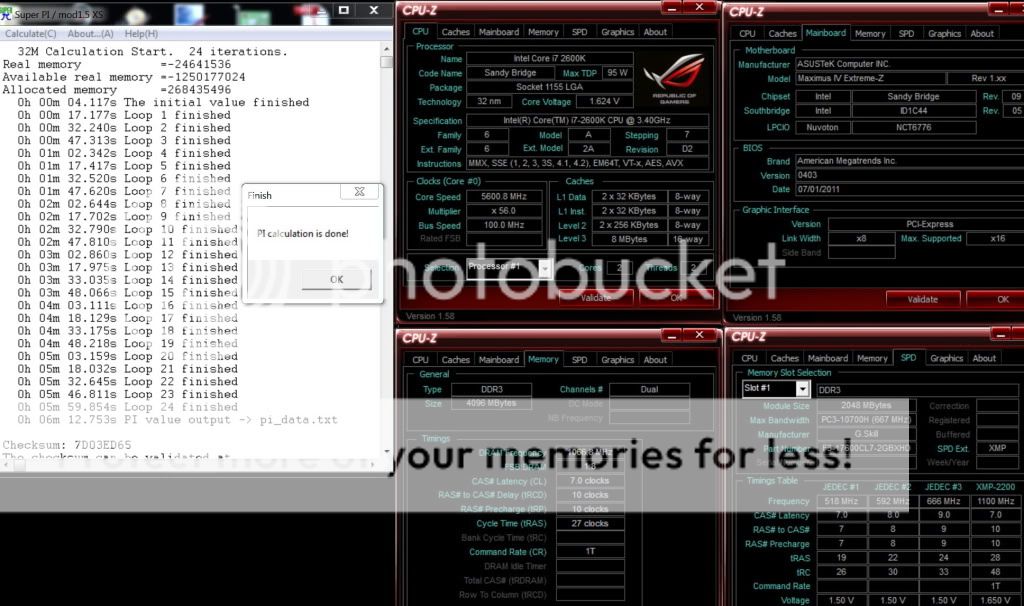
QUOTE(saturn85 @ Aug 16 2011, 04:13 PM) wow, bro owikh84, core i7 2600k at 5.45GHz.  what is the vcore using?  vcore at 1.6v just for short test. Not for 24/7 for sure. |
|
|
|
|
|
TSowikh84
|
Aug 16 2011, 11:43 PM
|
i7 Clan
|
QUOTE(FiragaZ @ Aug 16 2011, 11:03 PM) Cant really recall its actual temp but confirmed ~90C.  As i just said it is for short term only. 24/7 is still 5.0GHz HT. |
|
|
|
|
|
TSowikh84
|
Aug 18 2011, 10:46 AM
|
i7 Clan
|
QUOTE(jagged @ Aug 18 2011, 09:59 AM) Is this the RAM you're testing F3-17600CL9D-4GBXMD @ http://www.gskill.com/products.php?index=373.. Thanks bro.. Actually u could refer to the screenshot in CPU-Z SPD tab, my dram is the 2200MHz 7-10-10-27-1T rated at 1.65v kit model F3-17600CL7D-4GBXHD, which comes with black heatspreader. My very first dram for SB, it is also a great & one of the best kit for OC. Too bad u cant find this ram locally, import is the only way. |
|
|
|
|
|
TSowikh84
|
Aug 18 2011, 10:36 PM
|
i7 Clan
|
QUOTE(FiragaZ @ Aug 18 2011, 12:11 PM) hi, i oc my kvr 4gb 1333mhz to 1600mhz for 24/7, since its without heat spreader, will it overheat or reduce lifespan? u should know that KVR is not meant for OC, too risky.  |
|
|
|
|
|
TSowikh84
|
Aug 22 2011, 07:50 PM
|
i7 Clan
|
QUOTE(Dennos @ Aug 22 2011, 06:53 PM) [attachmentid=2400113] finding one new thingy on z68, the 12v volt so tight till it remain constant at 12.000v not moving at all Is it a bugs?
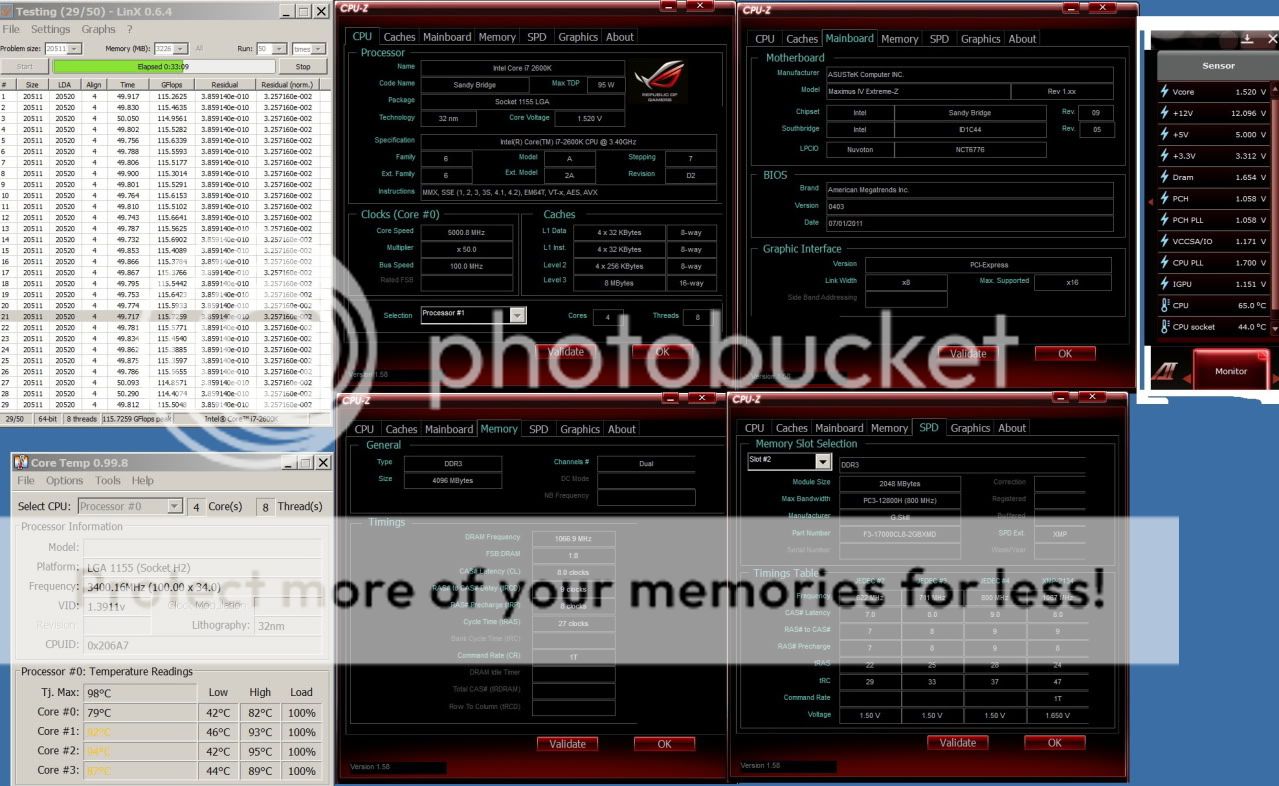
Added on August 22, 2011, 6:56 pmi notice everything change all the time, except vcore , 12v, 5v, 3.3 v quite normal it shows that voltage regulation is at its best on ur Asus board. less power ripple is a good thing. QUOTE(aeternalis @ Aug 22 2011, 07:20 PM) wah. 5.0Ghz HT on for 24/7 overclock. What vcore? Golden chip ka? a bad chip which requires 1.52v on load @ 5.0GHz HT for LinX stable. |
|
|
|
|
|
TSowikh84
|
Aug 22 2011, 10:17 PM
|
i7 Clan
|
QUOTE(aeternalis @ Aug 22 2011, 08:33 PM) hehe, i guess decreased chip lifespan also nevermind as long as can reach 5.0!  Afterall, LGA 2011 coming right? For me try dont run stress test anything higher than 1.54v on HT with air cooling or regular watercooling. I hope to get a golden chip soon. it's been 8 months of wait huhuhu LGA2011 is coming in Q4 2011 = Oct-Dec 2011  |
|
|
|
|
|
TSowikh84
|
Aug 23 2011, 06:15 AM
|
i7 Clan
|
QUOTE(Dennos @ Aug 23 2011, 12:04 AM) should we reduce internal pl voltage? If can, lowering the pLl will improve my cpu temp?
Added on August 23, 2011, 12:09 amgonna rape this i7 in no time, just make sure i got a stable setting for 24/7 folding. Intel default CPU PLL is 1.8v which is a lil bit high. As long as it's higher than vCore u're u good to go, but depends on chip too. Some chips really need extra CPU PLL to stable at higher clock. I set it down to 1.7v to shave off my temps lower. |
|
|
|
|
|
TSowikh84
|
Aug 23 2011, 09:39 AM
|
i7 Clan
|
Well done Dennis, u hv found sweet spot there for 24/7.
|
|
|
|
|
|
TSowikh84
|
Aug 23 2011, 12:39 PM
|
i7 Clan
|
QUOTE(aeternalis @ Aug 23 2011, 11:15 AM) Got a question about LLC: do you guys set it to High, UltraHigh or Extreme? High or ultra high will do. There are several oc guides for Asus mobos in post #1. |
|
|
|
|
|
TSowikh84
|
Aug 25 2011, 09:52 AM
|
i7 Clan
|
QUOTE(Dennos @ Aug 24 2011, 10:08 PM) test run all the setting in bios from A to Z and from z to A again and again. Default setting is still the best for folding and intel burn test. 1.3v 4.5ghz =60'c with 30k pts perday. EPU shows 60.23wattage for cpu only.
Added on August 25, 2011, 9:00 am2133 CL 9-11-9-28-2N 1.6V 1866 CL 9-9-9-24-2N 1.5V which one is faster? SB prefer higher speed over latency. |
|
|
|
|
|
TSowikh84
|
Aug 26 2011, 11:51 PM
|
i7 Clan
|
2600K @ 5.6GHz» Click to show Spoiler - click again to hide... «
|
|
|
|
|
|
TSowikh84
|
Aug 27 2011, 11:48 AM
|
i7 Clan
|
2600K @ 5.0GHz HT Costa Rica
MIVE-Z
GSkill Ripjaws-X 2200C7 2x2GB @ 2133C7» Click to show Spoiler - click again to hide... «
|
|
|
|
|
|
TSowikh84
|
Aug 27 2011, 08:30 PM
|
i7 Clan
|
ROG Maximus IV GENE-Z OC Guide» Click to show Spoiler - click again to hide... « BIOS Settings for the easy Overclocking:
- Keep all Turbo Mode Parameters at AUTO or the highest possible value to unlock overclock restrictions due to Intel thermal control.
- Ai Overclock Tuner can be set to Manual to unlock BCLK/PCIE OC related options, set to X.M.P. to load the XMP Profile off the DRAM module.
- Turbo Ratio can be set to Per Core Mode to allow higher CPU multiple supports with the cost of not being able to make CPU Turbo Ratio adjustments under OS. In general applications, it is recommended to part it at All Cores Mode to allow CPU Turbo Ratio adjustment under OS.
- Internal PLL Overvoltage can be set to Enabled to allow more CPU Turbo Ratio overclocking margin with the cost of the S3/S4 resume functionality. i.e. your system will not resume be able to resume from standby with this option enabled.
- Memory Bandwidth Booster can be set to Enabled for better DRAM performance or Disabled for better OC margin.
- EPU Power Saving Mode can to be set to Disabled to prevent additional voltage drop due to EPU power saving scheme.
- Load-Line Calibration can to be set to Extreme to ensure the CPU Vcore is not to drop below the voltage level set by the user regardless of the current consumption of the CPU. This will be useful to achieve the same level of overclocking result with a relatively lower Vcore setting.
- VRM Frequency can to be set to Manual to allow manual selection of a fixed VRM operating frequency. The higher the frequency, the faster the response, which yields a relatively stable delivery of CPU Vcore for the final push to gain just a little more BCLK overclocking capability for the CPU used.
- Phase Control can be set to Extreme to keep the active power phase of the CPU PWM at max for the whole time instead of down-phase when CPU idles down to gain just a little more margin for the CPU when been pushed to its extreme.
- Duty Control can be set to Extreme to force the PWM circuit to function with respect to its maximum possible current delivery instead of a balanced temperature for a better deliver of power to the CPU. This can also help to gain just a little more margin when trying to push the BCLK frequency to its max.
- CPU Current Capability can be set to 140% to override the level of over current protection of the CPU, allowing the CPU to drain more current from the CPU PWM, delivering more margins for the CPU to clock just a little higher.
- iGPU Load-Line Calibration can be set to Extreme to ensure the iGPU Vcore is not to drop below the voltage level set by the user regardless of the current consumption of the iGPU. This will be useful to achieve the same level of overclocking result with a relatively lower Vcore setting.
- iGPU Current Capability can be set to 140% to override the level of over current protection of the iGPU, allowing the iGPU to drain more current from the PWM, delivering more margin for the CPU to clock just a little higher.
- Likewise, the same power options are also available DRAM and VCCSA/VCCIO (DRAM controller). Raise the switching frequency, enable full phase control and disable over-current protection can help to deliver a little more OC margin.
- CPU Spread Spectrum options can be disabled for better OC capability.
It is recommended to keep other options at their default position "Auto" for better OC capability utilizing the OC experience of the ROG OC specialist team.
|
|
|
|
|
|
TSowikh84
|
Aug 28 2011, 04:44 PM
|
i7 Clan
|
BCLK
measured in MHz
Base Clock Increasing your base clock increases your CPU core clocks, memory speed, QPI frequency, and North Bridge Frequency
-Similar to the older FSB “Front Side Bus”
BCLK x CPU ratio = CPU frequency
Adjust the BCLK frequency to overclock the CPU speed!
Multiplier
-Multiplier is a ratio that determines the clock speed for the CPU based on the multiplication of the BCLK. For example, your CPU multiplier determines what your CPU core clock speed is using this formula: Base clock * multiplier
There are also multipliers for Memory frequency, QPI speed, and North Bridge (UCLK) frequency.
PCIE
measured in MHz
Periferal Connect Interface Express
-Video Graphics communication link
when overclocking, increasing the PCI-E clock can help with stability when above 200MHz BCLK
CPU Voltage
AKA -VCore this is your processor core voltage. Increasing this will supply your CPU cores the power they need to operate at higher frequencies.
Central Processing Unit
-Processor core voltage
DO NOT EXCEED 1.55v
IMC Voltage
"VTT" or "QPI" Increasing this will supply the power needed for the IMC (North Bridge) to operate at higher frequencies.
- L3 shared cache
- memory controller
- processor I/O power rail
Since memory controller frequency is dependent on BCLK, the higher the BCLK, the higher the IMC voltage required. DO NOT Exceed 1.45v
DRAM Voltage
DDR3 Random Access Memory
-Memory Voltage
Since DRAM speed is linked to the BCLK the higher the BCLK the higher the DRAM Voltage is needed
CPU PLL Voltage
PLL: Phase Locked Loop voltage
- Processor/IMC(Integrated Memory Controller)/other internal clock cycles
- Clock multiplying of processor is provided by an internal Phase Locked Loop
Does not have a significant effect on CPU Speed, -DO NOT Exceed 1.90v
PCH Voltage
Platform Controller Hub
- main I/O interface for CPU
- display connectivity
- Integrated Audio
- power management features
- Storage features
The higher the CPU frequency, the harder the I/O (input and output) has to work so there is higher power consumption and more heat is generated, raising the CPU temperature. The PCH voltage needs to be increased in order to stabilize I/O signaling. DO NOT EXCEED 1.25v
|
|
|
|
|
|
TSowikh84
|
Aug 28 2011, 10:41 PM
|
i7 Clan
|
Asus LLC is a lot better than Giga which has +/- 0.05v vdroop/vdrop
i had hard time to get an optimum vcore on UD7
imagine if my chip needed 1.5v to stable, i have to set 1.55v for LLC 75%.
for 24/7 OC, LLC 75% more recommended. 100% is for short term OC like short benchies only. Degradation...
|
|
|
|
|
|
TSowikh84
|
Aug 29 2011, 12:11 PM
|
i7 Clan
|
QUOTE(AlamakLor @ Aug 29 2011, 10:57) My prime95 blend test failed on core 4 @ 8hours +  Actually no need so long hours to find out the error. Instead of blend test, in a more proper and faster way U could use custom blend, min fft 128, dram capacity 3.5GB (for 4GB total). Make sure that all 100% or nearly full dram is stressed. And make sure latest Prime95 on win7 SP1. prove it by screenshot of task manager performance tab while at load. A correct Dram subtimings setting is very important for prime95 long run. Bcoz prime95 tends to error out sth wrong with ur dram. Prime95 is time consuming, why not settle down with LinX with Win7 SP1. |
|
|
|
|



 Quote
Quote


 0.0472sec
 0.52
0.52
 7 queries
 GZIP Disabled