Welcome Guest ( Log In | Register )

Bump Topic Topic Closed RSS Feed
7 Pages < 1 2 3 4 > » Bottom

Outline · [ Standard ] · Linear+

 Sandy Bridge Overclocking V1, 2500K/2600K/2700K | LGA1155 P67.Z68.Z77

views
     
Dennos
post Aug 27 2011, 12:01 PM

Look at all my stars!!
*******
Senior Member
2,736 posts

Joined: Dec 2006


QUOTE(owikh84 @ Aug 27 2011, 11:48 AM)
2600K @ 5.0GHz HT Costa Rica
MIVE-Z
GSkill Ripjaws-X 2200C7 2x2GB @ 2133C7


» Click to show Spoiler - click again to hide... «

*
igpu voltage 1.1 v. any effect to temp? hmm.gif

mine is 0.45v hmm.gif
Dennos
post Aug 27 2011, 12:14 PM

Look at all my stars!!
*******
Senior Member
2,736 posts

Joined: Dec 2006


Attached Image

which one is accurate? icon_question.gif
Dennos
post Aug 29 2011, 01:20 AM

Look at all my stars!!
*******
Senior Member
2,736 posts

Joined: Dec 2006


QUOTE(AlamakLor @ Aug 28 2011, 07:35 PM)
Observation note on LLC (Line Load Calibration), ROG board
I've been observing LLC's behavior very closely recently and I'd like to share my findings.

- Generally, setting LLC at AUTO will work in most cases. The mobo detects the vdroop very accurately. I noticed that it will generally set your LLC to 75% on auto mode
- Using the following example of my OC - 5ghz, vcore bios 1.375, LCC: AUTO

1) AISuite 2 will show a vcore of 1.368 (0.007) less than actual 1.375.
2) If I lower LCC to 50%, vdroop will occur and it would drop to 1.344. Prime will fail immediately.
3) If I lower LCC to 25%, BSOD will occur immediately
4) If I increase LCC to 100% vcore would go up t 1.400 and fluctuate upwards

Therefore,

LCC @ 75%, BIOS 1.375v, Actual 1.368 = 0.5% error (negative)
LCC @ 100%, BIOS 1.375v, Actual 1.400 = 1.8% error (positive)

I am able to obtain 1.376v by setting BIOS to 1.380 with LCC @ 75%, however LCC fluctuates around 1.368 - 1.376
To obtain the same range of 1.368 - 1.376, I would set LCC @ 100% and Vcore at 1.355.

Summary:
- LCC @ 100% would result in higher Vcore than what was set in Bios
- LCC @ 75% would result in lower Vcore than what was set in Bios
- Either LCC still suffers from the same fluctuation, it's just a matter of setting the Vcore in bios to obtain the same fluctuation range

i.e.

Bios Vcore @ 1.355, LCC @ 100% = Actual Vcore of 1.368 - 1.376
Bios Vcore @ 1.380, LCC @ 75% = Actual Vcore of 1.368 - 1.376

Now, I'm basing this on AISuite's sensor/CPUZ, maybe LCC 100% is actually more accurate if I'd taken measurement with a multimeter.
*
i faced this problem during folding. The voltage fluctration by manual LLC make the folding hang. Only in auto mode, the rig maintain steady

Dennos
post Aug 31 2011, 05:25 PM

Look at all my stars!!
*******
Senior Member
2,736 posts

Joined: Dec 2006


notice one problem on gene. When i tweak the cpu frequency tru AI, i got BSOD. But i got stable in burn test only if i tweak it in bios.

What's the problem?

same setting in both AI and bios, but no blue screen if i tweak in bios.

This post has been edited by Dennos: Aug 31 2011, 05:27 PM
Dennos
post Aug 31 2011, 05:26 PM

Look at all my stars!!
*******
Senior Member
2,736 posts

Joined: Dec 2006


Added on August 31, 2011, 5:27 pm
QUOTE(noobiehere123 @ Aug 31 2011, 05:25 PM)
i wan ask something if i5 2500k 4ghz vs i7 2600k 4ghz will make much diffrenece? bcuz i wan buy i5 2500k or i7 2600k
*
4 thread vs 8 thread, wat u say? rclxms.gif rclxms.gif

For benchmarking yes, for others, almost no.

This post has been edited by Dennos: Aug 31 2011, 05:27 PM
Dennos
post Sep 1 2011, 10:24 PM

Look at all my stars!!
*******
Senior Member
2,736 posts

Joined: Dec 2006


Attached Image

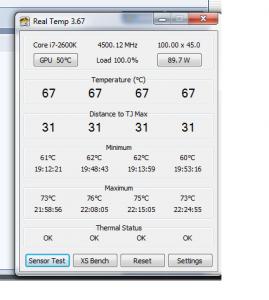
26ook on 4.5 around 90w rclxms.gif rclxms.gif


Added on September 1, 2011, 10:24 pmduring 100% load for folding.

This post has been edited by Dennos: Sep 1 2011, 10:24 PM
Dennos
post Sep 5 2011, 11:12 PM

Look at all my stars!!
*******
Senior Member
2,736 posts

Joined: Dec 2006


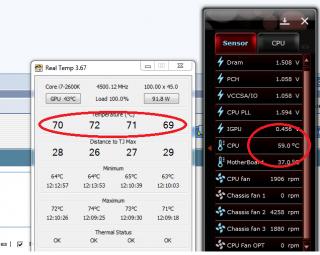
Just disable the igpu LUCID thingy in bios, i notice immediate reduce of wattage as shown by real temp 3.67. And also the temp reduce 3'c during folding or 100% loaded in 8 threads with 4.5ghz@1.312v.
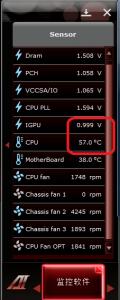
BTW the igpuv increases from 0.45 to 0.999v. And there is only one device selection in cpu-z.

Attached Image Attached Image Attached Image


This is the temp initially when i learned OC from Gurus Owi
http://forum.lowyat.net/topic/1709431/+1780
Attached Image

This post has been edited by Dennos: Sep 5 2011, 11:20 PM
Dennos
post Sep 5 2011, 11:27 PM

Look at all my stars!!
*******
Senior Member
2,736 posts

Joined: Dec 2006


the significant different is from nearly 90watt to 84.9w shown inreal temp 3.67.


Added on September 5, 2011, 11:28 pmthe temp doesent matter as i assume ambient temp will decide the overall temp.

This post has been edited by Dennos: Sep 5 2011, 11:28 PM
Dennos
post Sep 5 2011, 11:44 PM

Look at all my stars!!
*******
Senior Member
2,736 posts

Joined: Dec 2006


igpu multimonitor in bios. disable means u disable lucid thingy. I using h60 with free corsair fan. One fan.

suppose to work fine with 1.305volt, i pump extra 0.05 v to give extra voltage, becoz folding need very stable rig running 24/7 for 50hrs. any error will fail my "hardwork", lolx


Added on September 5, 2011, 11:46 pmif there is one display device selection in cpuz, thats mean lucid is off d.

This post has been edited by Dennos: Sep 5 2011, 11:46 PM
Dennos
post Sep 6 2011, 12:12 AM

Look at all my stars!!
*******
Senior Member
2,736 posts

Joined: Dec 2006


and remember to turn off AI.
Dennos
post Sep 6 2011, 11:38 PM

Look at all my stars!!
*******
Senior Member
2,736 posts

Joined: Dec 2006


roughly how many celcius different if changing H60 to custom cooling with 2x radiator + EK hf?

Ur input is appreciated.
Dennos
post Sep 7 2011, 07:44 AM

Look at all my stars!!
*******
Senior Member
2,736 posts

Joined: Dec 2006


costa rica chip is lower in vcore requirement, but has difficulty to go above 5ghz.

Am i wrong?


Added on September 7, 2011, 7:45 amsome lucky one can get bad ass costa rico chip with lower vcore requirement.

This post has been edited by Dennos: Sep 7 2011, 07:45 AM
Dennos
post Sep 7 2011, 09:03 AM

Look at all my stars!!
*******
Senior Member
2,736 posts

Joined: Dec 2006


QUOTE(owikh84 @ Sep 7 2011, 08:52 AM)
CPU PLL OV is either enabled or disabled only. Not that one which u can set value.

One unit of brand new sealed 2600K Costa is still available on hand.
All 2600K's regardless of Costa & Malay i've tested so far could do 5GHz easily. Just that my bad luck is most of them very like to suck voltage so much, vcore 1.5v++. Gotta do with their VID.

Costa has higher possibility to get lower VID thus lower vcore and higher OC potential (higher max multi). But this kind of chip is not really have good temps.

Golden batch is 3103B3XX.
*
Golden bath = 3103B375 ?
Dennos
post Sep 7 2011, 11:56 AM

Look at all my stars!!
*******
Senior Member
2,736 posts

Joined: Dec 2006


QUOTE(owikh84 @ Sep 7 2011, 11:16 AM)
Yes, one of goldie..
*
u really know to make me happy. thumbup.gif thumbup.gif

reading from real temp 3.67 at stock 3.4
Attached Image

This post has been edited by Dennos: Sep 7 2011, 12:14 PM
Dennos
post Sep 7 2011, 01:15 PM

Look at all my stars!!
*******
Senior Member
2,736 posts

Joined: Dec 2006


QUOTE(owikh84 @ Sep 7 2011, 12:58 PM)
Wow, no wonder i saw ur vcore and OC is quite decent.
So what max multi can u go into windows with internal CPU PLL OV disabled?
And whats ur max multi and MHz wall?
Congratz!
*
very shame to tell, i nvr ever oc above 4.5ghz with H60. Very annoy when i get BSOD, zzz.
Previously i immune to OC, but now i am poisoned after i read too much, sweat.gif sweat.gif .
In fact i use plenty of "Auto" in bios except vcore and Dram voltage and timing only, lolx.
Mind to show me ur setting, as my reference to OC this i7 taufu. rclxms.gif rclxms.gif
Dennos
post Sep 8 2011, 03:36 PM

Look at all my stars!!
*******
Senior Member
2,736 posts

Joined: Dec 2006


QUOTE(jeff88rey @ Sep 8 2011, 02:31 PM)

i dun thk its heat prob.. i can get 50x at 1.51v not exceeding 70c.. at 51x, real temp gives me abt 80c under load, bt got error with linx
*
this is the problem after i change the ram CL too tight. I got rounding error like 0.5 and 0.4 during prime.

This post has been edited by Dennos: Sep 8 2011, 03:36 PM
Dennos
post Sep 8 2011, 05:07 PM

Look at all my stars!!
*******
Senior Member
2,736 posts

Joined: Dec 2006


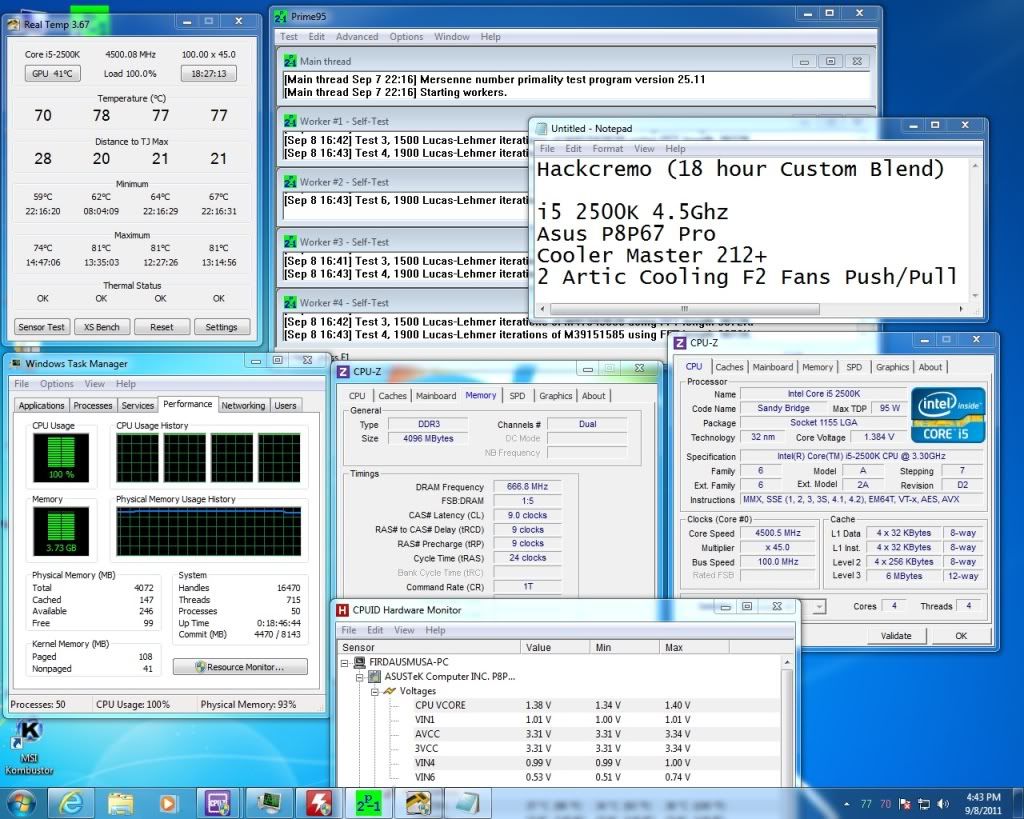
QUOTE(hackcremo @ Sep 8 2011, 05:02 PM)
user posted image

Got my procs stable at 4.5Ghz..wanna go for 4.7ghz after this...
*
try run Intel burn test, ufor maximum setting on 4 threads. 20 run
Dennos
post Sep 8 2011, 06:12 PM

Look at all my stars!!
*******
Senior Member
2,736 posts

Joined: Dec 2006


QUOTE(hackcremo @ Sep 8 2011, 05:48 PM)
have run IBT with AVX before but only at 5 runs..can it be assume as stable..??  i afraid of running IBT..it really burn my procs to 90'c..
*
usually i run IBT 20 runs at max, then Prime 6hrs at max setting before i start folding.
Dennos
post Sep 14 2011, 01:29 PM

Look at all my stars!!
*******
Senior Member
2,736 posts

Joined: Dec 2006


QUOTE(owikh84 @ Sep 13 2011, 09:03 PM)
vcore and temp improved abit with spread spectrum enabled.

user posted image
*
golden chip? rclxms.gif
Dennos
post Sep 16 2011, 08:27 PM

Look at all my stars!!
*******
Senior Member
2,736 posts

Joined: Dec 2006


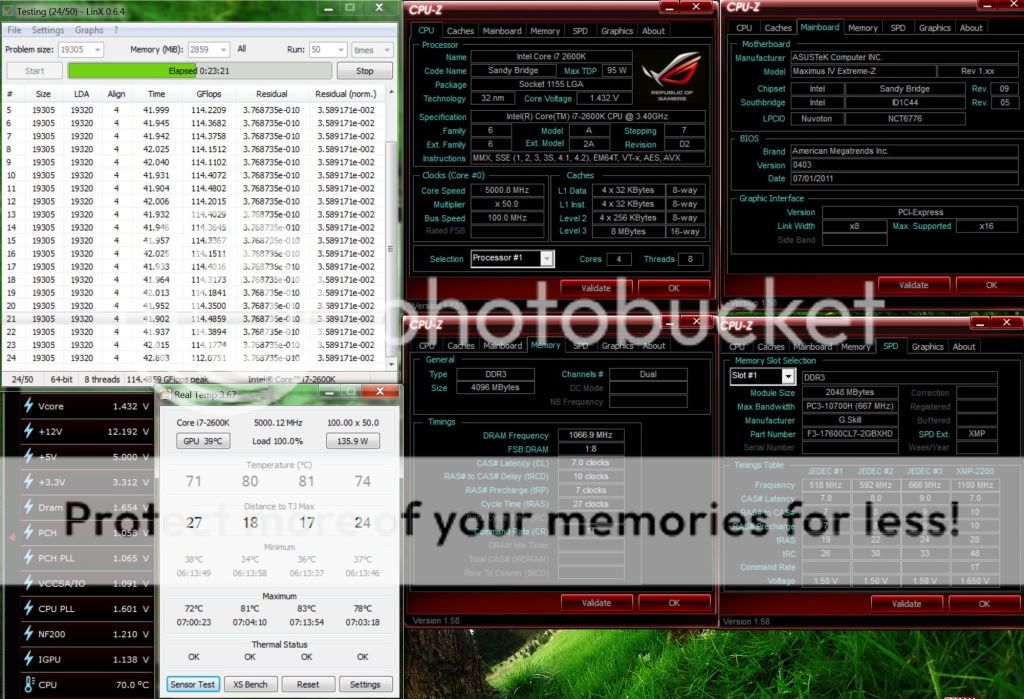
tested 1.4v 129watt on ibt max with 8threads, max temp 74'c

7 Pages < 1 2 3 4 > » Top
Topic ClosedOptions
 

Change to:
| Lo-Fi Version
0.0621sec    0.29    7 queries    GZIP Disabled
Time is now: 4th December 2025 - 01:20 AM