


5ghz 1.528v, zzzzzzzzzz
wat else missing?
Sandy Bridge Overclocking V1, 2500K/2600K/2700K | LGA1155 P67.Z68.Z77
|
|
 Sep 17 2011, 12:03 AM Sep 17 2011, 12:03 AM
Return to original view | Post
#41
|
 
Senior Member
2,736 posts Joined: Dec 2006   
|
5ghz 1.528v, zzzzzzzzzz wat else missing? |
|
|
|
|
|
Sep 17 2011, 12:11 AM
Return to original view | Post
#42
|
|
Senior Member
2,736 posts Joined: Dec 2006
|
QUOTE(owikh84 @ Sep 17 2011, 12:09 AM) watch out the temp it is over 90C dy... wat is max vrm fre? try higher VRM freq say 550 etc u might get lower vCore.  Added on September 17, 2011, 12:12 amlooks like i need 2 quad radiator. lolx This post has been edited by Dennos: Sep 17 2011, 12:12 AM |
|
|
Sep 17 2011, 12:49 AM
Return to original view | Post
#43
|
|
Senior Member
2,736 posts Joined: Dec 2006
|
now on 4.7ghz 1.4v pass linx 5 runs. temp max 75'c
would try this setting for folding. lolx |
|
|
Sep 17 2011, 01:22 AM
Return to original view | Post
#44
|
|
Senior Member
2,736 posts Joined: Dec 2006
|
QUOTE(MOBAJOBG @ Sep 17 2011, 01:00 AM) ...which could possibly beat my i7 990X @4GHz at folding. 1st bigbeta folder in malaysia is here.   Added on September 17, 2011, 1:23 ammight increase it to 4.8ghz since the 4.7ghz temp below 65'c with 1.4v now This post has been edited by Dennos: Sep 17 2011, 01:23 AM |
|
|
Sep 17 2011, 06:03 PM
Return to original view | Post
#45
|
|
Senior Member
2,736 posts Joined: Dec 2006
|
tat x fi is not x fi. just a software x fi
|
|
|
Sep 19 2011, 09:58 PM
Return to original view | Post
#46
|
|
Senior Member
2,736 posts Joined: Dec 2006
|
QUOTE(renishi @ Sep 19 2011, 09:40 PM) what would be the lowest and ideal CPU PLL? that would not be dmging my hardware? i put 1.6v pll when my vcore is from 1.4v to 1.538v. i have it at 1.7 and ok so far...... for every 0.2 i decrease, i have a drop of 3 to 4 watt on load and less 1 to 3 C. |
|
|
|
|
|
Sep 20 2011, 03:53 AM
Return to original view | Post
#47
|
|
Senior Member
2,736 posts Joined: Dec 2006
|
QUOTE(renishi @ Sep 20 2011, 01:06 AM) wah..... facing any degradation ? not even 0.0000001% degrade. I'm folding since i got this junk. Till today the earned points are constant. i assume my i7 similar to fresh bake chip. FYI, i even OC it to 4.5ghz and run it 24/7.  |
|
|
Sep 20 2011, 12:27 PM
Return to original view | Post
#48
|
|
Senior Member
2,736 posts Joined: Dec 2006
|
mine also, the red bios screen flash two times before loading windows.
|
|
|
Sep 21 2011, 12:43 PM
Return to original view | Post
#49
|
|
Senior Member
2,736 posts Joined: Dec 2006
|
QUOTE(owikh84 @ Sep 20 2011, 10:14 PM) that is not double post/boot THANKS, fixed it. In BIOS settings, find settings for "Onboard Devices" and look for "JMicron and Marvell" etc. You should see they have options under them called “Display OPROM” or "Display OptionROM in Boot". Just disable those. All of them. U don’t need them for now. Added on September 21, 2011, 12:45 pm QUOTE(NagaAbyssus @ Sep 21 2011, 11:54 AM) So i've just moved on to Intel yesterday and i've overclocked my i5 2500k from 3.3ghz to 4.6ghz. with ibt/linx Max test on memory and number of threads, i assume u get extra 10'c or bsod. lolxI don't know about intels maximum temperature so i think for now i'll just make it as high as 60 celcius. If there's no problem on higher temperature i would love to do so. Chassis : Haf 912 Advanced Mobo : Asus P8Z68-V CPU : i7 2500k CPU Cooler : Coolermaster V6 below is my screenshot of my CPU-Z and HWmonitor. I do notice that the sensors on my mainboard is somewhat incorrect so i'll be focusing on the CPU core temp. » Click to show Spoiler - click again to hide... « So is the temperature okay for now? Are there more rooms for OC'ing for me? This post has been edited by Dennos: Sep 21 2011, 12:45 PM |
|
|
Sep 21 2011, 02:40 PM
Return to original view | Post
#50
|
|
Senior Member
2,736 posts Joined: Dec 2006
|
prime test and linx got some different
|
|
|
Sep 22 2011, 02:32 PM
Return to original view | Post
#51
|
|
Senior Member
2,736 posts Joined: Dec 2006
|
QUOTE(HSLimMic @ Sep 22 2011, 06:00 AM) @renishi: Yup, it pass IBT. Latest changes; 4.5Ghz (1.29 vcore) - pass OCCT & IBT - max temp atm (74 degree) 
try run this. 8 threads + max ram. |
|
|
Sep 22 2011, 02:46 PM
Return to original view | Post
#52
|
|
Senior Member
2,736 posts Joined: Dec 2006
|
linx + win7 sp1, i get the highest vcore and temp during burning compared to prime and ibt occt......
|
|
|
Sep 22 2011, 03:34 PM
Return to original view | Post
#53
|
|
Senior Member
2,736 posts Joined: Dec 2006
|
QUOTE(louislkw @ Sep 22 2011, 03:30 PM) owikh go, can reserve one thread in garage sales now |
|
|
|
|
|
Sep 22 2011, 09:50 PM
Return to original view | Post
#54
|
|
Senior Member
2,736 posts Joined: Dec 2006
|
QUOTE(renishi @ Sep 22 2011, 07:02 PM) finally got my i2500k at 4.4ghz @ 1.32v on load (4.5ghz need 1.368v to be stable .... imo not worth it) 20 runs is enuf and usually i test run 1 or 2 run then retune again, lolxpassed linx + win sp 1 12hrs » Click to show Spoiler - click again to hide... « now need to increase the ram alittle~ |
|
|
Sep 22 2011, 11:34 PM
Return to original view | Post
#55
|
|
Senior Member
2,736 posts Joined: Dec 2006
|
i saw in OCN thread mention change wat wat frequency to 350 + spread spretum will reduce vcore.
|
|
|
Sep 23 2011, 12:11 PM
Return to original view | Post
#56
|
|
Senior Member
2,736 posts Joined: Dec 2006
|
pump vcc voltage to 1.5 or 1.2v
|
|
|
Sep 23 2011, 10:10 PM
Return to original view | Post
#57
|
|
Senior Member
2,736 posts Joined: Dec 2006
|
wow nice temp. Wat is the min vcore on 4.7 running linx 0.64?
|
|
|
Sep 24 2011, 12:42 PM
Return to original view | Post
#58
|
|
Senior Member
2,736 posts Joined: Dec 2006
|
cpu burned by OC is eligible for rma?
|
|
|
Sep 26 2011, 11:42 PM
Return to original view | Post
#59
|
|
Senior Member
2,736 posts Joined: Dec 2006
|
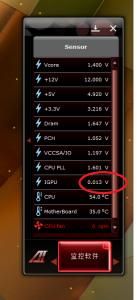
after some trial and error, finally manage to shave off igpu voltage with 0.01v offset. Min is 0~0.007v. This post has been edited by Dennos: Sep 26 2011, 11:43 PM |
|
|
Sep 27 2011, 04:06 PM
Return to original view | Post
#60
|
|
Senior Member
2,736 posts Joined: Dec 2006
|
QUOTE(owikh84 @ Sep 27 2011, 09:25 AM) Nice try dennis. Weird thing is we cannot disable iGPU completely on Z68 with just a simple "DISABLED" button in bios like HT etc. It is still running whenever the CPU is operating. can, disable the standby render as well.I believe by disabling this iGPU will help in reducing core temps & perhaps the vcore. Added on September 27, 2011, 4:06 pmjust above the lucid in bios. i got 3w reduced from real temp reading. lolx This post has been edited by Dennos: Sep 27 2011, 04:06 PM |
|
Topic ClosedOptions
|
| Change to: |  0.0435sec 0.0435sec
 0.89 0.89
 7 queries 7 queries
 GZIP Disabled GZIP Disabled
Time is now: 2nd December 2025 - 05:03 PM |
 Quote
Quote

