QUOTE(FiragaZ @ Apr 9 2011, 09:47 AM)
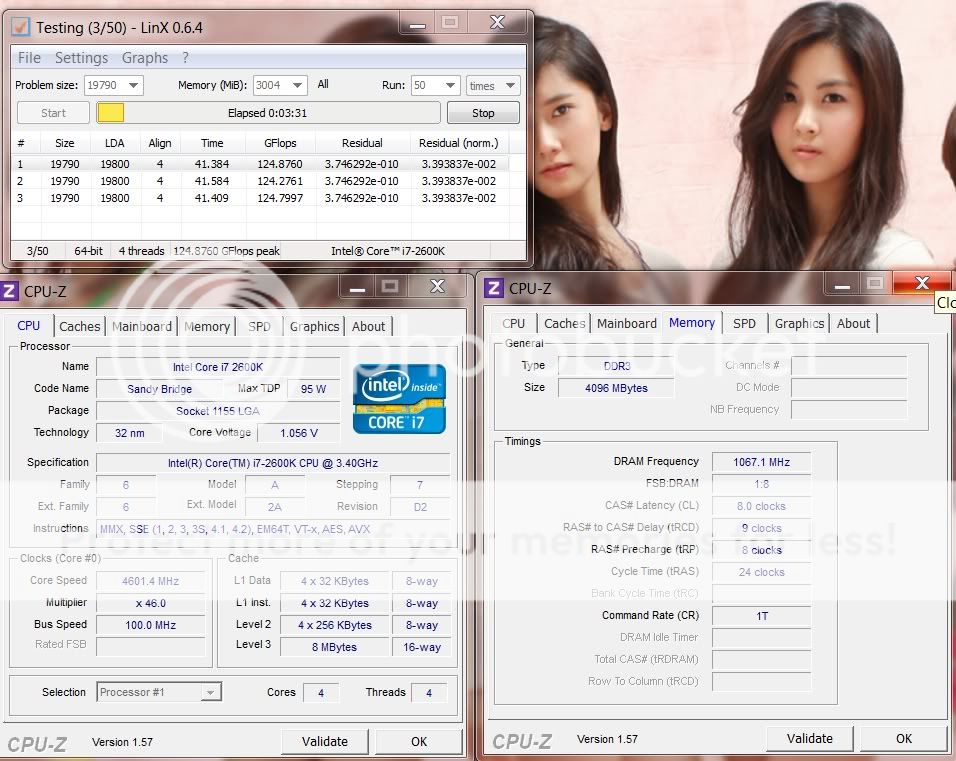
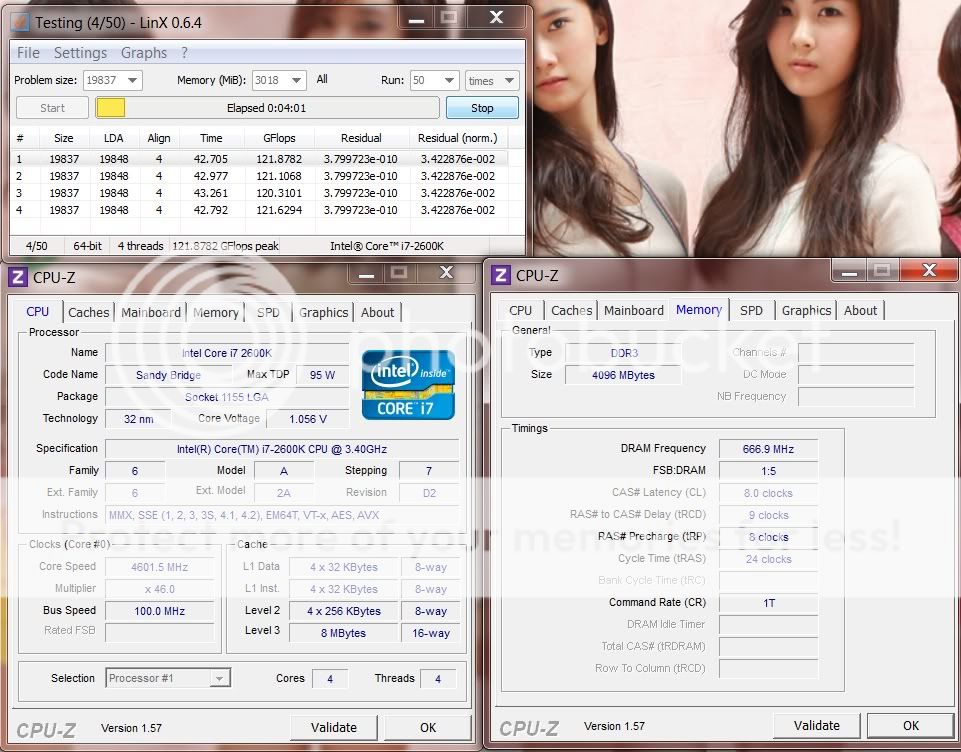
ur GFlops is a bit lower than average.do u mind to try priority in LinX setting to "above normal"
clear up some ram to at least 3000MB for LinX, close all the background apps.
Sandy Bridge Overclocking V1, 2500K/2600K/2700K | LGA1155 P67.Z68.Z77
|
|
Apr 9 2011, 09:56 AM
Return to original view | Post
#161
|
|
Elite
8,711 posts Joined: Nov 2007 From: Butterworth, PG / Machang, Kelantan |
|
|
|
|
|
|
Apr 9 2011, 04:00 PM
Return to original view | Post
#162
|
|
Elite
8,711 posts Joined: Nov 2007 From: Butterworth, PG / Machang, Kelantan |
4.6 2133MHz
![]() 4.6 1333MHz ![]() 2500K should be producing the same GFlops, unless CPU throttling. |
|
|
Apr 11 2011, 12:09 PM
Return to original view | Post
#163
|
|
Elite
8,711 posts Joined: Nov 2007 From: Butterworth, PG / Machang, Kelantan |
|
|
|
Apr 11 2011, 12:33 PM
Return to original view | Post
#164
|
|
Elite
8,711 posts Joined: Nov 2007 From: Butterworth, PG / Machang, Kelantan |
Death is possible but hardly seen. Normally is due to condensation during LN2, improper power phase control on mobo taken together with cpu. Disabling cores at high voltage for long term also can kill cpu.
Degradation is more possible, due to long term torturing with high temp n voltage. |
|
|
Apr 11 2011, 12:52 PM
Return to original view | Post
#165
|
|
Elite
8,711 posts Joined: Nov 2007 From: Butterworth, PG / Machang, Kelantan |
QUOTE(coolice @ Apr 11 2011, 12:35 PM) Pls dont kill em bro u can sell that 55x to me.Sayang leh.. QUOTE(gengstapo @ Apr 11 2011, 12:37 PM) Ic, your machine usually running at OC speed or just for benchmarking purpose? 5.0GHz for daily usage. Temp is still acceptable for me.I think my i7 facing degradation or might other hardware.. Not sure yet~ But i hv to take bath everytime after finish gaming lol 5.3GHz for short tests. GTX580s also runing at stock for routine tasks. |
|
|
Apr 11 2011, 07:57 PM
Return to original view | Post
#166
|
|
Elite
8,711 posts Joined: Nov 2007 From: Butterworth, PG / Machang, Kelantan |
|
|
|
|
|
|
Apr 11 2011, 09:05 PM
Return to original view | Post
#167
|
|
Elite
8,711 posts Joined: Nov 2007 From: Butterworth, PG / Machang, Kelantan |
|
|
|
Apr 11 2011, 11:33 PM
Return to original view | Post
#168
|
|
Elite
8,711 posts Joined: Nov 2007 From: Butterworth, PG / Machang, Kelantan |
QUOTE(lichyetan @ Apr 11 2011, 11:26 PM) lol... but anyhow upgrade to sandy bridge already save us electric bills + less heat compare to broomfield. muahhaha u got the word, let's sweep it down under the bridge of holy sandy.i reach cooling limits on my hot room with 4.8ghz. 80++ celcius. ambient is hot craps in BW, 33C at night phiuhh |
|
|
Apr 12 2011, 08:28 PM
Return to original view | Post
#169
|
|
Elite
8,711 posts Joined: Nov 2007 From: Butterworth, PG / Machang, Kelantan |
QUOTE(stasio @ Apr 12 2011, 05:03 PM) Maximus IV Extreme BIOS (1485) more ram options more playabilities http://91.121.148.119/downloads/BIOS/Maxim...e-ASUS-1485.ROM Changed some memory stuff added Memory timings: I/O Latency + RTL Offset |
|
|
Apr 13 2011, 06:48 AM
Return to original view | Post
#170
|
|
Elite
8,711 posts Joined: Nov 2007 From: Butterworth, PG / Machang, Kelantan |
QUOTE(cstkl1 @ Apr 13 2011, 04:40 AM) lol bios 1 of my m4e just gave up.. told ya it will happen to any m4e just after a reboot.going to order one epprom chip. anybody want more?? lol ordering 4 just incase for future issue. still dont get why this bios can die so easily i believe same thing will happen to bios2 as well. 1st time i got less 1MHz BCLK 105 to 104 then getting worse failed to OC even at 101. but last time flashing to newer bios fixed the problem. Falken suggested resiting cpu might fix this issue. QUOTE(acther @ Apr 13 2011, 06:22 AM) nice! btw UGPM! This post has been edited by owikh84: Apr 13 2011, 06:57 AM |
|
|
Apr 15 2011, 06:25 AM
Return to original view | Post
#171
|
|
Elite
8,711 posts Joined: Nov 2007 From: Butterworth, PG / Machang, Kelantan |
|
|
|
Apr 17 2011, 01:14 AM
Return to original view | Post
#172
|
|
Elite
8,711 posts Joined: Nov 2007 From: Butterworth, PG / Machang, Kelantan |
QUOTE(kuntawakaw @ Apr 17 2011, 12:53 AM) hello guys..new here try 2133 8-10-7-27 at 1.65vwta, is there any issue if using rams that not certified for sandy? i mean the ocing. cuz i found my rams wont do any good with sandy divider ( >1600 ) eg : 1600 6-8-6 , 1.5v hyperpi 32mable 1866 7-9-7 any volt wont do.. even loosing up not helping so much btw, spec 2600k msi P67A-GD65 gskill eco 1600 7-8-7 1.35v anything i missed, pls enlighten me cuz im too noob in intel |
|
|
Apr 17 2011, 06:17 PM
Return to original view | Post
#173
|
|
Elite
8,711 posts Joined: Nov 2007 From: Butterworth, PG / Machang, Kelantan |
QUOTE(kuntawakaw @ Apr 17 2011, 01:21 AM) i dont think it capable of doing that.. a quick try 2133 with auto timings = not bootable. Found THIS for ECO.but, thanks.. i will try again my luck with the timings u stated.. pst..any eco user here? edit: updated with ss. only 32m att cuz in learning process.. other stress tools will take more time. any misc voltage should i increase in order to gain higher ram clock? tfaw stocked at 50...but i changed to 30..should i leave at 50 or better to tightening? sorry for these questions.. still cant find a good guides to read. QUOTE(davidbilly87 @ Apr 17 2011, 05:24 PM) 1.24-1.26v under load. |
|
|
|
|
|
Apr 17 2011, 06:51 PM
Return to original view | Post
#174
|
|
Elite
8,711 posts Joined: Nov 2007 From: Butterworth, PG / Machang, Kelantan |
QUOTE(davidbilly87 @ Apr 17 2011, 06:45 PM) which type of BSOD?QUOTE BSOD codes for overclocking 0x101 = increase vcore 0x124 = increase vcore 0x0A = unstable RAM/IMC, increase QPI first, if that doesn't work increase vcore 0x1E = increase vcore 0x3B = increase vcore 0x3D = increase vcore 0xD1 = QPI/VTT, increase/decrease as necessary, can also be unstable Ram, raise Ram voltage 0x9C = QPI/VTT most likely, but increasing vcore has helped in some instances 0x50 = RAM timings/Frequency or uncore multi unstable, increase RAM voltage or adjust QPI/VTT, or lower uncore if you're higher than 2x 0x109 = Not enough or too Much memory voltage 0x116 = Low IOH (NB) voltage, GPU issue (most common when running multi-GPU/overclocking GPU) 0x7E = Corrupted OS file, possibly from overclocking. Run sfc /scannow and chkdsk /r |
|
|
Apr 17 2011, 07:30 PM
Return to original view | Post
#175
|
|
Elite
8,711 posts Joined: Nov 2007 From: Butterworth, PG / Machang, Kelantan |
QUOTE(davidbilly87 @ Apr 17 2011, 06:59 PM) Erm...just Whole Window Hang then restart @@ , my MB debug Code , when in window will auto close light, is it when it BSOD will show the code agian? BSOD code can only be seen in win. try increase vcore to 1.3v, later when got into win slowly decrease vcore. take note that LLC will either increase or decrease vcore during load depends on settings. C states are related to power saving, noth to do with ur BSOD full specs of PC would be helpful. |
|
|
Apr 18 2011, 07:10 AM
Return to original view | Post
#176
|
|
Elite
8,711 posts Joined: Nov 2007 From: Butterworth, PG / Machang, Kelantan |
QUOTE(davidbilly87 @ Apr 17 2011, 07:40 PM) This is my Spec : Intel stock cooler is best at 4.2GHz only at stock voltage.Proc : I7 2600K 3.4@4.0 v1.25 CPU Cooler : Intel Stock MB : AsRock Pro3 P67 - Bios : 1.80 GC: Asus DCU 460GTX 1GB PSU : SilverStone ST56F 560W SC : Creative Titanium PCI-EX HDD : WD Blue 640GB,Samsung F3 1TB Ram : KVR 4GB 1333@1600 1.5v x2 The Safety Voltage for Intel Stock Cooler is? i will change it at next month. Where to see those code? is it while BSOD? The LLC need close? Which Cooler is best on I7 2600K ? Corsair H50? or others suggest within rm 250 eg. BSOD 124: » Click to show Spoiler - click again to hide... « LLC depends on cpu/mobo reaction to voltage scaling. I always set to extreme for 5GHz+ due to my sucky 2600K. more Asrock OC guides pls refer to THIS Asus goes to THIS H5O should be able to handle up to 4.7GHz, which is as good as VenomousX Noctua NH-D14 for RM270? |
|
|
Apr 19 2011, 11:32 PM
Return to original view | Post
#177
|
|
Elite
8,711 posts Joined: Nov 2007 From: Butterworth, PG / Machang, Kelantan |
QUOTE(acther @ Apr 18 2011, 05:38 PM) thanks ah liang for the nice proc.max out at 54x, freq wall 5455MHz on UD7 will use it for net surfing and NFS Shift2 only until Z68 come out. QUOTE(kuntawakaw @ Apr 19 2011, 05:58 PM) thanks owikh for the link.. but somehow the user not sharing other details.. yalor hardly seen Eco do 2133 on Sandy, same fate as Hypers - compatibility issues. u need to whack heck a lot of vdimm and VTT for these.nvm..quick question.. what is the safe cpu io volt to pump if stress testing? i mean max safe.. another question..sorry, cant help to ask linx and prime95..which one stress ram more? (both at max ram usage ofkos) Go grab a new RAM lah i believe there are plenty of cheap compatible kits in the market. as for VCCIO aka VTT, most of the time u wont need to adjust it at all @ 1.05v. U might need to increase it a lil bit when playing with higher RAM speed & tighten timings etc... Using over 1.2V should only be necessary if u're pushing the proc toward 5GHz +. Like one of my proc @ 5GHz needed at least 1.2v VTT to boot into windows. Using above 1.4v is not recommended at all - u have been warned! Both LinX and Prime95 will stress the RAM, just that Prime tends to error out RAM settings. But u gotta Prime for at least 3 hours, some guys even did 6 hours+ |
|
|
Apr 20 2011, 06:50 AM
Return to original view | Post
#178
|
|
Elite
8,711 posts Joined: Nov 2007 From: Butterworth, PG / Machang, Kelantan |
QUOTE(acther @ Apr 20 2011, 03:40 AM) What's ur voltage? Any better than ur previous? For sure a a lot better than my previous chips, in terms of max multi, freq wall, voltage, etc.Finally made a decision on changing case, anyone interested in Lian Li X2000F? Comes in a package with water-cooling installed! And most importantly comes with more than 10 noiseblocker 140mm fans. But hvn't test on max BCLK yet maybe tonite will give it a try if got time. Been busy with new liquid & gas chromatography at medicine research lab. |
|
|
Apr 20 2011, 11:43 PM
Return to original view | Post
#179
|
|
Elite
8,711 posts Joined: Nov 2007 From: Butterworth, PG / Machang, Kelantan |
QUOTE(skyther @ Apr 20 2011, 07:57 AM) Hmm my oc sux compared to most of you guys. ur 2600K @ 4.7GHz at lower than 1.4v is considered as better than average chips but I guess it heats up faster than voltage sucking chip. 4.7 @ 1.32v, Prime SFFT 12hr / Blend 6hr / IBT 100 passes stable Dynamic Vcore +0.06v, no PLL overvoltage or LLC BCLK 100.5... my board appears to underclock BCLK a bit. RAM @1.5v, standard timings (9-9-9-24-1T) Neither PLL overvoltage or LLC seems to help me get past 4.7GHz. I'm trying to keep Vcore under 1.35v so the CPU doesn't fry.. lol. Any suggestions? vCore is not linearly proportional to speed but more like exponentially. A few MHz increment in frequency requires a few notches of vCore. no choice u need more vcore and change to WC |
|
|
Apr 21 2011, 06:38 AM
Return to original view | Post
#180
|
|
Elite
8,711 posts Joined: Nov 2007 From: Butterworth, PG / Machang, Kelantan |
QUOTE(acther @ Apr 21 2011, 01:58 AM) Dono whether to buy z68 anot.. Sis in Taiwan.. oh no wonder lah u can buy stuffs from TW so easily. Rupa2 nya got sibling over there.Can computer stuff move slower, really pokai lo keep chase liddat. Sad i believe Z68 will appear in local market next week and I'm going to grab one hehe... |
|
Topic ClosedOptions
|
| Change to: | 0.0268sec
0.54
7 queries
GZIP Disabled
Time is now: 4th December 2025 - 10:15 PM |