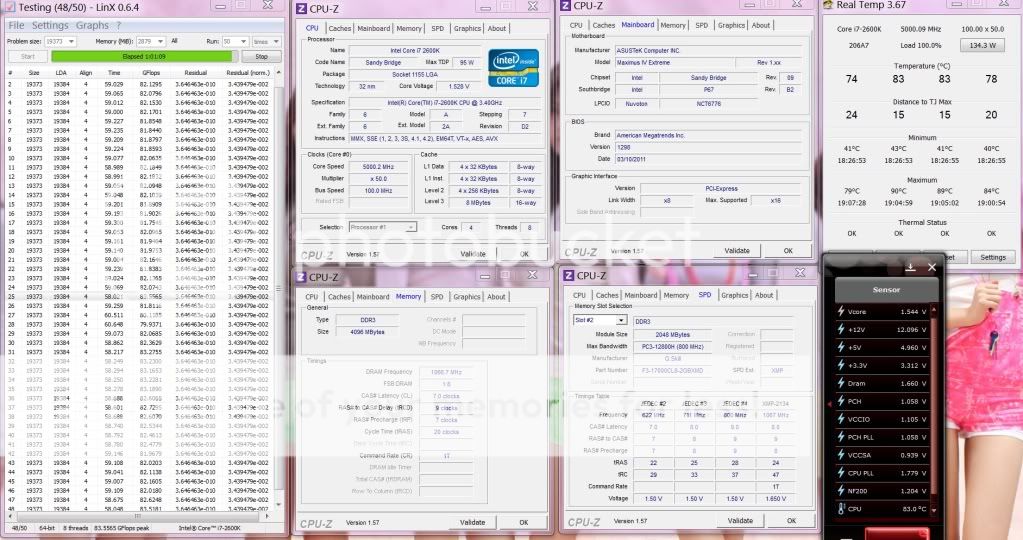
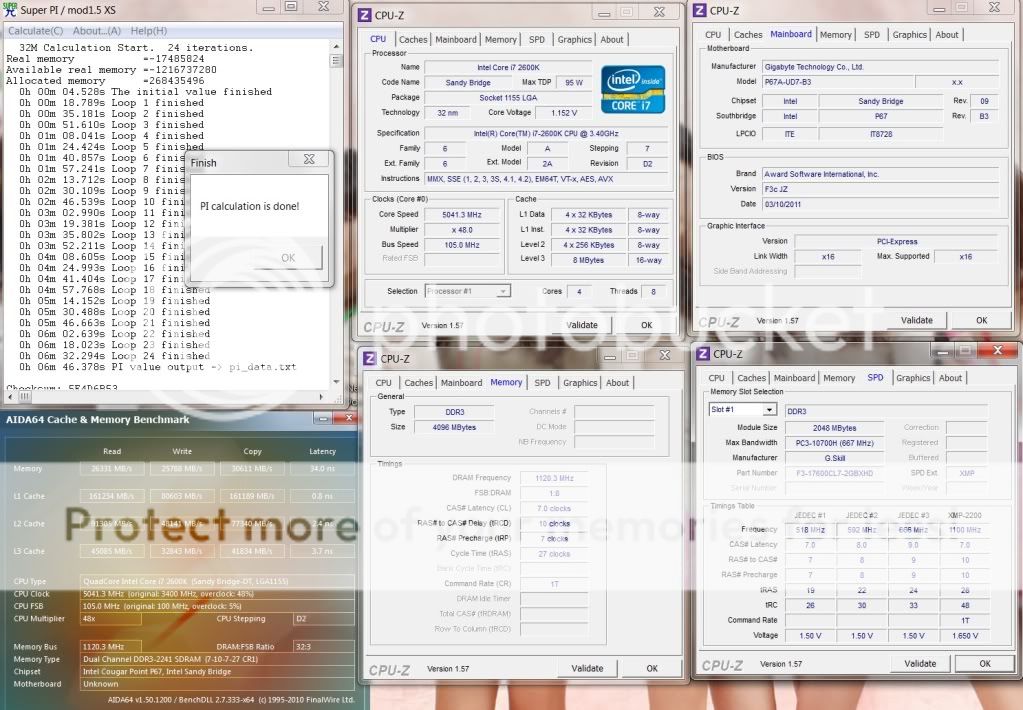
G.Skill RijawsX 2133MHz 6-9-6-24
» Click to show Spoiler - click again to hide... «
This post has been edited by owikh84: Mar 17 2011, 06:35 AM
Sandy Bridge Overclocking V1, 2500K/2600K/2700K | LGA1155 P67.Z68.Z77
|
|
 Mar 17 2011, 06:35 AM Mar 17 2011, 06:35 AM
Return to original view | Post
#121
|
 
Elite
8,711 posts Joined: Nov 2007 From: Butterworth, PG / Machang, Kelantan   
|
thanks stasio..
G.Skill RijawsX 2133MHz 6-9-6-24 » Click to show Spoiler - click again to hide... « This post has been edited by owikh84: Mar 17 2011, 06:35 AM |
|
|
|
|
|
Mar 17 2011, 10:32 AM
Return to original view | Post
#122
|
|
Elite
8,711 posts Joined: Nov 2007 From: Butterworth, PG / Machang, Kelantan
|
QUOTE(nncl @ Mar 17 2011, 07:34 AM) bro owikh, based on your playing, which perform better on sandy bridge platform? 2133 c8 with so call bbse chip inside or 2200 c7 with psc chip inside? Still to early to say. But of course BBSE 7-9-7 beats 7-10-7 in Pi due to lower tRCD on the former. PSC lowest tRCD is 10. Lower giving no boot. Lower CAS 6, both is best at 6-10-6 high vdimm 1.7v+, BBSE 6-9-6 scores lower than 7-9-6 1.66v. Cant test 2200+ yet as something wrong with my Maximus cant adjust BCLK anymore. Weird thing is bios1 and 2 (backup) are like that. Will swap to B3 within these few days most prolly play with it next week. Within this period will swutch to UD7 B3 hopefully tomoro. |
|
|
Mar 17 2011, 07:29 PM
Return to original view | Post
#123
|
|
Elite
8,711 posts Joined: Nov 2007 From: Butterworth, PG / Machang, Kelantan
|
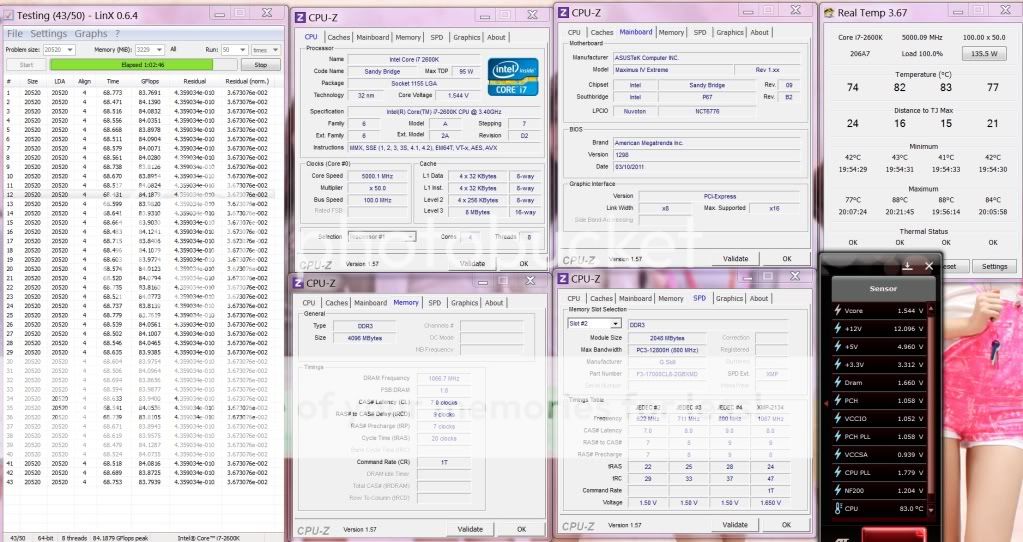
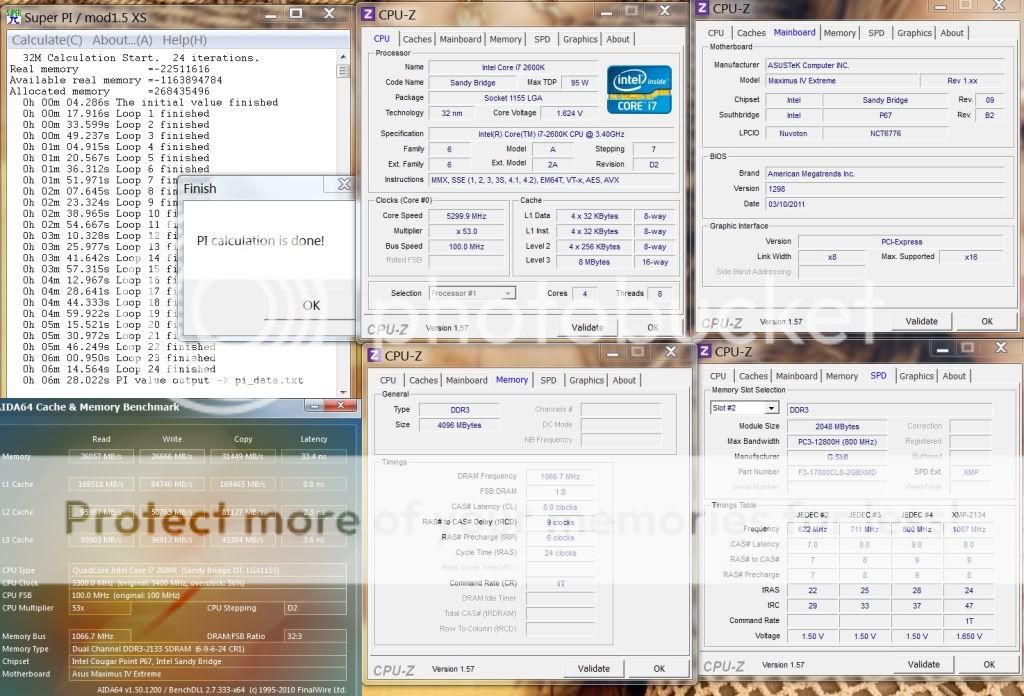
Intel Core i7 2600K @ 5.0 GHz (4C/8T)
Asus Maximus IV Extreme 1298 2x2GB G.Skill RipjawsX F3-17000CL8D-4GBXMD 2133C8 @ 2133Mhz 7-9-7-20-1T 2x MSI GTX580 SLI, 930/4100Mhz Corsair AX1200 » Click to show Spoiler - click again to hide... « Added on March 17, 2011, 8:57 pmsecond round with lower VTT and improved GFlops... » Click to show Spoiler - click again to hide... « This post has been edited by owikh84: Mar 17 2011, 08:57 PM |
|
|
Mar 17 2011, 10:51 PM
Return to original view | Post
#124
|
|
Elite
8,711 posts Joined: Nov 2007 From: Butterworth, PG / Machang, Kelantan
|
QUOTE(huskar88 @ Mar 17 2011, 09:58 PM) guys can ask...what is the best voltage for i7 2600k?? most 2600K is stable at 1.50-1.52 for 5.0GHz.im planning to oc 5ghz... temp is ur enemy as I'm afraid u will need a custom wc kit to tame that insanely high temp unless if u're in aircond room. H5O push pull can take care until 4.8GHz only. 5.0GHz on H5O hmmm it's gonna make ur proc toasted. Short single threaded apps ie Pi is fine but not for real life. until u found a golden chip then that's another story etc.. good luck!  |
|
|
Mar 17 2011, 11:19 PM
Return to original view | Post
#125
|
|
Elite
8,711 posts Joined: Nov 2007 From: Butterworth, PG / Machang, Kelantan
|
QUOTE(huskar88 @ Mar 17 2011, 11:04 PM) mine 1.45v oc 5ghz stable... I saw ur tests are too short to justify the stability. prime more than 1 hour and see hehe.. LinX is much stressful.but some ppl told me the voltage is too high... is that true?? http://forum.lowyat.net/topic/1796097 btw, I'm using Win7 SP1 which is more stressful than the vanilla Win7, means more vcore is needed. btw, OT Asrock Fatal1ty is HERE. Cheap and sexy! |
|
|
Mar 19 2011, 08:46 AM
Return to original view | Post
#126
|
|
Elite
8,711 posts Joined: Nov 2007 From: Butterworth, PG / Machang, Kelantan
|
QUOTE(stasio @ Mar 19 2011, 06:27 AM) owikh84, yaya, got my UD7 B3 yesterday. Thanks to lingloong and NationTech hehe.. Below are the drillz seems you get your UD7-B3 (XS).  ... ...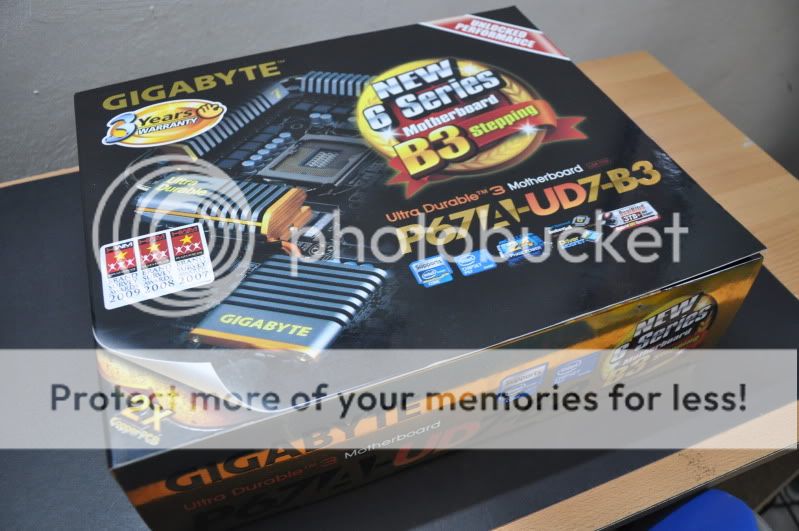   P/S: now switched to PCIEx8_1 problem solved but what a waste if not using X16. ok put my D2X on the said PCIEx16_1, working fine lol the POWER button on the top right is still up side down, why Giga didnt fix it?  This post has been edited by owikh84: Mar 19 2011, 11:56 PM |
|
|
|
|
|
Mar 20 2011, 03:29 PM
Return to original view | Post
#127
|
|
Elite
8,711 posts Joined: Nov 2007 From: Butterworth, PG / Machang, Kelantan
|
QUOTE(FiragaZ @ Mar 20 2011, 03:04 PM) hi, i got sumthing to ask, i got my intel i5 2500k oc to 4.7ghz with vcore 1.335. When i wan to go further n adjust 1.335>1.350, my pc fail to boot, after POST i got a black screen with underscore on top left screen. 1mo is i seen u guys oc with gaming ram, is it related to oc cpu? My ram is kvr 4gb ddr3 1333mhz, i leave it at stock speed currently. in bios enable CPU PLL overvoltage. it will spike the voltage to boot into windows. |
|
|
Mar 20 2011, 03:51 PM
Return to original view | Post
#128
|
|
Elite
8,711 posts Joined: Nov 2007 From: Butterworth, PG / Machang, Kelantan
|
QUOTE(FiragaZ @ Mar 20 2011, 03:45 PM) any risk enable it? what mean spike the voltage? the only effect is it will let u run higher speed.risk is blow up |
|
|
Mar 20 2011, 04:43 PM
Return to original view | Post
#129
|
|
Elite
8,711 posts Joined: Nov 2007 From: Butterworth, PG / Machang, Kelantan
|
QUOTE(FiragaZ @ Mar 20 2011, 04:15 PM) yeah it works now ^^, now testing 4.8ghz with 1.350 vcore. It is normal that some brands ie Giga MSI dont run 100MHz exactly. Asus does 100MHz.Why my bus speed is at 99.8mhz? is there anyway to running it at 100mhz? sry asking so many common here  To get 100MHz, u might set BCLK in bios to 100.2MHz. no risk in advanced... |
|
|
Mar 21 2011, 11:27 AM
Return to original view | Post
#130
|
|
Elite
8,711 posts Joined: Nov 2007 From: Butterworth, PG / Machang, Kelantan
|
Nice, but not a good proc. Temp is that high due to hot weather in msia.
ur vcore during load is actually 1.41v. |
|
|
Mar 21 2011, 11:56 PM
Return to original view | Post
#131
|
|
Elite
8,711 posts Joined: Nov 2007 From: Butterworth, PG / Machang, Kelantan
|
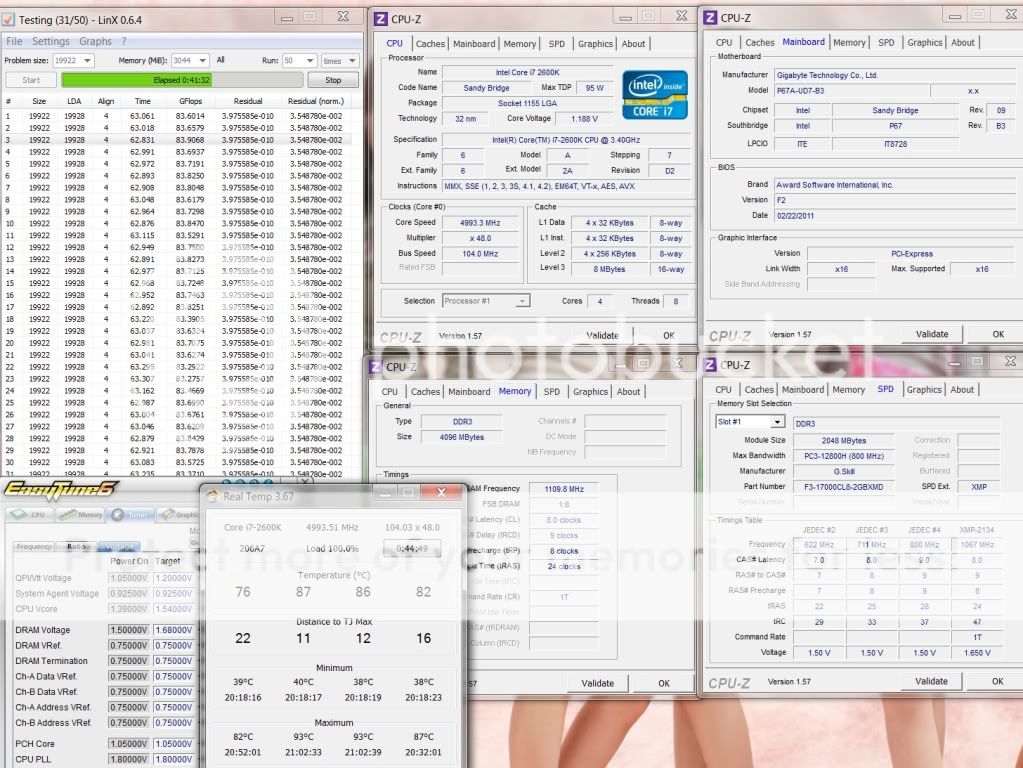
QUOTE(FiragaZ @ Mar 21 2011, 03:20 PM) Ya, the temp is a bit high, so i roll back to my previous solid hard rock 4.6ghz, only max 74c while running 50x linx. And i found my 4.8ghz is not stable yet, even i ran 50x linx and 1hour prime95, after that i just open winamp listen music and viewing picture in my folder den blue screen. TMPIN0 = cpu tempU knw TMPIN0 temp is from which system component? It hits 79c lol. TMPIN1 = case temp TMPIN2 = mobo temp Intel Core i7 2600K @ 4.99 GHz (4C/8T) = 104 X 48 Gigabyte P67A-UD7 B3 F2 2x2GB G.Skill RipjawsX F3-17000CL8D-4GBXMD 2133C8 @ 2218Mhz 8-9-8-1T 2x MSI GTX580 SLI, 930/4100Mhz Corsair AX1200 » Click to show Spoiler - click again to hide... « * pls ignore the overvoltaging ** cpu-z reads vcore wrongly. This post has been edited by owikh84: Mar 22 2011, 12:05 AM |
|
|
Mar 22 2011, 09:55 AM
Return to original view | Post
#132
|
|
Elite
8,711 posts Joined: Nov 2007 From: Butterworth, PG / Machang, Kelantan
|
QUOTE(FiragaZ @ Mar 22 2011, 09:39 AM) is oc ram related to oc cpu? Both are tied by BCLK thats da relationship between CPU and RAM.But i dont see the needs to increase vcore when increase dram from 1866 to 2133. Arghhh i miss my Maximus!!! |
|
|
Mar 23 2011, 11:09 AM
Return to original view | Post
#133
|
|
Elite
8,711 posts Joined: Nov 2007 From: Butterworth, PG / Machang, Kelantan
|
QUOTE(limsa007 @ Mar 22 2011, 11:48 PM) Hi, just success oc my 2500k @ 4.6ghz with hyper 212+ dual blade master. Look fine for 24/7, the load temp is lower if not running stress tests.is that ok for 24/7 run? |
|
|
|
|
|
Mar 23 2011, 07:30 PM
Return to original view | Post
#134
|
|
Elite
8,711 posts Joined: Nov 2007 From: Butterworth, PG / Machang, Kelantan
|
QUOTE(limsa007 @ Mar 23 2011, 07:00 PM) after that stress, i do some chatting and browsing, then i run 3Dmark vantage, after 3dmark, bsod.... is that psu problem? cos im using old enermax fma2 465W, and runing 5750. plan to save money get 850W or 1kW what's the code of the BSOD? pls refer to Post #1 for details.bios setting vcore 1.4v, PLL 1.85v, other auto. msi have the 1 button oc, im using gd65 with 2500k, 1 click i get 4.2ghz  If it's one of the listed then should be a bad OC especially the auto settings as these will changed randomly on every reboot. bad PSU is possible for sure higher wattage offers better OC etc..  |
|
|
Mar 23 2011, 11:04 PM
Return to original view | Post
#135
|
|
Elite
8,711 posts Joined: Nov 2007 From: Butterworth, PG / Machang, Kelantan
|
QUOTE(limsa007 @ Mar 23 2011, 09:59 PM) 0x124 - but my bios dont have VTT/QPI... left I/O and SA voltage to play around.. If u read again my post, 124 is related to insufficient vcore.I saw u ran linX in diagnosis mode, may be in normal windows environment u need extra vcore. one of the reason why i dun wana use diag mode. now linX again in normal mode  |
|
|
Mar 24 2011, 08:46 PM
Return to original view | Post
#136
|
|
Elite
8,711 posts Joined: Nov 2007 From: Butterworth, PG / Machang, Kelantan
|
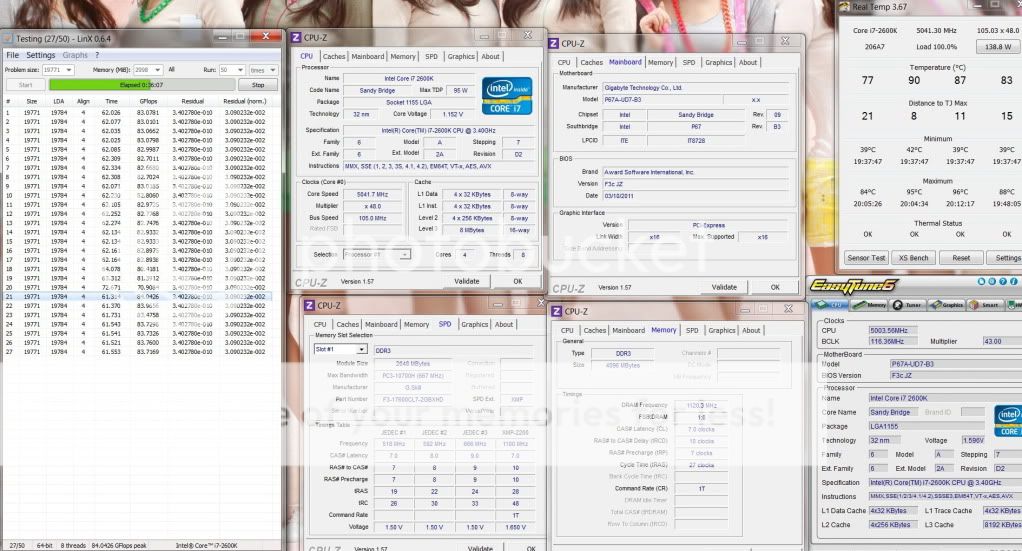
Intel Core i7 2600K @ 5.04 GHz (4C/8T) = 105 X 48
Gigabyte P67A-UD7 B3 F3C 2x2GB G.Skill RipjawsX 2133C7 @ 2240Mhz 7-10-7-27-1T 2x MSI GTX580 SLI, 930/4100Mhz Corsair AX1200 » Click to show Spoiler - click again to hide... « ** cpu-z reads vcore wrongly. » Click to show Spoiler - click again to hide... « This post has been edited by owikh84: Mar 24 2011, 09:03 PM |
|
|
Mar 27 2011, 08:09 AM
Return to original view | Post
#137
|
|
Elite
8,711 posts Joined: Nov 2007 From: Butterworth, PG / Machang, Kelantan
|
Intel Core i7 2600K @ 5.35 GHz = 105 X 51
Gigabyte P67A-UD7 B3 F3C 2x2GB G.Skill RipjawsX 2133C7 @ 2240Mhz 7-10-7-27-1T 2x MSI GTX580 SLI, 930/4100Mhz Corsair AX1200 » Click to show Spoiler - click again to hide... « ** cpu-z reads vcore wrongly.  |
|
|
Mar 27 2011, 01:55 PM
Return to original view | Post
#138
|
|
Elite
8,711 posts Joined: Nov 2007 From: Butterworth, PG / Machang, Kelantan
|
QUOTE(nncl @ Mar 27 2011, 12:38 PM) raise in vcore does not help in stable, i think not vcore set wrongly, what setting i need to change? woot LinX 2 hours+. notice that's 32-bit.cant really compare to our 64-bit runs which loaded all the memory capacity and took longer time between 2 runs. means faster to see errors with 64-bit than the other. hmm hard to say in ur sad case, could be mem timing issues. tFAW=30 is my trick for prime >3 hours notice that tRFC on UD7 is tighter than MIVE at auto default. MIVE always stay at 118-124 whilst UD7 at 74 for 2133 and 88 at 2200+. I could prime for 3 hours+ on UD7 but hardly pass an hour on MIVE. PS: if possible next time pls show another CPU-Z tabs as well |
|
|
Mar 27 2011, 05:37 PM
Return to original view | Post
#139
|
|
Elite
8,711 posts Joined: Nov 2007 From: Butterworth, PG / Machang, Kelantan
|
QUOTE(nncl @ Mar 27 2011, 02:12 PM) @metsatsu, yeah , that why i aim for 500 loop pass in linx. i was right no typo there just that still couldnt pass 1 hour with MIVE. @ owikh84 , thx for help, bro. already set the setting you mentioned above, now running. i think you mean you easily pass 3 hours + on MIVE rather than UD7 right? cause you mention UD7 timing more tight?  |
|
|
Mar 27 2011, 08:42 PM
Return to original view | Post
#140
|
|
Elite
8,711 posts Joined: Nov 2007 From: Butterworth, PG / Machang, Kelantan
|
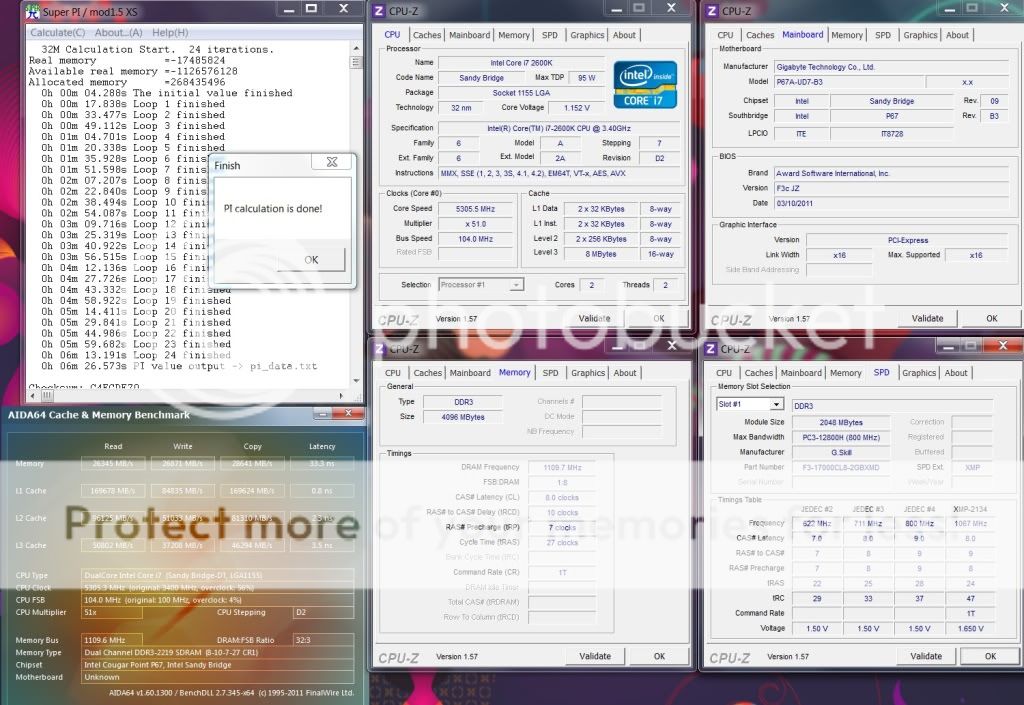
G.Skill RipjawsX 2133C8 @ 2220MHz 8-10-7-27-1T, 1.68v - cant do 7-10-7-27-1T
 |
|
Topic ClosedOptions
|
| Change to: |  0.0458sec 0.0458sec
 1.03 1.03
 7 queries 7 queries
 GZIP Disabled GZIP Disabled
Time is now: 4th December 2025 - 10:32 AM |
 Quote
Quote