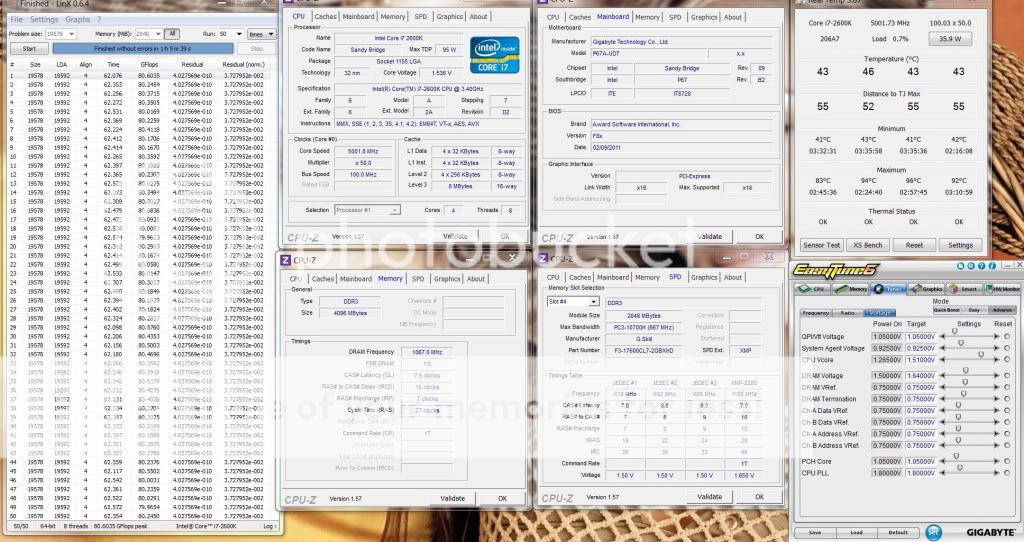
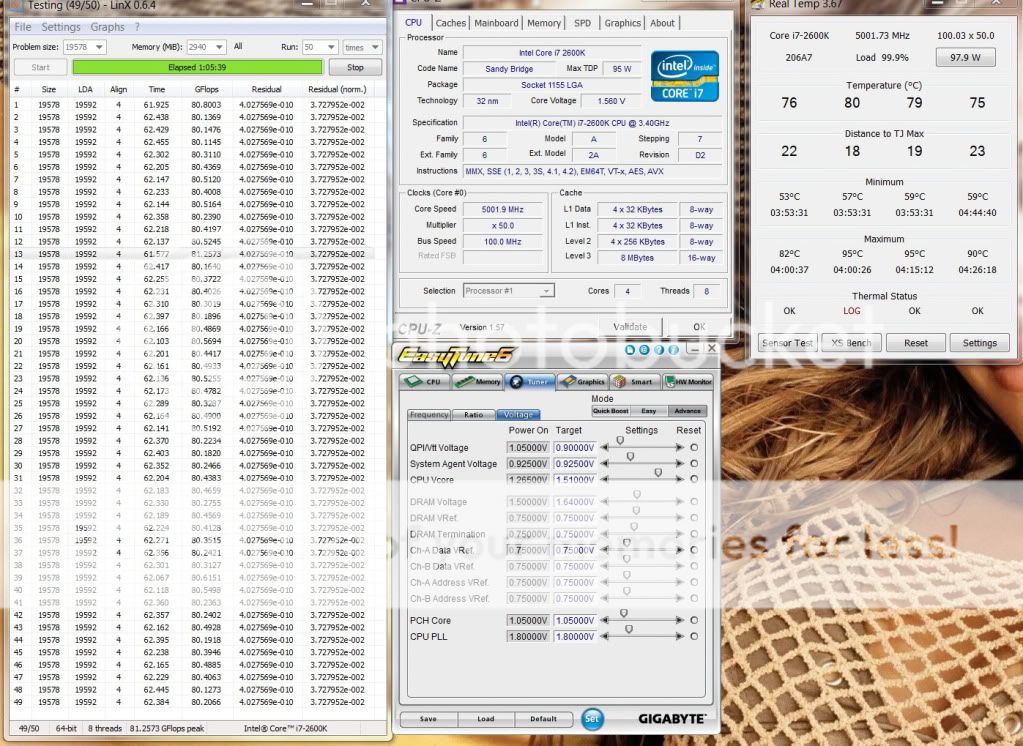
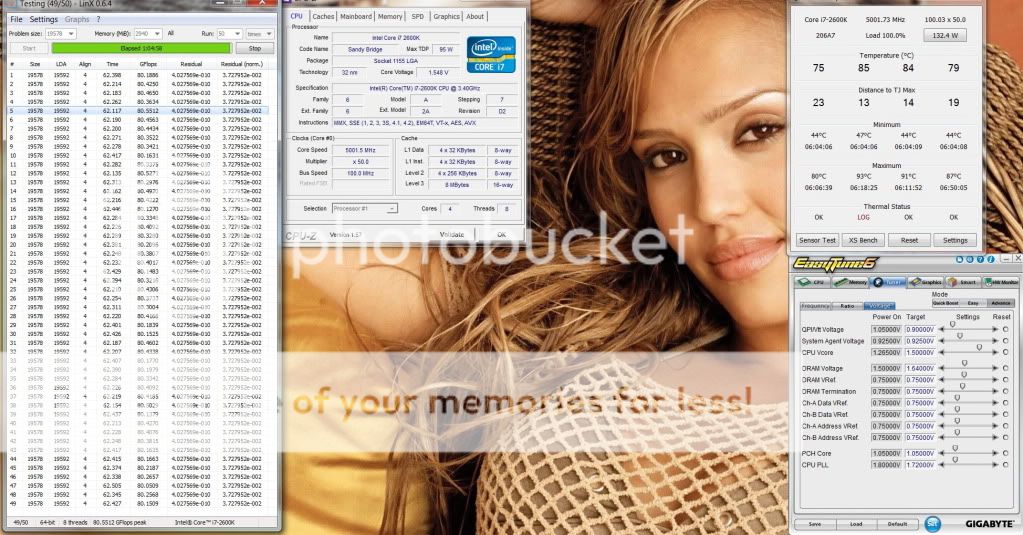
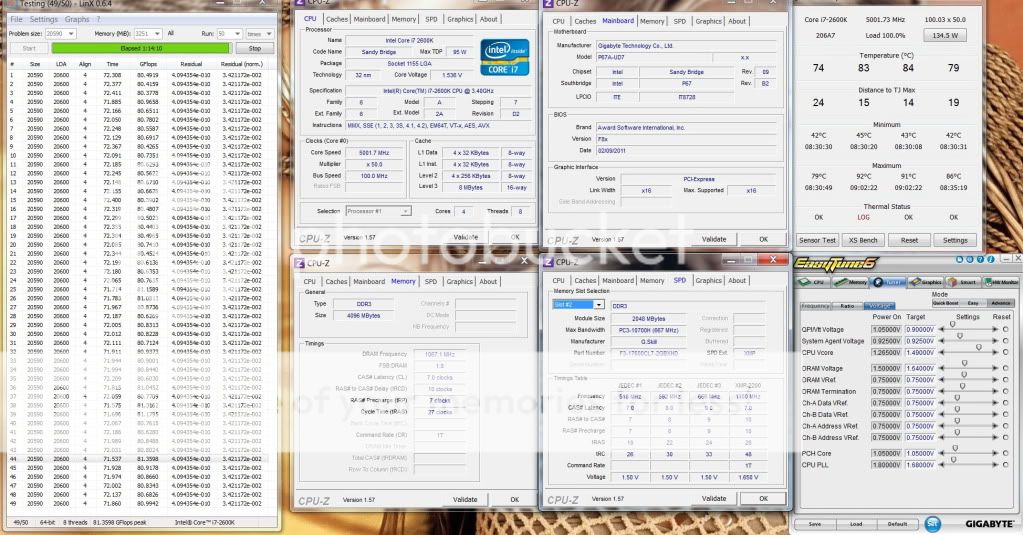
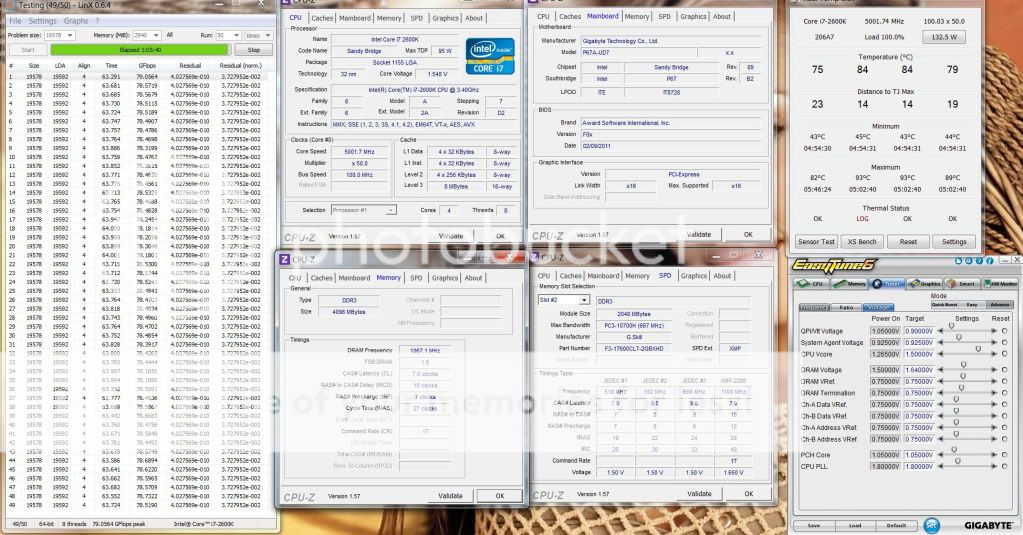
yes, 2 rads with 12 GentleThypoon + 2 Scythe slim.
I stay in one of the hottest place in Msia. ambient is 34C.
In Kelantan I got 3C cooler.
Sandy Bridge Overclocking V1, 2500K/2600K/2700K | LGA1155 P67.Z68.Z77
Sandy Bridge Overclocking V1, 2500K/2600K/2700K | LGA1155 P67.Z68.Z77
|
|
 Feb 20 2011, 01:34 PM Feb 20 2011, 01:34 PM
Return to original view | Post
#81
|
 
Elite
8,711 posts Joined: Nov 2007 From: Butterworth, PG / Machang, Kelantan   
|
yes, 2 rads with 12 GentleThypoon + 2 Scythe slim.
I stay in one of the hottest place in Msia. ambient is 34C. In Kelantan I got 3C cooler. |
|
|
|
|
|
Feb 20 2011, 04:02 PM
Return to original view | Post
#82
|
|
Elite
8,711 posts Joined: Nov 2007 From: Butterworth, PG / Machang, Kelantan
|
yes but SB is a lot cooler and faster than bloomfeld.
u can't clock this high with the former, and with HT enabled somemore. and let's don't forget this is not a golden chip yet and 2pcs of OCed GTX580 in SLI, in the same loop. I'm quite satisfied migrating from the dying bloomfield. |
|
|
Feb 21 2011, 10:16 PM
Return to original view | Post
#83
|
|
Elite
8,711 posts Joined: Nov 2007 From: Butterworth, PG / Machang, Kelantan
|
latest bios including old BIOS dl links can be found in my 1st post as well as the latest LinX, etc...
|
|
|
Feb 22 2011, 08:14 PM
Return to original view | Post
#84
|
|
Elite
8,711 posts Joined: Nov 2007 From: Butterworth, PG / Machang, Kelantan
|
QUOTE(monsh @ Feb 22 2011, 08:11 PM) im getting bad BIOS image file error for both F6 and F7A . For F5 bios onwards, pls use the latest @BIOS V2.11any explanation on this one ? help me please guys   hwbot links there they already said "(use @BIOS V2.10 (?)? if you're flashing from pre-F5 bios: click)" This post has been edited by owikh84: Feb 22 2011, 08:15 PM |
|
|
Feb 22 2011, 10:04 PM
Return to original view | Post
#85
|
|
Elite
8,711 posts Joined: Nov 2007 From: Butterworth, PG / Machang, Kelantan
|
QUOTE(monsh @ Feb 22 2011, 08:19 PM) i didnt see that one on hwbot . without internal PLL overvolt ur proc will be limited to 4.7-5.0 GHz only.flash in windows ? ergh, last thing i'd do in flashing bios >.<" UPDATE: successfully flash bios . seems like d vdrop quite bad . hoping that the vDroop won't be so much worst . anyway, what does internal PLL overvoltage feature does ? and what is the average vCore for 4.5-4.8ghz ? this new bios really made it more stable . couldn't even boot on F4 last time . this bios could boot up with everything on stock setting . will try some linX and prime later on . thanks again for all the guides guys ^^, but enabling it will hurt S3 sleep/hibernate from waking up. I always enable it 5.0 GHz onwards, if disabled I got random windows boot issue. yeah read about the serious vdroop on UD3. with that price no one can complain  vCore depends on chip, my 4.8 HT @ 1.476v load on LinX, but some might get a better chip as low as 1.4v (envy) - max vCore on air/Water single threaded benchmarks ie. Pi etc.. : 1.6V (short term only not 24/7, risky!) - max vCore on air with 4C/8T 1.4-1.45v (may vary on speed) - max vCore on Water with 4C/8T 1.5V (may vary on speed) - vdimm 1.6-1.65V is fine, also 1.7-1.8V wont fry the chip on air yet - lower your CPU PLL under 1.8v might be better as compared to the default 1.8v when OC past 5.0 GHz - if u hv prob running higher dram speed ie. 1866 or 2133 or better timings try adjusting VCCSA between 1.0-1.1v - VTT depends on chip, some is best doing at stock 1.05v, some need 1.2v etc to successfully boot. - try loosening dram timings when having issues with high mem speed, specially TRCD and TREF |
|
|
Feb 22 2011, 10:59 PM
Return to original view | Post
#86
|
|
Elite
8,711 posts Joined: Nov 2007 From: Butterworth, PG / Machang, Kelantan
|
QUOTE(monsh @ Feb 22 2011, 10:28 PM) ok thanks a lot for the info bro . stasio advised above, flash the backup BIOS chip as well by pressing ALT-F12 during bootbtw, heard about BIOS reverting to original one after crashing . mine already happened . hand itchy trying to boot at 5.0 failed and now bios reverted to F4 . so now what should i do ? reflash BIOS to f7a or what ? and also how to maintain the BIOS if crash ? |
|
|
|
|
|
Feb 23 2011, 07:14 AM
Return to original view | Post
#87
|
|
Elite
8,711 posts Joined: Nov 2007 From: Butterworth, PG / Machang, Kelantan
|
QUOTE(PenzoilGuy @ Feb 22 2011, 03:53 PM) ok guys this might be noob Question...i have a thought....i want to get dual channel is 128-bit, 4 sticks are still 4 channel hence the bus is still 128-bit.8GB Ram but which setup is better and much more stability interm of OC'ing... (4GBx2pc) or (2GBx4pc).... OR izzit overrated? just use 4GB (2GBx2pc)? using win7 64bit and targeted to buy 1600 Mhz or 1800 MHz the reason why i'm asking this...because each DDR3 channel is 64bit..so if use 2 pair just utilise 128bit...if slot-in all 4 become 256bit Dual-Channel RAM? So Owikh, Cstkl and Stasio , sifu & tailor please guide me....it bother me quite sometimes now...since most of u guys setup is just 4GB config.... anybody? 4GBx2 is easier to clock coz populated dram slot (2GBx4) would need more vdimm, vtt and/or loosen timing ie. CL8 to CL9 etc.. Like my GSkill RipjawsX, 2GBx4 needed above 1.7v vdimm, higher vtt for 32M benchable. unless if loosen timing then only u can tame the voltages. U might consider Corsair Vengeance 1600MHz 4GBx2 1600 8-8-8-24  |
|
|
Feb 24 2011, 03:52 PM
Return to original view | Post
#88
|
|
Elite
8,711 posts Joined: Nov 2007 From: Butterworth, PG / Machang, Kelantan
|
QUOTE(PenzoilGuy @ Feb 24 2011, 04:27 AM) alright, noted..bout dual channel am just not too sure interm of 64bits per/banks...thanks cstkl for clearing that up Make sure that ur windows is x64 (64bit), if not the x86 32bit windows will recognize as 3GB only ...so now looking for decent timing ...so now looking for decent timing emm quick question...do i need more than 4GB? IF most of the time purposely for gaming and adobe CS3 and abit of benchmark? izzit 8GB such a waste? thanks in advance guys  4GB should be enough for those purposes, but it wont hurt if u hv 8GB. Burst speed. 8GB is not a waste. Hardcore photoshoper should go for 8GB, if u noticed the mem usage is increasing during photoshoping. Adobe engineer recommends mem usage not exceeding 70%. Gaming, nowadays mostly will utilize up to 1.5GB only, the only game that i encountered consumes more than 2GB is Crysis. 3GB kit confirmed crash. This post has been edited by owikh84: Feb 24 2011, 03:56 PM |
|
|
Feb 24 2011, 08:52 PM
Return to original view | Post
#89
|
|
Elite
8,711 posts Joined: Nov 2007 From: Butterworth, PG / Machang, Kelantan
|
G.Skill RipjawsX, Kingston HyperX Genesis, etc... dont think u can find one in msia yet. I didnt say they are da best, but at least they r certified to pair with Sandy Bridge. Corsair Vangeance is confimed available at local stores. Other compatible rams pls refer to ur mobo manual. Elpida based ram which is extinct in the market might hv compatibility issue with 1155. PSC based is fine.
|
|
|
Feb 25 2011, 06:46 AM
Return to original view | Post
#90
|
|
Elite
8,711 posts Joined: Nov 2007 From: Butterworth, PG / Machang, Kelantan
|
Well cant really tell u how Vengeance OC. But most likely it is able to do:
1600 7-8-7 or 7-9-7 @1.65v 1800 8-9-8 @ 1.65v 2000 9-9-9 @ 1.65v Overrvolting is another thing How to know? Anything mr Google cant help u? This post has been edited by owikh84: Feb 25 2011, 06:52 AM |
|
|
Feb 25 2011, 08:35 AM
Return to original view | Post
#91
|
|
Elite
8,711 posts Joined: Nov 2007 From: Butterworth, PG / Machang, Kelantan
|
QUOTE(kevink82 @ Feb 25 2011, 08:25 AM) Most review site got 2000 on the vengence on 9-10-9-27 ish. Most prolly 2000 9-10-9 yes but theres always a trick to do 9-9-9 hehe..Arghh btw i cant simply mix up between one 2GB stick from a kit with another kit it's unstable think one of the reason why couldnt do fine on 4 sticks. |
|
|
Feb 25 2011, 09:39 AM
Return to original view | Post
#92
|
|
Elite
8,711 posts Joined: Nov 2007 From: Butterworth, PG / Machang, Kelantan
|
Didnt find any good chip so far. Just that one can post at 56x passing blinking cursor but stuck at logon screen. Dint hear any new stepping from design engineers.
2260MHz - 32mb ? This post has been edited by owikh84: Feb 25 2011, 11:32 AM |
|
|
Feb 25 2011, 02:54 PM
Return to original view | Post
#93
|
|
Elite
8,711 posts Joined: Nov 2007 From: Butterworth, PG / Machang, Kelantan
|
Maximus B3 will be ready on March 15
Expecting other Asus boards to be the same. |
|
|
|
|
|
Feb 25 2011, 04:05 PM
Return to original view | Post
#94
|
|
Elite
8,711 posts Joined: Nov 2007 From: Butterworth, PG / Machang, Kelantan
|
QUOTE(stasio @ Feb 25 2011, 04:00 PM) owikh84, At what speed?did you try run your memory 8-9-8..? |
|
|
Feb 25 2011, 04:41 PM
Return to original view | Post
#95
|
|
Elite
8,711 posts Joined: Nov 2007 From: Butterworth, PG / Machang, Kelantan
|
QUOTE(stasio @ Feb 25 2011, 04:09 PM) 2133 or above (with CR1). Didnt try that supposely beaten by C7.But doing great at 2133 7-10-7 @ 1.65v |
|
|
Feb 25 2011, 05:51 PM
Return to original view | Post
#96
|
|
Elite
8,711 posts Joined: Nov 2007 From: Butterworth, PG / Machang, Kelantan
|
QUOTE(cstkl1 @ Feb 25 2011, 05:31 PM) eh that will fail prime95 latest version with AVX blend custom 3.5gb each fft 30 mins for sure. on the first fft Could be true, didnt stress that for 24/7 purpose just for Pi is fine. |
|
|
Feb 27 2011, 03:41 PM
Return to original view | Post
#97
|
|
Elite
8,711 posts Joined: Nov 2007 From: Butterworth, PG / Machang, Kelantan
|
Finally Streamyx 4Mbps is back to normal after 4 days no signal...
 Intel Core i7 2600K 5.0GHz HT ON (4C/8T) Gigabyte P67A-UD7, F8X 2x2GB G.Skill RipjawsX 2200C7 @ 2133MHz 7-10-7-27-1T 2x MSI GTX580SLI, 930/4100Mhz Corsair AX1200 134.5w vs 115.8w 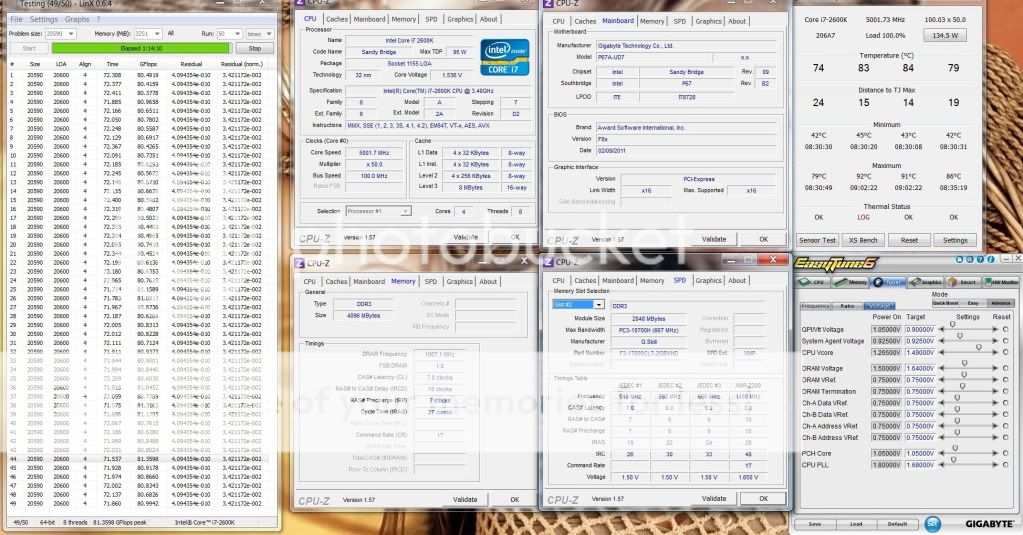  Hottest ambient: 35C  This post has been edited by owikh84: Feb 27 2011, 04:10 PM |
|
|
Mar 1 2011, 07:50 PM
Return to original view | Post
#98
|
|
Elite
8,711 posts Joined: Nov 2007 From: Butterworth, PG / Machang, Kelantan
|
thanks for sharing... but i had been getting BSOD 124 frequently since downgrading from 951 to 088. that was on 2nd bios since bios1 was corrupted lol couldn't recover anymore. Now i just wanna swap with B3.
Added on March 1, 2011, 7:56 pmUD7 is good for 5.0GHz and below only. 5.1GHz @ 1.55v bios set LLC2 load @ 1.608v still BSOD 101 (not enuf vcore) on M4E 5.1GHz @ 1.51v bios set 100% LLC load @ 1.536v stable d. This post has been edited by owikh84: Mar 1 2011, 07:56 PM |
|
|
Mar 1 2011, 09:48 PM
Return to original view | Post
#99
|
|
Elite
8,711 posts Joined: Nov 2007 From: Butterworth, PG / Machang, Kelantan
|
Just to show LLC is bad on UD7, en route to stabilize 5.0 GHz..
» Click to show Spoiler - click again to hide... « » Click to show Spoiler - click again to hide... « » Click to show Spoiler - click again to hide... « » Click to show Spoiler - click again to hide... « » Click to show Spoiler - click again to hide... « » Click to show Spoiler - click again to hide... « This post has been edited by owikh84: Mar 1 2011, 09:59 PM |
|
|
Mar 2 2011, 09:50 AM
Return to original view | Post
#100
|
|
Elite
8,711 posts Joined: Nov 2007 From: Butterworth, PG / Machang, Kelantan
|
QUOTE(stasio @ Mar 2 2011, 08:38 AM) My UD7 with 5.1GHz no problem(Vcore 1.50,LLC2),will try 5.2 and above.Even with uncompatible memory. Pi doesnt really stress CPU bro i can pass all 32m without changing ram settings from x50 to x53. For sure LinX and Prime95 need more vcore, tweaking n settings especially on Win7 SP1 |
|
Topic ClosedOptions
|
| Change to: |  0.0446sec 0.0446sec
 0.33 0.33
 7 queries 7 queries
 GZIP Disabled GZIP Disabled
Time is now: 3rd December 2025 - 10:59 PM |
 Quote
Quote