Welcome Guest ( Log In | Register )

7 Pages < 1 2 3 4 5 > » Bottom

Outline · [ Standard ] · Linear+

PC logitech z5500/z680/z5450 thread, all about logitech speakers thread

views
     
jerren
post Mar 19 2007, 12:02 AM

Enthusiast
*****
Senior Member
888 posts

Joined: Aug 2005
From: Segambut


QUOTE(hypEr_mad @ Mar 15 2007, 11:23 PM)
hey sifu's haha got 1 prob i am using fatality with z5500 just with coax connection at the moment i realised that the surround sound from the card doesnt play the rear side ler wat i am trying to say is when i am doin the THX setup console i press the rear right the front right sounded i double check dy my connections on the speakers are gd so izzit me or the card or the coax ??? gosh hope nothin scary
guys i just found out that the speaker wizard setting cant detect the rear speakers n the sub as well ler the driver redirected them as in rear right to front right n sub to the center now all my sound like ROJAK la darn  cry.gif
*
calm down bro... its normal with coax or optical connection,
if u want to hear the sound coming out from all of ur speaker then u hv to switch to "direct"..
jerren
post Mar 30 2007, 04:08 PM

Enthusiast
*****
Senior Member
888 posts

Joined: Aug 2005
From: Segambut


QUOTE(hypEr_mad @ Mar 21 2007, 08:08 PM)
wow hmmm like dat ar hmmmm hahahaha crazy man like this make me think of changing to creative speakers
*
QUOTE(justone @ Mar 22 2007, 12:21 PM)
i think digital connection u no nid to switch, in fact digital dun hav "direct"...sry dun hav z5500 n x-fi wif me now,cant guide u in detail...

jz switch everythn that related to audio to digital/SPDIF...soundcard-control panel,software-player,decoder-z5500
*
what i mean is u can't hear the sound coming out from the rear speaker during the test if using optical/coax...
switch to 6-channel [direct] if u wanna hear the test on all the speakers...


QUOTE(InfinITe_DudE @ Mar 30 2007, 08:47 AM)
errr..4ur infomation..it nearly wont drop 1..use double tape 2 stick it..at least ur whole speaker stand fall down..so dun worry..a realy good design speaker stand..cheap n nice..rm 79.90 n can hide d wire inside d speaker stand..
*
its the stand adjustable????

This post has been edited by jerren: Mar 30 2007, 04:08 PM
jerren
post Apr 12 2007, 05:11 PM

Enthusiast
*****
Senior Member
888 posts

Joined: Aug 2005
From: Segambut


QUOTE(andrewng88 @ Apr 3 2007, 11:14 AM)
[attachmentid=212658][attachmentid=212659]
this how my stand look like ! bought from ikea too ! fix/screw the speaker to the board and screw the stand to the board ! very neat !
*
i have bad experience in using speaker stand....
kinda careless when the stand is around my room, wil acidently knock it and fall on the floor, my previous Creative speaker grill has broken due to my action...
jerren
post Apr 13 2007, 01:23 AM

Enthusiast
*****
Senior Member
888 posts

Joined: Aug 2005
From: Segambut


i've ord giving up using speaker stand....
mount the surround satelite on the chair im using...
jerren
post Apr 15 2007, 05:12 PM

Enthusiast
*****
Senior Member
888 posts

Joined: Aug 2005
From: Segambut


@hypEr_mad:
sub watt for the 5450 is only 116, 315 is the total... sweat.gif sweat.gif
jerren
post Apr 15 2007, 06:57 PM

Enthusiast
*****
Senior Member
888 posts

Joined: Aug 2005
From: Segambut


here's why Z5500 --> Z5450 is downgrading, comparing to the specs

Spec = Logitech Z5500 >=< Logitech Z5450
Center Driver = 69 Watt Wired Satellite speaker >=< 42 Watt Wired Satellite speaker
Front Driver = 62 Watt Wired Satellite speaker >=< 38 Watt Wired Satellite speaker
Rear Driver = 62 Watt Wired Satellite speaker >=< 40.5 Watt Wireless Satellite speaker
Dimensions = [94mm x 188mm x 120mm] >=< [81mm x 57mm x 73mm]
Satellite Driver Details = 3" Aluminum Phase Plug Full-range drivers >=< 2.5" Aluminum Phase Plug Full-range drivers
Subwoofer = 188 Watt Wired 10" high-excursion driver >=< 116 Watt Wired 6.5" high-excursion driver
Dimensions = [330mm x 338mm x 460mm] >=< [297mm x 300mm x 380mm]
Response Bandwidth = 33 - 20000 Hz >=< 35 - 20000 Hz
Input Impedance = 8 KOhm >=< 9.5 KOhm
Output Level (SPL) = 115 dB >=< 103 dB
Max (RMS) Output Power (Total): Audio System Max Output Power = 1010 >=< 630
Nominal Output Power (Total) : Audio System Nominal Output Power = 505 Watt >=< 315 Watt


This post has been edited by jerren: Apr 15 2007, 09:53 PM
jerren
post Apr 15 2007, 10:01 PM

Enthusiast
*****
Senior Member
888 posts

Joined: Aug 2005
From: Segambut


i think Logitech Z5500 is the most "Boomy" pc "Multimmedia Speaker" in the market at the moment...
even the Creative S750 with the Frequency Response of 25Hz ~ 40kHz can do the "Boomy" bass like Z5500...

if Z5500 can't fits ur need then i guess u hv to move on to the next level...


*Edited:
p.s.: did you use digital coax/optical to connect ur pc/dvd player with the Z5500??

This post has been edited by jerren: Apr 15 2007, 10:10 PM
jerren
post Apr 16 2007, 12:01 AM

Enthusiast
*****
Senior Member
888 posts

Joined: Aug 2005
From: Segambut


PLS FORGET ABOUT CREATIVE S750
IF Z5500's bass can't satisfied ur need then S750 won't do any good.....
S750 is good for music, not for DVD movie..

trust me, pls read the previous page as what i've written that i'll tried both Z5500 & S750 since my dad is using it n i own a Z5500....


This post has been edited by jerren: Apr 16 2007, 12:02 AM
jerren
post Apr 23 2007, 03:17 AM

Enthusiast
*****
Senior Member
888 posts

Joined: Aug 2005
From: Segambut


Audiotrak Prodigy 7.1, not LT version
using coax out directly to my Z5500
jerren
post Jun 9 2007, 04:18 PM

Enthusiast
*****
Senior Member
888 posts

Joined: Aug 2005
From: Segambut


well, from my experience, listen to music with analog connection is a crap...no doubt about about it...
try using digital coax or optical, sure u'll find another paradise...

this is not enough, play music with "Foobar2000", using "ASIO Output"..
"Noise Sharpening" & "EQ" in the DSP Manager...

this enable u to tune/control the clarity [Noise Sharpening] and the level of the bass [EQ] if the bass is too much....

then use Stereo X2 on the Z5500...

this is my setup, really enjoy it with any kind of music...
jerren
post Jun 10 2007, 12:37 PM

Enthusiast
*****
Senior Member
888 posts

Joined: Aug 2005
From: Segambut


ya...
you have come this far, [ord save up rm1000]
we know that u hv budget problem, but try to hold it longer,
save up some more until u got enough money to get urself a Z5500..
if u LIKE Z5300 then u sure LOVE Z5500....
sure no regrets...
i didnt regret at all, to get this speaker

This post has been edited by jerren: Jun 10 2007, 12:38 PM
jerren
post Jun 11 2007, 12:08 AM

Enthusiast
*****
Senior Member
888 posts

Joined: Aug 2005
From: Segambut


my z5500 is 2yrs old this coming September..
fuse never burn...

jerren
post Jul 15 2007, 01:55 PM

Enthusiast
*****
Senior Member
888 posts

Joined: Aug 2005
From: Segambut


QUOTE(solitary @ Jul 14 2007, 03:00 PM)
1) Does this set of speaker required a sound card ?or i can just plug into astro & dvd player?

2) If Z5500 dosent required a sound card to play.. & can plug into astro & dvd ... may i parrallel with it ?

Means that ...
TV
Astro
Dvd Player ..
Z5500 plug to which devices ?

it will be troublesome when i want to watch Astro and i'll need to plug it in
when dvd i'll have to do it again..

3) does this Z5500 with Remote control..

4) if surround sound wanted.. DTS 5.1, does the dvd player itself need to have the feature first ?or normal player can give surround..

*
1.no, can plug n play
2.yes, the Z5500 has 1 digital Coax, 1 digital Optical, and 1 set of analog [can configure as (1x5.1) or (3xstereo)
so u can connect the DVD player with digital Coax or Optical, set the analog to 3x stereo so that u can connect 3 different devices with RCA and switch them using remote control, no need to plug n unplug...
3.yes
4.connect the DVD player with digital Coax or Optical only, then Z5500 will decode the DD or DTS, giving u full surround...
jerren
post Jul 22 2007, 12:59 AM

Enthusiast
*****
Senior Member
888 posts

Joined: Aug 2005
From: Segambut


QUOTE(Joseph Hahn @ Jul 21 2007, 01:35 AM)
Hey guys i found these nice tips when i was looking on how to find out the firmware version of the control center. rclxms.gif

Source: http://www.dealtime.com/xPR-Logitech-Z-550...RD-259247738500

Apparently i have firmware version 2.0.9. smile.gif


Added on July 21, 2007, 1:38 amOh and i'm planning to change the speaker cable. What's a good cable ? Something average priced.

My X-Fi Digital I/O Module should arrive next week. Right now i'm using my onboard Realtek HD Audio Digital Output.

Tried #4 from the guide, interesting haha...
user posted image
*
i've tried the tips...

cool man!!!!
jerren
post Aug 25 2007, 06:37 PM

Enthusiast
*****
Senior Member
888 posts

Joined: Aug 2005
From: Segambut


its normal if u doesnt play any media file..
jerren
post Aug 28 2007, 02:30 AM

Enthusiast
*****
Senior Member
888 posts

Joined: Aug 2005
From: Segambut


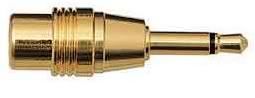
u might just only need this:
user posted image
just looking for this type: a Male 3.5mm Mono Poe to Female RCA

connect the above to the Flexijack: [Line In / Microphone In / Optical Outš via shared 3.5mm mini jack]
there's a part in the creative control call "digital out" or "pass through only"...hv to enable this...
Useful Link

and you're done...

This post has been edited by jerren: Aug 28 2007, 02:35 AM
jerren
post Aug 28 2007, 11:25 PM

Enthusiast
*****
Senior Member
888 posts

Joined: Aug 2005
From: Segambut


QUOTE(madballs @ Aug 28 2007, 09:41 AM)
i read up on the creative webbie that it won't work on my card, as my stupid flexijack can only have optical out and not optical I/O .
hmm...so meaning, i can only use coax cable and not optical cable to get digital from my stupid card ?
another thing, my soundcard can decode DD5.1 and DTS, so is the z5500 decoder better or my soundcard has a better decoder ?
also, if playing mp3, will it makes a difference when i play it in digital or analog signal ?
*
well, optical and coax are not much different....the thing is it output digital source, that's the point...
well for me, decode with Z5500 sounds better, especially watching DVD....
u should give it a try....
jerren
post Sep 4 2007, 03:25 AM

Enthusiast
*****
Senior Member
888 posts

Joined: Aug 2005
From: Segambut


QUOTE(leslie0880 @ Sep 3 2007, 03:27 AM)
all i jus let out my X-Fi+Digital I/O Moduler
now wanna find 1 sound card for my Z5500
so got any comment?
Asus Xonar D2 ok?
very like tat card!
*
Xonar D2??wow...that is an expensive card...
IMO, if use Digital out, the sound card is just act as a brigde [as an example]
passing through the signal...
[but a good DAC&ADC sound card is also important..]

QUOTE(nonoking @ Sep 3 2007, 10:47 AM)
z5500 + prodigy 7.1 LT ok or not?
how to connect to sound card by using optical cable?
*
im using prodigy 7.1, but not LT vers...
the SC is good for audio..
here's some guide for how to connect..
user posted image
Pic from: http://www.nexpc.co.kr
user posted image
Pic From: http://www.pcwelt.de
jerren
post Sep 4 2007, 06:18 PM

Enthusiast
*****
Senior Member
888 posts

Joined: Aug 2005
From: Segambut


ur on gaming??DVD??music??
jerren
post Sep 6 2007, 02:41 AM

Enthusiast
*****
Senior Member
888 posts

Joined: Aug 2005
From: Segambut


EAX 5.0 are only good for games..
CMSS 3D???ooh...pls..this aint help in any kind of music...
especially for MP3.. [totally no-no for me]
try to get those Envy24HT chip based card for music...

as for dvd [if u plan to decode by the Z5500] the signal is just passing through, it doesn't count on what sound card that u're using...
even on-board digital out also can do that [i've try that b4, nothing's different for me..]

as for the Vista problem, isn't there's a 3rd party software to overcome it ord???something call Alchemy...
[sorry cos i din follow much in this issue coz im not using Creative card or Vista...]

well, i doesn't see any reason for u to change thesound card unless u got extra money that u've got no place to spend...
hehe..take it easy bro, no offence...money is hard to earn...

7 Pages < 1 2 3 4 5 > » Top
 

Change to:
| Lo-Fi Version
0.0445sec    0.68    7 queries    GZIP Disabled
Time is now: 11th December 2025 - 11:14 PM