

btw my laptop is 4736G. monitor AOC e2239Fwh, the monitor is not even can be touch screen eventho the spec in the website saying so. bought from a forummer, stilll under warranty.
dear all sifu's, help pls~ pm me if dun want to spoil the tered.

Dual Monitor!, Share ur dual-monitor experience!
|
|
 Feb 16 2012, 09:15 AM Feb 16 2012, 09:15 AM
|
 
Senior Member
760 posts Joined: Mar 2011  
|
Here im back, i got my external Monitor for my laptop dy, but cannot set it to full 1080res, the max in the laptop is 1366x768 only, i belip all u know how to customise that.
btw my laptop is 4736G. monitor AOC e2239Fwh, the monitor is not even can be touch screen eventho the spec in the website saying so. bought from a forummer, stilll under warranty. dear all sifu's, help pls~ pm me if dun want to spoil the tered. |
|
|
|
|
|
Feb 19 2012, 11:29 AM
|

Junior Member
145 posts Joined: Apr 2010 From: Melaka
|
in my opinion ... 1 monitor is better
 just saying just saying |
|
|
Feb 19 2012, 01:26 PM
|

Junior Member
51 posts Joined: Feb 2012
|
QUOTE(' or 1=1 -- @ Feb 2 2012, 11:04 AM) 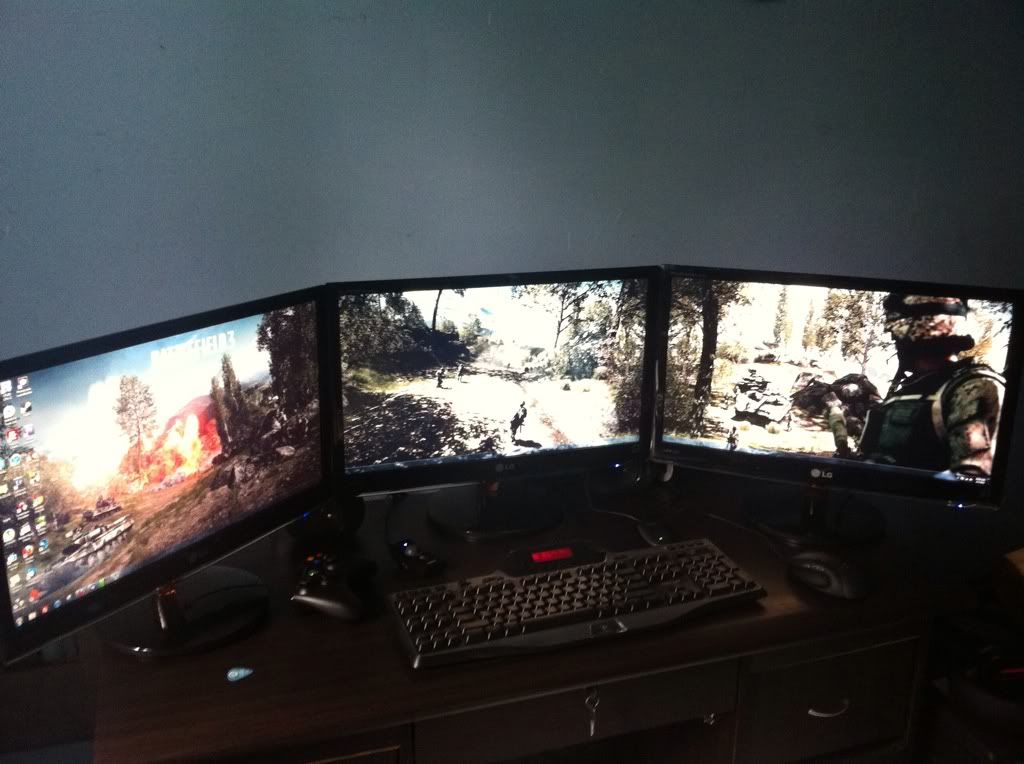 driving and fps games are really great with multi monitors  5760 x 1080 wallpapers are kinda limited tho. 5760 x 1080 wallpapers are kinda limited tho. Added on February 19, 2012, 1:29 pm QUOTE(emohardstyle @ Feb 19 2012, 11:29 AM) in my opinion ... 1 monitor is better If i had extra money then i will make more display just sayingThis post has been edited by ALBHmiri: Feb 19 2012, 01:29 PM |
|
|
Feb 19 2012, 09:26 PM
|

Senior Member
565 posts Joined: Jul 2007
|
i do own 42 inch plasma tv, but maybe will sell it for dual monitors, but not for gaming.
It is for design. Easy for tracing and etc etc. What do u guys think? is it worth it? The monitor that im going to look for is the AOC 23 inch IPS panel. Opinion? |
|
|
Feb 20 2012, 07:28 AM
|

Senior Member
1,039 posts Joined: Nov 2007 From: Penang Island Status: No Solidarity No Corruption 
|
I tried DVI, VGA and even TV output but the resolutions is same what we did only once desktop cannot have different 3 types of resolutions
|
|
|
Feb 21 2012, 07:34 PM
|

Senior Member
1,160 posts Joined: Jun 2011 From: Sabah
|
QUOTE(visualfoley @ Feb 19 2012, 09:26 PM) i do own 42 inch plasma tv, but maybe will sell it for dual monitors, but not for gaming. The choice for IPS panel is right IMO. But what brand to go i leave it to the sifu-s here. Good luck It is for design. Easy for tracing and etc etc. What do u guys think? is it worth it? The monitor that im going to look for is the AOC 23 inch IPS panel. Opinion? |
|
|
|
|
|
Feb 28 2012, 03:20 PM
|

Junior Member
477 posts Joined: Feb 2012 From: Kuala Selangor - Shah Alam 
|
QUOTE(' or 1=1 -- @ Feb 2 2012, 11:04 AM) driving and fps games are really great with multi monitors 5760 x 1080 wallpapers are kinda limited tho. |
|
|
Feb 28 2012, 10:19 PM
|

Junior Member
13 posts Joined: Aug 2011
|
hye..
i want to ask something... i have tried dual monitor...i'm using acer lcd both 17" vga... my problem is when i use vga to dvi coverter for my 2nd monitor it don't detect but it's okay when i use my mobo vga for 2nd monitor... my GC is asus nvidia GT 430..i have updated the latest driver....  thanx 4 all who answer my question.. |
|
|
Feb 29 2012, 07:22 AM
|
|
Senior Member
1,039 posts Joined: Nov 2007 From: Penang Island Status: No Solidarity No Corruption
|
I've tried before but resolutions only with 1 setting cannot set different monitor/tv different resolutions?
|
|
|
Mar 6 2012, 01:59 PM
|
|
Junior Member
477 posts Joined: Feb 2012 From: Kuala Selangor - Shah Alam
|
My friends said if u wanna do multiple monitor is better u get's the amd gc but someone said nvidia is much better if u wanna do for graphic work but not for multiple. It's true?
|
|
|
Mar 6 2012, 03:10 PM
|

Senior Member
789 posts Joined: Sep 2011 
|
QUOTE(Uncle Ron @ Mar 6 2012, 01:59 PM) My friends said if u wanna do multiple monitor is better u get's the amd gc but someone said nvidia is much better if u wanna do for graphic work but not for multiple. It's true? Depends. AMD's Eyefinity is good for more than two monitors on one card due to it using a DisplayPort connector that has it's own clock, something that nVidia still don't have. Not only that, each monitor in an Eyefinity setup is independent thus you can use monitors with varying size or resolutions and mix them up and it will still work. Nvidia on the other hand could only support two monitors per card, and 3 if you are using SLi (nVision mode). The problem with nVision is that you can only use 3 exact same monitors, and they are configured as one large monitor instead of 3 separate ones, something that for me is an issue as I don't want one large space, I just want multiple workspaces. for graphic work, it's due to popular graphic softwares like the ones from Adobe are optimised to use nVidia's CUDA technology. But unless you are doing a very large graphic work or video editing involving a lot of HD vidz, the difference can't be detected in real life. This post has been edited by DrBlueBox: Mar 6 2012, 03:11 PM |
|
|
Mar 6 2012, 03:24 PM
|
|
Junior Member
477 posts Joined: Feb 2012 From: Kuala Selangor - Shah Alam
|
QUOTE(DrBlueBox @ Mar 6 2012, 03:10 PM) Depends. AMD's Eyefinity is good for more than two monitors on one card due to it using a DisplayPort connector that has it's own clock, something that nVidia still don't have. Not only that, each monitor in an Eyefinity setup is independent thus you can use monitors with varying size or resolutions and mix them up and it will still work. Owh, but if i do hybrid with amd & nvidia can i get advantage for both gc like amd for different size monitor and nvidia for cuda? Nvidia on the other hand could only support two monitors per card, and 3 if you are using SLi (nVision mode). The problem with nVision is that you can only use 3 exact same monitors, and they are configured as one large monitor instead of 3 separate ones, something that for me is an issue as I don't want one large space, I just want multiple workspaces. for graphic work, it's due to popular graphic softwares like the ones from Adobe are optimised to use nVidia's CUDA technology. But unless you are doing a very large graphic work or video editing involving a lot of HD vidz, the difference can't be detected in real life.  |
|
|
Mar 6 2012, 03:27 PM
|

Junior Member
481 posts Joined: Mar 2009
|
Sharing my setup at work..
 |
|
|
|
|
|
Mar 6 2012, 03:48 PM
|
|
Junior Member
477 posts Joined: Feb 2012 From: Kuala Selangor - Shah Alam
|
QUOTE(poyol @ Mar 6 2012, 03:27 PM) Sharing my setup at work.. I see DELL 17 INCH LCD on right! am i right?  |
|
|
Mar 6 2012, 03:48 PM
|
|
Senior Member
789 posts Joined: Sep 2011
|
QUOTE(Uncle Ron @ Mar 6 2012, 03:24 PM) Owh, but if i do hybrid with amd & nvidia can i get advantage for both gc like amd for different size monitor and nvidia for cuda? Yes. I am doing just that actually. GTX570 SLi --> main gaming monitor/Adobe Premiere, HD5450 --> 3 other monitors |
|
|
Mar 6 2012, 03:57 PM
|
|
Junior Member
477 posts Joined: Feb 2012 From: Kuala Selangor - Shah Alam
|
QUOTE(DrBlueBox @ Mar 6 2012, 03:48 PM) Yes. I am doing just that actually. GTX570 SLi --> main gaming monitor/Adobe Premiere, HD5450 --> 3 other monitors if I do that is it will take a lot of electricity? Scared my electricity bil will extremely high later...  |
|
|
Mar 6 2012, 04:03 PM
|
|
Senior Member
789 posts Joined: Sep 2011
|
QUOTE(Uncle Ron @ Mar 6 2012, 03:57 PM) if I do that is it will take a lot of electricity? Scared my electricity bil will extremely high later... Not really, since the HD5450 is not a powerful/power hungry card. |
|
|
Mar 6 2012, 04:04 PM
|

Senior Member
902 posts Joined: Mar 2009
|
if u want more monitors together with awesomeness, u need the ooomph from GCs and sacrifice more money into the bills lol
|
|
|
Mar 6 2012, 04:09 PM
|
|
Junior Member
477 posts Joined: Feb 2012 From: Kuala Selangor - Shah Alam
|
QUOTE(DrBlueBox @ Mar 6 2012, 04:03 PM) Not really, since the HD5450 is not a powerful/power hungry card. Owh, but i already own AMD HD 6870 151 watt gc so which one nVidia gc i need to buy for low power consumption but still great! Added on March 6, 2012, 4:29 pm QUOTE(Jinster @ Mar 6 2012, 04:04 PM) if u want more monitors together with awesomeness, u need the ooomph from GCs and sacrifice more money into the bills lol U r right... LoL... Actually i'm not doin' for awesomeness but for large space... Haha... This post has been edited by Uncle Ron: Mar 6 2012, 04:29 PM |
|
|
Mar 8 2012, 11:14 AM
|

Junior Member
68 posts Joined: Sep 2008
|
I use 2 monitors... when working one will be where all the tutorial/reference/instructions and other one is actual working space... save me a lot of time and very efficient.
sorry didn't read any other posts, just responding to the thread title. |
| Change to: |  0.0293sec 0.0293sec
 0.85 0.85
 6 queries 6 queries
 GZIP Disabled GZIP Disabled
Time is now: 17th December 2025 - 07:16 PM |
 Quote
Quote