

i think the SNR is quite low here..


Streamyx Things to do / Self-investigation (streamyx only), *updated - what to do when mis-capped
|
|
 Oct 17 2006, 09:26 PM Oct 17 2006, 09:26 PM
|
 
Senior Member
1,788 posts Joined: Jan 2003 From: 冰城  
|
plese help to check my ADLS modem settings:
i think the SNR is quite low here..
|
|
|
|
|
|
Oct 31 2006, 10:27 PM
|

Junior Member
154 posts Joined: Jan 2003 From: Selangor 
|
This is my info. is it ok?
|
|
|
Nov 5 2006, 12:39 PM
|

Senior Member
7,173 posts Joined: Jan 2003 From: PCH
|
is my SnR ok? i wonder how to read it as i saw on most of you guys screenies, so different...
  |
|
|
Nov 5 2006, 02:55 PM
|

Senior Member
657 posts Joined: May 2005
|
[attachmentid=151047]
Guys...please help me check it out...My connection speed isn't constant. |
|
|
Nov 5 2006, 03:13 PM
|
 
Staff
12,090 posts Joined: Dec 2004 From: Malaysia
|
Isn't constant but when downloading is the speed consistent enough ?
|
|
|
Nov 6 2006, 12:58 AM
|
|
Senior Member
657 posts Joined: May 2005
|
nope...you can see my SNR Margin and local line attn.freaking hell!!!only like now i managed to download at 110kbps from emule.
|
|
|
|
|
|
Nov 7 2006, 06:21 PM
|

Junior Member
292 posts Joined: Nov 2006
|
 why streamyx cap me at 2mbps when i subscribed 1m  btw, how to activate the nat as i can't connect to ftp ( port 21 ) ? please help me btw, how to activate the nat as i can't connect to ftp ( port 21 ) ? please help me  ... thanks ... thanks  |
|
|
Nov 27 2006, 11:25 AM
|

Junior Member
105 posts Joined: Sep 2005
|
my modem is also zte 831
but i cant see any page with DSL parameter i followed your steps. WAN -> DSL -> DSL param. no see DSL. section Status -> ADSL line got la. line status as seen here got these. also no see SNR margin . ADSL Line Status Current adsl line status is as the below. Line Mode G.dmt Line State Show Time Latency Type Fast Line Up Time Duration 05:21:14:40 Line Coding Trellis On Line Up Count 4 Statistics Downstream Upstream Line Rate 512 Kbps 256 Kbps Attainable Line Rate 1248 Kbps 896 Kbps Noise Margin 13.9 dB 24.0 dB Line Attenuation 63.0 dB 31.5 dB Output Power 11.8 dBm 15.4 dBm K 17 9 R 0 0 S 1 1 D 1 1 Super Frames 29909812 29909810 Super Frame Errors 2314 4 RS Words 0 0 RS Correctable Errors 0 0 RS Uncorrectable Errors 0 0 HEC Errors 718 0 OCD Errors 0 0 LCD Errors 0 0 ES Errors 0 0 thanks! |
|
|
Dec 9 2006, 07:52 PM
|

Junior Member
99 posts Joined: Mar 2005 From: KL
|
Im under streamyx 1mb plan. Here is my DSL Status (Huawei MT800 Adsl Router Modem)
Operational Status: Showtime/Data Standard: G.dmt DSL Version: Y.1.28.150 / 2.1.050224e Latency: Fast UpStream DownStream Speed: 512 Kbps Speed: 2048 Kbps SNR Margin: 20.0db SNR Margin: 32.5db Line Attenuation: 0.0db Line Attenuation: 9.0db CRC Error: 8 CRC Error: 2 FEC Error: 0 FEC Error: 0 I believe I should be getting pretty good connection speed right? I did the streamyx connection test. It shown me perfect 1mb connection. However, when it comes to downloading softwares, files (not BitTorrent) .. My connection only manage to reach max 15kB/s most of the time. I download a 19mb antivirus software from official website took me more than 1 hour. May I know what are the possibilities of this slow connection? Just try out my connection at testmy.net :::.. Download Stats ..::: Download Connection is:: 60 Kbps about 0.1 Mbps (tested with 97 kB) Download Speed is:: 7 kB/s Tested From:: http://testmy.net/ (Server 1) Test Time:: 2006/12/09 - 5:08am Bottom Line:: 1X faster than 56K 1MB Download in 146.29 sec Tested from a 97 kB file and took 13.099 seconds to complete Download Diagnosis:: May need help : running at only 14.56 % of your hosts average (net.my) D-Validation Link:: http://testmy.net/stats/id-T4KVZLI1W User Agent:: Mozilla/4.0 (compatible; MSIE 6.0; Windows NT 5.1; SV1; .NET CLR 1.1.4322) [!] This post has been edited by Mascon: Dec 9 2006, 08:09 PM |
|
|
Dec 10 2006, 01:23 PM
|
|
Senior Member
1,991 posts Joined: Apr 2006 From: Kuching
|
QUOTE(Mascon @ Dec 9 2006, 07:52 PM) Im under streamyx 1mb plan. Here is my DSL Status (Huawei MT800 Adsl Router Modem) Testing the speed at tmnet website is the only official version which they accept if you want to complain to them. As long as you are accessing websites within Malaysia, that is the speed you will get (fast).Operational Status: Showtime/Data Standard: G.dmt DSL Version: Y.1.28.150 / 2.1.050224e Latency: Fast UpStream DownStream Speed: 512 Kbps Speed: 2048 Kbps SNR Margin: 20.0db SNR Margin: 32.5db Line Attenuation: 0.0db Line Attenuation: 9.0db CRC Error: 8 CRC Error: 2 FEC Error: 0 FEC Error: 0 I believe I should be getting pretty good connection speed right? I did the streamyx connection test. It shown me perfect 1mb connection. However, when it comes to downloading softwares, files (not BitTorrent) .. My connection only manage to reach max 15kB/s most of the time. I download a 19mb antivirus software from official website took me more than 1 hour. May I know what are the possibilities of this slow connection? Just try out my connection at testmy.net :::.. Download Stats ..::: Download Connection is:: 60 Kbps about 0.1 Mbps (tested with 97 kB) Download Speed is:: 7 kB/s Tested From:: http://testmy.net/ (Server 1) Test Time:: 2006/12/09 - 5:08am Bottom Line:: 1X faster than 56K 1MB Download in 146.29 sec Tested from a 97 kB file and took 13.099 seconds to complete Download Diagnosis:: May need help : running at only 14.56 % of your hosts average (net.my) D-Validation Link:: http://testmy.net/stats/id-T4KVZLI1W User Agent:: Mozilla/4.0 (compatible; MSIE 6.0; Windows NT 5.1; SV1; .NET CLR 1.1.4322) [!]  However, accessing websites outside the country is a different story as can be seen by your speedtest result from www.testmy.net. Have you tried to use a proxy server? I use it for browsing and downloading (not BT) and speeds are usually above 100kBs. Also install a download manager (e.g. Download Accelerator Plus) which connects to the same server/file with more connections thus increasing your download speed. A 19Mb file shouldn't take longer than 5 minutes on a 1mb line. Read below for proxy thread http://forum.lowyat.net/index.php?act=ST&f=126&t=221966 This post has been edited by Xybirium: Dec 10 2006, 01:24 PM |
|
|
Dec 10 2006, 03:00 PM
|
|
Junior Member
99 posts Joined: Mar 2005 From: KL
|
QUOTE(Xybirium @ Dec 10 2006, 01:23 PM) Testing the speed at tmnet website is the only official version which they accept if you want to complain to them. As long as you are accessing websites within Malaysia, that is the speed you will get (fast). However, accessing websites outside the country is a different story as can be seen by your speedtest result from www.testmy.net. Have you tried to use a proxy server? I use it for browsing and downloading (not BT) and speeds are usually above 100kBs. Also install a download manager (e.g. Download Accelerator Plus) which connects to the same server/file with more connections thus increasing your download speed. A 19Mb file shouldn't take longer than 5 minutes on a 1mb line. Read below for proxy thread http://forum.lowyat.net/index.php?act=ST&f=126&t=221966 Thankyou so much dude. After using proxies.. I've got this connection:::.. Download Stats ..::: Download Connection is:: 455 Kbps about 0.5 Mbps (tested with 579 kB) Download Speed is:: 56 kB/s Tested From:: http://testmy.net/ (Server 1) Test Time:: 2006/12/09 - 11:58pm Bottom Line:: 8X faster than 56K 1MB Download in 18.29 sec Tested from a 579 kB file and took 10.425 seconds to complete Download Diagnosis:: Looks Great : 10.44 % faster than the average for host (net.my) Currently using this proxies 219.93.175.66:3128 Really appreciate your help.  |
|
|
Dec 10 2006, 11:06 PM
|
|
Senior Member
1,991 posts Joined: Apr 2006 From: Kuching
|
QUOTE(Mascon @ Dec 10 2006, 03:00 PM) Thankyou so much dude. After using proxies.. I've got this connection:::.. Download Stats ..::: Download Connection is:: 455 Kbps about 0.5 Mbps (tested with 579 kB) Download Speed is:: 56 kB/s Tested From:: http://testmy.net/ (Server 1) Test Time:: 2006/12/09 - 11:58pm Bottom Line:: 8X faster than 56K 1MB Download in 18.29 sec Tested from a 579 kB file and took 10.425 seconds to complete Download Diagnosis:: Looks Great : 10.44 % faster than the average for host (net.my) Currently using this proxies 219.93.175.66:3128 Really appreciate your help.  |
|
|
Dec 14 2006, 06:36 PM
|

Senior Member
766 posts Joined: Jul 2006
|
my internet disconnects very frequently.. i'm using the zte modem. much of the time, the DSL, LAN LED light dies off.. then the PWR LED dies after a while. after once in a while, the light comes back and i'm able to login for a while before it disconnects again.. the PWR LED goes on and off..
|
|
|
|
|
|
Dec 17 2006, 10:05 AM
|
|
Senior Member
657 posts Joined: May 2005
|
QUOTE(vetkin_gray @ Dec 14 2006, 06:36 PM) my internet disconnects very frequently.. i'm using the zte modem. much of the time, the DSL, LAN LED light dies off.. then the PWR LED dies after a while. after once in a while, the light comes back and i'm able to login for a while before it disconnects again.. the PWR LED goes on and off.. Have you tried taking the telephone receiver off the hook and try to on your modem again? |
|
|
Dec 17 2006, 04:08 PM
|
 
Elite
1,319 posts Joined: Jan 2003 From: Serdang Raya, Malaysia
|
Hello and good day, how do I check my settings in a netgear router? Thank you.
Using a Netgear RP614v3 Im using a modem that looks like Aztech 600E but it's just a modem. This post has been edited by Kheez: Dec 17 2006, 04:11 PM |
|
|
Dec 20 2006, 01:06 AM
|

Senior Member
1,451 posts Joined: Jul 2005
|
Hi there i'm using Aztech modem DSL 305E how do i check those data ? I try to type 10.0.0.2 at internet explorer but couldn't get in
 |
|
|
Dec 20 2006, 02:50 AM
|

Senior Member
9,572 posts Joined: Jun 2005 From: Terengganu Darul Iman
|
QUOTE(Daniel89 @ Dec 20 2006, 02:06 AM) Hi there i'm using Aztech modem DSL 305E how do i check those data ? I try to type 10.0.0.2 at internet explorer but couldn't get in To configure your router/modem, you need to login to the router/modem using a web browser.1. Connect the router/modem as shown in the manual. 2. Launch your web browser. 3. Type in 10.0.0.2 at the Address bar and press Enter key. (Note: 10.0.0.2 is the default IP address for Router). 4. You will prompt to login to the router. Type admin for the User name and leave the password field empty. Click OK to continue. login with admin mode, and then try to go for adsl status, 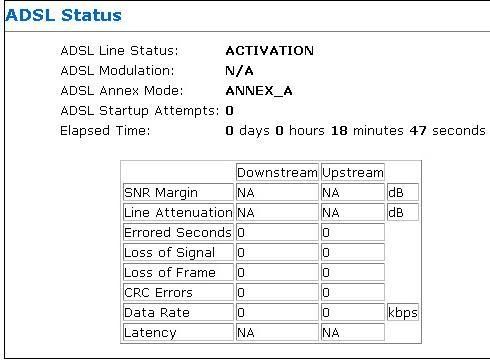 This post has been edited by scorps: Dec 20 2006, 02:51 AM |
|
|
Dec 20 2006, 10:29 AM
|
|
Senior Member
1,451 posts Joined: Jul 2005
|
After finish check it just close it can already right ?
 |
|
|
 Jan 1 2007, 02:01 AM Jan 1 2007, 02:01 AM
|
|
Junior Member
90 posts Joined: Jan 2006
|
This is my modem status:
ADSL modem Status Item Information Firmware version 13.9.45 Line Type Fast Mode Line Coding ITU G.DMT mode Line Status Showtime ADSL Link Time 00:36:34 Item DownStream UpStream Channel Bit Rate(Kbps) 320 512 Relative Capacity Occupation(%) 95 90 Noise Margin(dB) 5.0 8.0 Output Power(dBm) 18.5 12.0 Attenuation(dB) 40.0 24.0 ======= - I have frequently facing disconnection most of the time - I subscibe to streamyx 1mb line but the speed is lower than what i expected - I am currently using Level 1 All in one wireless modem - I have called up streamyx regarding the issue earlier and then they check for me - Some telekom guy check my line using some special tools and mentioned that there is not problem at all? = I am still facing the similar issue.  - What should i do? Can anyone provide me with some useful solution to resolve it? javascript:emoticon(':x') smilie |
|
|
Jan 1 2007, 01:24 PM
|

Senior Member
598 posts Joined: Sep 2004
|
Modem Status
Link Status Connected Us Rate (Kbps) 128 Ds Rate (Kbps) 1024 US Margin 29 DS Margin 31 Modulation MMODE LOS Errors 0 DS Line Attenuation 13 US Line Attenuation 8 Path Mode Interleaved Modem : Aztech DSL 600EU Upload speed jadi camtue sjak September 2006, sbelum nih 1024/512. Adehh 4 bulan rugi sbb Upload Slow, nak maintain ratio torrent pun susah. Last call pd Oktober & last action ada technician setting port jadi 512/256. Lpas setting 512/256 terus down xleh buat ape2, 1 mggu gaks down. Bila diorang reset balik port jd 1024/128 baru leh surfing dolod etc cam biasa. So camner nak atasi? Aku malas dah nak call sbb klo diorang silap setting pulak xleh guna internet laaa... Hampeh punya technician..  |
| Change to: |  0.0208sec 0.0208sec
 1.30 1.30
 6 queries 6 queries
 GZIP Disabled GZIP Disabled
Time is now: 19th December 2025 - 07:21 AM |
 Quote
Quote