

Attached thumbnail(s)

Streamyx Things to do / Self-investigation (streamyx only), *updated - what to do when mis-capped
|
|
 Oct 16 2005, 12:42 PM Oct 16 2005, 12:42 PM
|
 
Senior Member
702 posts Joined: Jan 2003 From: Singapore/KL/Ipoh  
|
can anyone help me bout this? i subscribe the 1mb package and get this...
Attached thumbnail(s)
|
|
|
|
|
|
Oct 17 2005, 08:51 AM
|

Junior Member
135 posts Joined: Jun 2005
|
GUYsssSsSsssSSssSs...... Help!!!!!!!!!!!!
My streamyx a lil coo choo...... I conncting via wi-fi at home. I'm using a modem as well. Problem: One day it works fine... the next....... it'll say low or rescrited connectivity. Then cannot surf... cannot anything.... |
|
|
Oct 17 2005, 09:35 AM
|

Senior Member
1,083 posts Joined: Jan 2003 From: "New" Klang Road, Kuala Lumpur
|
QUOTE(justints @ Oct 17 2005, 08:51 AM) GUYsssSsSsssSSssSs...... Help!!!!!!!!!!!! what is ur router brand and model?My streamyx a lil coo choo...... I conncting via wi-fi at home. I'm using a modem as well. Problem: One day it works fine... the next....... it'll say low or rescrited connectivity. Then cannot surf... cannot anything....  i face this problem using baffalo router as well... RAIN FRIED MY D-LINK!!!  |
|
|
Oct 23 2005, 12:43 AM
|

Senior Member
2,108 posts Joined: Jan 2003
|
i'm a 1MB subscriber and i got this when i went through the modem page
 clearly i'm being mis-capped so lets say that i have already made a report... do i still need to flush my DNS to refresh the latest speed or does it refresh by itself? |
|
|
Oct 23 2005, 10:44 PM
|

Elite
1,701 posts Joined: Jan 2003 From: Setia Alam
|
Hi i using the problink huricane with router built in but no firewall. There days I had difficulty accesing the router and worse when doing transfer files via network it is very slow. Can anyone suggest what happen to my network?
I had a very bad SNR: downstream - 10.5 and upstream - 15.0 Linte Att: downstream - 42.4 and upstream - 26.0 |
|
|
Oct 25 2005, 12:25 AM
|

Senior Member
1,088 posts Joined: Jan 2003 From: xxxBarcodexxx Status: Shuffling 
|
i'm using 1 mb package n i got this for the streamyx test miscapped, is it? need advise, thanks 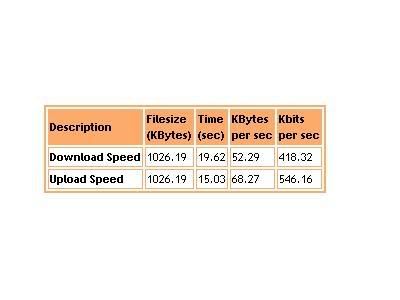 |
|
|
|
|
|
Oct 25 2005, 02:18 PM
|

Junior Member
178 posts Joined: Oct 2005 From: Johor Bahru 
|
QUOTE(Ahlok @ Oct 25 2005, 12:25 AM) i'm using 1 mb package SINGLE MODEM CHECKED.. if router find ur own router guide..n i got this for the streamyx test miscapped, is it? need advise, thanks erm... ok if u r using tmnet free modem aztech dsl300, open browser go to 192.168.1.1, username admin pass admin check DSL page.. if 1 mb datarate should be 1024 mbps download 512 upload, if true ur packages capped correctly. if not bring mortar go TMnet kedai telekom or clickers LOL This post has been edited by izzani: Oct 25 2005, 02:19 PM |
|
|
Oct 25 2005, 02:23 PM
|
|
Junior Member
178 posts Joined: Oct 2005 From: Johor Bahru
|
QUOTE(narutokun83 @ Oct 23 2005, 12:43 AM) i'm a 1MB subscriber and i got this when i went through the modem page Should be refresh itself. Obviously miscapped. Call 1515 make report. If not go report at kedai telekom, ask them make sure fixed today. No action go tmnet bring yellow form (grade A goverment officer) sure come to ur house before u arrived after report made!clearly i'm being mis-capped so lets say that i have already made a report... do i still need to flush my DNS to refresh the latest speed or does it refresh by itself? This post has been edited by izzani: Oct 25 2005, 02:27 PM |
|
|
Oct 25 2005, 02:27 PM
|
|
Junior Member
178 posts Joined: Oct 2005 From: Johor Bahru
|
QUOTE(smwah @ Oct 23 2005, 10:44 PM) Hi i using the problink huricane with router built in but no firewall. There days I had difficulty accesing the router and worse when doing transfer files via network it is very slow. Can anyone suggest what happen to my network? 1. Check if u install personal firewall that blocked networkI had a very bad SNR: downstream - 10.5 and upstream - 15.0 Linte Att: downstream - 42.4 and upstream - 26.0 2. Scan for virus and spyware 3. Try ping ur router. should be less than <1ms than ok 4. Check ur Lan cable.. make sure no wire stuck behind door 5. Make ur home-network wizard again. 6. Cannot? reset ur router to factory setting and start from beginning. PPP setting. 7. Last test with different PCs. Try and error. |
|
|
Oct 25 2005, 06:42 PM
|

Senior Member
885 posts Joined: Apr 2005
|
SNR
downstream =29dB upstream = 30dB Line Attenuation downstream = 17dB upstream = 2dB im running on 512k package... and im getting frequent timeouts... but nvr dc b4.... how? is it ok? |
|
|
Oct 25 2005, 10:20 PM
|
|
Senior Member
885 posts Joined: Apr 2005
|
QUOTE(osxchd @ Oct 17 2005, 09:35 AM) what is ur router brand and model? upgrade your router.. and restart the device... then try..i face this problem using baffalo router as well... RAIN FRIED MY D-LINK!!! |
|
|
Oct 25 2005, 11:11 PM
|

Junior Member
211 posts Joined: Jan 2003 From: Kuala Lumpur
|
QUOTE(strynch @ Jun 15 2005, 03:47 PM) downstream is ok i guess.. wanna ask... his LATENCY and mine what is the DIFF...but my upstream?   his one is FAST while my one is INTERLEAVED... some guru's explain...  This post has been edited by briangan: Oct 25 2005, 11:16 PM |
|
|
Oct 27 2005, 03:42 PM
|

Senior Member
1,104 posts Joined: Sep 2004 From: NUS,Singapore 
|
the latency is the delay between the data packets transfer from the internet to your computer. Actually,it is not noticable when surfing but the latency only comes into play for online gaming like Counter Strike, which a mili second of delay can cause inaccurate bullet registration. Don't worry about your latency, it is normal . My 1mbps is also on interleaved
|
|
|
|
|
|
Oct 28 2005, 12:11 AM
|

Junior Member
225 posts Joined: Oct 2005
|
hello...I am using the same modem....
My house now connect to streamyx by using this zxte831 modem and 1 switch.. I found a problem tat always dc la... Can u teach me how to set the modem page???I never set it,i just enter username and password to connect,other thing i do not touch. |
|
|
 Oct 28 2005, 07:01 AM Oct 28 2005, 07:01 AM
|

Senior Member
1,238 posts Joined: Sep 2005 From: Kota Bharu - Klang Valley
|
Need help, newbie here how was my connection status? is it too bad or? how to solve this?
[attachmentid=77140][attachmentid=77141] This post has been edited by xjukie: Oct 28 2005, 07:04 AM |
|
|
Oct 28 2005, 02:11 PM
|
|
Senior Member
885 posts Joined: Apr 2005
|
QUOTE(xjukie @ Oct 28 2005, 07:01 AM) Need help, newbie here how was my connection status? is it too bad or? how to solve this? waa.. almost same as mine but my SNR is higher.. ermm... do u get any dc or timeouts?[attachmentid=77140][attachmentid=77141] |
|
|
Oct 28 2005, 02:18 PM
|
|
Senior Member
1,238 posts Joined: Sep 2005 From: Kota Bharu - Klang Valley
|
QUOTE(freako @ Oct 28 2005, 02:11 PM) waa.. almost same as mine but my SNR is higher.. ermm... do u get any dc or timeouts? Rite now, connection ok no dc or timeouts. Some say that if SNR Margin the higher the better and Line Attenuation the below is much better rite? newbie here, correct me if im wrong and help me to solve this probs. thanks |
|
|
Oct 28 2005, 04:43 PM
|

Senior Member
1,616 posts Joined: Jan 2005
|
QUOTE(YSHP @ Oct 16 2005, 12:42 PM) can anyone help me bout this? i subscribe the 1mb package and get this... Atleast you've got a nice upstream speed. The fastest way to solve the prob is contact your contractor. If you don't have one call the Tmnut hotline. |
|
|
Oct 28 2005, 04:44 PM
|
|
Senior Member
885 posts Joined: Apr 2005
|
yes u r rite...
my line sux... first day i get streamyx ( like 2 weeks ago) untill now still got timeout.. eeeeSSSHH!! |
|
|
Oct 28 2005, 04:47 PM
|
|
Senior Member
1,616 posts Joined: Jan 2005
|
QUOTE(izzani @ Oct 25 2005, 02:18 PM) SINGLE MODEM CHECKED.. if router find ur own router guide.. Upload 512kbps is normal???erm... ok if u r using tmnet free modem aztech dsl300, open browser go to 192.168.1.1, username admin pass admin check DSL page.. if 1 mb datarate should be 1024 mbps download 512 upload, if true ur packages capped correctly. if not bring mortar go TMnet kedai telekom or clickers LOL |
| Change to: |  0.0184sec 0.0184sec
 0.29 0.29
 6 queries 6 queries
 GZIP Disabled GZIP Disabled
Time is now: 15th December 2025 - 01:49 PM |
 Quote
Quote