

 Back to home, found the drpbox sycronizing 1721 files
found that someone extract the firmware, Ndrive, Papago into local folder. Then he delete the rar file

Samsung Galaxy 5 GT-I5503(V2 Froyo-ing Now), Froyo, pls come to papa
|
|
 Dec 9 2010, 07:16 PM Dec 9 2010, 07:16 PM
|
 
All Stars
13,681 posts Joined: Mar 2006  
|
Back to home, found the drpbox sycronizing 1721 files found that someone extract the firmware, Ndrive, Papago into local folder. Then he delete the rar file |
|
|
|
|
|
Dec 9 2010, 07:36 PM
|

Junior Member
361 posts Joined: Nov 2010
|
QUOTE(mc_guiver @ Dec 9 2010, 05:56 PM) 1.this is not official firmware thz for ur information2.you can refer on this page http://forum.xda-developers.com/showthread.php?t=781149 or you can back a few pages..you will find the giude 3.it stable but a few bug on this release  i now consider want to upgrade myself or not bcz they said when u upgrade it will become no warranty for the phone when the official firmware will be release |
|
|
Dec 9 2010, 07:36 PM
|
|
Senior Member
658 posts Joined: Feb 2007
|
QUOTE(StupidGuyPlayComp @ Dec 9 2010, 07:16 PM) Back to home, found the drpbox sycronizing 1721 filesfound that someone extract the firmware, Ndrive, Papago into local folder. Then he delete the rar file since it can show the time when it was deleted.  it shld hv a way to show which user deleted the file. it shld hv a way to show which user deleted the file. |
|
|
Dec 9 2010, 07:38 PM
|

Junior Member
60 posts Joined: Nov 2010 From: Seremban/KL
|
QUOTE(StupidGuyPlayComp @ Dec 9 2010, 07:16 PM) Back to home, found the drpbox sycronizing 1721 filesfound that someone extract the firmware, Ndrive, Papago into local folder. Then he delete the rar file From 226mb it turns to 693mb.. there goes my bandwith.. This post has been edited by khaez: Dec 9 2010, 07:39 PM |
|
|
Dec 9 2010, 08:10 PM
|

Junior Member
287 posts Joined: Jan 2007
|
Froyo users. Gps has already been optimised. No need to change settings in*#*# menu. Wrong settings will get ur gps jumping around. Hehe
|
|
|
Dec 9 2010, 08:17 PM
|

Junior Member
197 posts Joined: Jul 2006
|
I think we should find a better way to manage the G5 server, or thing like this will keep happening.
|
|
|
|
|
|
Dec 9 2010, 08:21 PM
|
|
All Stars
13,681 posts Joined: Mar 2006
|
QUOTE(elvis-L @ Dec 9 2010, 02:12 PM) app such as papago, calculator those can move to memory card?@@  By Move2SD Enabler, papago can move, stock apps like calculator cant...........system apps better remain in phone By Move2SD Enabler, papago can move, stock apps like calculator cant...........system apps better remain in phoneAdded on December 9, 2010, 8:23 pm QUOTE(ghs06565 @ Dec 9 2010, 04:37 PM) this is official release or what Actually this a froyo come from official Samsung............but just a beta version, not yet finalizedhow u upgrade why it will not stable Added on December 9, 2010, 8:23 pm QUOTE(ghs06565 @ Dec 9 2010, 07:36 PM) thz for ur information i now consider want to upgrade myself or not bcz they said when u upgrade it will become no warranty for the phone when the official firmware will be release I not advise to upgrade unless you are a testerAdded on December 9, 2010, 8:24 pm QUOTE(yweising @ Dec 9 2010, 07:36 PM) yesterday when i recovered it the rar file still exist 1 wor... since it can show the time when it was deleted. it shld hv a way to show which user deleted the file. I knew who deleted..............I recovered back already I knew who deleted..............I recovered back alreadyAdded on December 9, 2010, 8:26 pm QUOTE(gocke55014 @ Dec 9 2010, 08:10 PM) Froyo users. Gps has already been optimised. No need to change settings in*#*# menu. Wrong settings will get ur gps jumping around. Hehe  Yes, I found that using froyo with Khaez's setting is not doing well.......... Yes, I found that using froyo with Khaez's setting is not doing well..........Can you give the stock GPS setting for froyo? Settings -> Parameter Settings -> Address -> Server Type: ??? Settings -> Parameter Settings -> Position mode: ???? Settings -> Fix Request Settings -> Session Operation: ???? Settings -> Fix Request Settings -> Server Option: ???? gpsOne XTRA -> Xtra Enable: ??? Added on December 9, 2010, 8:27 pm QUOTE(qunox @ Dec 9 2010, 08:17 PM) I think we should find a better way to manage the G5 server, or thing like this will keep happening. I try upload the large file to sendspace this weekend, then delete that files from DropboxYou guy might need t backup it before Saturday Added on December 9, 2010, 8:30 pm  OT : yesterday earn a unit LG Optimus One, today earn another unit OT : yesterday earn a unit LG Optimus One, today earn another unit  This post has been edited by StupidGuyPlayComp: Dec 9 2010, 08:30 PM |
|
|
Dec 9 2010, 08:43 PM
|
|
Junior Member
141 posts Joined: Oct 2010
|
how to delete a wallpaper that i download via web to my phone ?
i cant find it in my sd folder .. and i duno how to view my phone folder .. |
|
|
Dec 9 2010, 08:46 PM
|
|
Junior Member
361 posts Joined: Nov 2010
|
QUOTE(StupidGuyPlayComp @ Dec 9 2010, 08:21 PM) By Move2SD Enabler, papago can move, stock apps like calculator cant...........system apps better remain in phoneAdded on December 9, 2010, 8:23 pm Actually this a froyo come from official Samsung............but just a beta version, not yet finalized Added on December 9, 2010, 8:23 pm I not advise to upgrade unless you are a testerAdded on December 9, 2010, 8:24 pm I knew who deleted..............I recovered back alreadyAdded on December 9, 2010, 8:26 pm Yes, I found that using froyo with Khaez's setting is not doing well..........Can you give the stock GPS setting for froyo? Settings -> Parameter Settings -> Address -> Server Type: ??? Settings -> Parameter Settings -> Position mode: ???? Settings -> Fix Request Settings -> Session Operation: ???? Settings -> Fix Request Settings -> Server Option: ???? gpsOne XTRA -> Xtra Enable: ??? Added on December 9, 2010, 8:27 pm I try upload the large file to sendspace this weekend, then delete that files from Dropbox You guy might need t backup it before Saturday Added on December 9, 2010, 8:30 pm OT : yesterday earn a unit LG Optimus One, today earn another unit thz for ur advise but i think the finalized will cost the long time to release but i can wait hehe  |
|
|
Dec 9 2010, 08:52 PM
|
|
All Stars
13,681 posts Joined: Mar 2006
|
QUOTE(ukoo @ Dec 9 2010, 08:43 PM) how to delete a wallpaper that i download via web to my phone ? If its a live wallpaperi cant find it in my sd folder .. and i duno how to view my phone folder .. Setting - Applications - Manage Applications - Choose the wallpaper apps - Uninstall if it only a normal wallpaper go to "gallery" search and delete Added on December 9, 2010, 8:53 pm QUOTE(ghs06565 @ Dec 9 2010, 08:46 PM) en expected earlier 2011thz for ur advise but i think the finalized will cost the long time to release but i can wait hehe This post has been edited by StupidGuyPlayComp: Dec 9 2010, 08:53 PM |
|
|
Dec 9 2010, 09:03 PM
|
|
Junior Member
141 posts Joined: Oct 2010
|
QUOTE(StupidGuyPlayComp @ Dec 9 2010, 08:52 PM) If its a live wallpaper but i wish to keep the wallpaper .. and save some of my phone space .. Setting - Applications - Manage Applications - Choose the wallpaper apps - Uninstall if it only a normal wallpaper go to "gallery" search and delete Added on December 9, 2010, 8:53 pm expected earlier 2011 |
|
|
Dec 9 2010, 09:04 PM
|
|
Junior Member
64 posts Joined: Mar 2010
|
QUOTE(StupidGuyPlayComp @ Dec 9 2010, 08:21 PM) By Move2SD Enabler, papago can move, stock apps like calculator cant...........system apps better remain in phoneAdded on December 9, 2010, 8:23 pm Actually this a froyo come from official Samsung............but just a beta version, not yet finalized Added on December 9, 2010, 8:23 pm I not advise to upgrade unless you are a testerAdded on December 9, 2010, 8:24 pm I knew who deleted..............I recovered back alreadyAdded on December 9, 2010, 8:26 pm Yes, I found that using froyo with Khaez's setting is not doing well..........Can you give the stock GPS setting for froyo? Settings -> Parameter Settings -> Address -> Server Type: ??? Settings -> Parameter Settings -> Position mode: ???? Settings -> Fix Request Settings -> Session Operation: ???? Settings -> Fix Request Settings -> Server Option: ???? gpsOne XTRA -> Xtra Enable: ??? Added on December 9, 2010, 8:27 pm I try upload the large file to sendspace this weekend, then delete that files from Dropbox You guy might need t backup it before Saturday Added on December 9, 2010, 8:30 pm OT : yesterday earn a unit LG Optimus One, today earn another unit Added on December 9, 2010, 9:05 pmhmm.. dropbox no more new app updated rite? i saw my pc stated tat thousands files have been updated but its like ntg change?@@ This post has been edited by elvis-L: Dec 9 2010, 09:05 PM |
|
|
Dec 9 2010, 09:05 PM
|

Senior Member
3,200 posts Joined: Jan 2003 From: IPOH 
|
QUOTE(StupidGuyPlayComp @ Dec 9 2010, 08:21 PM) By Move2SD Enabler, papago can move, stock apps like calculator cant...........system apps better remain in phoneAdded on December 9, 2010, 8:23 pm Actually this a froyo come from official Samsung............but just a beta version, not yet finalized Added on December 9, 2010, 8:23 pm I not advise to upgrade unless you are a testerAdded on December 9, 2010, 8:24 pm I knew who deleted..............I recovered back alreadyAdded on December 9, 2010, 8:26 pm Yes, I found that using froyo with Khaez's setting is not doing well..........Can you give the stock GPS setting for froyo? Settings -> Parameter Settings -> Address -> Server Type: ??? Settings -> Parameter Settings -> Position mode: ???? Settings -> Fix Request Settings -> Session Operation: ???? Settings -> Fix Request Settings -> Server Option: ???? gpsOne XTRA -> Xtra Enable: ??? Added on December 9, 2010, 8:27 pm I try upload the large file to sendspace this weekend, then delete that files from Dropbox You guy might need t backup it before Saturday Added on December 9, 2010, 8:30 pm OT : yesterday earn a unit LG Optimus One, today earn another unit |
|
|
|
|
|
Dec 9 2010, 09:08 PM
|
|
All Stars
13,681 posts Joined: Mar 2006
|
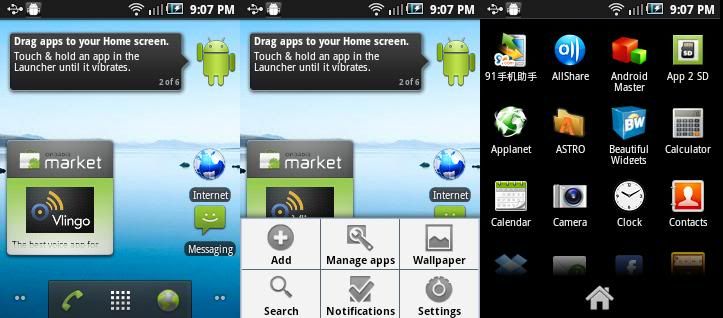
Gingerbread Launcher (I dont know real or not)
 Added on December 9, 2010, 9:10 pm QUOTE(ukoo @ Dec 9 2010, 09:03 PM) but i wish to keep the wallpaper .. and save some of my phone space .. You want delete or save?just save the wallpaper in SD card, "Gallery" automatic can find it out This post has been edited by StupidGuyPlayComp: Dec 9 2010, 09:10 PM |
|
|
Dec 9 2010, 09:11 PM
|
|
Senior Member
3,200 posts Joined: Jan 2003 From: IPOH
|
bro StupidGuyPlayComp know wat requirment for gingerbread..???im planing for my next DROID phone acer liquid metal is my next hunt
|
|
|
Dec 9 2010, 09:11 PM
|
|
All Stars
13,681 posts Joined: Mar 2006
|
QUOTE(elvis-L @ Dec 9 2010, 09:04 PM) means tat all those app or games like angry bird can move to memory card as well? Added on December 9, 2010, 9:05 pmhmm.. dropbox no more new app updated rite? i saw my pc stated tat thousands files have been updated but its like ntg change?@@ Yes, all the apps can move to SD (but USB debugging must activate)anyway, not whole apps can move, only partial Added on December 9, 2010, 9:13 pm QUOTE(kenny79 @ Dec 9 2010, 09:05 PM) my ndrive and papago loose in folder already I deleted the unwanted file.........recover back the correct file, so the dropboox synchronizing stoppedAdded on December 9, 2010, 9:13 pm QUOTE(kenny79 @ Dec 9 2010, 09:11 PM) bro StupidGuyPlayComp know wat requirment for gingerbread..???im planing for my next DROID phone acer liquid metal is my next hunt Not sure, you can try find it outThis post has been edited by StupidGuyPlayComp: Dec 9 2010, 09:13 PM |
|
|
Dec 9 2010, 09:31 PM
|
|
Junior Member
141 posts Joined: Oct 2010
|
QUOTE(StupidGuyPlayComp @ Dec 9 2010, 09:08 PM) Gingerbread Launcher (I dont know real or not) im using the app .. zedge to download to wallpaper .. i think it auto download it to phone ..Added on December 9, 2010, 9:10 pm You want delete or save? just save the wallpaper in SD card, "Gallery" automatic can find it out so now i wan to move it to sd .. in gallery cant move .. |
|
|
Dec 9 2010, 09:34 PM
|
|
Junior Member
287 posts Joined: Jan 2007
|
these are the default GPSoneXtra settings for G5 froyo for reference
i dont think we need to change anything here to get better gps lock because its already been optimized in froyo. under setttings >> Location & Security Settings, just tick on use assisted GPS. that should do it. Settings -> Parameter Settings -> Address -> Server Type: UMTS SLP Settings -> Parameter Settings -> Position mode: option 2 Settings -> Fix Request Settings -> Session Operation: MS-based Settings -> Fix Request Settings -> Server Option: Default gpsOne XTRA -> Xtra Enable: Disable |
|
|
Dec 9 2010, 09:39 PM
|
|
All Stars
13,681 posts Joined: Mar 2006
|
QUOTE(ukoo @ Dec 9 2010, 09:31 PM) im using the app .. zedge to download to wallpaper .. i think it auto download it to phone .. "My files" - Home - Zedge - Wallpapersso now i wan to move it to sd .. in gallery cant move .. Added on December 9, 2010, 9:40 pm QUOTE(gocke55014 @ Dec 9 2010, 09:34 PM) these are the default GPSoneXtra settings for G5 froyo for reference Thanks bro..........i dont think we need to change anything here to get better gps lock because its already been optimized in froyo. under setttings >> Location & Security Settings, just tick on use assisted GPS. that should do it. Settings -> Parameter Settings -> Address -> Server Type: UMTS SLP Settings -> Parameter Settings -> Position mode: option 2 Settings -> Fix Request Settings -> Session Operation: MS-based Settings -> Fix Request Settings -> Server Option: Default gpsOne XTRA -> Xtra Enable: Disable This post has been edited by StupidGuyPlayComp: Dec 9 2010, 09:40 PM |
|
|
Dec 9 2010, 09:45 PM
|

Junior Member
322 posts Joined: Mar 2010 From: Ipoh
|
QUOTE(StupidGuyPlayComp @ Dec 9 2010, 09:08 PM) Gingerbread Launcher (I dont know real or not) Well it looks official enough. Im quite interested in the Nexus S. The Gingerbread OS somehow charming me Added on December 9, 2010, 9:10 pm You want delete or save? just save the wallpaper in SD card, "Gallery" automatic can find it out . And to kenny, iirc someone mentioned that a 1Ghz processor and 512mb ram is the minimum requirement |
|
Topic ClosedOptions
|
| Change to: |  0.0209sec 0.0209sec
 0.26 0.26
 6 queries 6 queries
 GZIP Disabled GZIP Disabled
Time is now: 8th December 2025 - 07:52 PM |
 Quote
Quote