QUOTE(AlexLai @ Dec 29 2010, 09:50 PM)
I wonder what MXM class slot the GT335M uses. 
Maybe can mod it to a GTX260M

I'm positively sure its soldered to the motherboard. Most budget laptop areMaybe can mod it to a GTX260M
Asus A | U | N series combined thread V3
|
|
 Dec 29 2010, 09:57 PM Dec 29 2010, 09:57 PM
Return to original view | Post
#21
|
 
Senior Member
5,211 posts Joined: Feb 2005 From: Konohana  
|
QUOTE(AlexLai @ Dec 29 2010, 09:50 PM) I wonder what MXM class slot the GT335M uses. I'm positively sure its soldered to the motherboard. Most budget laptop areMaybe can mod it to a GTX260M |
|
|
|
|
|
Dec 29 2010, 10:24 PM
Return to original view | Post
#22
|
|
Senior Member
5,211 posts Joined: Feb 2005 From: Konohana
|
QUOTE(AlexLai @ Dec 29 2010, 10:00 PM) Well, I'll take a looksie if I have time and get back to you on that one. Really? What kind of laptop you talking about?Added on December 29, 2010, 10:08 pmOh and I found out it's an MXM type 3. |
|
|
Dec 30 2010, 12:27 AM
Return to original view | Post
#23
|
|
Senior Member
5,211 posts Joined: Feb 2005 From: Konohana
|
QUOTE(AlexLai @ Dec 29 2010, 10:28 PM) The GT335M uses the MXM 3 as standard (same as GTX260M), but I haven't taken the time to open up my A42Jv just yet. Hopefully it's not soldered considering it's a mid range GPU. Oh you mean the card? Even low end card like HD3450 have the MXM equivalent. |
|
|
Dec 30 2010, 12:50 AM
Return to original view | Post
#24
|
|
Senior Member
5,211 posts Joined: Feb 2005 From: Konohana
|
QUOTE(AlexLai @ Dec 30 2010, 12:41 AM) Sweet, now time to see what shape it is and perhaps I'll go pick up a GTX260M from eBay. Don't get too excited. By the looks of it I don't think there is a room to fit MXM slot on A42 body |
|
|
Dec 30 2010, 02:43 AM
Return to original view | Post
#25
|
|
Senior Member
5,211 posts Joined: Feb 2005 From: Konohana
|
QUOTE(AlexLai @ Dec 30 2010, 01:22 AM) Oh well, wishful thinking doesn't hurt anyways. Hope for the best, but be sure to open your laptop first before buying anything. |
|
|
Dec 30 2010, 09:53 PM
Return to original view | Post
#26
|
|
Senior Member
5,211 posts Joined: Feb 2005 From: Konohana
|
QUOTE(budingyun @ Dec 30 2010, 09:04 PM) anyone tried BIOS 210 for A42JV?? Why don't you try it and tell us about it. Don't be scared with BIOS updatehttp://dlcdnet.asus.com/pub/ASUS/nb/K42JV/K42JvAS210.zip http://my.asus.com/product.aspx?P_ID=rYVE2WwDuvd0y27e |
|
|
|
|
|
Jan 1 2011, 11:19 AM
Return to original view | Post
#27
|
|
Senior Member
5,211 posts Joined: Feb 2005 From: Konohana
|
QUOTE(dante10 @ Jan 1 2011, 02:32 AM) have anyone try undervolting? is it safe?...i read a few webs it says that undervolting can lower the temp of the laptop as well as increasing battery life? Undervolting on what? Core i series? Its not supported yet. Only thing you can do is force it to not raise multiplier from the lowest one via Windows Power Options in battery mode |
|
|
Jan 2 2011, 12:47 AM
Return to original view | Post
#28
|
|
Senior Member
5,211 posts Joined: Feb 2005 From: Konohana
|
For me the Power4Gear is just another bloatware, you could configure Windows power options to do exactly the same thing. I already hate the ATK necessity to enable laptop hotkey. Way too much system process bloating the laptop unnecessarily
My setting: Power saver: Everything set to maximum power saving, except the WiFi at maximum performance when plugged in. CPU min and max state is 0% so it will stay on lowest multiplier no matter what I do. Runs unbelievably quiet and very cool to touch or use on lap. Great battery runtime as well, up to 3 hours 30 minutes when browsing with minimum brightness. Balanced: When plugged in I set the CPU max state to 100% and min state to 0%, on battery is the same as Power Saver plan and moderate power saving on everything else High performance: Like the name suggested, everything maxed out, CPU min and max state is 100%, no power saving option enabled at all |
|
|
Jan 2 2011, 02:28 PM
Return to original view | Post
#29
|
|
Senior Member
5,211 posts Joined: Feb 2005 From: Konohana
|
Thanks lee. You could set everything in advanced power setting. Just open the menu one by one and test it yourself
|
|
|
Jan 3 2011, 03:33 PM
Return to original view | Post
#30
|
|
Senior Member
5,211 posts Joined: Feb 2005 From: Konohana
|
What kind of cooler pad did you guys use with your A42J? I still haven't used any cooler yet.
|
|
|
Jan 3 2011, 04:52 PM
Return to original view | Post
#31
|
|
Senior Member
5,211 posts Joined: Feb 2005 From: Konohana
|
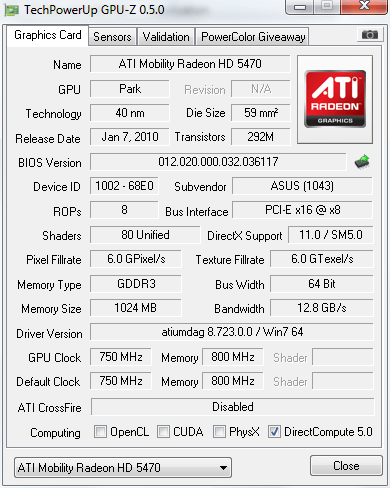
QUOTE(wtm0325 @ Jan 3 2011, 04:36 PM) no need cooler la, even max load it won't heat like other notebook, just use 2 poker deck to jack it up will do I agree somehow, yes it is very cool as compared to my old laptop. Never hang, never have any issue with it. Temperature never exceed 70C even when playing GTA IV. And of course I raised it slightly so it get cold air. Just wondering what you guy use   Can you post up your GPU-Z screenshot? I wanted to compare to mine |
|
|
Jan 3 2011, 06:39 PM
Return to original view | Post
#32
|
|
Senior Member
5,211 posts Joined: Feb 2005 From: Konohana
|
QUOTE(AlexLai @ Jan 3 2011, 06:05 PM) No cooler at all, flat on the table. Doesn't heat up that much, even when using on the bed. Btw, I noticed that the A42Jv and A42Ja have a larger heatsink and fan. You have opened your laptop?QUOTE(wtm0325 @ Jan 3 2011, 06:35 PM) » Click to show Spoiler - click again to hide... « Temperature is roughly the same as mine, except HDD is hotter about 3-5C |
|
|
Jan 4 2011, 05:10 PM
Return to original view | Post
#33
|
|
Senior Member
5,211 posts Joined: Feb 2005 From: Konohana
|
This Seagate drive isn't really fast, but freaking hot. When I fit my other backup 2.5" 250GB 5400rpm inside the temperature is pretty much the same
|
|
|
|
|
|
Jan 5 2011, 12:43 AM
Return to original view | Post
#34
|
|
Senior Member
5,211 posts Joined: Feb 2005 From: Konohana
|
QUOTE(wtm0325 @ Jan 4 2011, 08:34 PM) SO when's your turn to change HDD? I dunno, thought I might not upgrade anything. Better to collect money and upgrade my desktop. Starcraft 2 is damn addicting, my head hurts playing 8 hours straight I don't OC on this baby becoz I don't play SC2 anymore, busy working with design artwork hahaha  |
|
|
Jan 6 2011, 05:29 PM
Return to original view | Post
#35
|
|
Senior Member
5,211 posts Joined: Feb 2005 From: Konohana
|
I'm ding some experiment with my laptop. First change the BIOS to A42Jr BIOS, it works! But thats to be expected since both basically use the same mainboard, its written A42Jr on the PCB.
Secondly try to get the Intel HD IGP to work, I get it detected in Windows but I get code 43 error, maybe there isn't any MUX to switch between both cards |
|
|
Jan 7 2011, 11:42 PM
Return to original view | Post
#36
|
|
Senior Member
5,211 posts Joined: Feb 2005 From: Konohana
|
I used Crosshair II and its the best investment I ever done on motherboard. It did give problems on first few months of usage but with constant BIOS updates and email report t get fixed and now its the perfect board.
This is laptop not motherboard, astria try to go off topic.... again. You have 18k post dude stop it. Back on topic I used my old laptop cooler with three small fans blowing and its noticeably cooler but by not that much, about 2-3C cooler |
|
|
Jan 8 2011, 03:26 AM
Return to original view | Post
#37
|
|
Senior Member
5,211 posts Joined: Feb 2005 From: Konohana
|
My hotkey works well, have you try reinstalling ATK Package? You could try dante method or if you wanted to disable it permanently there is a setting in BIOS to disable it
|
|
|
Jan 8 2011, 08:28 PM
Return to original view | Post
#38
|
|
Senior Member
5,211 posts Joined: Feb 2005 From: Konohana
|
QUOTE(mintychoc @ Jan 8 2011, 07:16 PM) I'm using my U45JC and it's new. The mouse touchpad works fine, but when I plug in my USB mouse that came with the laptop, the USB mouse is not detected. I tried plugging it into all 3 USB ports and they all don't seem to work, but the mouse works when i plug it into another computer. What should I do? Does other USB device like thumbdrive works on the laptop? |
|
|
Jan 8 2011, 10:23 PM
Return to original view | Post
#39
|
|
Senior Member
5,211 posts Joined: Feb 2005 From: Konohana
|
Done some testing between A42Je and A42Jr BIOS. I noticed the A42Je BIOS actually saves more power than A42Jr BIOS despite both have identical board and identical feature. Weird. I get about 15-25 minutes more with A42Je BIOS.
|
|
|
Jan 9 2011, 06:17 PM
Return to original view | Post
#40
|
|
Senior Member
5,211 posts Joined: Feb 2005 From: Konohana
|
I decided to totally dismantle the A42J to see who make the horrid LCD screen and to my surprise is Samsung! My old k40AB uses AUO panel and looks miles better, color were more vivid, so does the contrast. The black in Samsung panel is more grey than black.
|
|
Topic ClosedOptions
|
| Change to: |  0.0375sec 0.0375sec
 0.63 0.63
 7 queries 7 queries
 GZIP Disabled GZIP Disabled
Time is now: 8th December 2025 - 09:33 AM |
 Quote
Quote