Welcome Guest ( Log In | Register )

Bump Topic Topic Closed RSS Feed
166 Pages « < 31 32 33 34 35 > » Bottom

Outline · [ Standard ] · Linear+

 Acer TimelineX 3820TG & 4820TG, Owners and visitors discussion

views
     
TScowithgun
post Nov 29 2010, 03:08 PM

A cow that can play notebook & phone
*******
Senior Member
2,248 posts

Joined: Sep 2010
QUOTE(gome @ Nov 29 2010, 01:22 PM)
yeah, my GPU max is about 80+. i've actually elevated the back of my laptop and made a diy usb fan to blow from there. hmmm... hmm.gif
*
some dude in NBR re-apply thermal paste, seem to be able to improve heat management by as much as 5 degree...
k-bkeat
post Nov 29 2010, 03:41 PM

Look at all my stars!!
*******
Senior Member
2,201 posts

Joined: Mar 2010
re-apply thermal paste void warranty right? n its dangerous too...
lee_what2004
post Nov 29 2010, 03:44 PM

*stare* ji--------
Group Icon
Elite
14,813 posts

Joined: Nov 2006


Not really dangerous if you know what you are doing...
k-bkeat
post Nov 29 2010, 04:25 PM

Look at all my stars!!
*******
Senior Member
2,201 posts

Joined: Mar 2010
but still void warranty right? so far any reported faulty/spoilt timelinex laptop?
TScowithgun
post Nov 29 2010, 06:20 PM

A cow that can play notebook & phone
*******
Senior Member
2,248 posts

Joined: Sep 2010
QUOTE(k-bkeat @ Nov 29 2010, 04:25 PM)
but still void warranty right? so far any reported faulty/spoilt timelinex laptop?
*
reapply thermal paste will probably void warranty since it involve removal of the bottom panel (i think!)

to avoid warranty issue, as an alternative, consider removing only the keyboard and the panel beneath it. u can still access the fan and heatsink. u cant reapply thermal paste, but u can clean the fan!

i have the PDF on how to open that... will post it later, alternatively, google it.
k-bkeat
post Nov 29 2010, 06:42 PM

Look at all my stars!!
*******
Senior Member
2,201 posts

Joined: Mar 2010
how acer timelinex laptop durability? so far non of u all claimed warranty right?
gome
post Nov 29 2010, 06:46 PM

Casual
***
Junior Member
488 posts

Joined: Jan 2003
if you read some pages back, i did. heck, i even mentioned to you about my key flying out. so yes, i claimed warranty.
k-bkeat
post Nov 29 2010, 06:52 PM

Look at all my stars!!
*******
Senior Member
2,201 posts

Joined: Mar 2010
QUOTE(gome @ Nov 29 2010, 06:46 PM)
if you read some pages back, i did. heck, i even mentioned to you about my key flying out. so yes, i claimed warranty.
*
omai. so its not so durable? planning to get a laptop which can last me years unsure.gif
TScowithgun
post Nov 29 2010, 08:41 PM

A cow that can play notebook & phone
*******
Senior Member
2,248 posts

Joined: Sep 2010
QUOTE(k-bkeat @ Nov 29 2010, 06:52 PM)
omai. so its not so durable? planning to get a laptop which can last me years  unsure.gif
*
as far as i remember, in this tread (649 post), got 2 peoples with problems:

1. key fall out (Gome)
2. can't boot up (KahVII)

however, we are small community, there are 7883 post in NBR about 3820TG i read most of them, not many (less than 5%?) complain about this notebook...

there are a forum with 2421 post about 4820tg, but i dont read them. u should read it to find out if many people experiencing problem...

u are going to pay a few thousand hard earn $, best u research properly, should worth the effort... thumbup.gif

i am attaching the PDF (cant remember the link from NBR) that has step by step on how to open 3820tg
lee_what2004
post Nov 29 2010, 08:43 PM

*stare* ji--------
Group Icon
Elite
14,813 posts

Joined: Nov 2006


This pdf?
http://www.mediafire.com/file/7zwo3dpxx1hg..._Directions.pdf
kindan@NBR
TScowithgun
post Nov 29 2010, 08:45 PM

A cow that can play notebook & phone
*******
Senior Member
2,248 posts

Joined: Sep 2010
yes! thanks sifu lee! i use the attach file in the forum, but cant find my attachment after post...

another problem reported:

3. dead pixel in screen (fixgd)

This post has been edited by cowithgun: Nov 29 2010, 08:48 PM
tech_frix
post Nov 30 2010, 07:45 AM

Boo Yah!
*******
Senior Member
5,656 posts

Joined: Sep 2007
From: wheres d oil price is higher than condoms..

just bought 4820TG..
can i upgrade d rams?
will it void d warranty?tq
lee_what2004
post Nov 30 2010, 07:47 AM

*stare* ji--------
Group Icon
Elite
14,813 posts

Joined: Nov 2006


Can upgrade, no void...
tech_frix
post Nov 30 2010, 08:32 AM

Boo Yah!
*******
Senior Member
5,656 posts

Joined: Sep 2007
From: wheres d oil price is higher than condoms..

thanks..roughly how much for ddr3 now?
lee_what2004
post Nov 30 2010, 08:36 AM

*stare* ji--------
Group Icon
Elite
14,813 posts

Joined: Nov 2006


RM90-100 for 2GB...
TScowithgun
post Nov 30 2010, 11:10 AM

A cow that can play notebook & phone
*******
Senior Member
2,248 posts

Joined: Sep 2010
QUOTE(tech_frix @ Nov 30 2010, 07:45 AM)
just bought 4820TG..
can i upgrade d rams?
will it void d warranty?tq
*
brows.gif welcome to the club! u must be excited, but take some time to check out your notebook first, i reckon reading this post to make sure u are getting a good condition notebook. not that many has problem, but just in case. tongue.gif

then, share with us about your experience with the notebook. rclxms.gif
k-bkeat
post Nov 30 2010, 11:35 AM

Look at all my stars!!
*******
Senior Member
2,201 posts

Joined: Mar 2010
1. check physical status of notebook; any part broke (check area between battery and notebook), gaps between screen and notebook, between panel, etc
2. check for screen dead pixel
3. check each key if functional, and whether got keyboard flex
4. check touchpad if OK or not very sensitive, etc
5. check all ports (HDMI, VGA, LAN, wifi, bluetooth, USB, card reader)
6. check temperature of notebook in light used, heavy used (user HWMonitor)
7. check battery using BatteryCare
8. benchmark using 3dMark06 see score is acceptable


add on,

1. check speakers
2. how to check internal stuffs? like hdd bad sector, ram all those?

regarding no.1 can i have a picture of wat it suppose to be looked like? (good one), if possible show me a bad one laugh.gif

no.7, wat u mean by check battery care? see how long it can last?

thx in advance for sifus help notworthy.gif
ALeUNe
post Nov 30 2010, 11:44 AM

I'm the purebred with aristocratic pedigree
Group Icon
VIP
9,692 posts

Joined: Jan 2003
From: Mongrel Isle
QUOTE(k-bkeat @ Nov 29 2010, 03:41 PM)
re-apply thermal paste void warranty right? n its dangerous too...
*
You don't really need to re-apply thermal paste for TimelineX series notebook.
This is because both GPU and CPU are using thermal paste instead of thermal pad.
The original paste is decent.

Nevertheless, I applied mine with Tuniq TX3, slight improvement by 3c.
k-bkeat
post Nov 30 2010, 11:47 AM

Look at all my stars!!
*******
Senior Member
2,201 posts

Joined: Mar 2010
QUOTE(ALeUNe @ Nov 30 2010, 11:44 AM)
You don't really need to re-apply thermal paste for TimelineX series notebook.
This is because both GPU and CPU are using thermal paste instead of thermal pad.
The original paste is decent. 

Nevertheless, I applied mine with Tuniq TX3, slight improvement by 3c.
*
ooo. thx. i guess noobie like me shouldnt risk it for slight improvement blush.gif
TScowithgun
post Nov 30 2010, 12:11 PM

A cow that can play notebook & phone
*******
Senior Member
2,248 posts

Joined: Sep 2010
QUOTE(k-bkeat @ Nov 30 2010, 11:35 AM)
add on,

1. check speakers
2. how to check internal stuffs? like hdd bad sector, ram all those?

regarding no.1 can i have a picture of wat it suppose to be looked like? (good one), if possible show me a bad one laugh.gif

no.7, wat u mean by check battery care? see how long it can last?

thx in advance for sifus help  notworthy.gif

*
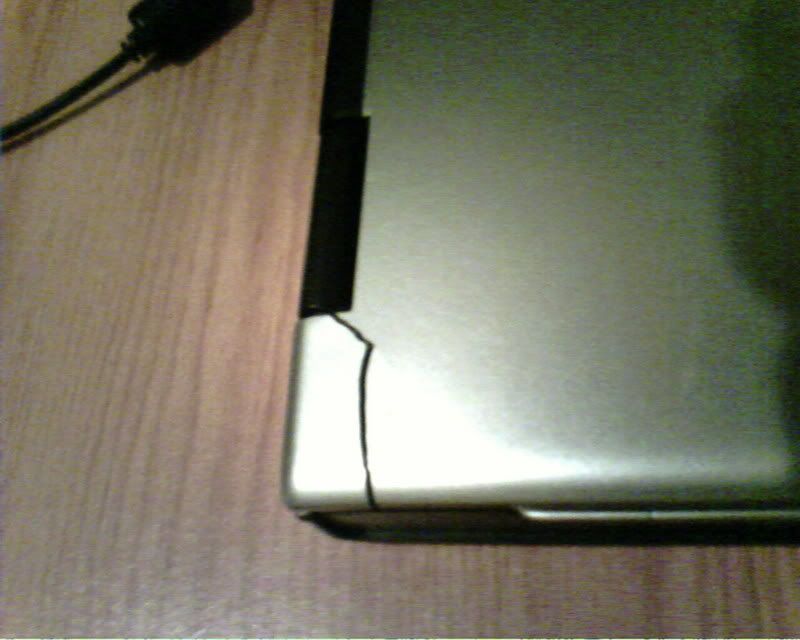
brows.gif the no.1 included becoz people ask me to check that, apparently, there are unfortunately acer user has crack like this:

user posted image

it should be obvious if there is crack.

no7, download batterycare, monitor for discharge rate and total capacity, u should get something like 64Whr for the 6 cell. and, i reckon to try using the battery a few hours to see if anything abnormal (like suddenly drop to 5%, shutdown, etc)

good idea about checking bad sector and ramtest...

to check for bad sector:

1. click Start button, type "cmd" DONT press Enter
2. right click on the "cmd" icon top of the menu
3. run as Admin
4. click Yes
5. in the Black cmd box, type "chkdsk /r"

it will ask u to reschedule and scan during next reboot... reboot the pc and let it scan, it's gonna take a looooong time tongue.gif i didnt do this myself sweat.gif

to test RAM, as reckon by sifu lee: http://www.memtest.org/#downiso pai she... i also didnt do this...


166 Pages « < 31 32 33 34 35 > » Top
Topic ClosedOptions
 

Change to:
| Lo-Fi Version
0.0238sec    0.49    6 queries    GZIP Disabled
Time is now: 6th December 2025 - 06:26 AM