Welcome Guest ( Log In | Register )

Bump Topic Topic Closed RSS Feed
166 Pages « < 116 117 118 119 120 > » Bottom

Outline · [ Standard ] · Linear+

 Acer TimelineX 3820TG & 4820TG, Owners and visitors discussion

views
     
TScowithgun
post Mar 19 2011, 09:05 AM

A cow that can play notebook & phone
*******
Senior Member
2,248 posts

Joined: Sep 2010
QUOTE(hottemper @ Mar 18 2011, 11:58 PM)
Synaptics installed on a Alps touchpad!
However, you cant use Synaptics own software, and you lost all your Alps gesture.

But, Synaptics is way much better even without those gestures. It's smoother, more sensitive compared to Alps.
*
why not try the toshiba driver? someone using 3820tg installed this Toshiba driver and say it's very good:

http://cdgenp01.csd.toshiba.com/content/su...tc00353700g.exe

It support 2 fingers scrolling and 'flick' ability... might wanna give it a try? Cos if it's good, I might consider installing it! I am still using the Windows driver with no gesture and multi-touch.

SUSngkhanmein
post Mar 19 2011, 09:13 AM

カラカラ Karakara
*******
Senior Member
7,727 posts

Joined: Jan 2010
From: Ara Damansara, Petaling Jaya & Batu Pahat, Johor.


QUOTE(lee_what2004 @ Mar 18 2011, 11:39 PM)
Just try to install it? Remember seeing someone managed to install Synaptics apps on Alps on 1830T..
Pin to taskbar ? or just search on start menu ?
I don't use desktop icons as well..
*
1+ i don't like use shortcut.. i put some icon on desktop to look better.
lee_what2004
post Mar 19 2011, 09:16 AM

*stare* ji--------
Group Icon
Elite
14,813 posts

Joined: Nov 2006


QUOTE(cowithgun @ Mar 19 2011, 09:05 AM)
why not try the toshiba driver? someone using 3820tg installed this Toshiba driver and say it's very good:

http://cdgenp01.csd.toshiba.com/content/su...tc00353700g.exe

It support 2 fingers scrolling and 'flick' ability... might wanna give it a try? Cos if it's good, I might consider installing it! I am still using the Windows driver with no gesture and multi-touch.
*
I use one of the gesture available to turn off monitor tongue.gif
hottemper
post Mar 19 2011, 11:09 AM

Getting Started
**
Junior Member
248 posts

Joined: Feb 2006
From: KL


QUOTE(lee_what2004 @ Mar 18 2011, 11:59 PM)
If miss the two finger scroll, can try this...
http://code.google.com/p/two-finger-scroll/
*
master leeeeee~
it stated no Synaptics Touchpad device found... after i install the 2 finger scroll..
TScowithgun
post Mar 19 2011, 03:13 PM

A cow that can play notebook & phone
*******
Senior Member
2,248 posts

Joined: Sep 2010
QUOTE(lee_what2004 @ Mar 19 2011, 09:16 AM)
I use one of the gesture available to turn off monitor tongue.gif
*
ok, think i ll give it a try later. i have a proggie that turn off monitor pin in my taskbar too.
C3ll
post Mar 19 2011, 03:48 PM

New Member
*
Newbie
3 posts

Joined: Feb 2006
hello all.. i'm 3820tg owner, bought in Jan 2011. smile.gif
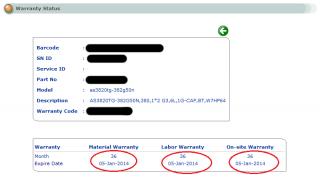
just wanna ask about acer warranty status. last time i check for my 3820tg warranty status shows only 1 year.
I just plan to buy acer supercare 1 extended warranty but today when i check again, the status changed to 3 year. mine don't have extended warranty.. is it normal? Attached Image
lee_what2004
post Mar 19 2011, 10:37 PM

*stare* ji--------
Group Icon
Elite
14,813 posts

Joined: Nov 2006


QUOTE(hottemper @ Mar 19 2011, 11:09 AM)
master leeeeee~
it stated no Synaptics Touchpad device found... after i install the 2 finger scroll..
*
Then don't have other option sad.gif

QUOTE(cowithgun @ Mar 19 2011, 03:13 PM)
ok, think i ll give it a try later. i have a proggie that turn off monitor pin in my taskbar too.
*
You use which one ?

QUOTE(C3ll @ Mar 19 2011, 03:48 PM)
hello all.. i'm 3820tg owner, bought in Jan 2011.  smile.gif
just wanna ask about acer warranty status. last time i check for my 3820tg warranty status shows only 1 year.
I just plan to buy acer supercare 1 extended warranty but today when i check again, the status changed to 3 year. mine don't have extended warranty.. is it normal? Attached Image
*
Call/email the Acer ton confirm it?
miriel10
post Mar 19 2011, 10:45 PM

Casual
***
Junior Member
376 posts

Joined: Dec 2008


I just bought a 4820tg biggrin.gif

I was wondering is it okay to leave my laptop on AC with the battery attached all the time? My old Vaio used to have this "80% charged, on AC power/plugged in" or something like that.
lee_what2004
post Mar 19 2011, 10:46 PM

*stare* ji--------
Group Icon
Elite
14,813 posts

Joined: Nov 2006


Its fine as long the heat is under control...
TScowithgun
post Mar 20 2011, 02:24 AM

A cow that can play notebook & phone
*******
Senior Member
2,248 posts

Joined: Sep 2010
QUOTE(lee_what2004 @ Mar 19 2011, 10:37 PM)
You use which one ?
*
found the code to do this from codeguru:

http://www.codeproject.com/KB/system/display_states.aspx

so, compile a proggie to just turn off screen (by removing other functions from the code above):

#include <windows.h>

int WINAPI WinMain(HINSTANCE hInstance, HINSTANCE hPrevInstance, LPSTR lpCmdLine, int nCmdShow)
{
// Eliminate user's interaction for 500 ms
Sleep(500);

// Turn off monitor
SendMessage(HWND_BROADCAST, WM_SYSCOMMAND, SC_MONITORPOWER, (LPARAM) 2);

return 0;
}


screen will back on if u just move the mouse... thumbup.gif


Added on March 20, 2011, 2:27 amStill playing Dragon Age 2, downloaded the Hi-Res texture pack and using now. Finally something that can make use of the 1GB ram of the graphic card! No slow down when using it, nice... laugh.gif warning, spoiler about the game below... it's so fun to play, i just wanna share it....

» Click to show Spoiler - click again to hide... «


This post has been edited by cowithgun: Mar 20 2011, 02:30 AM
lee_what2004
post Mar 20 2011, 11:37 AM

*stare* ji--------
Group Icon
Elite
14,813 posts

Joined: Nov 2006


I'm using this one.
http://sourceforge.net/projects/monitoroff/

Tried AMD 11.4 Preview ?

This post has been edited by lee_what2004: Mar 21 2011, 12:02 AM
TScowithgun
post Mar 21 2011, 12:30 AM

A cow that can play notebook & phone
*******
Senior Member
2,248 posts

Joined: Sep 2010
QUOTE(lee_what2004 @ Mar 20 2011, 11:37 AM)
I'm using this one.
http://sourceforge.net/projects/monitoroff/

Tried AMD 11.4 Preview ?
*
been looking at 11.4 for a loooong time, still havent install... CatalystCreator says should use 11.4 if playing Dragon Age 2! although i do feel some combat scene not as smooth as it can be (mostly because I turn around too much), i m still getting more than 30 FPS most of the time.... so, it is still bare-able... i was waiting for 11.3 since Wednesday, but till now still nothing sad.gif

Rumors is that 11.3 will be release today (20th) Pacific time! So, by the time I wake up, it should be available icon_rolleyes.gif (hopefully)....

If 11.3 still not very satisfying, I will try 11.4 preview!
Riddhy
post Mar 21 2011, 12:41 AM

Regular
******
Senior Member
1,956 posts

Joined: May 2008


have you guys tried ocing i3 380m in 3820tg? how much can oc? 3 ghz will be great
lee_what2004
post Mar 21 2011, 12:47 AM

*stare* ji--------
Group Icon
Elite
14,813 posts

Joined: Nov 2006


QUOTE(cowithgun @ Mar 21 2011, 12:30 AM)
been looking at 11.4 for a loooong time, still havent install... CatalystCreator says should use 11.4 if playing Dragon Age 2! although i do feel some combat scene not as smooth as it can be (mostly because I turn around too much), i m still getting more than 30 FPS most of the time.... so, it is still bare-able... i was waiting for 11.3 since Wednesday, but till now still nothing sad.gif

Rumors is that 11.3 will be release today (20th) Pacific time! So, by the time I wake up, it should be available  icon_rolleyes.gif (hopefully)....

If 11.3 still not very satisfying, I will try 11.4 preview!
*
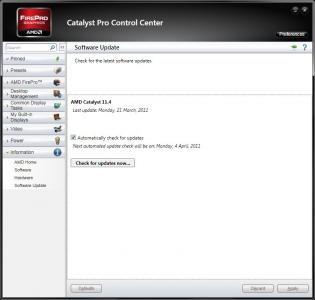
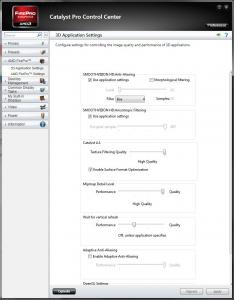
Got check for update for now..
as for 3D apps setting, seems the same..


Attached thumbnail(s)
Attached Image Attached Image
fr0sti3
post Mar 21 2011, 10:35 AM

F0NZz1e
******
Senior Member
1,095 posts

Joined: Dec 2008
hmm i just started dragon age 2, medium settings sometimes will stutter
ya all playing on which setting?
sarf2k4
post Mar 21 2011, 10:54 AM

Casual
***
Junior Member
393 posts

Joined: Aug 2006
QUOTE(fr0sti3 @ Mar 21 2011, 10:35 AM)
hmm i just started dragon age 2, medium settings sometimes will stutter
ya all playing on which setting?
*
dx11
high quality
1366x768

thats all i can remember

if use very high i would get laggy during gameplay even though just walking

one question:

if i want to install this ccc11.x, should i install it under discrete or switchable?
fr0sti3
post Mar 21 2011, 11:08 AM

F0NZz1e
******
Senior Member
1,095 posts

Joined: Dec 2008
ccc11.x from amd install under discrete mode.

not sure if anyone else having this issue, my ACBEL 90w AD9009 shows "plugged in, not charging" BIOS issue?

i checked the default adapter, both same voltages & amp wor
TScowithgun
post Mar 21 2011, 11:19 AM

A cow that can play notebook & phone
*******
Senior Member
2,248 posts

Joined: Sep 2010
QUOTE(sarf2k4 @ Mar 21 2011, 10:54 AM)
dx11
high quality
1366x768

thats all i can remember

if use very high i would get laggy during gameplay even though just walking

one question:

if i want to install this ccc11.x, should i install it under discrete or switchable?
*
should go to BIOS and change to Discrete first. then login windows and install it. After that, switch back in BIOS to switchable.

my setting (which can get more 30 plus FPS)

user posted image


Added on March 21, 2011, 11:25 am
QUOTE(fr0sti3 @ Mar 21 2011, 11:08 AM)
ccc11.x from amd install under discrete mode.

not sure if anyone else having this issue, my ACBEL 90w AD9009 shows "plugged in, not charging" BIOS issue?

i checked the default adapter, both same voltages & amp wor
*
As far as I know, "plugged in, not charging" is not a problem. It is the notebook 'smart' feature that will not charge your battery if it is above 97%. This actually help keep your battery last longer...


Added on March 21, 2011, 11:49 am
QUOTE(Riddhy @ Mar 21 2011, 12:41 AM)
have you guys tried  ocing i3 380m in 3820tg? how much can oc? 3 ghz will be great
*
u probably havent check NBR for a long time biggrin.gif many people in that forum only has i3 and they have successfully push to 3Gz and more...

This post has been edited by cowithgun: Mar 21 2011, 11:49 AM
fr0sti3
post Mar 21 2011, 12:04 PM

F0NZz1e
******
Senior Member
1,095 posts

Joined: Dec 2008
ah ok thanks cowithgun, i'll try later to get btry levels below 50% then try charging.
coz i had experience with my dell vostro last time it doesn't charge when windows mobility center shows plug in no charging.

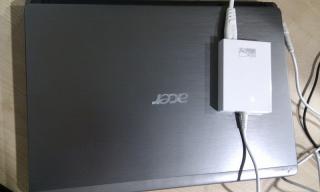
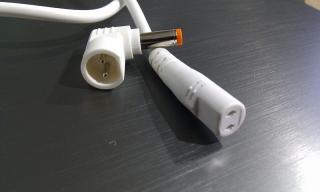
in case anyone's wondering here how the white ACBEL AD9009 90w adapter looks like


Attached thumbnail(s)
Attached Image Attached Image Attached Image
TScowithgun
post Mar 21 2011, 12:17 PM

A cow that can play notebook & phone
*******
Senior Member
2,248 posts

Joined: Sep 2010
QUOTE(lee_what2004 @ Mar 21 2011, 12:47 AM)
Got check for update for now..
as for 3D apps setting, seems the same..
*
damn 11.3 still not available yet... sad.gif i suspect 11.4 benefit 6xxx series more.... so, i m still holding... any noticeable improvement? brows.gif

for those playing Dragon Age 2, be glad to know that this game run better in ATI than in nVidia:

http://www.techspot.com/review/374-dragon-...test/page4.html

Also, if you have several monitors, the game look DAMN NICE with Eyefinity

http://blogs.amd.com/play/2011/03/08/are-y...-ii-experience/

user posted image


166 Pages « < 116 117 118 119 120 > » Top
Topic ClosedOptions
 

Change to:
| Lo-Fi Version
0.0342sec    0.38    6 queries    GZIP Disabled
Time is now: 5th December 2025 - 02:44 AM