Guide: How to Have Playbook Tethering & BIS Access at the same time
As a Playbook AND BB user, there are many way to get connect. 1 of them is tethering to your BB phone. But during tethering, your BB will disconnect from BIS and a msg "Modem Mode Enabled" will appear.
As a powerful user, I need my bb to alway connected to BIS while I still want to tethering for the same time.
I saw some tricks at crackberry forum and want to share with U guy.
The step as below:
1) First U need to get into Engineering Screen aka Help Me screen. U can do this by pressing alt+ RIGHT aA +H in homescreen. Screen below will pop up:

2) Then, U need to find out the lock code to go further.
This is the link to generate the lock code: http://dl.dropbox.com/u/9610464/HelpScreen.htmlU need to key in all informations
as what appear in YOUR Help ME! Screen:
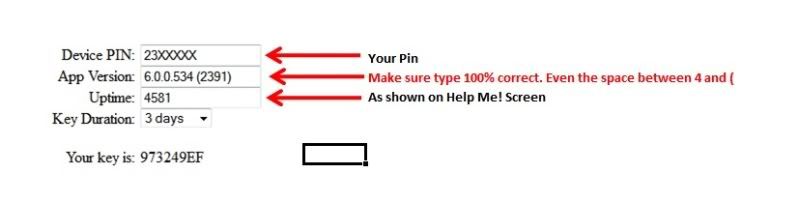
3) Once U got the code, type in the code on the Help Me! screen.
4) If U type in correctly, below screen will appear. Select
Multi-WAP Engineering Screen 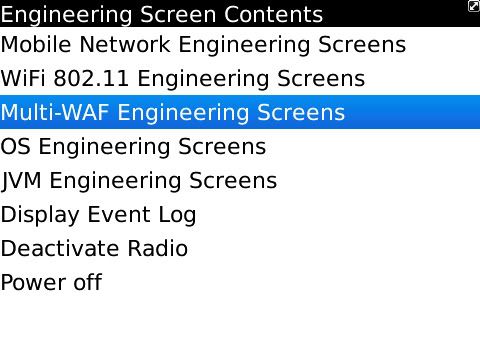
5) Select
Tunnel Engineering Screen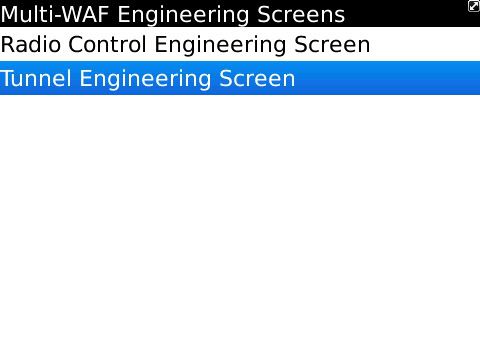
6) Change
IP Modem Solo Mode to
DISABLE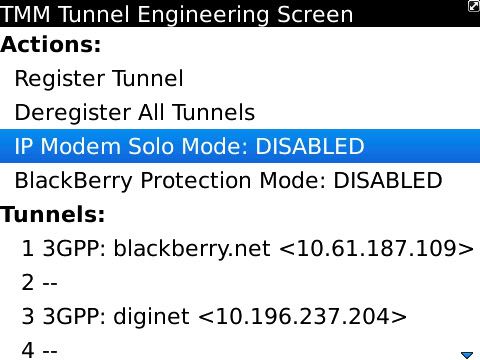
7) Try tethering your Playbook with your BB, U will see "Modem Mode Enable" but your BB still connected to BIS.

 Please aware that there is a RISK to screw up your BB if U dont know and dont follow the above guide. I am not responsible for that. DO IT AT YOUR OWN RISK!!!This post has been edited by mikelanding: May 20 2011, 03:52 PM

 May 19 2011, 07:27 PM


 Quote
Quote





 0.0214sec
 0.75
0.75
 6 queries
 GZIP Disabled