Outline ·
[ Standard ] ·
Linear+
[BULK] Amazon and Kindle 3 Heavy Items Bulk!, New Bulk 15 Just Opened!Shipped in quick
|
TShavocx
|
 Sep 26 2010, 10:10 AM Sep 26 2010, 10:10 AM
|

|
QUOTE(Kal-el @ Sep 25 2010, 07:44 PM) can show us the neoprene case and the screen protector? and will the screen protector disrupt our reading ability?
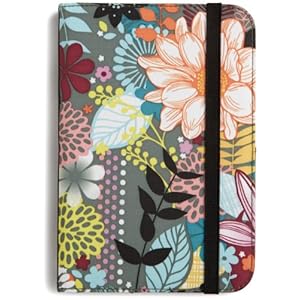
These are expensive though, about USD 34 each. I thought of using the Neoprene case that im also using for my Ipad. An easy way to imagine them is the easy slip on cover, a sleeve if you must. There are many neoprene sleeves to choose from. They all offer strong protection due to the strength of the neoprene fabric. But few are made to fit the Kindle 3 quite so well, doesnt matter, a 7" sleeve or 10" will do just fine. Even though there is no zipper the device is held so tightly that you never feel any likelihood of it falling free. The Kindle only comes out when you want it to. But the lack of zipper also makes the whole thing super easy, slip your Reader in and out without any fuss.
For the screen protector, im sure it will not disrupt our reading ability, havent had one yet myself to test and confirm though, still awaiting for this shipment in  This post has been edited by havocx: Sep 26 2010, 11:50 AM This post has been edited by havocx: Sep 26 2010, 11:50 AM |
|
|
|
|
|
SUSKal-el
|
Sep 26 2010, 11:29 PM
|
|
|
|
|
|
|
|
|
SUSKal-el
|
Sep 27 2010, 06:37 PM
|
|
|
6" is the screen size, the dimensions are 7.5" x 4.8"
|
|
|
|
|
|
microsun2000
|
Sep 27 2010, 09:16 PM
|
New Member

|
Hi, I would like to order two units of the item. I wonder if i can pay you half 1st and once the items reach malaysia then I pay you full amount?
|
|
|
|
|
|
ckyongs
|
Sep 27 2010, 09:49 PM
|
Getting Started
|
please pm me details for payment - 1 unit Kindle 3 wifi.
thx.
|
|
|
|
|
|
TShavocx
|
Sep 28 2010, 12:12 AM
|
|
|
QUOTE(microsun2000 @ Sep 27 2010, 09:16 PM) Hi, I would like to order two units of the item. I wonder if i can pay you half 1st and once the items reach malaysia then I pay you full amount?
Remember Im not doing this for profit but to cut my shipping charges and wait time to bring it in to Malaysia, for some bulk,
I will have to rely on other materials being collected and only once everyone makes payment will they start to ship in.
This Kindle Bulk is just the Kindle's and any other items that you might wanna get at the same time from Amazon.
Since Im not trying to make a profit, Ill try my best to accomodate your request.
QUOTE(ckyongs @ Sep 27 2010, 09:49 PM) please pm me details for payment - 1 unit Kindle 3 wifi. thx. 
Ive sent you the details via PM, let me know if you're good. Also, get well soon!
Promised some Status Update Right after Amazon Updates me. 2 other orders well on its way to US address!
See the difference from the first status update photo
 This post has been edited by havocx: Sep 28 2010, 12:28 AM This post has been edited by havocx: Sep 28 2010, 12:28 AM |
|
|
|
|
|
12H4M
|
Sep 28 2010, 07:39 PM
|
New Member
|
I'm considering this Belkin case for my Kindle... Belkin Neoprene Kindle Case  Oh I forgot to ask about the power adapter, do I need to buy the UK spec (3 pins) for it?...I read that the order comes with a US version (doesn't fit here in M'sia)... |
|
|
|
|
|
Darqfyre
|
Sep 28 2010, 08:08 PM
|
Getting Started
|
Delicious leather cases but oh so expensive....
|
|
|
|
|
|
TShavocx
|
Sep 28 2010, 09:13 PM
|
|
|
QUOTE(12H4M @ Sep 28 2010, 07:39 PM) I'm considering this Belkin case for my Kindle... Belkin Neoprene Kindle Case Oh I forgot to ask about the power adapter, do I need to buy the UK spec (3 pins) for it?...I read that the order comes with a US version (doesn't fit here in M'sia)...
For the power adapter dont worry too much about it, Kindle can be charged 2 ways, via direct power (no need of transformer) using its US plug or USB. US plug, you just need to get the adapter, about RM3.
No need to spend on getting a full blown power transformer or better yet, get a Plug head that can charge USB, and carry that along, that way while on the move you can plug the USB to
say car adapter, or a normal laptop for power.
BUT, why worry ? Kindle lasts about a month on a full single charge without Wifi. Amazing huh ! 
QUOTE(Darqfyre @ Sep 28 2010, 08:08 PM) Delicious leather cases but oh so expensive.... 
Thanks for your order! |
|
|
|
|
|
12H4M
|
Sep 28 2010, 10:41 PM
|
New Member
|
Thanks havocx for the quick response!  |
|
|
|
|
|
SUSKal-el
|
Sep 28 2010, 10:51 PM
|
|
|
QUOTE(12H4M @ Sep 28 2010, 10:41 PM) Thanks havocx for the quick response! eh, that case is for the old kindle, u sure that is the case with the best fitting for kindle 3?
Added on September 28, 2010, 10:57 pmAnd also, you guys wanna get this protective screen cover? 99cents http://www.amazon.com/CrazyOnDigital-Gener...5685595&sr=1-12This post has been edited by Kal-el: Sep 28 2010, 10:57 PM |
|
|
|
|
|
12H4M
|
Sep 29 2010, 02:20 AM
|
New Member
|
QUOTE eh, that case is for the old kindle, u sure that is the case with the best fitting for kindle 3? I know but based on some of the users' review it does a good job for Kindle 3!...as long as you don't require a snug fit case & use it only for protection & mobility then I think it's ok...you can read some of the reviews here: Customer Reviews |
|
|
|
|
|
TShavocx
|
Sep 29 2010, 09:33 AM
|
|
|
QUOTE(Kal-el @ Sep 28 2010, 10:51 PM) eh, that case is for the old kindle, u sure that is the case with the best fitting for kindle 3?
Added on September 28, 2010, 10:57 pmAnd also, you guys wanna get this protective screen cover? 99cents http://www.amazon.com/CrazyOnDigital-Gener...5685595&sr=1-12
only shipping's a bomb for it even within US, USD 2.94 for a 99cents product. I guess though if all of us want it,
I could combine all the 99cents and share the shipping for the USD 2.94.
Let me know via PM if you're up for it.
QUOTE(12H4M @ Sep 29 2010, 02:20 AM) I know but based on some of the users' review it does a good job for Kindle 3!...as long as you don't require a snug fit case & use it only for protection & mobility then I think it's ok...you can read some of the reviews here: Customer Reviews
Else, you might wanna consider this, Kindle 3 Accesory Kit,
\it comes with the case, screen protector, car charger, and US protector plug. Any extra accesories order let me know before lunch
30th September 2010 okie. (Ill finalise placing orders then.) |
|
|
|
|
|
12H4M
|
Sep 29 2010, 10:39 AM
|
New Member
|
QUOTE(havocx @ Sep 29 2010, 09:33 AM) Else, you might wanna consider this, Kindle 3 Accesory Kit, \it comes with the case, screen protector, car charger, and US protector plug. Any extra accesories order let me know before lunch 30th September 2010 okie. (Ill finalise placing orders then.) I think I'll stick with the Belkin case despite its extra size...looks more sturdy & no straps attached...  |
|
|
|
|
|
SUSKal-el
|
Sep 29 2010, 03:08 PM
|
|
|
Okay havocx, you may add the zippered black-red case and the screen protector. Its up to you to get the single one or the package with 3 in it. Im fine as long i get one of it. QUOTE(12H4M @ Sep 29 2010, 02:20 AM) I know but based on some of the users' review it does a good job for Kindle 3!...as long as you don't require a snug fit case & use it only for protection & mobility then I think it's ok...you can read some of the reviews here: Customer Reviewsthats the good thing about Amazon, the reviews |
|
|
|
|
|
12H4M
|
Sep 29 2010, 05:01 PM
|
New Member
|
Same here with the screen protector...count me in... |
|
|
|
|
|
praetorian
|
Sep 29 2010, 06:04 PM
|
|
|
Hi,
May I know what different type of ebook formats the kindle can read? Thanks in advance.
|
|
|
|
|
|
SUSKal-el
|
Sep 29 2010, 06:51 PM
|
|
|
QUOTE(praetorian @ Sep 29 2010, 06:04 PM) Hi, May I know what different type of ebook formats the kindle can read? Thanks in advance. simple google search will give you the answer you need http://en.wikipedia.org/wiki/Amazon_Kindle#File_formats |
|
|
|
|
|
TShavocx
|
Sep 29 2010, 07:24 PM
|
|
|
QUOTE(praetorian @ Sep 29 2010, 06:04 PM) Hi, May I know what different type of ebook formats the kindle can read? Thanks in advance.
The original Kindle supported only unprotected Mobipocket books (MOBI, PRC), plain text files (TXT), Topaz format books (TPZ), and Amazon's proprietary DRM-restricted format (AZW). Version 2.3 firmware upgrade for Kindle 2 (U.S. and International) added native Portable Document Format (PDF) support.Earlier versions did not fully support PDF, but Amazon provided "experimental" conversion to the native AZW format,with the caveat that not all PDFs may format correctly.It does not support the EPUB ebook standard. Amazon offers an email-based service that will convert JPEG, GIF, PNG and BMP graphics to AZW.Amazon will also convert HTML pages and Microsoft Word (DOC) documents through the same email-based mechanism, which will send a Kindle-formatted file to the device directly for $0.15 per MB or to a personal e-mail account for free. These services can be accessed by sending emails to <kindleusername>@kindle.com and to <kindleusername>@free.kindle.com for Whispernet-delivered and free email-delivered file conversion, respectively, but these are services available just for those who bought a real Kindle device, not available for those who just own the digital Kindle application (iPhone, iPad, etc.). The file that the user wants to be converted needs to be attached to these emails. Users could also convert PDF and other files to the first-generation Kindle's supported formats using third-party software. The original Kindle supported audio in the form of MP3s and Audible audiobooks (versions 2, 3 and 4), which had to be transferred to the Kindle via USB or on an SD card. However there is software available (e.g. Calibre) which can convert a non-DRM EPUB file into the Kindle Format.
A book may be downloaded from Amazon to a limited number of devices at the same time. The limit ranges from one to six devices, depending on an undisclosed number of licenses set by the book publisher. When the limit is reached, the users have to unregister some devices in the Manage Your Kindle page in order to add new device.
In short in can actually read a variety of formats if you readily convert them to be readable by Kindle. Thus original format readable is .mobi . prc .txt .tpz .azw .pdf. Using the converter however more various ebooks are readable by the Kindle. Supported Formats for Conversion
In addition to the file formats listed above, you can also convert other personal documents to read on your Kindle. The supported file formats are listed below:
• Microsoft Word (.DOC) • Structured HTML (.HTML, .HTM) • JPEG (.JPEG, .JPG) • GIF (.GIF) • PNG (.PNG) • BMP (.BMP) • Compressed ZIP (.ZIP)
QUOTE(Kal-el @ Sep 29 2010, 06:51 PM) simple google search will give you the answer you need http://en.wikipedia.org/wiki/Amazon_Kindle#File_formats
Added on September 29, 2010, 7:33 pmQUOTE(praetorian @ Sep 29 2010, 06:04 PM) Hi, May I know what different type of ebook formats the kindle can read? Thanks in advance.
The original Kindle supported only unprotected Mobipocket books (MOBI, PRC), plain text files (TXT), Topaz format books (TPZ), and Amazon's proprietary DRM-restricted format (AZW). Version 2.3 firmware upgrade for Kindle 2 (U.S. and International) added native Portable Document Format (PDF) support.Earlier versions did not fully support PDF, but Amazon provided "experimental" conversion to the native AZW format,with the caveat that not all PDFs may format correctly.It does not support the EPUB ebook standard. Amazon offers an email-based service that will convert JPEG, GIF, PNG and BMP graphics to AZW.Amazon will also convert HTML pages and Microsoft Word (DOC) documents through the same email-based mechanism, which will send a Kindle-formatted file to the device directly for $0.15 per MB or to a personal e-mail account for free. These services can be accessed by sending emails to <kindleusername>@kindle.com and to <kindleusername>@free.kindle.com for Whispernet-delivered and free email-delivered file conversion, respectively, but these are services available just for those who bought a real Kindle device, not available for those who just own the digital Kindle application (iPhone, iPad, etc.). The file that the user wants to be converted needs to be attached to these emails. Users could also convert PDF and other files to the first-generation Kindle's supported formats using third-party software. The original Kindle supported audio in the form of MP3s and Audible audiobooks (versions 2, 3 and 4), which had to be transferred to the Kindle via USB or on an SD card. However there is software available (e.g. Calibre) which can convert a non-DRM EPUB file into the Kindle Format.
A book may be downloaded from Amazon to a limited number of devices at the same time. The limit ranges from one to six devices, depending on an undisclosed number of licenses set by the book publisher. When the limit is reached, the users have to unregister some devices in the Manage Your Kindle page in order to add new device.
In short in can actually read a variety of formats if you readily convert them to be readable by Kindle. Thus original format readable is .mobi . prc .txt .tpz .azw .pdf. Using the converter however more various ebooks are readable by the Kindle. Supported Formats for Conversion
In addition to the file formats listed above, you can also convert other personal documents to read on your Kindle. The supported file formats are listed below:
• Microsoft Word (.DOC) • Structured HTML (.HTML, .HTM) • JPEG (.JPEG, .JPG) • GIF (.GIF) • PNG (.PNG) • BMP (.BMP) • Compressed ZIP (.ZIP)
QUOTE(Kal-el @ Sep 29 2010, 06:51 PM) simple google search will give you the answer you need http://en.wikipedia.org/wiki/Amazon_Kindle#File_formats
This post has been edited by havocx: Sep 29 2010, 07:33 PM |
|
|
|
|



 Quote
Quote


 0.0203sec
 0.82
0.82
 6 queries
 GZIP Disabled