QUOTE(boonwuilow @ Jan 7 2011, 10:01 PM)
Then u use phoenix or JAf to revive?

JAF, haven't try using other than that yetNokia 5800 XpressMusic a.k.a "TUBE" v.29, V52 is up. Time for another update~
|
|
 Jan 7 2011, 10:03 PM Jan 7 2011, 10:03 PM
|
 
Senior Member
2,746 posts Joined: Jun 2006 From: LYN Database  
|
QUOTE(boonwuilow @ Jan 7 2011, 10:01 PM) Then u use phoenix or JAf to revive? JAF, haven't try using other than that yet |
|
|
|
|
|
Jan 7 2011, 10:27 PM
|

Senior Member
2,041 posts Joined: Jan 2009 From: Symbian HQ
|
QUOTE(more2teayap @ Jan 7 2011, 10:03 PM) JAF, haven't try using other than that yet Mind to share how u revive back ur phone ? |
|
|
Jan 7 2011, 11:43 PM
|

Junior Member
82 posts Joined: Aug 2009 From: jb 
|
nw while trying to flash the cfw, CNT didnt light up.... is it stil save for flashing?
|
|
|
Jan 8 2011, 02:00 AM
|

Junior Member
131 posts Joined: May 2009
|
Haven't log in here since I've go on a new semester....XD
Btw, do anyone know any software to record my call with no beep? For now I found Mr. recorder from ovi store but its only got 30 sec for free version and RM4 for full version.... I don't buy that since I think I want to reflash my cfw later...and reflashing means that RM4 will be gone for good...=.= |
|
|
Jan 8 2011, 07:58 AM
|
|
Senior Member
2,746 posts Joined: Jun 2006 From: LYN Database
|
QUOTE(Dlim88 @ Jan 7 2011, 10:27 PM) Mind to share how u revive back ur phone ? This is the guide I followed, which does not use normal mode, need to remove the battery upon successfully flashhttp://forum.pnht.pl/showthread.php?21-GUI...Custom-Firmware |
|
|
Jan 8 2011, 09:08 AM
|
|
Senior Member
2,041 posts Joined: Jan 2009 From: Symbian HQ
|
QUOTE(more2teayap @ Jan 8 2011, 07:58 AM) This is the guide I followed, which does not use normal mode, need to remove the battery upon successfully flash Ooo ...Thx for tat http://forum.pnht.pl/showthread.php?21-GUI...Custom-Firmware  |
|
|
|
|
|
Jan 8 2011, 09:57 AM
|
|
Junior Member
82 posts Joined: Aug 2009 From: jb
|
can themes be downloaded to c6 cfw?
|
|
|
Jan 8 2011, 10:17 AM
|

Senior Member
5,372 posts Joined: May 2008 From: Nokia HQ
|
QUOTE(mikuo @ Jan 8 2011, 09:57 AM) can themes be downloaded to c6 cfw? I believe any theme built for Nokia S60v5 phones can be used on C6 CFW or 5800 OFW |
|
|
Jan 8 2011, 10:46 AM
|
|
Senior Member
2,746 posts Joined: Jun 2006 From: LYN Database
|
QUOTE(mikuo @ Jan 8 2011, 09:57 AM) can themes be downloaded to c6 cfw? yeah, shouldn't be a problemAdded on January 8, 2011, 11:06 am QUOTE(mikuo @ Jan 8 2011, 09:57 AM) can themes be downloaded to c6 cfw? yeah, shouldn't be a problemThis post has been edited by more2teayap: Jan 8 2011, 11:06 AM |
|
|
Jan 8 2011, 11:21 AM
|

Junior Member
52 posts Joined: Aug 2010
|
this is how i do it...
first, i uninstall ovi suite (only if you edi have it in your pc), then install jaf, replace the .ini files and create shortcut for pkey (set compatibility to win xp and start as admin if you're using win7) then install back the ovi suite ( this is to make sure that the cable driver is up to date, we need the driver that provided with ovi suite, or else the flash won't go well, the driver provided by jaf installer is not working for me...) second, i down load the cfw from PNHT... also download navifirm to get the ori firmware, just in case if the flash isn't go well, you can reflash with ori firmware... third, put all 6 of cfw files in C:/program files/nokia/phoenix/products/rm-356 folder... nooooo need to replaced any files or added or mix up or rename or anything, just put the cfw files in this folder... then this the important step... start pkey, click go, click ok at box driver bla bla bla, click at bb5 tab and do this in order... - tick normal mode - tick dead usb - untick crt 308 - tick use ini select rm-356 nokia 5800d-1 xpress music..............., click ok, click flash, click yes at warning box bla bla bla, now switch off your phone and connect using usb cable and press the power button for 1 sec only... then the jaf will detect your phone and start the flashing process and wait until it stated done... btw, i didn't format my mcard during flash process and some of the apps in mcard is working, most are not... need to reinstall, and please set your message storage in mcard, and copy all contacts to mcard (dont use a backup/restore in file manager, but use a copy option in contacts) after your phone is fully startup (done installing everthing and in idle state) copy back your contact from mcard to phone (also using copy option in contacts)... dont restore a previus setting or files (if you make a backup)... as for me messages and contacts is all i need, and i got it all in mcard edi... now youre done...  This post has been edited by lazirsuy: Jan 8 2011, 11:24 AM |
|
|
Jan 8 2011, 01:23 PM
|
|
Senior Member
2,041 posts Joined: Jan 2009 From: Symbian HQ
|
QUOTE(mikuo @ Jan 8 2011, 09:57 AM) can themes be downloaded to c6 cfw? Ofcos can ...  |
|
|
Jan 8 2011, 03:31 PM
|
|
Junior Member
82 posts Joined: Aug 2009 From: jb
|
another ques....there is a cfw i ddled with only 3 files which is the coo, fpsx and v01 files.... so, do i hav to download the c6 fw files and add these 3 files first b4 flashing?
This post has been edited by mikuo: Jan 8 2011, 04:15 PM |
|
|
Jan 8 2011, 04:02 PM
|
|
Senior Member
875 posts Joined: Jan 2010 From: KL
|
Eh.. Don't blindly suggest people to Hard Reset their phone.. A lot of problems are caused by own user not reading changelogs and instructions of the CFW before flashing, and some can even be solved if u look hard enough.. So don't push for Hard Reset unless its really a problem like OS corrupted.
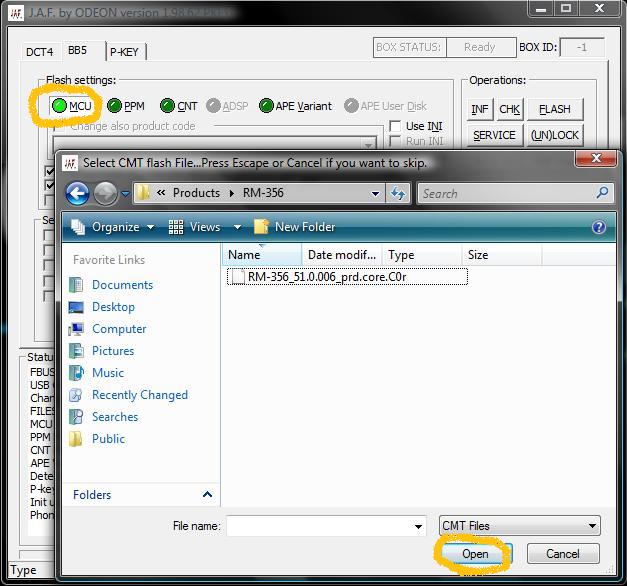
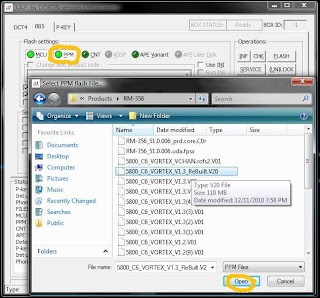
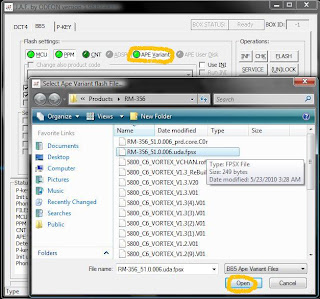
- Keep in mind that Hard Reset is the Last Resort Following the Flashing guide on the FP does work for C6 CFWs. There's also an alternate method of flashing with JAF that only needs 3 of the CFW files, and they don't have to be in the RM-356 folder  » Click to show Spoiler - click again to hide... « QUOTE another ques....there is a cfw i ddled with only 3 files which is the coo, fpsx and v01 files.... so, do i hav to download the c6 fw files and add these 3 files first b4 flashing? I suppose thats the Vortex CFW right? There's a 'Tutorial' section in the Vortex blog. Can't share it here sadly cause there are links to JAF there  » Click to show Spoiler - click again to hide... « This post has been edited by JustinLFJ: Jan 8 2011, 04:04 PM |
|
|
|
|
|
Jan 8 2011, 04:07 PM
|
|
Junior Member
82 posts Joined: Aug 2009 From: jb
|
QUOTE(JustinLFJ @ Jan 8 2011, 04:02 PM) Eh.. Don't blindly suggest people to Hard Reset their phone.. A lot of problems are caused by own user not reading changelogs and instructions of the CFW before flashing, and some can even be solved if u look hard enough.. So don't push for Hard Reset unless its really a problem like OS corrupted. yupp~ hm...so shld i ddl the c6 firmware n store it in the Phoenix file first? from the pic, it seems to have many many files in there- Keep in mind that Hard Reset is the Last Resort Following the Flashing guide on the FP does work for C6 CFWs. There's also an alternate method of flashing with JAF that only needs 3 of the CFW files, and they don't have to be in the RM-356 folder » Click to show Spoiler - click again to hide... « I suppose thats the Vortex CFW right? There's a 'Tutorial' section in the Vortex blog. Can't share it here sadly cause there are links to JAF there » Click to show Spoiler - click again to hide... « This post has been edited by mikuo: Jan 8 2011, 04:16 PM |
|
|
Jan 8 2011, 04:09 PM
|
|
Senior Member
875 posts Joined: Jan 2010 From: KL
|
QUOTE(mikuo @ Jan 8 2011, 04:07 PM) yupp~ hm...so shld i ddl the 5800 firmware n store it in the Phoenix file first? from the pic, it seems to have many many files in there Nope, just place it somewhere that is easy to access. Then select them 1 by 1 with JAF as shown in the spoiler above. Don't use Phoenix. Don't need to care about the other files in the pic.I used this method for my Vortex v1.4 |
|
|
Jan 8 2011, 04:21 PM
|
|
Junior Member
82 posts Joined: Aug 2009 From: jb
|
oooo,..... my cuurent cfw is a c6cfw.... so by straight flashing vortex's cfw which is also a c6 cfw wont crash the phone rite?
|
|
|
Jan 8 2011, 04:26 PM
|
|
Senior Member
875 posts Joined: Jan 2010 From: KL
|
QUOTE(mikuo @ Jan 8 2011, 04:21 PM) oooo,..... my cuurent cfw is a c6cfw.... so by straight flashing vortex's cfw which is also a c6 cfw wont crash the phone rite? As long as you're on the same version of the CORE file, it wont  . Which version of C6 CFW are you on? v51? v52? . Which version of C6 CFW are you on? v51? v52?There are 2 options at the place you download from, right? This post has been edited by JustinLFJ: Jan 8 2011, 04:26 PM |
|
|
Jan 8 2011, 04:29 PM
|
|
Junior Member
82 posts Joined: Aug 2009 From: jb
|
QUOTE(JustinLFJ @ Jan 8 2011, 04:26 PM) As long as you're on the same version of the CORE file, it wont ooooo. ic ic . Which version of C6 CFW are you on? v51? v52?There are 2 options at the place you download from, right? v52yup yup thx for the help! |
|
|
Jan 8 2011, 04:31 PM
|
|
Senior Member
875 posts Joined: Jan 2010 From: KL
|
QUOTE(mikuo @ Jan 8 2011, 04:29 PM) ooooo. ic ic No probs v52yup yup thx for the help!  Good luck flashing  |
|
|
Jan 8 2011, 10:25 PM
|
|
Senior Member
2,041 posts Joined: Jan 2009 From: Symbian HQ
|
QUOTE(mikuo @ Jan 8 2011, 04:29 PM) ooooo. ic ic Vice choise u choose Vortex v52yup yup thx for the help!  |
|
Topic ClosedOptions
|
| Change to: |  0.0302sec 0.0302sec
 0.33 0.33
 6 queries 6 queries
 GZIP Disabled GZIP Disabled
Time is now: 7th December 2025 - 06:35 AM |
 Quote
Quote