Outline ·
[ Standard ] ·
Linear+
Intel Core i7 LGA1366 & X58 Overclocking V2, Discussion, Benchmarks, Stabilty, Guides
|
kaka_89
|
 Jun 3 2011, 12:20 AM Jun 3 2011, 12:20 AM
|

|
QUOTE(gengstapo @ Jun 3 2011, 12:12 AM) Its affordable la, not like yours the well-known TJ07  From 6GB, only 3GB detected? Hmm weird ehh. Maybe the slot got problem. If running default still same? Maybe you are right also, since RAM got lifetime, just RMA if its really spoilt~ i think you got the wrong person already.. i'm the one who having the problem..  .. i'm using 3gb of ram on win7 32 bit, but last night before i re-slot back the ram, it detects only 2gb.. ..after re-sloting each rams, it becomes 3gb back.. ..kinda weird... running linx on on default setting w/o any errors..  ..i would like to oc it back see what happens..maybe with different settings.. |
|
|
|
|
|
kaka_89
|
Jun 3 2011, 02:36 PM
|
|
|
btw i tried running with xmp profile.. i experienced lagging when playing games right now...aishhh.. » Click to show Spoiler - click again to hide... « @monsh yes, happens with no oc at the beginning..however, right now i able to boot up safely but experienced lagging during playing games.. |
|
|
|
|
|
kaka_89
|
Jun 7 2011, 03:15 PM
|
|
|
QUOTE(monsh @ Jun 6 2011, 06:12 PM) so nice to see u all got time to do it T_T im bz wif my projects and all . cant really jeopardise the system . scared it'll turn back on me then im gonna lose my whole job it's okay for not torturing your rig for a while.. ... at least it will prevent your board from kaput..  ..just like me.. |
|
|
|
|
|
kaka_89
|
Jun 7 2011, 04:30 PM
|
|
|
i'm struggling on my EE now.. .. is really hard to find the best combination on bclk and cpu multi tho.. .. when get the desired cpu speed, dram speed is not desired enough..still doing some study on this EE..  |
|
|
|
|
|
kaka_89
|
Jun 7 2011, 05:12 PM
|
|
|
that 21x200 at what cpuV dude..?..
|
|
|
|
|
|
kaka_89
|
Jun 7 2011, 05:51 PM
|
|
|
you are talking 4.2g's dude..21x200..i don't think 1.29v will make it..
try pump more..monsh 4.2g's @ 1.375v..try increase notch by notch, and see which one boot..
|
|
|
|
|
|
kaka_89
|
Jun 7 2011, 10:46 PM
|
|
|
wow..thats hot dude..are you on air..?..
|
|
|
|
|
|
kaka_89
|
Jun 8 2011, 12:43 PM
|
|
|
lol..u really mad.. ..3.5g's @ 95c.. .. what's the highest speed u reach bro..? |
|
|
|
|
|
kaka_89
|
Jun 8 2011, 02:22 PM
|
|
|
better sell it off before it burns.. ..and get youself the sandy.. .. monsh, what is your QPI, uncore and DRAM freq @ 4.2g's.. |
|
|
|
|
|
kaka_89
|
Jun 8 2011, 11:18 PM
|
|
|
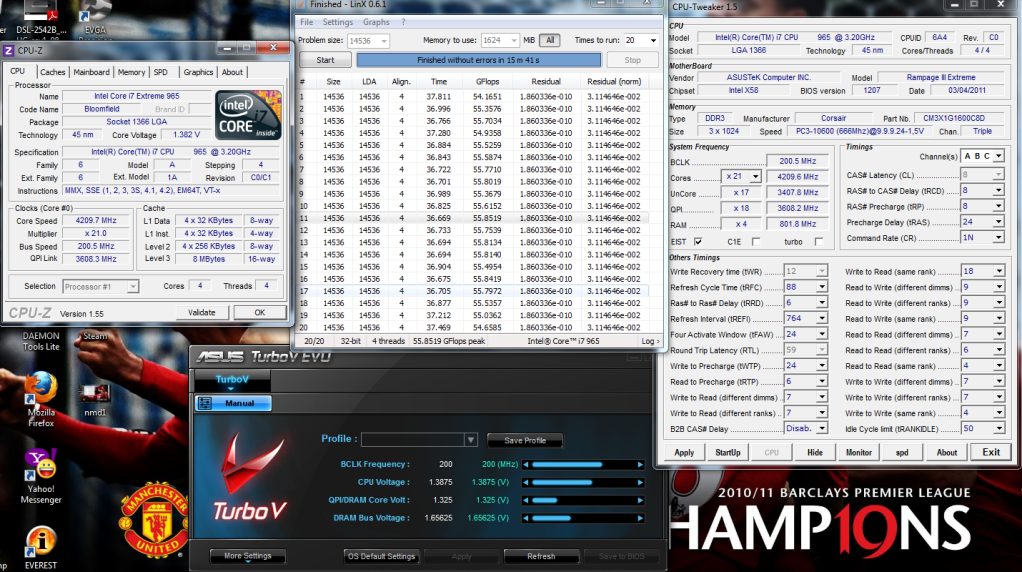
4.0g's and above really need to pump more vcore..  ..but with your proc, it seems to be a bit lower compare with my proc.. i'm running 4.2g's @ cpuV 1.3875..luckily i'm running on water..  » Click to show Spoiler - click again to hide... « try and run your rams on the desired timing..8-8-8-28/82 or 88...loosen the timings will sometimes gets you a stable linx.. |
|
|
|
|
|
kaka_89
|
Jun 9 2011, 09:43 AM
|
|
|
@monsh..
what's your QPI freq..?..is it 4k too..?
|
|
|
|
|
|
kaka_89
|
Jun 11 2011, 02:25 PM
|
|
|
QUOTE(kakicam @ Jun 11 2011, 06:35 AM) qpi iinm set to the lowest...
Added on June 11, 2011, 6:35 amneither do i.. bro hows your temp on 4.2...? of you want to see a slight performance for the graphic card, increasing the QPI link/rate might help since it will increase the speed bandwidth.. |
|
|
|
|
|
kaka_89
|
Jun 13 2011, 02:07 AM
|
|
|
QPI acts as the bus speed of the FSB (previously for LGA775) in the i7 platform, and as we know the FSB is the data transmission path for the chipset(previously on the north bridge), processor, and memory.
previously Northbridge chipset can be known as the processor, memory and the PCI-E, then the Core i7, chipset, known by the name of IOH (Input-Output Hub), which served as the input and output of the entire system...
so, iinm increasing the QPI link rate will help to improve the performance from the PCIe lane..if you don't understand me, you can just google...correct me if i'm wrong..
and according to cstkl1, QPI doesn't have the impact on any voltage..
|
|
|
|
|
|
kaka_89
|
Jun 13 2011, 10:10 PM
|
|
|
as we know, bclk decides all the frequencies(cpu speed, dram speed, QPI speed),
QPI is the limiting factor for the other elements as the highest stable QPI link speed for the current Core i7 processors is 8.0GT/s or 4.0GHz..
the reason you only see limited setting for QPI link/rate because of there are only 3 available QPI multi for all processor
which is slower(18), mid(22) and higher(24)..different proc have different QPI speed..
for instance, for the i7 920, 940 the default QPI is 4.8GT/s or 2400Mhz and
for Extreme proc (i7 965), which is more higher, 6.4GT/s or 3200/mhz..(this is one of the distinction between and ordinary i7 proc and EE procs)
most of stable and maximum performance oc outhere, using the ratio of 8:9 between their uncore and QPI speed..
it is easier to understand by giving some examples..i’ll be using the i7 920 proc..
on default setting(including the multi), i7 920
bclk =133,
cpu multi=20 (2667)
uncore multi=16(2133)
dram multi=8(1067)
QPI multi=18(4800),
when you take the ratio of uncore to QPI you will get 2132:2400(4800/2) or approximately 8:9..
based from my experience running QPI lower than uncore prove to be not stable..
but I’m not sure for you guys..running it on 1:1 ratio also cannot be guaranteed to be stable..
the best is at 8:9 ratio..according to what I read from lots of i7 reviews, this is what I understand..
|
|
|
|
|
|
kaka_89
|
Jun 13 2011, 10:26 PM
|
|
|
lol..is based from my reading bro...that is not from him..you can ask him if you wanted to.. .. yeah, you can try to set to mid, and as for auto..i'm not sure..and try see via cpu-tweaker.. that's why sometimes, is hard to reach a stable 4k uncore with 2k rams, it's all because of the QPI limitation.. this also explain, why x58 rarely reach bclk above 220..with limited cpu multi on ordinary procs..so there comes the EE..when you play witl cpu multi instead of bclk.. |
|
|
|
|
|
kaka_89
|
Jun 13 2011, 11:00 PM
|
|
|
i'm running on QPI multi 18 dude (which is the lowest), because of my rams limitation..i'm using only dom 1600mhz with 3407mhz uncore.. i got no money for 2k rams..  .. QPI multi at 18 will give me 3608mhz of QPI speed..if you see the ratio is 8:9 (uncore:QPI).. |
|
|
|
|
|
kaka_89
|
Jun 13 2011, 11:11 PM
|
|
|
use this tool.. it really helps for a start to oc and see how the all the frequencies works.. http://icrontic.com/files/apps/nehalem-calc/what is your QPI speed by looking at cpu-z..? |
|
|
|
|
|
kaka_89
|
Jun 14 2011, 01:10 AM
|
|
|
what can you expect when you oc dude.. ..of course it will be higher than default.. i think it's just a warning sign since it above default value.. |
|
|
|
|
|
kaka_89
|
Jun 14 2011, 02:28 PM
|
|
|
that is actually 7000/2=3000mhz dude....
just ignore what the tools says, it is just a reminder since it will be higher than the default value...
|
|
|
|
|
|
kaka_89
|
Jun 14 2011, 04:23 PM
|
|
|
iinm increasing the QPI speed does actually helps the memory write and copy performance..
|
|
|
|
|



 Quote
Quote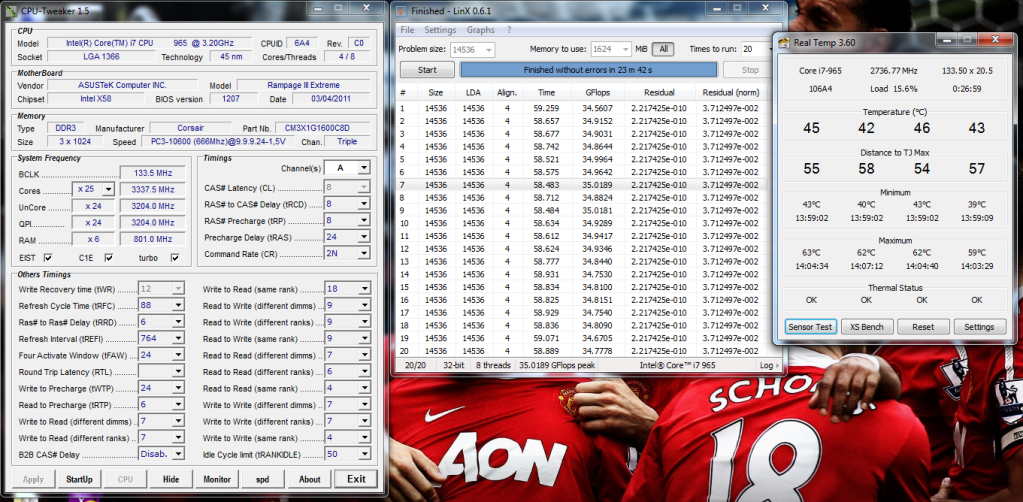

 0.0389sec
 1.21
1.21
 7 queries
 GZIP Disabled