


Added on October 25, 2010, 8:22 pm@verdangilte, Can you check the same thing for me? Thank you.
This post has been edited by kizwan: Oct 25 2010, 08:24 PM
Asus A | U | N series combined thread V2, New model coming in.....
|
|
 Oct 25 2010, 08:21 PM Oct 25 2010, 08:21 PM
Return to original view | Post
#81
|
 
Senior Member
826 posts Joined: Jan 2009  
|
@budingyun, I need your help. Please check in Device Manager, under System Devices. Can you see SMBUS controller/device? I'm currently communicating with asus support via email on this matter. Thank you.
Added on October 25, 2010, 8:22 pm@verdangilte, Can you check the same thing for me? Thank you. This post has been edited by kizwan: Oct 25 2010, 08:24 PM |
|
|
|
|
|
Oct 26 2010, 08:59 AM
Return to original view | Post
#82
|
|
Senior Member
826 posts Joined: Jan 2009
|
QUOTE(budingyun @ Oct 26 2010, 08:31 AM) no any smbus there.. Thank you for checking it for me.   Added on October 26, 2010, 11:24 amFor A42JV owner, about SMBUS controller. A42JV Device Manager:-  CPU-Z Memory SPD Information:-  Check with HWiNFO32 Program:-  CPU-Z Memory SPD infromation (after launching HWiNFO32 Program):-  The SPD information will disappear again if reboot or after resuming from hibernate. This is why I contacted Asus support regarding the "disappearance" of the SMBUS controller in Device Manager. I can't RMA'd the notebook since there is no problem with it. No sudden freeze & BSOD for no reason. Since there is "Technical Inquiry" on our ASUS Member Home page, so I utilized it for asking this technical question to Asus support. Also, since at least three random people who owned A42JV already confirmed they can't see SMBUS controller in Device Manager, I guess it kinda solved this issue. However, I still find it very unusual. This post has been edited by kizwan: Oct 26 2010, 11:32 AM |
|
|
Oct 26 2010, 11:30 AM
Return to original view | Post
#83
|
|
Senior Member
826 posts Joined: Jan 2009
|
Today I have time to overclock Bus Speed with SetFSB:-
Bus Speed = 133MHz (Default) 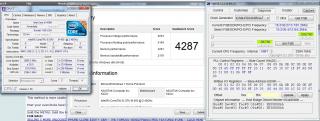
Bus Speed = 145.1MHz 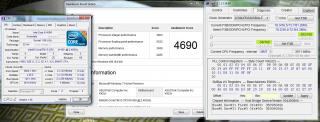
Bus Speed = 148MHz 
|
|
|
Oct 26 2010, 11:40 AM
Return to original view | Post
#84
|
|
Senior Member
826 posts Joined: Jan 2009
|
QUOTE(lee_what2004 @ Oct 26 2010, 11:33 AM) Can reach 160.4 MHz? I didn't tried yet, maybe later. Windows freezed when I tried to decrease (address 0xF) from D8 to D5. Maybe too much. I add ~3Mhz more to Bus Speed when I increase (address 0x10) from 31 to 32. I think I can increase it to 33, around 151Mhz but still too far from 160MHz. |
|
|
Oct 26 2010, 01:33 PM
Return to original view | Post
#85
|
|
Senior Member
826 posts Joined: Jan 2009
|
QUOTE(lee_what2004 @ Oct 26 2010, 11:51 AM) For me, the first time, straight change it to 160.4MHz and it works fine. - I tried straight change to 160MHz but windows just freeze. But when I change the fsb to 150MHz and try to increase the 0x10, somehow it can't go beyond 39, when I put it on 40, it straight freeze, and also can't go lower than 33 or 32, freeze as well. Making me think like there's some kind of limit range for 0x10, though it supposed to works since the BCLK still lower than 160.4MHz, which is stable.. - After that I tried to set for address 0xF from D8 to D6 & set for address 0x10 from 31 to 34, windows freeze. - After that I tried to set for address 0xF from D8 to D6 & set for address 0x10 from 31 to 33, it applied for a moment, then BSOD. In Reliability Check History, it said video hardware error. I guess it make the IGP unstable. (I need to turn OFF the computer since BSOD only reboot the computer. Previous settings still applied. After cold-boot, it reset back to default.) Conclusion, the most stable overclock settings on my notebook is 148MHz (address 0xF = D6 & address 0x10 = 32). I'm satisfy with the results since it increased the processor speed from 2.66GHz to 2.96GHz.This post has been edited by kizwan: Oct 26 2010, 01:39 PM |
|
|
Oct 26 2010, 02:50 PM
Return to original view | Post
#86
|
|
Senior Member
826 posts Joined: Jan 2009
|
QUOTE(lee_what2004 @ Oct 26 2010, 01:46 PM) 2.96GHz is TurboBoost though... Yeah, that is correct but it still real processor speed. The base clocks raised to 2.66Ghz..  Not something we calculate on paper & dream for it when sleeping. Not something we calculate on paper & dream for it when sleeping.  In my opinion, for budget gaming notebook, because it doesn't have fancy cooling system (fancy heatsink), i5 processor is much better than i7 in real life performance. I found i7 (mobile) processor, especially quad core processor is very lazy to achieve highest turbo boost compare to i5 because of the insufficient cooling system. In my opinion, for budget gaming notebook, because it doesn't have fancy cooling system (fancy heatsink), i5 processor is much better than i7 in real life performance. I found i7 (mobile) processor, especially quad core processor is very lazy to achieve highest turbo boost compare to i5 because of the insufficient cooling system.Nvidia released new driver very fast. Maybe a lot of complains to 260.89 driver. I also found if installed without fresh install option selected, nvidia control panel seems not stable. This post has been edited by kizwan: Oct 26 2010, 02:52 PM |
|
|
|
|
|
Oct 26 2010, 02:59 PM
Return to original view | Post
#87
|
|
Senior Member
826 posts Joined: Jan 2009
|
QUOTE(lee_what2004 @ Oct 26 2010, 02:53 PM) But gaming performance drop somehow when overclocking the CPU... I see. Make sense since overclocking does stressed the CPU. So, I think better stick with stock speed. i5-450M already more than enough to play any demanding games. |
|
|
Oct 26 2010, 05:51 PM
Return to original view | Post
#88
|
|
Senior Member
826 posts Joined: Jan 2009
|
QUOTE(w33wawa @ Oct 26 2010, 03:58 PM) After overclocking, i suppose that overclocking drain more battery. So,in practical,how much battery life shorten due to overclocking? Sorry, I didn't check battery life when overclocking. Now @ stock speed. I played games on stock speed. Overclocking just for fun (and for benchmark).  Perhaps, maybe around 1 to 1.5 hour. Perhaps, maybe around 1 to 1.5 hour.Added on October 26, 2010, 5:56 pm QUOTE(AlexLai @ Oct 26 2010, 05:11 PM) Our i5-450M runs at 4X degress and lower when idling. My friend's X42Jr's i7 runs more than 5X degrees on idle. Yeah, my Dell Studio with i7 quad core also run 5X celcius on idle.  When doing CPU extensive task, the temp up to 77 to 85 celcius. Still consider OK but because of the throttling, it will be difficult to achieve highest turbo boost. I even tried in very cold server room + cooling pad but still failed to achieved it. When doing CPU extensive task, the temp up to 77 to 85 celcius. Still consider OK but because of the throttling, it will be difficult to achieve highest turbo boost. I even tried in very cold server room + cooling pad but still failed to achieved it. This post has been edited by kizwan: Oct 26 2010, 05:56 PM |
|
|
Oct 26 2010, 10:01 PM
Return to original view | Post
#89
|
|
Senior Member
826 posts Joined: Jan 2009
|
@eugenechiuu, it only ask to restart if the files supposed to be replaced with newer version is in use. 260.89 driver also doesn't ask me to restart but I still restart it.
 On unrelated matter, anyone use "keyboard protective film" on their notebook? I have two things worried me; heat air dissipated at keyboard area & accuracy when typing. Any thoughts are welcome. |
|
|
Oct 26 2010, 10:31 PM
Return to original view | Post
#90
|
|
Senior Member
826 posts Joined: Jan 2009
|
QUOTE(eugenechiuu @ Oct 26 2010, 10:05 PM) I had 1 free when I bought the laptop.. Used it to prevent dust but it doesn't fit properly n made my laptop looked very ugly lol.. So I removed it.. Accuracy is fine I guess.. Good for preventing dust.. Yes that one. You're right, it doesn't fit properly because of the keyboard design. |
|
|
Oct 27 2010, 01:16 PM
Return to original view | Post
#91
|
|
Senior Member
826 posts Joined: Jan 2009
|
@lee_what2004,
Check this post @ notebookreview forum. This person successfully increased the Bus Speed to 172.4MHz. His PLL control register is almost similar to A42JV. I noticed he increased register 0x00 from 23 to 29. Do I need to increased mine? (Mine default 29, maybe increased it to 35?) My A42JV is not with me right now, so I can only test it tonight...if I have free time. |
|
|
Oct 28 2010, 12:45 AM
Return to original view | Post
#92
|
|
Senior Member
826 posts Joined: Jan 2009
|
QUOTE(eugenechiuu @ Oct 27 2010, 10:39 PM) I don't wanna update bios since Lee said would not be able to detect temp.. There is BIOS update for A42JV? I can't seems to find it at Asus support page. Where can I find the BIOS update? |
|
|
Oct 28 2010, 12:51 AM
Return to original view | Post
#93
|
|
Senior Member
826 posts Joined: Jan 2009
|
QUOTE(lee_what2004 @ Oct 28 2010, 12:48 AM) Its not BIOS, but beta AHCI driver I see. |
|
|
|
|
|
Oct 28 2010, 12:57 AM
Return to original view | Post
#94
|
|
Senior Member
826 posts Joined: Jan 2009
|
QUOTE(lee_what2004 @ Oct 28 2010, 12:52 AM) Any luck on pushing the i5 450M? I haven't tried it yet. Today is very busy day.  Added on October 28, 2010, 1:44 am QUOTE(lee_what2004 @ Oct 28 2010, 12:52 AM) Any luck on pushing the i5 450M? I tried a couple of minutes ago. No joy.  This post has been edited by kizwan: Oct 28 2010, 01:44 AM |
|
|
Oct 29 2010, 05:35 PM
Return to original view | Post
#95
|
|
Senior Member
826 posts Joined: Jan 2009
|
QUOTE(Amal @ Oct 29 2010, 05:09 PM) You mean RAM also works the same way? Both suggestion are correct.Because lee_what2004 said that I can sell the original RAM and still able to send the laptop with the new RAM to ASUS warranty, just that they will only service the rest of the parts except the RAM? which is right?  1) Don't sell the original RAM. When you need to send your notebook to Asus service center for repair, switch the new RAM with old one. This way your new RAM not accidentally MIA. 2) Sell the original RAM. When you need to send your notebook to Asus service center for repair, just send it. |
|
|
Oct 29 2010, 11:09 PM
Return to original view | Post
#96
|
|
Senior Member
826 posts Joined: Jan 2009
|
I have to make a confession here. I have been a very, very bad boy. The last time I defragment my hard disk is when I use Windows 95.
|
|
|
Oct 30 2010, 02:01 AM
Return to original view | Post
#97
|
|
Senior Member
826 posts Joined: Jan 2009
|
QUOTE(eugenechiuu @ Oct 30 2010, 12:32 AM) lol u should.. it improves ur boot time up to minus 20 seconds...... I might doing so if I have problem with boot time or slow down issue but I'm currently happy with it. Since I use Windows Vista (when people downgrading their Vista with XP) & now Windows 7, I don't have any problem with boot time. Anyway, disk defragmentation already scheduled to run weekly by default on Windows Vista & 7. So you don't need to do it manually.Do you save a lot of files in C drive? What is your partition scheme, especially partition size? |
|
|
Oct 30 2010, 09:29 PM
Return to original view | Post
#98
|
|
Senior Member
826 posts Joined: Jan 2009
|
QUOTE(Amal @ Oct 29 2010, 08:20 PM) Thanks for the advice bro... Have you upgrade your RAM? I just upgraded mine to 4GB of RAM today.meaning no issue with the warranty rite? anyone interested in buying 4GB(2GBx2) latpop RAM? hehehe To A42JV owner, Does your stock RAM speed is DDR3-1333 (667MHz)? I mean design speed not operation speed. I know with our i5 processor it will only work on 1066 (533MHz). I just want to know what you guys got. This post has been edited by kizwan: Oct 30 2010, 09:30 PM |
|
|
Oct 30 2010, 11:07 PM
Return to original view | Post
#99
|
|
Senior Member
826 posts Joined: Jan 2009
|
QUOTE(eugenechiuu @ Oct 30 2010, 10:33 PM) I was wondering how's the wear level of everyone's battery? I use it quite seldom so I kinda leave aside, then today I plug it back in the wear level was 7.84%! >< Shit, my laptop just 3 months old lor.. Mine 2%. I keep it connected to my laptop. My laptop less than 3 month old (2 month maybe).Added on October 30, 2010, 11:13 pm QUOTE(ph0bic @ Oct 30 2010, 09:54 PM) guys,after lots of googling i finally found out what's the problem really called.. Yes, use quietHDD and disable APM. What is your HDD brand? I ask this because I read it only happen with WD 500GB HDDs, however I doubt it.is micro stuttering or lag spikes or something like that..done all the diagnostic i can..even update everything..but the problem still cannot be fixed.. yesterday the lag did not appear after i started the laptop..but after i shut it down and turn it on again..it started again...really annoying lorh.. This post has been edited by kizwan: Oct 30 2010, 11:15 PM |
|
|
Oct 31 2010, 12:00 AM
Return to original view | Post
#100
|
|
Senior Member
826 posts Joined: Jan 2009
|
QUOTE(eugenechiuu @ Oct 30 2010, 11:41 PM) oh darn, i guess plugging it inside the laptop is better... should do that from now on... It is up to you actually. You can store it (meaning not use it) but you have to make sure it have at least 40% charge/capacity. Please read this and this for more information.Added on October 31, 2010, 12:10 am QUOTE(gogo2 @ Oct 30 2010, 11:38 PM) Newer badge one is 1333. Mine is 1333 Kingston. So I added another 2gb kingston 1333. Same here.While upgrading the RAM, I noticed a daughter/sister board but I'm not sure what it is. It is too thick to say it is wireless card. This post has been edited by kizwan: Oct 31 2010, 12:10 AM |
|
Topic ClosedOptions
|
| Change to: |  0.0509sec 0.0509sec
 0.56 0.56
 7 queries 7 queries
 GZIP Disabled GZIP Disabled
Time is now: 9th December 2025 - 12:15 AM |
 Quote
Quote