Welcome Guest ( Log In | Register )

Bump Topic Topic Closed RSS Feed
7 Pages < 1 2 3 4 5 > » Bottom

Outline · [ Standard ] · Linear+

 Asus A | U | N series combined thread V2, New model coming in.....

views
     
kizwan
post Oct 11 2010, 01:39 PM

BÖw DÖwn TÖ LÖrd PringlËs
*****
Senior Member
826 posts

Joined: Jan 2009


QUOTE(gogo2 @ Oct 11 2010, 01:30 PM)
ya... to me I feel that its because of overheating... but some might not agree  flex.gif just touch the hardisk...its damn hot
*
Hope it didn't failed after the warranty expired. Let us compare our HDD temperature & model (for example Momentus XT). I think mine is Momentus.


Added on October 11, 2010, 1:41 pm
QUOTE(lee_what2004 @ Oct 11 2010, 01:33 PM)
Let's try, I got one seagate hdd running@53C for couple days now laugh.gif
*
Mine 42C tongue.gif but I'm in airconded room right now. Will test it whithout aircond later.

This post has been edited by kizwan: Oct 11 2010, 01:41 PM
kizwan
post Oct 11 2010, 02:28 PM

BÖw DÖwn TÖ LÖrd PringlËs
*****
Senior Member
826 posts

Joined: Jan 2009


@gogo2, what is your HDD temperature? Is yours 5400RPM or 7200RPM? Mine 5400RPM. Actually both of my notebooks only have 5400RPM. I don't know if it will influence the temperature or not, just asking. tongue.gif I'm planning to upgrade it to 7200RPM later. What do you prefer? WD?
kizwan
post Oct 11 2010, 02:55 PM

BÖw DÖwn TÖ LÖrd PringlËs
*****
Senior Member
826 posts

Joined: Jan 2009


QUOTE(astria @ Oct 11 2010, 02:32 PM)
theoratically 7.2k rpm ones consumes more power and thus is slightly hotter...

however i remember my previous HDD (Momentus 7200.3) idles at 36-38C...
*
How about SSD? My hard disk usage now is around ~70GB & KINGSTON SSD V 64GB is around RM500 (around US$162). Doesn't look economical though. tongue.gif Both of my notebook only have one HDD slot unless I sacrifice the DVD-ROM. Use something like this; SATA to SATA 2nd HDD caddy. Put SSD in the main drive & 7200RPM in the caddy.
kizwan
post Oct 11 2010, 06:02 PM

BÖw DÖwn TÖ LÖrd PringlËs
*****
Senior Member
826 posts

Joined: Jan 2009


QUOTE(lee_what2004 @ Oct 11 2010, 04:19 PM)
Its very bad....
I'm expecting under -10.0W for Intel HD + power saver...
*
It is hard to achieve -10W on A42JV, at least mine. I was able to achieved -11W if I didn't touched it at all. If I check email & browsing I got between (average) -14W to -17W. I'm connected to internet through my mobile phone (usb).


Added on October 11, 2010, 6:06 pm
QUOTE(michealelsie @ Oct 11 2010, 04:45 PM)
i see....coz the Acer 4820TG i heard the built quality is sucks....is't???

coz i m finding a laptop now...i am a moderate gamer but my friends around me keep complain their laptop battery power sucks, if use without wall plug power, just last for 2 hrs just for normal web surfing...not convenience if online at outside...

that's why i m abit confuse now... any good suggestion?
*
Acer TimelineX 4820TG not that bad. Good quality actually. I recommend:-
1) Acer TimelineX 4820TG
2) Lenovo IdeaPad Y460

There is one user selling Acer TimelineX 5820TG. Go check it out.

This post has been edited by kizwan: Oct 11 2010, 06:06 PM
kizwan
post Oct 11 2010, 06:35 PM

BÖw DÖwn TÖ LÖrd PringlËs
*****
Senior Member
826 posts

Joined: Jan 2009


QUOTE(lee_what2004 @ Oct 11 2010, 06:09 PM)
It really sounds to me that the nVidia isn't really turned off, since that's the discharge rate I'm getting with SXPS 16, P8700 + ATi HD4670....
*
My thoughts exactly. The Nvidia GPU can be easily turned ON by any services or applications. I believe this can be fixed with BIOS update.

EDIT: I believe A42JV disadvantages compared to 4820TG is the battery. A42JV only equipped with 6-cell 4400 mAh battery while 4820TG equipped with 6-cell 6600 mAh battery. The different of technology applied on both notebook can also contribute to the differences on battery life. A42JV using Optimus technology where when Nvidia GPU is turned ON, the Intel HD is not turned OFF because the output is go through the Intel HD. Which means a lot of power used when Nvidia GPU turned ON. I don't know what method use by 4820TG though because it use ATI Mobility GPU.

This post has been edited by kizwan: Oct 11 2010, 06:55 PM
kizwan
post Oct 11 2010, 06:56 PM

BÖw DÖwn TÖ LÖrd PringlËs
*****
Senior Member
826 posts

Joined: Jan 2009


QUOTE(lee_what2004 @ Oct 11 2010, 06:52 PM)
What about turn on globally as Intel, would that help?
*
Already done that. sad.gif
kizwan
post Oct 11 2010, 07:21 PM

BÖw DÖwn TÖ LÖrd PringlËs
*****
Senior Member
826 posts

Joined: Jan 2009


QUOTE(lee_what2004 @ Oct 11 2010, 06:58 PM)
What about if uninstall nVidia driver? a bit extreme though tongue.gif
Maybe I'll try that when I have more free time. tongue.gif
QUOTE(lee_what2004 @ Oct 11 2010, 06:58 PM)

Added on October 11, 2010, 7:11 pm
For the ATi, they copy the content from ATi to Intel and vice versa and each has the connection to the display, during that changing, the screen blank...
Yeah, I forgot. I already take a look 4820TG schematic before. I didn't realize the answer is just in front of me. tongue.gif
QUOTE(lee_what2004 @ Oct 11 2010, 06:58 PM)

Added on October 11, 2010, 7:11 pm
While yes, its true during nVidia it should eat more due to Intel HD is also ON, but during Intel mode, the nVidia should be completely off as what nVidia demonstrated on some demo video where the GPU is completely off and can be plugged out, then they plug it in back and they ran some benchmark, the nVidia is ON back....
*
It should behave like that. I don't know why battery life is poor on A42JV. It should 3 or 3.5 hours at least.
kizwan
post Oct 11 2010, 10:43 PM

BÖw DÖwn TÖ LÖrd PringlËs
*****
Senior Member
826 posts

Joined: Jan 2009


QUOTE(bananalow @ Oct 11 2010, 09:40 PM)
Can N43jq consider good gaming machine ? the GC is not bad but the processor is i7 ~~ Since most of the model now go for i7 instead of i5 ~~ i wonder will that affect the quality of gaming equip with i7 quad >< (slow clock processor )
*
The most important is GPU. Performance should similar whether you run it with i5 or i7 processor (assuming GPU is identical). Depend on games design, you might see certain games run slightly smoother with i7 processor. I found based on specification, Asus N43JQ is good for gaming. It is GT 425M right? However, I found the N43JQ casing doesn't look it capable to dissipate hot air fast enough when playing demanding games. Just my two cents. icon_rolleyes.gif
kizwan
post Oct 12 2010, 12:52 AM

BÖw DÖwn TÖ LÖrd PringlËs
*****
Senior Member
826 posts

Joined: Jan 2009


QUOTE(lee_what2004 @ Oct 12 2010, 12:42 AM)
Not much difference...
*
Agreed.
kizwan
post Oct 12 2010, 03:52 AM

BÖw DÖwn TÖ LÖrd PringlËs
*****
Senior Member
826 posts

Joined: Jan 2009


QUOTE(w33wawa @ Oct 12 2010, 03:12 AM)
@kizwan
saw ur name appear in insanely mac forum =)
can write a guide on how to run mac osx on A42JV?
*
Unfortunately Mac OS X is not compatible with this notebook because of the Optimus technology. New MacBook Pro which come with switchable graphics doesn't use Optimus. Instead Apple came out with their own solution. On Optmius notebook, Nvidia GPU is not "connected" directly with output (LVDS, HDMI, VGA, etc). The Intel HD (IGP) is responsible in relaying the output to monitor regardless which GPU processing it. There is no solution to get the Intel GPU to work with Mac OS X yet (on non-apple notebook). Since the IGP controlling the output, the Nvidia GPU is not detected properly. You'll only have better luck getting Mac OS X working on notebook if it have only Nvidia GPU (not switchable graphics) & of course Intel processor.

This post has been edited by kizwan: Oct 12 2010, 03:53 AM
kizwan
post Oct 12 2010, 04:08 AM

BÖw DÖwn TÖ LÖrd PringlËs
*****
Senior Member
826 posts

Joined: Jan 2009


How about the sound quality on N series notebook? Does N series have subwoofer?
kizwan
post Oct 12 2010, 12:09 PM

BÖw DÖwn TÖ LÖrd PringlËs
*****
Senior Member
826 posts

Joined: Jan 2009


QUOTE(CZero @ Oct 12 2010, 08:36 AM)
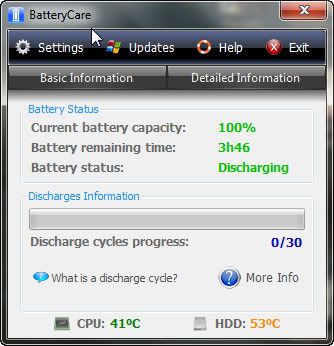
A few tweaking and I got this on my A42Jv.
user posted image
Forgot to check the discharge rate. sweat.gif
*
That is very hot HDD. Mine never reached 50.


Added on October 12, 2010, 12:14 pm
QUOTE(astria @ Oct 12 2010, 09:09 AM)
all i say it's crap, on my N81V at least...

my friend's older Lenovo Y510 is way better even though it's not Altec Lansing...
*
I'm surprise N series don't have subwoofer. It should have since it is multimedia notebook. Dell Studio have subwoofer & sound quality is very good compared to A42JV.

EDIT: I found at least N71JV is equipped with subwoofer & ... 2.1 speaker. The sound quality on N71JV should be good.

This post has been edited by kizwan: Oct 12 2010, 12:29 PM
kizwan
post Oct 13 2010, 12:57 AM

BÖw DÖwn TÖ LÖrd PringlËs
*****
Senior Member
826 posts

Joined: Jan 2009


QUOTE(mimi89 @ Oct 13 2010, 12:42 AM)
just bought new SONY Bluetooth Laser Mouse VGP-BMS10/S with RM110 for this laptop . Feeling weird ==.
*
May I know why?
kizwan
post Oct 13 2010, 03:09 AM

BÖw DÖwn TÖ LÖrd PringlËs
*****
Senior Member
826 posts

Joined: Jan 2009


QUOTE(ketapang @ Oct 13 2010, 02:03 AM)
Is it compulsory for asus live update n backup storage to run on every startup? wat if i turn it off?
*
No. You can uninstall it if you want.
kizwan
post Oct 13 2010, 12:52 PM

BÖw DÖwn TÖ LÖrd PringlËs
*****
Senior Member
826 posts

Joined: Jan 2009


QUOTE(lee_what2004 @ Oct 13 2010, 09:50 AM)
i7 740QM if run at 4 cores, it would run in 1.7GHz
only at 2 cores, it would turbo boost...

If by your definition, 2 cores for SC2, others for other resources, means it need to run at 4 cores, then it can't turbo boost, hence running SC2 in 1.7GHz?
*
The calculation should be like this:-
Core i7-740QM
- Turbo 1/1/6/9
- First number is the multiple of 133.33 MHz supported when four cores are active, the second number is the multiple for three cores, the third number is for two cores, and the fourth number is for one active core.
- Normal operating frequency is 1.73 GHz = 1730 MHz
* With 3 or 4 cores active: to 1.863 GHz —————> 1730 + 1 x 133.33 = 1730 + 133.33 ≃ 1863.33
* With 2 cores active: to 2.529 GHz ———————> 1730 + 6 x 133.33 = 1730 + 799.98 ≃ 2529.98
* With only 1 core active: to 2.929 GHz —————–> 1730 + 9 x 133.33 = 1730 + 1199.97 ≃ 2929.97

* When 4 cores active, the frequency is low (1.863 GHz) but remember it running 4 cores. 1.863 GHz 1 core vs 1.863 GHz 4 cores; the later performed much much better.

Quote from Intel website:-
QUOTE
What is Intel® Turbo Boost Technology and how does it work?
Intel® Turbo Boost Technology is a way to automatically run the processor core faster than the marked frequency if the part is operating under power, temperature, and current specifications limits of the Thermal Design Power (TDP). This results in increased performance of both single and multi-threaded applications.


This post has been edited by kizwan: Oct 13 2010, 12:58 PM

kizwan
post Oct 13 2010, 03:47 PM

BÖw DÖwn TÖ LÖrd PringlËs
*****
Senior Member
826 posts

Joined: Jan 2009


QUOTE(gogo2 @ Oct 13 2010, 01:45 PM)
if the software/game is written so perfect to use 2 core, then effectively the frequency double...

meaning, at 1.73ghz dual core x 2= 3.4GHz (effective)
*
No. Running on 2 cores will not double the processor frequency. The advantage of 2 cores vs 1 core is 2 cores can process two task simultaneously compared to 1 core which only can process 1 task at one time. It doesn't double the processor frequency.

This post has been edited by kizwan: Oct 13 2010, 03:51 PM
kizwan
post Oct 13 2010, 04:38 PM

BÖw DÖwn TÖ LÖrd PringlËs
*****
Senior Member
826 posts

Joined: Jan 2009


QUOTE(gogo2 @ Oct 13 2010, 04:29 PM)
shit... i know someone will misinterpret my statement...

come on la.. i no talking about double frequency. Only idiot will think like that.. omg.. i can't believe
you read my statement wrong...

I'm saying the efective result la adui...
*
QUOTE(gogo2 @ Oct 13 2010, 01:45 PM)
if the software/game is written so perfect to use 2 core, then effectively the frequency double...

meaning, at 1.73ghz dual core x 2= 3.4GHz (effective)
*
You just wrote "frequency double" there. Aduii.... Funny, only stupid people call other people stupid. LOL

This post has been edited by kizwan: Oct 13 2010, 04:41 PM
kizwan
post Oct 13 2010, 05:00 PM

BÖw DÖwn TÖ LÖrd PringlËs
*****
Senior Member
826 posts

Joined: Jan 2009


QUOTE(gogo2 @ Oct 13 2010, 04:48 PM)
yeah, I'm just saying in theory, the performance is like doubling... but not in frequency.. 
i say if I were to say the frequency is doubling, I'll be idiot. I did not call u stupid. Pls read properly la adui...
*
Yeah, whatever. LOL
kizwan
post Oct 13 2010, 07:37 PM

BÖw DÖwn TÖ LÖrd PringlËs
*****
Senior Member
826 posts

Joined: Jan 2009


QUOTE(RedDevils88 @ Oct 13 2010, 07:27 PM)
that's y i dont like bt mouse. >.<
*
Yeah me too. It doesn't work effectively though.
kizwan
post Oct 14 2010, 02:16 PM

BÖw DÖwn TÖ LÖrd PringlËs
*****
Senior Member
826 posts

Joined: Jan 2009


QUOTE(RedDevils88 @ Oct 14 2010, 12:41 AM)
hey my gf's a42ja's screen colour seems to be kinda shallow.. means it is not as sharp as my a42jv.. i have tried to change the settings using ati catalyst but it is still the same.. it is very easy to spot the difference when we play sc2 side by side. anyone can confirm this? or else i have to send the laptop to check rclxub.gif
*
Can you take a picture of both notebook screens side-by-side? I want to see the different...

7 Pages < 1 2 3 4 5 > » Top
Topic ClosedOptions
 

Change to:
| Lo-Fi Version
0.0442sec    0.40    7 queries    GZIP Disabled
Time is now: 9th December 2025 - 08:26 PM