Welcome Guest ( Log In | Register )

Bump Topic Topic Closed RSS Feed
4 Pages  1 2 3 > » Bottom

Outline · [ Standard ] · Linear+

 Samsung Galaxy S I9000 Official Thread V3, Please read FAQ!!

views
     
kmrdeva
post Aug 12 2010, 08:10 PM

Look at all my stars!!
*******
Senior Member
4,783 posts

Joined: Jan 2003
QUOTE(frankgan @ Aug 12 2010, 07:58 PM)
Can anyone help? icon_question.gif
*
The non-asian firmwares do not have any option for chinese input, meaning you can't enter/type chinese text. I read somewhere that you can work around this by downloading and installing other keyboard or input applications that support chinese input.

kmrdeva
post Aug 13 2010, 02:49 PM

Look at all my stars!!
*******
Senior Member
4,783 posts

Joined: Jan 2003
QUOTE(lost123 @ Aug 13 2010, 02:47 PM)
hey does any1 noe how long more will maxis haf the official rights to sell the galaxy S?
*
Should be quite long, I suspect. Just look at the HTC Desire - still no word on when Digi or Celcom will offer it under contract.
kmrdeva
post Aug 17 2010, 10:19 PM

Look at all my stars!!
*******
Senior Member
4,783 posts

Joined: Jan 2003
QUOTE(ckdenion @ Aug 17 2010, 09:56 PM)
im nt able to search paid apps in market...
y?
*
Bro..

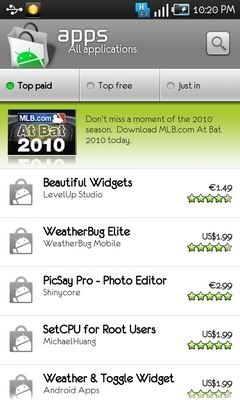
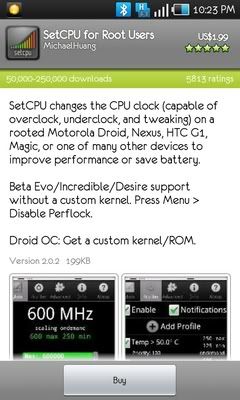
1. Paid apps not supported in Android Market for us Malaysian users, sadly.
1. Your phone needs to be rooted first.
2. You need to run MarketAccess.apk to emulate another provider. I use T-Mobile US.
3. I've bought a number of apps off the Market this way.

user posted image user posted image

This post has been edited by kmrdeva: Aug 17 2010, 10:30 PM
kmrdeva
post Aug 18 2010, 10:41 AM

Look at all my stars!!
*******
Senior Member
4,783 posts

Joined: Jan 2003
QUOTE(Crossover @ Aug 18 2010, 10:27 AM)
Saw I9000TGYJH1, trying to check the code for TGY, cant get any, any idea TGY is the code for which country?
*
Funny region code that one. Surprisingly, when I loaded this firmware on my phone, I got these version numbers:

PDA : I9000ZSJH1
PHONE : I9000ZSJH1
CSC : I9000ZSJH1

Hong Kong firmware, I believe.
kmrdeva
post Aug 18 2010, 11:00 AM

Look at all my stars!!
*******
Senior Member
4,783 posts

Joined: Jan 2003
QUOTE(angel-girl @ Aug 18 2010, 10:57 AM)
do share wit us wats the pros n cons  biggrin.gif
*
I have 2 other colleagues in the office using SGS phones. I have updated all 3 of our phones here to I9000TGYJH1 a few days back.

The first thing my colleagues noticed was that the Chinese input system was better than the one in the SEA firmware. I personally don't use Chinese input so I can't comment any more on this.

Also, the H1 firmware feels less laggy (overall) than the G4 or G8 firmwares.

kmrdeva
post Aug 18 2010, 11:32 AM

Look at all my stars!!
*******
Senior Member
4,783 posts

Joined: Jan 2003
QUOTE(angel-girl @ Aug 18 2010, 11:05 AM)
for the chinese input i use google pingyin,its not bad n wont lag.how bout the consumption of bat?
*
Batt consumption doesn't feel much different than G4 or G8 firmwares. My phone lasts a whole day (100% at 8am, 10-20% left at 11pm) with average usage.
kmrdeva
post Aug 18 2010, 12:34 PM

Look at all my stars!!
*******
Senior Member
4,783 posts

Joined: Jan 2003
QUOTE(jujx @ Aug 18 2010, 12:30 PM)
Haha yea, never really find the point of using. I didn't even install it before, just get the samsung usb driver enough
*
Same here.. ODIN for firmware flashing needs, phone in mass storage mode for file transfers to/from PC, and everything else sync'ed to the cloud (dropbox, gmail, contacts, calendar, twitter, facebook etc). Even the USB drivers (for tethering as modem) can be found online separately without needing to install Kies. Yay!
kmrdeva
post Aug 18 2010, 01:51 PM

Look at all my stars!!
*******
Senior Member
4,783 posts

Joined: Jan 2003
QUOTE(turion64 @ Aug 18 2010, 01:46 PM)
after flashing I9000TGYJH1, phone stuck at "S" blade logo splash screen. anyone experience this?

im using ODIN v3 1.00 and 513 PIT file...
*
Err, I used the 512 pit file. Worked like a charm.
kmrdeva
post Aug 18 2010, 02:04 PM

Look at all my stars!!
*******
Senior Member
4,783 posts

Joined: Jan 2003
QUOTE(turion64 @ Aug 18 2010, 01:58 PM)
juz tried 512 biggrin.gif now its at the screen which ask me to reboot using the volume button.
below it says installing  muti-CSC and stuck there..
should i go ahead and reboot now?
*
Waah, I dunno where you're stuck at. This is what I did when I updated:

1. Start ODIN, selected 'repartition', chose 512 pit file.
2. PDA set to the *PDA*.MD5 file, MODEM set to the *MODEM*.MD5 file and CSC set to the *CSC*.md5 file.
3. Booted phone to Download mode (the android pic on screen)
4. Plugged in the phone, ODIN detects the phone.
5. Clicked START and waited until progress box showed PASS (green box).

I don't remember the phone ever booting up to the Recovery mode during the process.

kmrdeva
post Aug 18 2010, 02:38 PM

Look at all my stars!!
*******
Senior Member
4,783 posts

Joined: Jan 2003
QUOTE(irenic @ Aug 18 2010, 02:11 PM)
i edit a lil bit hehe
*
Ha ha, thanks. biggrin.gif


Added on August 18, 2010, 2:43 pm
QUOTE(hihihehe @ Aug 18 2010, 02:36 PM)
a little bit for me(MyBackup Pro do the job for me)
i just dun like plug the usb when i still have battery left and set back my APN/wifi
*
Initially, before I found Titanium Backup, I used to lose everything (data and apps) after every f/w flash, requiring hours of re-sync and re-download/install of apps.

3 days back, I purchased (i.e. donated so that I can do multiple scheduled backups, keep multiple backup histories etc) Titanium Backup for USD3.99.

2 days back, I flashed to HK JH1 firmware from MiddleEast JG8. Lost everything, installed Titanium Backup and restored everything back. SMS, call logs, apps, practically all data and apps. Happy now.


Added on August 18, 2010, 2:45 pm
QUOTE(irenic @ Aug 18 2010, 01:53 PM)
kmrdeva,

since u said u flashed it 2-3 days ago, do apply any lagfix to the phone before u flash to H1 and after u flash to H1?
*
Nope, no lagfix. Just rooted my phone only.

Fed up with lagfix stuff for now - with lagfix, I only notice improvements in benchmarks but no significant speedups in normal operation (in my experience).


This post has been edited by kmrdeva: Aug 18 2010, 02:45 PM

kmrdeva
post Aug 18 2010, 03:13 PM

Look at all my stars!!
*******
Senior Member
4,783 posts

Joined: Jan 2003
QUOTE(ckdenion @ Aug 18 2010, 03:06 PM)
my fren using 16GB external storage card
which means internal is 16GB
external also 16GB
*
Quite good value then. I got my 16GB SGS for bloody RM2599 from maxis as I am on Digi and didn't want to MNP. Had to buy another class4 16GB micro-SD too (< RM200).


Added on August 18, 2010, 3:15 pm
QUOTE(digitheatre @ Aug 18 2010, 03:11 PM)
how do i use the SGS for tethering?
btw.. just got my croc leather zenus case today.. ordered from ebay.. it's so nice n very good quality..  rclxm9.gif
*
USB-based tethering? Well, if you have Kies or at least the SGS usb drivers installed, all you need to do is to connect the phone to the computer and choose 'PC Internet' mode. This is how it works for me, easy and simple.

I am getting about 1mbps sustained download speeds (am on Digi Smart Plan).

This post has been edited by kmrdeva: Aug 18 2010, 03:15 PM
kmrdeva
post Aug 18 2010, 03:23 PM

Look at all my stars!!
*******
Senior Member
4,783 posts

Joined: Jan 2003
QUOTE(ckdenion @ Aug 18 2010, 03:15 PM)
hmm...i jz suspect isit 1st hand mobile or not since he get it for rm1.7k...
i did not ask him whether is 1st hand or 2nd hand la since he not mentioning...
dun wan to make him malu in front of frens ma...
*
Last time I checked, the AP version (8GB) was selling for about RM1.8k-2k here in Penang. New unit.
kmrdeva
post Aug 18 2010, 04:01 PM

Look at all my stars!!
*******
Senior Member
4,783 posts

Joined: Jan 2003
QUOTE(Star_knight79 @ Aug 18 2010, 03:46 PM)
If you know how to buy the Titanium Backup without using market enabler (Means to root the phone), please let me know ya. Thanks.

Don't bother. Mis-info. The previous guy really don't know what he is talking about.
*
I didn't buy Titanium Backup from the Market. I paid via Paypal directly on the software owner's site.
kmrdeva
post Aug 18 2010, 04:09 PM

Look at all my stars!!
*******
Senior Member
4,783 posts

Joined: Jan 2003
QUOTE(ohmlawx @ Aug 18 2010, 04:07 PM)
count me in.. just get my SGS.. really lost.. seems need a lot of reading.. hehe
*
With great power comes great responsibility.. Most if not all of us also started by reading here and there. smile.gif
kmrdeva
post Aug 18 2010, 04:45 PM

Look at all my stars!!
*******
Senior Member
4,783 posts

Joined: Jan 2003
QUOTE(turion64 @ Aug 18 2010, 04:35 PM)
Bro, r there any big difference between donate and free version?
*
Quite a lot of differences. Taken from Titanium Backup Home Page.

QUOTE
Features of the Free version:

No time limit
Very fast app listing (~1 second for 300 apps)
Sort apps by name / last backup / backup frequency
Filter apps by name / type / status / Apps Organizer labels (also affects Batch operations)
Backup/restore regular apps + their settings
Backup/restore protected apps + their settings
Backup/restore system settings (incl. Wi-Fi AP list)
Restores the Market links when restoring apps
Zero-click background batch backup
Interactive batch restore
Many batch scenarios (eg: if more than N days since last backup, etc)
Zero-click app un-installer
Zero-click system app un-installer
Desktop widgets
A single weekly or biweekly scheduled backup (beta)

Additional features of the Donate version:

Branding to your name
Multiple backups per app (history length can be chosen)
Zero-click background batch restore
Batch verification of all backups
Ultra fast HyperShell (much faster for almost everything)
Market Doctor can remake any broken Market links (only for apps that were backed up with the link in place)
App freezer can disable an app (and make it invisible) without un-installing it
Unlimited, independent scheduled backups (each of which can run 1 to 7 times a week)
This post has been edited by kmrdeva: Aug 18 2010, 04:46 PM
kmrdeva
post Aug 18 2010, 04:52 PM

Look at all my stars!!
*******
Senior Member
4,783 posts

Joined: Jan 2003
QUOTE(turion64 @ Aug 18 2010, 04:49 PM)
icic thx bro biggrin.gif

btw, how come when i access Ti backup, the superuser request keep poping up. i have to click a dozen times and sometimes it wont go away...
*
Launch the SuperUser Permissions app and go to settings and uncheck notification. This is what I did.
kmrdeva
post Aug 18 2010, 05:12 PM

Look at all my stars!!
*******
Senior Member
4,783 posts

Joined: Jan 2003
QUOTE(turion64 @ Aug 18 2010, 04:57 PM)
hmm unchecked, still same.
*
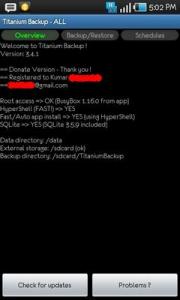
Reboot phone? I don't have this issue. On the main screen of Titanium Backup, please tell me what you see.

Do try pressing on the Problems? button, maybe some important components are wrong version or something.


Attached thumbnail(s)
Attached Image
kmrdeva
post Aug 18 2010, 05:34 PM

Look at all my stars!!
*******
Senior Member
4,783 posts

Joined: Jan 2003
QUOTE(hnr2802 @ Aug 18 2010, 05:24 PM)
is your superuser updated 2.3.2.1?
*
How do I check the superuser version, bro?
kmrdeva
post Aug 18 2010, 05:50 PM

Look at all my stars!!
*******
Senior Member
4,783 posts

Joined: Jan 2003
QUOTE(hnr2802 @ Aug 18 2010, 05:38 PM)
if your superuser icon is ninja dude (if im not mistaken) its the old version
if android skull it is 2.3 version or higher.
if your are on 2.3 version or higher u can update through market http://www.appbrain.com/app/com.noshufou.android.su
if old version just download from xda & it will override the old version
*
Yep, mine is the ninja one. Updating now.

Thanks, buddy! smile.gif

XDA Forum Link

This post has been edited by kmrdeva: Aug 18 2010, 05:50 PM
kmrdeva
post Aug 18 2010, 06:33 PM

Look at all my stars!!
*******
Senior Member
4,783 posts

Joined: Jan 2003
QUOTE(Crossover @ Aug 18 2010, 06:27 PM)
mine was rooted with Ninja, but i do not know how to use the above link (XDA Forum)

If i use ur link ie the [REF].... izzit ok?
*
I just downloaded from the link provided on that web page - MultiUpload - and then updated via recovery mode. Everything good now.

Thanks for sharing the XDA forum thread, hnr2802. smile.gif

This post has been edited by kmrdeva: Aug 18 2010, 06:34 PM

4 Pages  1 2 3 > » Top
Topic ClosedOptions
 

Change to:
| Lo-Fi Version
0.0335sec    0.72    7 queries    GZIP Disabled
Time is now: 10th December 2025 - 04:58 PM