

QUOTE(han2nd @ Sep 26 2012, 04:20 PM)
Thanks for the reply i already update once, the problem came after the update. 

Hi han2nd, has you do a factory default after you do the update?Thank you
Home Networking N Router By Asus RTN-66U / Asus RTN-16 / RT-N56U, Asus RT-N Series Supported Unifi
 |
 Sep 26 2012, 04:40 PM Sep 26 2012, 04:40 PM
Return to original view | Post
#21
|
 
Senior Member
2,319 posts Joined: Mar 2010 
|
QUOTE(han2nd @ Sep 26 2012, 04:20 PM) Thanks for the reply i already update once, the problem came after the update. Hi han2nd, has you do a factory default after you do the update?Thank you |
|
|
|
|
|
Sep 26 2012, 05:04 PM
Return to original view | Post
#22
|
|
Senior Member
2,319 posts Joined: Mar 2010
|
QUOTE(han2nd @ Sep 26 2012, 04:47 PM) Sorry what is factory default? how do i set it? Hi han2nd, you can refer to the image below. You can see there is a button in the red rectangular, press it with a pin for 5sec then release. That is our reset button. After that please redo the setting for your internet and have a try.Attached thumbnail(s) 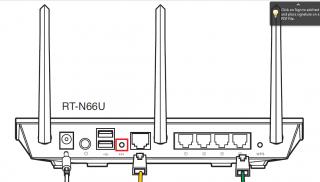
|
|
|
Sep 26 2012, 05:24 PM
Return to original view | Post
#23
|
|
Senior Member
2,319 posts Joined: Mar 2010
|
QUOTE(flowerhorn @ Sep 25 2012, 01:31 PM) Hi he contacted me once before raya and no news after that. Thanks Hi flowerforn, sorry for the late reply. For the repeater problems, our RD is currently testing the problem and hoping by this Friday will get the firmware, latest will be by next week Monday.Once we got the firmware already, we will let you know. Thank you |
|
|
Sep 28 2012, 09:38 AM
Return to original view | Post
#24
|
|
Senior Member
2,319 posts Joined: Mar 2010
|
QUOTE(Neo|ofGeo @ Sep 28 2012, 12:04 AM) any update on n13u? Hi Neo|ofGeo, can you elaborate more on the problem of your router? mine seem dead =='' Thank you This post has been edited by ASUSmy: Sep 28 2012, 11:26 AM |
|
|
Oct 1 2012, 12:45 PM
Return to original view | Post
#25
|
|
Senior Member
2,319 posts Joined: Mar 2010
|
QUOTE(cnwong @ Oct 1 2012, 11:33 AM) Hi, Hi cnwong, may I know what is the currently firmware version that you are using? The latest firmware version is 1.0.1.8l. Below is the link for the firmware.I have the RT-N56U but my HyppTV was always lag/stop (1/2 second) when watching the TV programme. But with the original Unifi router is fine. Why? Also i have just purchase the NAS and attached as LAN to the RT-N56U router and that the nightmare begin when i do multitask on BT/NAS/Internet Surfing. As mentioned by someone above, i think the asus router cannot handle LOAD. To my supprise that it stated "•Powerful Online Multitasking at up to 300,000 Data Sessions"!? http://support.asus.com/Download.aspx?SLan..._N56U_1018l.zip If you have updated the latest firmware and the problem still persist, would you be able to provide the log file for use to let our RD to check what is the problems? Thank you |
|
|
Oct 1 2012, 06:20 PM
Return to original view | Post
#26
|
|
Senior Member
2,319 posts Joined: Mar 2010
|
QUOTE(rayfoo @ Oct 1 2012, 05:44 PM) when will Asus launch the new firmware for rt-n56u, the firmware new UI look like the N66U Hi rayfoo, currently we are testing the new UI, once finish testing we will upload it at the official website.Estimated within this month, for exact date will let you all know. Thank you |
|
|
|
|
|
Oct 3 2012, 05:21 PM
Return to original view | Post
#27
|
|
Senior Member
2,319 posts Joined: Mar 2010
|
QUOTE(lcloon @ Oct 3 2012, 03:43 PM) Hi everyone. Hi lcloon, have you try do a factory default on the RT-N56U and redo the configuration to have a test? If you already done that, I will need your help to save a copy of the log file on the Rt-N56U router and send to me?Previously, I used my Asus RT-N56U to pair with Unifi's ZTE 931 modem. But after the modem adapter got problem, TM technician replaced the different set of modem for me as they said now Unifi is using this Huawei HG655A modem to all new customers, ZTE 931 no more available. After install the new modem, the Huawei HG655A modem got no problem with the Unifi's DLink router. But my Asus RT-N56U no more can communicate/link with the Huawei HG655A. I did update the Asus RT-N56U latest firmware but still can't communicate/link with the Huawei modem. Anyone here got similar problem? Or can anyone here kind to assist? Thank you |
|
|
Oct 3 2012, 06:52 PM
Return to original view | Post
#28
|
|
Senior Member
2,319 posts Joined: Mar 2010
|
QUOTE(lcloon @ Oct 3 2012, 05:47 PM) how to save the log file? The log file will remain undisturb even i did many times of factory reset and firmware updates? The log file will started from the day i 1st install the router? Hi lcloon, the log will be reset after you do the factory reset or on off the router. Once you power on the log will be create again. All you have to do is redo all the setting then if still cannot connect, the log will be generated. Then you can save the log file and send to me. You can follow the image below on how to save the log file.Once you log in to the router, under Advanced Settings there you can see System Log. Once you click it Save the log file from the General Log. Thank you This post has been edited by ASUSmy: Oct 3 2012, 06:56 PM Attached thumbnail(s) 
|
|
|
Oct 4 2012, 09:26 AM
Return to original view | Post
#29
|
|
Senior Member
2,319 posts Joined: Mar 2010
|
QUOTE(kembar4 @ Oct 3 2012, 06:59 PM) Hi, I am interested with the RT-N15U promotion. Hi kembar4, for the offer you can trade in any networking products including the one that you mentioned.Can i trade in the streamyx adsl modem for this? Can I flash DDWRT / Tomato on this router? As for the DD-WRT and the Tomato you can have a look at their website. For our firmware you can always go to our official website with the following link. http://my.asus.com/Networks/Wireless_Route...TN15U/#download Thank you |
|
|
Oct 4 2012, 11:57 AM
Return to original view | Post
#30
|
|
Senior Member
2,319 posts Joined: Mar 2010
|
QUOTE(MaKiMo @ Oct 4 2012, 11:46 AM) Yesterday went to PJ Digital Mall, not one shop knows the trade-in promo for the RT-N56U. C-Zone said no more forms... like dat how to get at RM399? Sien.... Hi MaKiMo, you can try MY Computer System which is in digital mall also. Below is the details of the shop.Company : My Computer System Address : Lot 2-05, 2nd Floor Digital Mall, No 2, Jln 14/20, Seksyen 14, Petaling Jaya, Selangor. 46100 Malaysia Phone : 014 6600622 Fax : 03 79551346 Email : info@mycomp2u.com Website: http://www.mycomp2u.com Thank you |
|
|
Oct 5 2012, 09:20 AM
Return to original view | Post
#31
|
|
Senior Member
2,319 posts Joined: Mar 2010
|
QUOTE(email2one @ Oct 5 2012, 06:25 AM) CODE http://support.asus.com/Download.aspx?SLan..._N56U_1018l.zip Latest version really bad for wireless connections. http://support.asus.com/Download.aspx?SLan..._N56U_1018m.zip Have a try on this version. Thank you |
|
|
Oct 9 2012, 10:17 AM
Return to original view | Post
#32
|
|
Senior Member
2,319 posts Joined: Mar 2010
|
QUOTE(3shen @ Oct 9 2012, 02:04 AM) Wah ASUSmy, you easily and snappily reply others but nicely ignore my polite plea on page 49 eh.... fantastic PR you have Sir ! Way to go in restoring my faith in Asus. Hi 3shen, we notice that there are many people having problem with the RT-N13. We are collecting information and log file for our RD. We will update the result ASAP. We are sorry for the waiting.I use it as a repeater to repeat the signal of the Unifi D-Link DIR 615.... it works great for two days and then hangs like how the other users here experience with it as their primary router. The internet usage is just web browsing and light downloading like mp3 and all. Thank you |
|
|
Oct 9 2012, 11:00 AM
Return to original view | Post
#33
|
|
Senior Member
2,319 posts Joined: Mar 2010
|
QUOTE(berjaya-mazda @ Oct 8 2012, 10:14 PM) Anyone use Asus RTN-16 with Unifi and used the latest firmware (Version 3.0.0.4.220 ) ? It is working for Unifi Home ? Right now i am using the custom firmware ( 3.0.0.3.102) from KLSeet and never upgrade since then. Hi berjaya-mazda, yes the new firmware can support Unifi Home. If you miss the out when selecting the connection type, you still can do it from the Lan section. Please refer the picture below. Thank you This post has been edited by ASUSmy: Oct 9 2012, 11:01 AM Attached thumbnail(s) 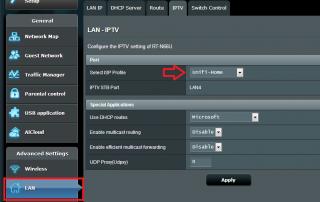
|
|
|
|
|
|
Oct 10 2012, 04:42 PM
Return to original view | Post
#34
|
|
Senior Member
2,319 posts Joined: Mar 2010
|
QUOTE(shadowblack @ Oct 9 2012, 03:37 PM) Can someone tell me the wireless range of Asus RT-N66U router? Hi shadowblack, I have seen your post "Need help with wifi range" regarding the wifi range. From the image that you have provided from your house to your sister house, an outdoor antenna will have better advantage on the wifi sharing. And at your sister can use a repeater to receive the signal and rebroadcast to whole house.Thank you. This post has been edited by ASUSmy: Oct 10 2012, 04:43 PM |
|
|
Oct 12 2012, 06:52 PM
Return to original view | Post
#35
|
|
Senior Member
2,319 posts Joined: Mar 2010
|
QUOTE(Hudd @ Oct 12 2012, 05:22 PM) Guys, Hi Hudd, would you be able to provide the firmware version and send me the system log and the configuration file of the router?Bought RT-N15U last month and no issue with the internet or Wifi..the only problem I got is with the Unifi TV. Change channel and it give slow response with the x satellite picture..same goes if you press 100 to view all the channels..might take 10-15 sec before the picture loaded..no issue with the Dlink Unifi router..updated with the current ASUS firware.. Anybody have this problem? or maybe I should try to use beta firmware from klstreet.. Thank you |
|
|
Oct 15 2012, 10:43 AM
Return to original view | Post
#36
|
|
Senior Member
2,319 posts Joined: Mar 2010
|
QUOTE(Hudd @ Oct 12 2012, 08:43 PM) latest firmware 2.1.1.1.67. How to send the log? your email? and where to get the config file? Hi Hudd, I have PM my e-mail to you already, you use that mail to send the log and configuration files to me. And how to get the configuration, you can refer to the image below. You can download it under Administration.Thanks.. Thank you Attached thumbnail(s) 
|
|
|
Oct 16 2012, 06:58 PM
Return to original view | Post
#37
|
|
Senior Member
2,319 posts Joined: Mar 2010
|
QUOTE(momoomo @ Oct 16 2012, 03:56 PM) is the rt-n16 able to support P1 fiber on vlan tagging? Hi momoomo, currently our router are more stable on unifi and Maxis, as for P1 are not recommended especially P1 4G.Thank you This post has been edited by ASUSmy: Oct 22 2012, 06:16 PM |
|
|
Oct 22 2012, 06:22 PM
Return to original view | Post
#38
|
|
Senior Member
2,319 posts Joined: Mar 2010
|
Hi All those user that used RT-N13U and have the Hang problem, can I ask do you notice that the wireless led light are off when the hang occurs? Or is there anything that is different before and after it hang on the router?
And this mostly occur when in Router, Repeater or AP mode? Thank you |
|
|
Oct 23 2012, 05:13 PM
Return to original view | Post
#39
|
|
Senior Member
2,319 posts Joined: Mar 2010
|
QUOTE(gsJackMin @ Oct 23 2012, 12:29 PM) hi guys, just wondering does the new Asus RTN-66U compatible with maxis fiber network? Hi gsJackMin, the router does support Maxis fiber network. But you need to keyin the vlan and the IPTV manually at LAN->IPTV in the router.Thank you |
|
|
Oct 23 2012, 06:25 PM
Return to original view | Post
#40
|
|
Senior Member
2,319 posts Joined: Mar 2010
|
QUOTE(JosephChen @ Oct 23 2012, 05:49 PM) Can you list jb asus network reseller? I can't find at asus website. Want to buy n56 n trade in my old router. Hi JosepChen, you can drop by ActiveLansing or Meadow Systems at Digital Valley, Danga City Mall.They are doing the router offer. Thank you |
| Change to: |  0.0288sec 0.0288sec
 0.43 0.43
 7 queries 7 queries
 GZIP Disabled GZIP Disabled
Time is now: 3rd December 2025 - 09:23 PM |
 Quote
Quote