Welcome Guest ( Log In | Register )

Bump Topic Topic Closed RSS Feed
126 Pages « < 25 26 27 28 29 > » Bottom

Outline · [ Standard ] · Linear+

 Samsung Galaxy S I9000 Official Thread V2, FAQ at first post.

views
     
hnr2802
post Jul 23 2010, 03:37 PM

On my way
****
Senior Member
627 posts

Joined: May 2009


flashed to JM1.
my sgs is maxis set. the JM1 is european firmware. so far everything ok. but 1st boot up lag a bit, after that ok.
previously from JG5. no lag at all.
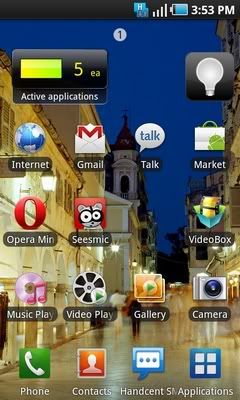
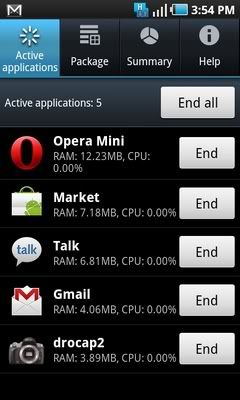
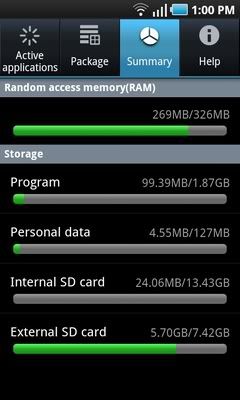
New apps will appear when flashed. called Task Manager. can kill apps, see available ram, storage & uninstall apps directly from there.
There a new samsung widget also, connected with the Task Manager. it shows how many apps active.
Previously im not using atk. my assumption of the closing apps & maintain sufficient ram when im on JG5 was pressing back button until the app closed.
So when im in JM1 i checked whether my method was correct or not... & im right. The task manager does not show any single apps when im quiting the apps using the back button instead of the home button.

Few screenshots:
Attached Image Attached Image

This post has been edited by hnr2802: Jul 23 2010, 03:49 PM
KiDkillER
post Jul 23 2010, 03:39 PM

The Home Builder
******
Senior Member
1,517 posts

Joined: Oct 2007


QUOTE(jujx @ Jul 23 2010, 03:20 PM)
One more, don't use Task killer. ONLY use it to kill certain BIG apps like camera or games.
*
Is it meaning that we can still use it but just kill BIG apps like camera or games? If want kill that, is it needed to checkbox whatever we want to kill? I downloaded the application but not sure how it works, the default setting is checkbox all.

How ah? hmm.gif
jujx
post Jul 23 2010, 03:39 PM

Regular
******
Senior Member
1,398 posts

Joined: Mar 2007
If don't know how to use then don't use. Task Killer is not recommended, system will handle itself.

It depends on how the developer code the app, so apps exit on back button some not.

This post has been edited by jujx: Jul 23 2010, 03:40 PM
hnr2802
post Jul 23 2010, 03:43 PM

On my way
****
Senior Member
627 posts

Joined: May 2009


QUOTE(jujx @ Jul 23 2010, 03:39 PM)
If don't know how to use then don't use. Task Killer is not recommended, system will handle itself.

It depends on how the developer code the app, so apps exit on back button some not.
*
he's right. i examined it myself. dont use task killer
blurjoey
post Jul 23 2010, 03:44 PM

Sumo Hammy!
*******
Senior Member
6,040 posts

Joined: Jan 2003
From: Cheras, Kuala Lumpur


QUOTE(en_mizi @ Jul 23 2010, 03:14 PM)
hi all, new sgs owner here. currently, trying to download kies but hardly can't find the useable link. can someone show me the working url pls?

thanks in advance!
*
Latest version
http://netload.in/dateiMKaI2Ib1uo/Kies_1.5...0071_32.exe.htm

From http://www.samsung-firmware.com/
ahhon83
post Jul 23 2010, 03:46 PM

Casual
***
Junior Member
437 posts

Joined: Sep 2008
ok, then is there any other way can we do to close the apps? bcoz i think it will drain more battery if just leave it there....my battery just half day....

btw, i'm using jg4, yet to root it. so, after root, will the battery performance last longer?

dannyng
post Jul 23 2010, 03:46 PM

Getting Started
**
Junior Member
126 posts

Joined: May 2010
Dear All,

After playing with my new toy for 2 days, I can said that I love this SGS
more and more each day.

Can someone help to answer the below;

1) I managed to create email (exchange outook). is there a way to remove the above tab(inbox, folder, draft, outbook, send, trash etc..) as I only need to have inbox and send.

2) I try to download Samsung PC Studio and Samsung PC suit but both did not work (not able to connect). Do anyone have link for me to download both apps (maybe I download non android apps)?

Cheers,

Danny


KiDkillER
post Jul 23 2010, 03:51 PM

The Home Builder
******
Senior Member
1,517 posts

Joined: Oct 2007


QUOTE(hnr2802 @ Jul 23 2010, 03:43 PM)
he's right. i examined it myself. dont use task killer
*
noted. Just removed Advance Task Killer. So is there any way that we can close the application (application that is still running even we press back button)?

Another thing, I think there is an application that can shows how many application that's running on the main page. The promoter showed me before I bought it but I forgot what application was that.

Anyone knows it?
hnr2802
post Jul 23 2010, 03:55 PM

On my way
****
Senior Member
627 posts

Joined: May 2009


QUOTE(KiDkillER @ Jul 23 2010, 03:51 PM)
noted. Just removed Advance Task Killer. So is there any way that we can close the application (application that is still running even we press back button)?

Another thing, I think there is an application that can shows how many application that's running on the main page. The promoter showed me before I bought it but I forgot what application was that.

Anyone knows it?
*
flash to new sgs unofficial firmware I9000XWJM1. u will get the Samsung ver task killer. better than other task killer.

This post has been edited by hnr2802: Jul 23 2010, 03:56 PM
jujx
post Jul 23 2010, 03:58 PM

Regular
******
Senior Member
1,398 posts

Joined: Mar 2007
You must first know that android is a linux based OS, and linux handles memory different from Windows.

This is how android was design, when you close an app, an app is put to SLEEP mode. It won't consume any processing power or battery BUT RAM.

It is put to sleep for easy multitasking when user want to use back the app.

Let say user wants to use an app that requires ALOT of RAM but the RAM available is not enough, the system will auto clear those SLEEPING apps that is no longer in use.

So basically you don't have to do anything.

Read more at here : http://geekfor.me/faq/you-shouldnt-be-usin...r-with-android/

This post has been edited by jujx: Jul 23 2010, 03:58 PM
looprevil
post Jul 23 2010, 03:59 PM

Casual
***
Junior Member
320 posts

Joined: Jul 2006
QUOTE(jujx @ Jul 23 2010, 03:39 PM)
If don't know how to use then don't use. Task Killer is not recommended, system will handle itself.

It depends on how the developer code the app, so apps exit on back button some not.
*
QUOTE(hnr2802 @ Jul 23 2010, 03:43 PM)
he's right. i examined it myself. dont use task killer
*
i'm using task killer in my sgs for few days d.. dint see anything unusual blush.gif

notice the memory available is only ~100mb after all the apps being killed.. is it normal?
KiDkillER
post Jul 23 2010, 04:01 PM

The Home Builder
******
Senior Member
1,517 posts

Joined: Oct 2007


QUOTE(hnr2802 @ Jul 23 2010, 03:55 PM)
flash to new sgs unofficial firmware I9000XWJM1. u will get the Samsung ver task killer. better than other task killer.
*
I have many noob questions about firmware and what JG5? I don't understand these "language" lol! Mind to explain bro?

1) What is JG5?
2) Any effect to the phone if I "flash" to new firmware?
3) What is root? Something like "jailbreak" for iphone? Any advantage for doing so?

I always see you guys talk about these but I don't even understand... unsure.gif
hnr2802
post Jul 23 2010, 04:03 PM

On my way
****
Senior Member
627 posts

Joined: May 2009


QUOTE(jujx @ Jul 23 2010, 03:58 PM)
You must first know that android is a linux based OS, and linux handles memory different from Windows.

This is how android was design, when you close an app, an app is put to SLEEP mode. It won't consume any processing power or battery BUT RAM.

It is put to sleep for easy multitasking when user want to use back the app.

Let say user wants to use an app that requires ALOT of RAM but the RAM available is not enough, the system will auto clear those SLEEPING apps that is no longer in use.

So basically you don't have to do anything.

Read more at here : http://geekfor.me/faq/you-shouldnt-be-usin...r-with-android/
*
yup he's correct again. furthermore, the system will only kill apps based on priority rating. eg. it will kill less frequently used apps 1st & than your other main apps.
TShihihehe
post Jul 23 2010, 04:03 PM

10k Club
********
All Stars
13,795 posts

Joined: Jan 2006
From: stress & confuse world


QUOTE(KiDkillER @ Jul 23 2010, 06:01 PM)
I have many noob questions about firmware and what JG5? I don't understand these "language" lol! Mind to explain bro?

1) What is JG5?
2) Any effect to the phone if I "flash" to new firmware?
3) What is root? Something like "jailbreak" for iphone? Any advantage for doing so?

I always see you guys talk about these but I don't even understand...  unsure.gif
*
1. short name of firmware
2. better than usual
3. yes.please read the 1st post
jujx
post Jul 23 2010, 04:03 PM

Regular
******
Senior Member
1,398 posts

Joined: Mar 2007
QUOTE(looprevil @ Jul 23 2010, 03:59 PM)
i'm using task killer in my sgs for few days d.. dint see anything unusual  blush.gif

notice the memory available is only ~100mb after all the apps being killed.. is it normal?
*
Try not to use it for few days, see got any difference.

Well maybe you can't feel it for SGS since its very fast, if you use slow device like Hero you'll know why don't use task killer.
ckdenion
post Jul 23 2010, 04:07 PM

Financial Practitioner
*******
Senior Member
2,866 posts

Joined: Sep 2008
From: Wangsa Maju, KL


i will b joining the SGS league soon!
will get it dis weekend
ahhon83
post Jul 23 2010, 04:08 PM

Casual
***
Junior Member
437 posts

Joined: Sep 2008
QUOTE(hnr2802 @ Jul 23 2010, 03:55 PM)
flash to new sgs unofficial firmware I9000XWJM1. u will get the Samsung ver task killer. better than other task killer.
*
Ok, will try to flash it to new firmware....JM1.....
hnr2802
post Jul 23 2010, 04:08 PM

On my way
****
Senior Member
627 posts

Joined: May 2009


QUOTE(KiDkillER @ Jul 23 2010, 04:01 PM)
I have many noob questions about firmware and what JG5? I don't understand these "language" lol! Mind to explain bro?

1) What is JG5?
2) Any effect to the phone if I "flash" to new firmware?
3) What is root? Something like "jailbreak" for iphone? Any advantage for doing so?

I always see you guys talk about these but I don't even understand...  unsure.gif
*
nvm, before this i doesnt understand anything at all. after frequent reading online.. rclxms.gif

1) it is the 1 of the lates unofficial firmware for galaxy s available for you to download.
2) no, IF you do it correctly.
3) yup something like jailbreak. root give u access to system file to android os. in lay-man words, if can control some1's brains u can make him do anything. tongue.gif

This post has been edited by hnr2802: Jul 23 2010, 04:12 PM
kmrdeva
post Jul 23 2010, 04:12 PM

Look at all my stars!!
*******
Senior Member
4,790 posts

Joined: Jan 2003
Guys and gals, the latest European firmware (probably not Samsung official, plus no Asian input support) I9000XWJM1 has a superb Task Manager.

user posted image user posted image user posted image

Update - Sorry, resized the screenshots. Initially uploaded using Photobucket app for Android.

This post has been edited by kmrdeva: Jul 23 2010, 04:24 PM
ahhon83
post Jul 23 2010, 04:13 PM

Casual
***
Junior Member
437 posts

Joined: Sep 2008
QUOTE(hnr2802 @ Jul 23 2010, 04:08 PM)
nvm, before this i doesnt now understand anything at all. after frequent reading online.. rclxms.gif

1) it is the 1 of the lates unofficial firmware for galaxy s available for you to download.
2) no, IF you do it correctly.
3) yup something like jailbreak. root give u access to system file to android os. in lay man words, if can control some1 brains u can make him do anything.  tongue.gif
*
Can understand tat, previously using Omnia, though is different....

But my battery really sucks...sigh....if background apps not contribute to battery draining, why battery drain so fast....sigh....

126 Pages « < 25 26 27 28 29 > » Top
Topic ClosedOptions
 

Change to:
| Lo-Fi Version
0.0274sec    0.79    6 queries    GZIP Disabled
Time is now: 22nd December 2025 - 07:29 AM