Welcome Guest ( Log In | Register )

Bump Topic Topic Closed RSS Feed
159 Pages « < 153 154 155 156 157 > » Bottom

Outline · [ Standard ] · Linear+

 DELL Studio XPS™ 13 & 16 Notebooks [V4], powered by Intel C2D, Core i5 n Core i7

views
     
faizpsp89
post Sep 1 2011, 03:42 AM

///M
******
Senior Member
1,169 posts

Joined: Nov 2007
From: International Hill


Guys , i accidentally dropped my XPS sad.gif .. Believe it or not , my lappy was inside my backpack when it drop..It dropped frm my bed to the ground sad.gif

This is the final impact sad.gif

user posted image

user posted image

user posted image

Do u think i should call Dell and ask for warranty claim?Do u think this is under warranty? Omg i feel so stupid sad.gif ..I shouldn't had left my bag on the bed sad.gif ..I really hope its under warranty sad.gif

See the dent on the pict , so sakit my hati sad.gif

Btw , its still under warranty , ends March 2012

This post has been edited by faizpsp89: Sep 1 2011, 03:43 AM
lee_what2004
post Sep 1 2011, 03:46 AM

*stare* ji--------
Group Icon
Elite
14,813 posts

Joined: Nov 2006


Do you have it with Complete Cover warranty ?
faizpsp89
post Sep 1 2011, 03:50 AM

///M
******
Senior Member
1,169 posts

Joined: Nov 2007
From: International Hill


QUOTE(lee_what2004 @ Sep 1 2011, 03:46 AM)
Do you have it with Complete Cover warranty ?
*
I dont knw..How do i check..Can u pls check it fr me?Ill give u my code?
lee_what2004
post Sep 1 2011, 03:52 AM

*stare* ji--------
Group Icon
Elite
14,813 posts

Joined: Nov 2006


When you check the warranty online, did it got say accidental damage or complete cover on the list ?
faizpsp89
post Sep 1 2011, 03:56 AM

///M
******
Senior Member
1,169 posts

Joined: Nov 2007
From: International Hill


It says next -day -business-on site?
lee_what2004
post Sep 1 2011, 03:59 AM

*stare* ji--------
Group Icon
Elite
14,813 posts

Joined: Nov 2006


If only have that, then most likely only the normal warranty..

I'm afraid its not covered, but you could always try call them..
faizpsp89
post Sep 1 2011, 04:01 AM

///M
******
Senior Member
1,169 posts

Joined: Nov 2007
From: International Hill


Damn it , hw much do u think if i upgrade mine to complete cover? :S
lee_what2004
post Sep 1 2011, 04:06 AM

*stare* ji--------
Group Icon
Elite
14,813 posts

Joined: Nov 2006


I'm not sure if can upgrade warranty, most likely need to extend to longer warranty with complete cover..
More than RM500 per year I guess..

faizpsp89
post Sep 1 2011, 04:12 AM

///M
******
Senior Member
1,169 posts

Joined: Nov 2007
From: International Hill


Haihh :'(
-kytz-
post Sep 10 2011, 02:45 AM

10k Club
********
All Stars
12,573 posts

Joined: Nov 2008
Anybody wanna download a calibrated colour profile for SXPS 16 WLED backlight? This is the accurate one ONLY for WLED backlight

Here it is
http://forum.notebookreview.com/dell-xps-s...d-monitors.html

Those who aren't members can dl here tongue.gif (for LG panel only)

Attached File  LGD0214_8_27_2010_1___Copy.zip ( 4.09k ) Number of downloads: 0


p/s: Credits to weingseen
lee_what2004
post Sep 10 2011, 02:48 AM

*stare* ji--------
Group Icon
Elite
14,813 posts

Joined: Nov 2006


Been using that smile.gif
-kytz-
post Sep 10 2011, 02:51 AM

10k Club
********
All Stars
12,573 posts

Joined: Nov 2008
QUOTE(lee_what2004 @ Sep 10 2011, 02:48 AM)
Been using that smile.gif
*
haha nice. so far ok for you?

My only complaint is that the brightness has been reduced quite a bit sad.gif

But it scored pretty well in the black levels test smile.gif http://www.lagom.nl/lcd-test/black.php

I can differentiate all the black levels from pic 1 to the last biggrin.gif (but i set my brightness max lah laugh.gif )
lee_what2004
post Sep 10 2011, 02:55 AM

*stare* ji--------
Group Icon
Elite
14,813 posts

Joined: Nov 2006


hmm, mine can't differentiate 1 until 3.

If I use 8-22-2010 profile, can't differentiate 1 and 2.

This post has been edited by lee_what2004: Sep 10 2011, 02:57 AM
-kytz-
post Sep 10 2011, 03:03 AM

10k Club
********
All Stars
12,573 posts

Joined: Nov 2008
QUOTE(lee_what2004 @ Sep 10 2011, 02:55 AM)
hmm, mine can't differentiate 1 until 3.

If I use 8-22-2010 profile, can't differentiate 1 and 2.
*
hmmmm I think same case with weingseen.

anyway, im getting a U2312HM soon tongue.gif
lee_what2004
post Sep 10 2011, 03:07 AM

*stare* ji--------
Group Icon
Elite
14,813 posts

Joined: Nov 2006


Plan to use the display port ?
-kytz-
post Sep 10 2011, 03:15 AM

10k Club
********
All Stars
12,573 posts

Joined: Nov 2008
QUOTE(lee_what2004 @ Sep 10 2011, 03:07 AM)
Plan to use the display port ?
*
yup. i saw some bought a DP port to "full" DP port.. means our port is the mini one?

And yeap, planning to get spyder to calibrate the monitor as well.
lee_what2004
post Sep 10 2011, 03:20 AM

*stare* ji--------
Group Icon
Elite
14,813 posts

Joined: Nov 2006


Nope, the regular one.


-kytz-
post Sep 10 2011, 03:25 AM

10k Club
********
All Stars
12,573 posts

Joined: Nov 2008
QUOTE(lee_what2004 @ Sep 10 2011, 03:20 AM)
Nope, the regular one.
*
Ohhh i see.

Btw, i saw ur siggy. What's that ATI GPU scaling fix for?
lee_what2004
post Sep 10 2011, 03:27 AM

*stare* ji--------
Group Icon
Elite
14,813 posts

Joined: Nov 2006


For scaling the screen when running at not native resolution, e.g. have black bar on the sides or full screen..
We can adjust the settings on CCC, but some laptop with ATi GPU don't have that settings on CCC, so can use that to adjust it.
-kytz-
post Sep 15 2011, 07:00 PM

10k Club
********
All Stars
12,573 posts

Joined: Nov 2008
sigh.. just got my U2311H but problem now is that my laptop can't use its own colour profile anymore..

It's a bit long but hope you guys might understand sweat.gif

Problem:

Had problems with the colours of my ext monitor(it being too warm). Luckily, managed to fix it but there's another problem:

My laptop screen is displaying the default colour profile instead of the calibrated colour profile I downloaded off the net, even though it's set as default already sweat.gif

What happened:

(My monitor is currently using calibrated colour profile)

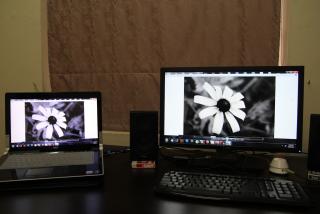
Brought back monitor, plugged into laptop and all. Started it and was surprised to learn that the colours are way too warm. Look up some black and white pictures and find them brownish.. the whites aren't even whites!

Checked the colours on my laptop, it's cooler and more accurate! The whites look more like whites than my ext monitor. (my laptop is still using the default calibrated colour profile)

Feeling a bit fustrated already, so I tried to calibrate my own monitor using the RGB mode where you input your own Red Green and Blue levels. Tried and tried and tried, still couldn't get the whites to look white. Was totally way off.

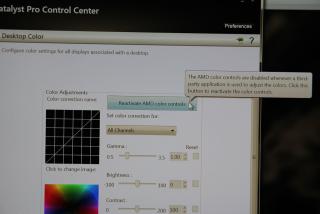
So I tried opening the ATI Catalyst Control Pro Centre, looked up at 'dekstop colour' and saw the icon ' Reactivate Colour Control' !!! It was unticked so I tick it loh.

To my surprise!! All the colours in my ext monitor came back!! No more warm colours now.. all accurate. Black and white looks like really black and white picture. White is white and black is black.

BUT big problem is that, my laptop colour profile reverted back the default colour profile doh.gif So yes, this is the problem now.

tl:dr So in short

before reactivating colour in ATI control centre, laptop accurate, monitor inaccurate(warm)

After reactivating colour control: Laptop accurate-----> inaccurate (from using calibrated profile to default), Ext monitor inaccurate------> accurate

So what did this ATI colour thingy do ah? I want both to be accurate!

Sos:

Before reactivating setting

Attached Image

Colour control setting

Attached Image

After reactivating setting
Attached Image


159 Pages « < 153 154 155 156 157 > » Top
Topic ClosedOptions
 

Change to:
| Lo-Fi Version
0.0303sec    0.43    6 queries    GZIP Disabled
Time is now: 12th December 2025 - 08:20 AM