Welcome Guest ( Log In | Register )

Bump Topic Topic Closed RSS Feed
8 Pages < 1 2 3 4 5 > » Bottom

Outline · [ Standard ] · Linear+

Hardware Apple iPad Discussion Thread | V2, Everything about iPad

views
     
stringfellow
post May 20 2010, 07:04 PM

Ultrawide | 4K | VR
********
Senior Member
11,305 posts

Joined: Jan 2003
Check out Waterfield's Muzetto's page, looks like the stock situation is much dire than I thought. Any preorders now will only confirm a production run of July 15th!

Im pulling out of any forms of bulking for this, it'll take too long a time to complete this. Sorry guys.
stringfellow
post May 24 2010, 12:27 PM

Ultrawide | 4K | VR
********
Senior Member
11,305 posts

Joined: Jan 2003
QUOTE(Playbook @ May 24 2010, 12:22 PM)
Question on iPad sleeves.

Background: I already have a 16GB Wifi iPad (thanks to string), as well as a clear case and screen protector (that I am happy with).

I am now looking to get a sleeve as I'd like to stick it into my backpack (either my current proper laptop backpack or a crumpler bag).

I have narrowed down the following sleeves, which I would like to get your opinions on (if you have already used it), and as to whether or not you are aware if they can be sourced locally.  I am trying to decide which to get.

(1) Griffin Technology's Jumper, a neoprene sleeve
http://www.griffintechnology.com/products/jumper

(2) Belkin's Pleated Sleeve
http://www.belkin.com/IWCatProductPage.pro...oduct_Id=509026

(3) Hard Candy's Bubble Sleeve
http://www.hardcandycases.com/ipad-bubblesleeve.html

Also, is anyone using a decent good black leather folio style case? e.g.

(4) Mivizu's Primo iPad Leather Case
http://www.mivizu.com/Primo_iPad_Case_p/cipadmvzprmblk.htm

Thank you in advance for your inputs and opinions smile.gif
*


If your clear case is the Nude, then the Waterfield Slip Case is the perfect match. However, I understand that you need it sourced locally so that may not be a feasible option.

Your options would be to try out any netbook-labelled sleeves/cases to see if it fits. I has a CaseLogic bag once as a makeshift option before my Muzetto arrived, it's a decent option but the iPad will be jangling around in that sleeve/bag because it's not a perfect fit.

This post has been edited by stringfellow: May 24 2010, 12:31 PM
stringfellow
post May 24 2010, 12:54 PM

Ultrawide | 4K | VR
********
Senior Member
11,305 posts

Joined: Jan 2003
QUOTE(Playbook @ May 24 2010, 12:41 PM)
Hi String,

I did end up getting the SwitchEasy Nude btw smile.gif Got it over at the Gardens side after I met you at KLCC (thanks again!).

Right now, I am leaning towards Griffin's Jumper, which does allow me to purchase it from the Griffin store in the US and have it mailed into the country.  I will also check out the Waterfield Slip Case to see if it can be shipped in - thanks for the pointer in that direction, will check it out smile.gif 

P.s.  String, you have been an amazing help, all the way through from getting the iPad and providing post-purchase advice to me too smile.gif  I am still setting it up for work applications, so thanks to your US iTunes advice, I got the account setup and loaded with US$150 and started with Keynote, Pages, Numbers and Appigo's Todo, plus the requisite Bloomberg, Financial Times and WSJ (mine will be a gaming-free setup / entertainment-free setup, and actually will not be used to run youtube, photos, etc).  I have never really been an Apple fan, but thanks to your guidance, you have actually started making the Apple experience enjoyable for me smile.gif  I have actually started using it to manage a business remotely, as well as running stock market and banking transactions.

P.p.s. hope the flying's going well!
*
I'm glad it all works out for you. Looks like we have "switcher" in our hands coming up soon. tongue.gif

I would suggest going to www.ilounge.com for your iPad accessories needs. They have first looks, reviews and tons of pictures for you to scrutinize before you decide which one to get. For anecdotal or "word-on-the-street" kinda impressions, head to forums.macrumors.com and head to the iPad and iPad accessories section. They have loads of reviews, especially if you're looking into folio-style cases.

Good luck! I'm waiting for my ElementCase Joule stand to arrive to complete the whole accessory hunt. My Muzetto + Slip Case has been with me to Brisbane, and works exceptionally well with what I have in mind. Fits the wardrobe too, all that is missing is a leather jacket and fedora, and it's "Dr. Jones" and not Stringfellow anymore! laugh.gif
stringfellow
post May 24 2010, 05:44 PM

Ultrawide | 4K | VR
********
Senior Member
11,305 posts

Joined: Jan 2003
Those familiar with Nintendo's franchises would be ecstatic to know that Phoenix Wright Ace Attorney is out and available on the AppStore. I've already had it on the NDS, so I stepping aside for this one.
stringfellow
post May 24 2010, 07:19 PM

Ultrawide | 4K | VR
********
Senior Member
11,305 posts

Joined: Jan 2003
Personal experience, I've tweeted but here's the observation. iPad 3G eats battery so much, that it is now a valid and present worry for me. Using it for 2 hours and the battery depletion rate is significantly more alarming than the Wifi+MiFi combo, already at 75% now. In comparison, the WiFi+MiFi combo normally would be around 89% at this time.

Points to ponder, to those thinking of getting the 3G model.


Added on May 24, 2010, 7:46 pmThose who doubts the clarity and anti-glare/anti-fingerprint properties of the PowerSupport AntiGlare film, this thread at Macrumors forum shows it all:-

http://forums.macrumors.com/showthread.php?t=916880

Another good comparison thread :-
http://forums.macrumors.com/showthread.php?t=921023

Complete with macro shots, right up to the jaggies! You pay for more of course, but I believe only the best for my iPads.

This post has been edited by stringfellow: May 24 2010, 08:00 PM
stringfellow
post May 24 2010, 09:29 PM

Ultrawide | 4K | VR
********
Senior Member
11,305 posts

Joined: Jan 2003
QUOTE(dvlzplayground @ May 24 2010, 09:24 PM)
wow the powersupport antiglare is very good biggrin.gif! does it have any rgb noise and anyone doing bulk for MBP 15"? tongue.gif
*
You don't see any RGB noise on those screenshots on that link, right? wink.gif Made in Japan, baby!
stringfellow
post May 24 2010, 11:00 PM

Ultrawide | 4K | VR
********
Senior Member
11,305 posts

Joined: Jan 2003
QUOTE(mAxPC @ May 24 2010, 10:42 PM)
Ordered myself a set of Power Support as well, trying to get a friend in the US to get the STM carry bag for me tongue.gif if not I will just tide myself with my VMware laptop bag happy.gif

Quite surprised to hear about your experience with the iPad 3G, reviews are saying the power drain isn't that significant, an hour difference compared to the wi-fi model.
*
The power drain from those reviews are probably done while being stationary, albeit not moving, and they drained the iPad 3G battery by looping movies and/or other routines like surfing or listening to music, until the battery becomes flat. I was moving around before settling down at Starbucks KLCC while waiting to meet friends there. I was at KJ LRT, moving to Lowyat Plaza, on the monorail to Bukit Nanas, walked to Dang Wangi LRT, on the LRT to Setiawangsa back home, move out again to KLCC before settling down, like I said, in Starbucks KLCC. The different coverage strength and the iPad itself compensating for the low signal strength within these areas I'm moving around to catch the 3G signal may have drained the battery more than what it should. Bear in mind, since I am moving around, I use only 3G connection, exclusively even though there are stray WiFi hotspots around. In comparison to the the Wifi+MiFi combo, the power strain would be on the MiFi unit itself since it is now responsible to "catch" the 3G signal and not the iPad WiFi itself, all the iPad had to do was "catch" the WiFi signal which is steady from the MiFi. Gosh, I hope that's not too complicated! laugh.gif

In any case, the power drain on the 3G while I'm moving around, is enough to make me reconsider bringing back my MiFi around with me. I have kept it at home since I was moving around with the 3G, but the significant power draw got me thinking twice now. hmm.gif
stringfellow
post May 25 2010, 01:00 PM

Ultrawide | 4K | VR
********
Senior Member
11,305 posts

Joined: Jan 2003
QUOTE(rx330 @ May 25 2010, 10:35 AM)
ok... where to get powersupport anti glare protector? any local sellers here?

i bought one from SGP the other day
*
Search for forum member named xavinlyn, he has them. If he doesn't, he can order them. He orders on Tuesday (today!) and gets them by Saturday by most cases. If you're quick, he may have extra now.

QUOTE(Playbook @ May 25 2010, 11:18 AM)
These are awesome links.  Which leads to the next question to everyone (and I just did a search of recent threads on Garage Sales), is anyone heading to Singapore soon to get the PowerSupport AntiGlare film for iPad?  I understand that iStore Singapore stocks it.  Are any of you aware of any other retail outlets in Singapore stocking it?

Regards.
*
As per my response to rx330 above.
I've already warned xavinlyn that he may be inundated with sale of this SC pretty soon after people see the quality of that SC. I hope he's ready. laugh.gif

EDIT: Arrgghh what the hell, here's the link.

http://forum.lowyat.net/index.php?showtopi...&#entry33458536

Remember to get the anti-glare, not the crystal clear version.
stringfellow
post May 25 2010, 01:47 PM

Ultrawide | 4K | VR
********
Senior Member
11,305 posts

Joined: Jan 2003
QUOTE(rx330 @ May 25 2010, 01:41 PM)
and again.. string, i dunno to love or hate u sad.gif more expenditure...

ashe.. my spore supplier just called sad.gif fark... no 3G for me this week... they couldnt get any from the US, its gonna be a sad week...
*
Only the best stuff I share with you bro.

On that 3G-related note, I'm gonna try an experiment. I'm gonna bring the MiFi together with me, use the 3G iPad connecting to the internet with only the MiFi (3G off), try to move around as much as yesterday, and record the power drain.


Added on May 25, 2010, 1:53 pm
QUOTE(beavis68 @ May 25 2010, 10:28 AM)
i found my pogo stylus for iphone......... (which i dump it somewhere in my storeroom)

[attachmentid=1593253]
and my conclusion is: -

1. writing note is not very responsive n not very smooth......... it could be due to my matte sc
2. for drawing picture it is quite responsive and very smooth.
3. even i try it on games.....it is very responsive n smooth (i try it on "Let's Golf")
*
Good observation there, bro. Sorry I did not responded to you this morning on Beejive, I was watching Lost Finale on the Apple TV. DND sign up already. tongue.gif

I guess even the Pogo Sketch is no different then. The quest for a "pointier" stylus continues. I have both Penultimate and Paperdesk, but writing using the Pogo Stylus/Sketch is gonna be just the same as writing with your fingers. Need a finer point writing device to properly jot things down like writing using a pen on a notepad.

About the Joule order:
» Click to show Spoiler - click again to hide... «


This post has been edited by stringfellow: May 25 2010, 02:02 PM

stringfellow
post May 25 2010, 02:21 PM

Ultrawide | 4K | VR
********
Senior Member
11,305 posts

Joined: Jan 2003
QUOTE(mAxPC @ May 25 2010, 02:18 PM)
After reading what String mentioned about the battery life in the iPad 3G, guess online reviews should take that into consideration as well, rather than just running static tests smile.gif

As for me, still waiting for $$$ to finance a Mi-Fi unit hehe with all my work, haven't had the chance to properly use the iPad, though my 3GS got plenty of usage.
*
Yup, which should mimic actual usage of a typical usage while he moves around town doing his routines. If he's stationary, then chances are, he would be stationary AT a particular Wifi hotspot.
stringfellow
post May 25 2010, 04:25 PM

Ultrawide | 4K | VR
********
Senior Member
11,305 posts

Joined: Jan 2003
QUOTE(fortynine @ May 25 2010, 04:13 PM)
Honestly, I expected a simple respond such as "I'm using it, and loving it!" or "Tried it, didn't like it". I invested in one and would soon experience what it has to offer. Would you actually be offended if someone without an iPad asks iPad related questions?? Chill la bro...  smile.gif
Good to know, mate! Do you think I'd be able to use it for 3 hours before the power hits 20% (from full charge, of course) ? Got my MyWi, now waiting for my iPad to arrive. rclxms.gif
*
QUOTE(rx330 @ May 25 2010, 04:19 PM)
sad.gif kena pijak.. peasant no money to invest until ask 100 pages of questions
*
Disregard those animosities, guys. It's wise to ask questions about your potential purchases, it shows you're more concerned on how it fits your usage pattern and routine.

I'd be glad to answer any questions, but only if I have any experience in using them. I don't have MyWi so I can't say much about it.

This post has been edited by stringfellow: May 25 2010, 04:25 PM
stringfellow
post May 25 2010, 06:43 PM

Ultrawide | 4K | VR
********
Senior Member
11,305 posts

Joined: Jan 2003
QUOTE(Eralus @ May 25 2010, 05:16 PM)
anyone have extra unit of huawei E5830 to sell for cheaper price compare to current market??let me know key
get a screen protector for your iPad dude...
try capdase(RM80)
or powersupport(125)... as mention by bro stringfellow...
but i think powersupport is much better compare to capdase after saw it on bro stringfellow iPad 3G..
he dare to show me how good this screen protector by put his hand on the iPad screen and no finger print at all..

for powersupport here the link : http://forum.lowyat.net/index.php?showtopi...&#entry33458536
for capdase : http://forum.lowyat.net/index.php?showtopi...hl=capdase+ipad
*
LOL, it was my sweaty palm. The PowerSupport resisted the sweat smears and the stain evaporates off the surface.

I was using the Capdase before I applied the PowerSupport, but Capdase comes in many version. If you're picking the CApdase, pick the Imag version, not the Aris. The old Aris version is not fingerprint resistant, it is only antiglare IIANM. The new Imag version is both anti fingerprint and antiglare. Unfortunately, the Aris version is the one carried by the local Machines, the Imag version, you'll have to get it somewhere else. PM me if you're interested on the Imag version, I don't want this thread turning into product placements. tongue.gif PowerSupport is still tops, IMO.
stringfellow
post May 25 2010, 07:14 PM

Ultrawide | 4K | VR
********
Senior Member
11,305 posts

Joined: Jan 2003
From the current observation alone, the iPAd WiFi + MiFi is king, compared to the standalone 3G.

Pros and Cons of the two different version, all IMO of course:-

iPad WiFi + MiFi

+ Battery saver! You have steady power drain because of steady connection between your iPad and the MiFi. Power depletion is much steadier, which gives that peace of mind that you won't run out of power in your daily commute/routine.
+ Depending on the specs of your MiFi, you can now get reasonably accurate position compared to WiFi only position triangulation. This opens up the possibility of using the Wifi-only iPad to navigation.
+ Since the MiFi is with you all the time now, for road warriors using other devices that can tap onto WiFi connection, this provides another option to go online.
+ Aesthethically more pleasing than the 3G, with a clean aluminum back, compared to the black-strip on the 3G model
+ You can reuse your current SIM card on the MiFi without the need to mutilate it further to fit into the 3G SIM tray. The annoyance of having to swap between your phone and the MiFi may be a deterrent to some to do this often. Also, you avoid needing to subscribe to another data package to be use solely for the MiFi.
- Apps that require GPS positioning, will not be able to take advantage of the WiFi model. This is for future-proofing purposes, for example an app that requires pinpoint accuracy to work, such as location-aware apps, etc.
- You're carrying two devices instead of all-in-one.
- Once your MiFi battery power depletes, you're stuck with searching for WiFi hotspots for your connection. Most MiFi solutions last 5 hours *advertised*, and unless you want to bring its charger (add another device), you're stuck without a connection until it is recharged, or you're in another hotspot.

iPad 3G

+ All-in-one! The constraints of moving around with finite amount of space that can be brought with you in this case is a huge plus. Travelling light with the iPad is the whole idea here.
+ Built-in, GPS component with A-GPS. This gives pinpoint accurate positioning if you're concerned with apps that uses navigational properties.
+ Future-proofing, to a certain extent. Granted, there may be future updates to the iPad, but with every feature sets on the device, all available apps, present or future will be able to take advantage of the device fully. May be obsoleted by future add ons to the iPads like cameras, etc.
- Battery hog! Moving around with the device alone has shown that power draw is significantly larger because of the need to remain connected, the device will compensate by increasing power consumption to catch the 3G signal in low-strength coverage areas.
- Aesthetically less pleasing in looks because of the black strip
- Unless you're subscribing to service operators with support for microSIMs, mutilation to fit into the 3G iPad is necessary. May entice users to subscribe to a secondary data-package only service, which adds to the already burgeoning cost.

Bear in mind, these are my pros and cons, these points may or may not be important to you, depending on how and where you use your iPad. Feel free to add your own take on this.

The best combo I'd see would be the 3G iPad + MiFi, for that maximum connectivity + battery conservation purposes. You can turn off the 3G wireless connection while using MiFi, and once MiFi battery depletes, you can either already be at a hotspot, or use the onboard 3G connectivity.
stringfellow
post May 25 2010, 07:49 PM

Ultrawide | 4K | VR
********
Senior Member
11,305 posts

Joined: Jan 2003
QUOTE(bass6 @ May 25 2010, 07:39 PM)
yup, how bout different from cost between WiFi+MiFi and the 3G?
*
Good point, but I don't list that down since some combinations would be almost the same as buying the 3G model. It depends on which MiFi models you are interested in.
stringfellow
post May 25 2010, 09:04 PM

Ultrawide | 4K | VR
********
Senior Member
11,305 posts

Joined: Jan 2003
QUOTE(Eralus @ May 25 2010, 08:58 PM)
this is definitely a good review from u bro..make me think again to buy iPad 3G or not...hmmmmm
*
Yup, definitely makes you think twice doesn't it?

Just out of curiosity, when are you closing your Waterfield bulk order? I'm thinking very hard if I need to get myself the Keyboard Short Sleeve or not. The shipping charges may not be worthwhile to get one.
stringfellow
post May 25 2010, 09:29 PM

Ultrawide | 4K | VR
********
Senior Member
11,305 posts

Joined: Jan 2003
Given Machines' supposed notoriety, they did not disappoint today. They have the PowerSupport AntiGlare film for sale for RM118! More than 50 units available at Machines KLCC alone!

In addition to that, they also have the Cygnett Lavish, a book-style case(folio) for the iPad as well, in addition to SecondSkin and Glam. Head on there for your PowerSupport before they sold out!

EDIT: Eralus, you got PM.

This post has been edited by stringfellow: May 25 2010, 09:30 PM
stringfellow
post May 25 2010, 10:07 PM

Ultrawide | 4K | VR
********
Senior Member
11,305 posts

Joined: Jan 2003
QUOTE(zwanvedder @ May 25 2010, 10:00 PM)
can Machine staff help us to attach the SP..? blush.gif
*
Probably depends on how you've treated them in the past or in the forum. They're not obliged to do anything more than selling the product.

Anything extra, is more like a request than a demand. It pays to be nice now, isn't it, rather than some folks b****ing about them to no end, and demanding ridiculous things.

No offense, and as a disclaimer, zwan, those remarks are not pointed to you in any way. "Whoever eats the jalapeño pepper, he'll be tasting the "hotness" of his acts" icon_rolleyes.gif

This post has been edited by stringfellow: May 25 2010, 10:25 PM
stringfellow
post May 27 2010, 09:57 AM

Ultrawide | 4K | VR
********
Senior Member
11,305 posts

Joined: Jan 2003
They have absolutely beautiful Toffee Black Leather Tote and STM Latte bag that is PERFECT for the iPad here. I'm at the Apple Store Sydney by the way. Toffee is AUD249.99, while the STM Latte is AUD99.99. No STM Micro in sight. In fact, no iPad-related accessories in sight anyway. Almost feel like the calm before the impending storm.

This post has been edited by stringfellow: May 27 2010, 10:00 AM
stringfellow
post May 27 2010, 10:06 AM

Ultrawide | 4K | VR
********
Senior Member
11,305 posts

Joined: Jan 2003
Pictures up on my tweets. Check them out. My driver is picking me up at 3pm SYD time/1pm KL time, so you have until that time to decide.


Added on May 27, 2010, 10:12 amUpon inspection, they also have the STM Scout Olive color small 13' messenger bag, for AUD89.95. 

This post has been edited by stringfellow: May 27 2010, 10:12 AM
stringfellow
post May 27 2010, 11:52 AM

Ultrawide | 4K | VR
********
Senior Member
11,305 posts

Joined: Jan 2003
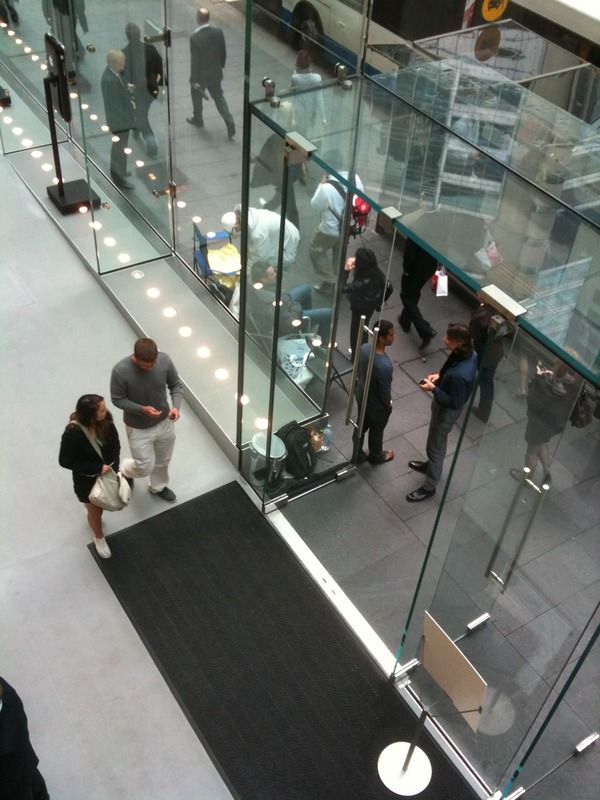
The line for iPad has started at Apple Store SYD. Didn't notice earlier coz it's close to bus stand and they looked like they're waiting for the bus. Was informed by Clarissa, one of the friendlier Apple Genius here that they've been out there since 2am! Good God!

user posted image

Pardon the size, it may be big, uploaded straight from iPhone using Photobucket app, and no option to resize. If I use the iPad, I can resize, but I don't wanna risk being mugged. tongue.gif Therefore, picture is spoilered, and please don't quote the pic on your post. It'll just misalign the entire thread. Thanks.

This post has been edited by stringfellow: May 29 2010, 02:42 PM

8 Pages < 1 2 3 4 5 > » Top
Topic ClosedOptions
 

Change to:
| Lo-Fi Version
0.0489sec    1.01    7 queries    GZIP Disabled
Time is now: 23rd December 2025 - 06:44 AM