Welcome Guest ( Log In | Register )

56 Pages « < 9 10 11 12 13 > » Bottom

Outline · [ Standard ] · Linear+

Hardware Your Mac Apple Hardware Setup v2, Showcase your Apple Hardare/Collections

views
     
wei
post Jul 14 2010, 10:13 AM

Get your Macs done right!
*******
Senior Member
6,496 posts

Joined: Jan 2003
From: Kota Damansara


QUOTE(cRazYee @ Jul 14 2010, 09:07 AM)
in danny's photo, the edge are rounded fillet but not big radius
how do you mean by curve? is it the same fillet edge as i meant?
*
This is what I'm having:
http://forum.lowyat.net/index.php?showtopi...post&p=34365697
cRazYee
post Jul 14 2010, 11:00 AM

Look at all my stars!!
*******
Senior Member
2,642 posts

Joined: Jan 2005
From: Penang
oh curve macam ni
more like a workspace

danny's one is more like a showcase
hahaha
wei
post Jul 14 2010, 12:31 PM

Get your Macs done right!
*******
Senior Member
6,496 posts

Joined: Jan 2003
From: Kota Damansara


Haha, yeah, more like a action figures/ diecast doll showroom. That's what make it unique. If glass top, i prefer black tempered glass with steel legs, that's is cool and solid.
cRazYee
post Jul 15 2010, 09:07 AM

Look at all my stars!!
*******
Senior Member
2,642 posts

Joined: Jan 2005
From: Penang
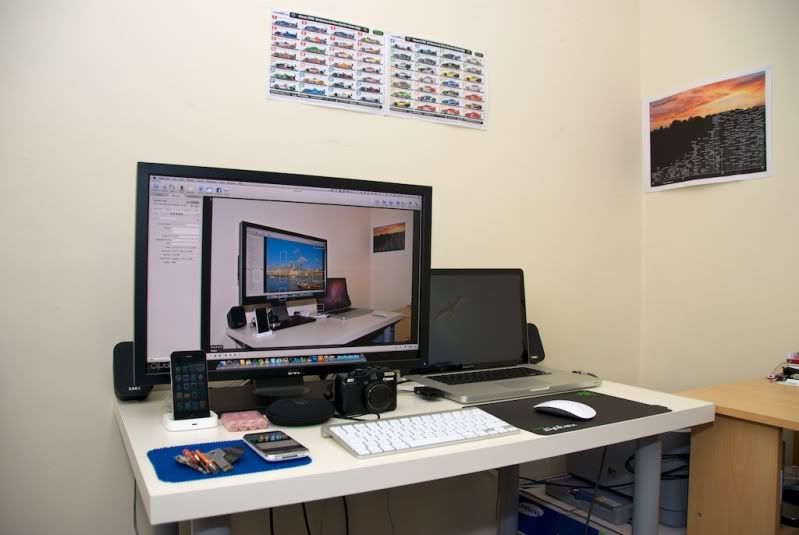
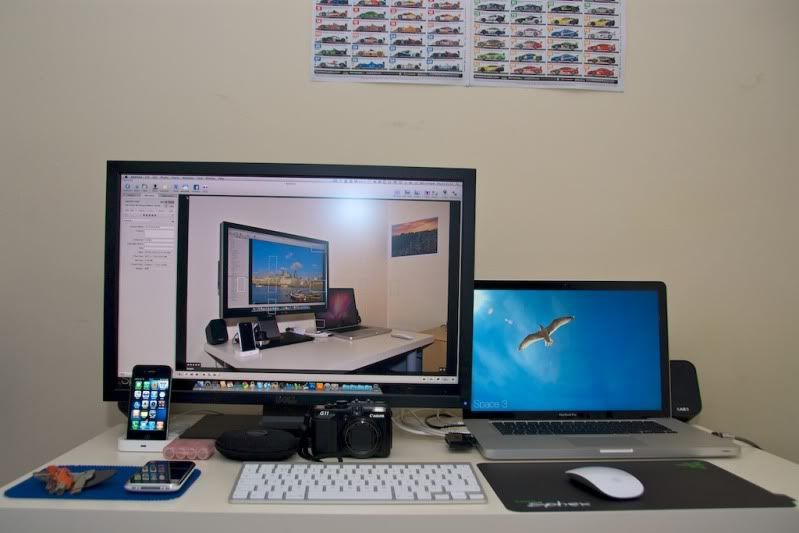
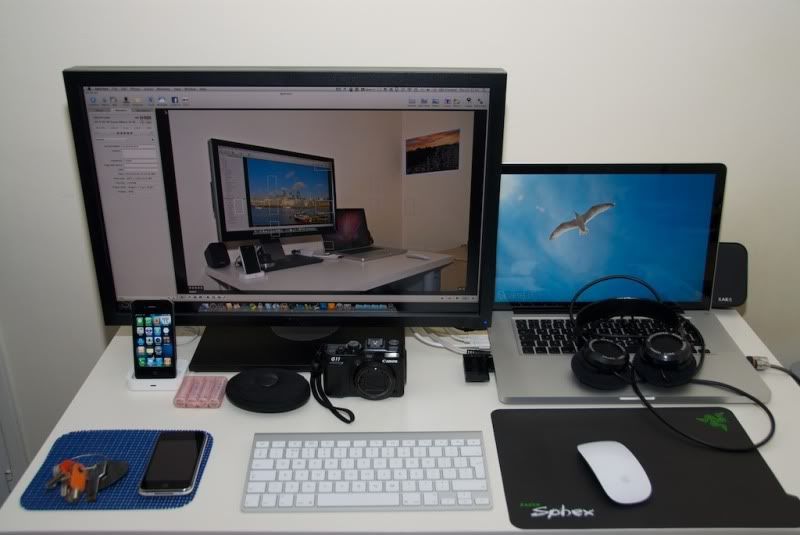
my Desk since last update here
user posted image
user posted image
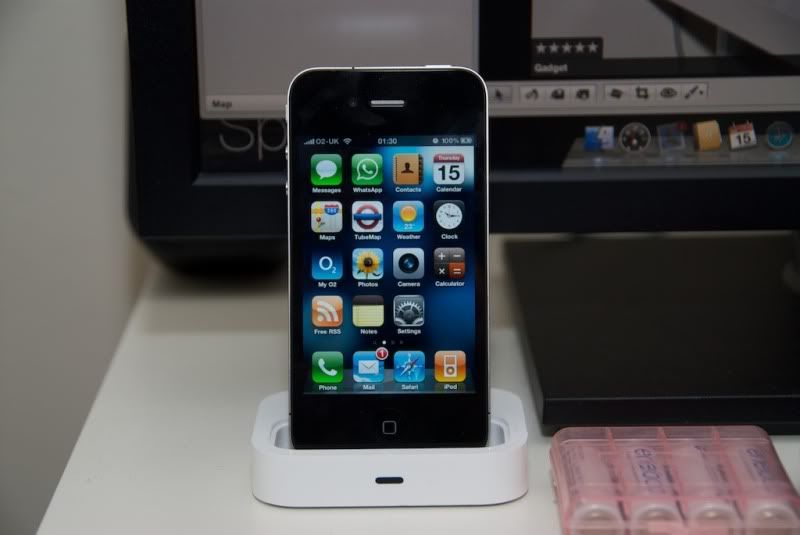
New member, iPhone 4 (need dock adapter, couldn't get it from London Apple store today)
user posted image
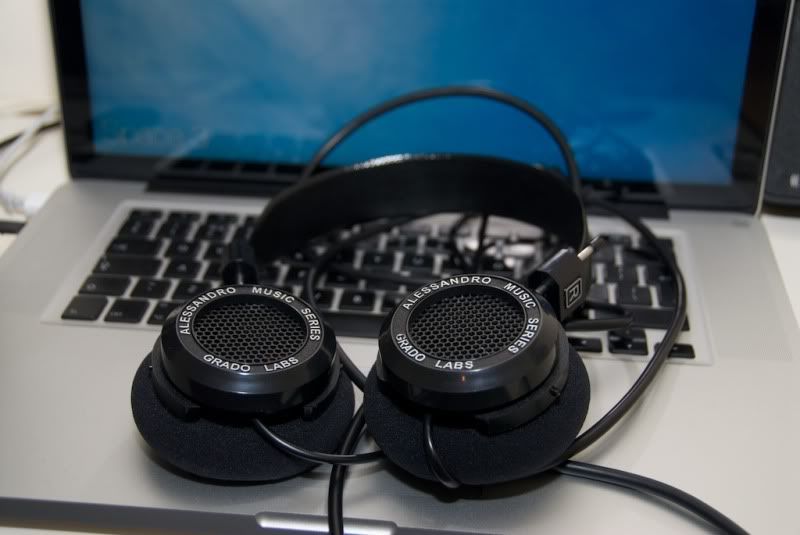
New member, Alessandro Music Series 1i
user posted image
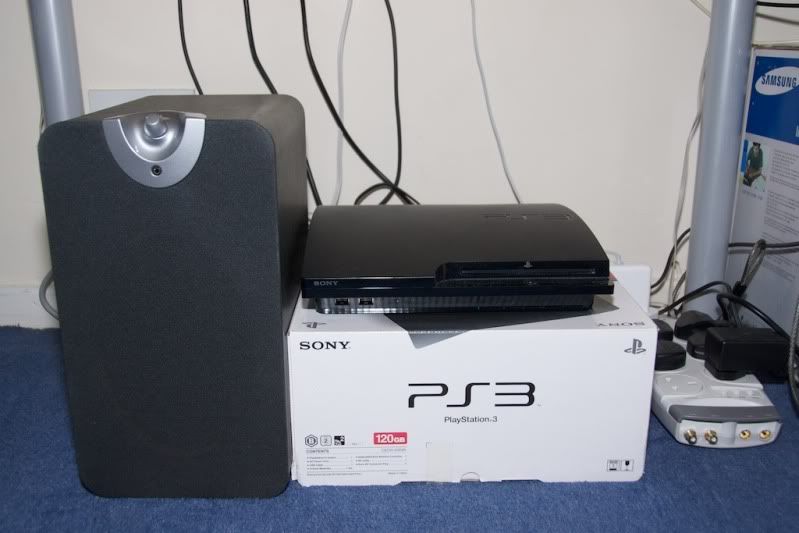
New member, PS3 Slim 120GB
user posted image
others, Razer Sphex, Apple wireless keyboard, Canon Powershot G11
user posted image
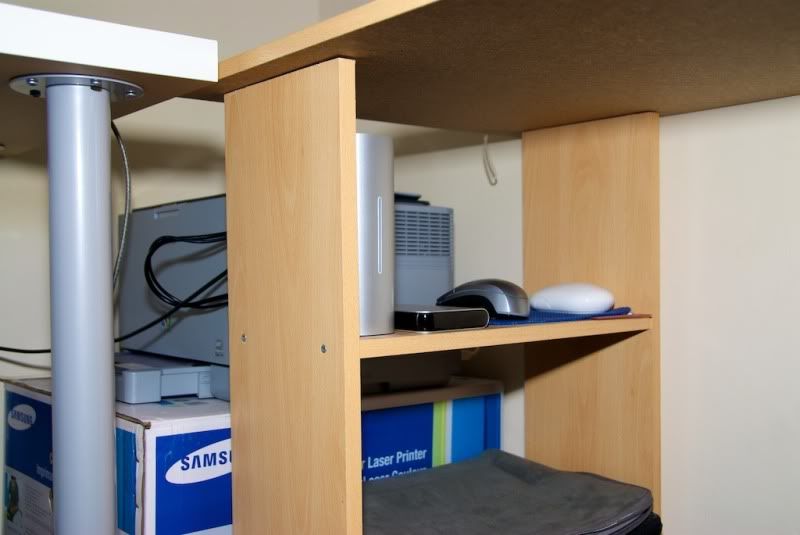
Place i hide my ext HDD, and mouses. Samsung Laser Printer CLP-310 at behind
user posted image

to be honest, no space for other gizmo
guess i should stop now

This post has been edited by cRazYee: Jul 15 2010, 09:13 AM
Crusader
post Jul 15 2010, 09:33 AM

Enthusiast
*****
Senior Member
783 posts

Joined: Jan 2003
From: My Room.


QUOTE(cRazYee @ Jul 15 2010, 09:07 AM)
my Desk since last update here


to be honest, no space for other gizmo
guess i should stop now
*
Sweet setup. Like the headphone...
rx330
post Jul 15 2010, 10:45 AM

10k Club
********
All Stars
11,809 posts

Joined: Jun 2006
i think i need a proper table as well...
CreamMilk
post Jul 15 2010, 11:01 AM

Casual
***
Junior Member
486 posts

Joined: Jan 2005
From: Technology paradise
QUOTE(cRazYee @ Jul 15 2010, 09:07 AM)
my Desk since last update here

-- eliminated --

to be honest, no space for other gizmo
guess i should stop now
*
Great UK life you have there, you have almost all the gadgets that in my wish list blush.gif
cRazYee
post Jul 15 2010, 12:08 PM

Look at all my stars!!
*******
Senior Member
2,642 posts

Joined: Jan 2005
From: Penang
To be honest, it easier to make dream happen here. Save on Daily meal, spend on weekends gadgets.

Plus, something maybe cheaper here, as it sounds like.


Added on July 15, 2010, 12:12 pm
QUOTE(Crusader @ Jul 15 2010, 09:33 AM)
Sweet setup. Like the headphone...
*
Someone is selling in lowyat forum with quite expensive price

Get it direct from alenssandro, it's just usd110, with shipment

This post has been edited by cRazYee: Jul 15 2010, 12:12 PM
llsphinxll
post Jul 21 2010, 01:53 AM

debt that all men pay..
*******
Senior Member
2,197 posts

Joined: Nov 2008


hey guys,

i just connected my mbp with an enternal screen. and althou i use it with the mbp display off, the body (esp the left side) still gets pretty hot. considering i am using this in a non air-conditioned room, is there any other way to resolve this? i am worried that it might get too hot that i dont even close the lid. anyone else experiencing this?
Jing-leBelle
post Jul 21 2010, 02:05 AM

Very New Member
*******
Senior Member
2,003 posts

Joined: Sep 2008
From: Lowyat.NET


I'm connecting with external screen too, with display off but lid opened. It's getting hot with long time usage too, but mine is average 60-70. Do you use smcFanControl? Everytime i switch the fan speed faster when it reach over 70 celcius.
Eithanius
post Jul 21 2010, 02:06 AM

::+::KukuNius(tm)::+::
*******
Senior Member
3,952 posts

Joined: Apr 2005
From: Sector 1921B, Delta Quadrant


QUOTE(llsphinxll @ Jul 21 2010, 01:53 AM)
hey guys,

i just connected my mbp with an enternal screen. and althou i use it with the mbp display off, the body (esp the left side) still gets pretty hot. considering i am using this in a non air-conditioned room, is there any other way to resolve this? i am worried that it might get too hot that i dont even close the lid. anyone else experiencing this?
*
hot is very subjective.... pretty as in it burns your hand...?

fire up your activity monitor and see if there's any process(es) that's hogging up your cpu...

any external bus-powered devices plugged in...?


QUOTE(Jing-leBelle @ Jul 21 2010, 02:05 AM)
I'm connecting with external screen too, with display off but lid opened. It's getting hot with long time usage too, but mine is average 60-70. Do you use smcFanControl? Everytime i switch the fan speed faster when it reach over 70 celcius.
*
I trust enough that the MBP SMC does its job without smcFanControl... wink.gif


Added on July 21, 2010, 2:13 ambtw llsphinxll, this question should be addressed here...

http://forum.lowyat.net/topic/1391606

This post has been edited by Eithanius: Jul 21 2010, 02:13 AM
llsphinxll
post Jul 21 2010, 07:06 PM

debt that all men pay..
*******
Senior Member
2,197 posts

Joined: Nov 2008


QUOTE(Jing-leBelle @ Jul 21 2010, 02:05 AM)
I'm connecting with external screen too, with display off but lid opened. It's getting hot with long time usage too, but mine is average 60-70. Do you use smcFanControl? Everytime i switch the fan speed faster when it reach over 70 celcius.
*
yeah i leave the lid open too with display off, but i wonder whether is there any other way to control the temperature of the mbp without being in an air conditioned room as i plan to get the BookArc.

QUOTE(Eithanius @ Jul 21 2010, 02:06 AM)
hot is very subjective.... pretty as in it burns your hand...?

fire up your activity monitor and see if there's any process(es) that's hogging up your cpu...

any external bus-powered devices plugged in...?
I trust enough that the MBP SMC does its job without smcFanControl...  wink.gif


Added on July 21, 2010, 2:13 ambtw llsphinxll, this question should be addressed here...

http://forum.lowyat.net/topic/1391606
*
hot = uncomfortable to touch, not until it burns the hand. sometimes after leaving it on for too long, visiting website with flash will cause the fan to go fast.

and i thought external displays are apple hardware hence posting the query here. the link is rather mbp related issues imo. blush.gif
Eithanius
post Jul 21 2010, 07:12 PM

::+::KukuNius(tm)::+::
*******
Senior Member
3,952 posts

Joined: Apr 2005
From: Sector 1921B, Delta Quadrant


QUOTE(llsphinxll @ Jul 21 2010, 07:06 PM)
yeah i leave the lid open too with display off, but i wonder whether is there any other way to control the temperature of the mbp without being in an air conditioned room as i plan to get the BookArc.
hot = uncomfortable to touch, not until it burns the hand. sometimes after leaving it on for too long, visiting website with flash will cause the fan to go fast.

and i thought external displays are apple hardware hence posting the query here. the link is rather mbp related issues imo. blush.gif

*
websites with flash... see...?

fire up Activity Monitor, see both Safari, and the Flash plugin processes... this is what's using your CPU power...

And which model of the MBP do you have...? If you're on the 2010 15" MBP, plugging into external display will trigger the GT 330M automatically, so it uses slightly more power, hence higher temp...
llsphinxll
post Jul 21 2010, 07:26 PM

debt that all men pay..
*******
Senior Member
2,197 posts

Joined: Nov 2008


urm not sure how do i read the activity monitor, but if im reading it correctly, iTunes and safari are taking up alot of the cpu usage and memory.

but after turning on flash (app on fb), it stats that the flash takes up 110% of cpu usage and abt 700mb or memory. is that normal? blush.gif

btw currently using mbp 15" early 09 version with the external. i have another mbp 15" early 10 version with the 330m. wud that be a better pair (less hot) with the monitor compared to the older version?
Eithanius
post Jul 21 2010, 07:36 PM

::+::KukuNius(tm)::+::
*******
Senior Member
3,952 posts

Joined: Apr 2005
From: Sector 1921B, Delta Quadrant


QUOTE(llsphinxll @ Jul 21 2010, 07:26 PM)
urm not sure how do i read the activity monitor, but if im reading it correctly, iTunes and safari are taking up alot of the cpu usage and memory.

but after turning on flash (app on fb), it stats that the flash takes up 110% of cpu usage and abt 700mb or memory. is that normal? blush.gif

btw currently using mbp 15" early 09 version with the external. i have another mbp 15" early 10 version with the 330m. wud that be a better pair (less hot) with the monitor compared to the older version?
*
Pretty much that way...

And that's one of the reasons why Apple's trying to dump Flash in favor of HTML5... it's a resource hog....

This post has been edited by Eithanius: Jul 21 2010, 07:36 PM
llsphinxll
post Jul 21 2010, 08:12 PM

debt that all men pay..
*******
Senior Member
2,197 posts

Joined: Nov 2008


QUOTE(Eithanius @ Jul 21 2010, 07:36 PM)
Pretty much that way...

And that's one of the reasons why Apple's trying to dump Flash in favor of HTML5... it's a resource hog....
*
guess there is no way to solve the heating prob of the mbp xcept to blow a fan directly to it. sad.gif considering how the heat goes out of the mbp upwards, i dont think buying a cooler wud help right?
Eithanius
post Jul 21 2010, 08:17 PM

::+::KukuNius(tm)::+::
*******
Senior Member
3,952 posts

Joined: Apr 2005
From: Sector 1921B, Delta Quadrant


QUOTE(llsphinxll @ Jul 21 2010, 08:12 PM)
guess there is no way to solve the heating prob of the mbp xcept to blow a fan directly to it. sad.gif considering how the heat goes out of the mbp upwards, i dont think buying a cooler wud help right?
*
I wouldn't worry too much about it... I've been encoding videos for weeks now, each session last about 15 minutes with temps going up to 90 and fans at full blast..., and I have a table fan blowing at me instead of the MBP, which is blocked by my hi-fi speaker...

Believe me, the MBP is designed to work that way, and the processor is designed to handle temps up to 105 max... The reason you get much heat is that the MBP is made out of aluminum - a perfect heat conductor, and it's doing better on heat dissipation than plasticky laptops.
dvlzplayground
post Jul 22 2010, 06:46 PM

Web developer Nadzim.com
*******
Senior Member
7,916 posts

Joined: Jul 2005
From: Kuala Lumpur


QUOTE(llsphinxll @ Jul 21 2010, 08:12 PM)
guess there is no way to solve the heating prob of the mbp xcept to blow a fan directly to it. sad.gif considering how the heat goes out of the mbp upwards, i dont think buying a cooler wud help right?
*
well the hot air is supposed to exit at the rear exhaust port. so just make sure u dont blow air into that port and ofcoz dont block it lah.

i used a cooler before but i dont see any temp difference heheh
bjonbjonbjon
post Jul 23 2010, 04:05 PM

Getting Started
**
Junior Member
268 posts

Joined: Apr 2009
Get a zalman notebook cooler, sit below ur ac, place a fan on the side of the table blowing ur laptop from the side, if ur on a wooden desk put something under ur laptop (book) to lift it up so heat will dissipate evenly? These are just a few simple guides on cooling ur laptop.
llsphinxll
post Jul 23 2010, 09:37 PM

debt that all men pay..
*******
Senior Member
2,197 posts

Joined: Nov 2008


QUOTE(bjonbjonbjon @ Jul 23 2010, 04:05 PM)
Get a zalman notebook cooler, sit below ur ac, place a fan on the side of the table blowing ur laptop from the side, if ur on a wooden desk put something under ur laptop (book) to lift it up so heat will dissipate evenly? These are just a few simple guides on cooling ur laptop.
*
among the alternatives mentioned, im using the: blow the fan directly on the laptop. invested on a cooler master few months back, but found that it didnt help at all, so scraped that option.

i think ive seen one of those mini usb fan that i cud use to blow directly at the left corner of the mbp.mm hmm.gif

56 Pages « < 9 10 11 12 13 > » Top
 

Change to:
| Lo-Fi Version
0.0330sec    0.18    6 queries    GZIP Disabled
Time is now: 7th December 2025 - 03:42 AM