Outline ·
[ Standard ] ·
Linear+
Asus A42J/A52J (C/K/R/V) Versatile Performance, Review n discussion
|
ScivanShimitar
|
  Aug 23 2010, 01:24 AM Aug 23 2010, 01:24 AM
|
Getting Started


|
QUOTE(verdangilte @ Aug 22 2010, 06:15 PM) is that G335M still have any update after 258.96 to settle some issues ?? like lag when play dota , have the hack tools section on online game I'm facing the same problem as yours where i always have limited access to the internet when I'm trying to connect to my campus wifi. while all my friends can connect without any problem, I already tried to reinstall the middleware for the wifi but still the problem continues.Anyone can help? about the dota you can just switch the preferred graphic card to the integrated graphic, for me it the mouse lag and when there's more than 5 players on the screen it will lag. But after i switched to the integrated graphic , no more lag hurray.............. |
|
|
|
|
|
gstoh
|
Aug 23 2010, 01:33 AM
|
|
|
QUOTE(liamx @ Aug 23 2010, 12:42 AM) ok i take the ss again sorry for the late reply coz my housemate download like mega =.= cant even login [attachmentid=1741953] this i taken when i play for 30 min, lag !!! [attachmentid=1741954] then i log off the game n login again. then everything is smooth no more lags. i can see ur GPU self-throttled? why both gpu core and memory speed clocked down to 405Mhz? |
|
|
|
|
|
liamx
|
Aug 23 2010, 01:36 AM
|
Getting Started
|
no.. if i solo / i playing myself then i will lag after 30 min + if i party up with ppl ( about 8 ppl in the screen n hitting together ) it lags after 5 min n freeze in about 15 min i took some ss dat i play juz now uber lag i using the driver from asus webbie, coz the nvidia webbie got gameguard prob. the driver from asus website ( latest one ) works fine 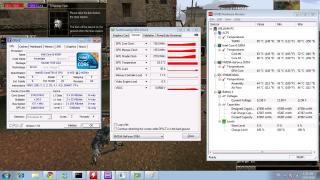
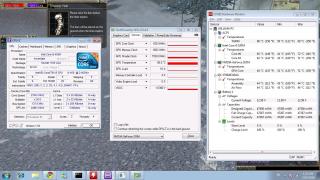
Added on August 23, 2010, 1:38 amQUOTE(gstoh @ Aug 23 2010, 01:33 AM) i can see ur GPU self-throttled? why both gpu core and memory speed clocked down to 405Mhz? no idea.. i took some new ss take a look. This post has been edited by liamx: Aug 23 2010, 01:38 AM |
|
|
|
|
|
lee_what2004
|
Aug 23 2010, 01:39 AM
|
*stare* ji--------

|
Now from that screenshot, your GPU is throttled....
|
|
|
|
|
|
liamx
|
Aug 23 2010, 01:44 AM
|
Getting Started
|
QUOTE(lee_what2004 @ Aug 23 2010, 01:39 AM) Now from that screenshot, your GPU is throttled.... what means throttled ? |
|
|
|
|
|
lee_what2004
|
Aug 23 2010, 01:45 AM
|
*stare* ji--------
|
Means the GPU is forced to run significantly slower clock/memory to prevent overheating....
Usually triggered when reach certain temperature, but yours is still in normal range...
|
|
|
|
|
|
liamx
|
Aug 23 2010, 01:47 AM
|
Getting Started
|
QUOTE(lee_what2004 @ Aug 23 2010, 01:45 AM) Means the GPU is forced to run significantly slower clock/memory to prevent overheating.... Usually triggered when reach certain temperature, but yours is still in normal range... anyway to fix it ?? |
|
|
|
|
|
lee_what2004
|
Aug 23 2010, 01:53 AM
|
*stare* ji--------
|
Does this occur with older driver?
|
|
|
|
|
|
liamx
|
Aug 23 2010, 01:55 AM
|
Getting Started
|
QUOTE(lee_what2004 @ Aug 23 2010, 01:53 AM) Does this occur with older driver? duno , coz i only try this driver btw.. it goes the same when i use integrated graphics.. |
|
|
|
|
|
lee_what2004
|
Aug 23 2010, 01:57 AM
|
*stare* ji--------
|
Never seen Intel GMA can throttle as well  Sure running in intel mode? Using what nvidia driver? 257.41? This post has been edited by lee_what2004: Aug 23 2010, 01:59 AM |
|
|
|
|
|
liamx
|
Aug 23 2010, 02:01 AM
|
Getting Started
|
QUOTE(lee_what2004 @ Aug 23 2010, 01:57 AM) Never seen Intel GMA can throttle as well Sure running in intel mode? Using what nvidia driver? 257.41? error .. haha.. coz if i switch directly to intel n login to the game then the graphics actually still remain nvidia hehe mistake. i need to restart pc and it will completely run in intel i think so coz i d/l from asus webbie its 8.17.12.5741 forceware 257.41 This post has been edited by liamx: Aug 23 2010, 02:02 AM |
|
|
|
|
|
lee_what2004
|
Aug 23 2010, 02:04 AM
|
*stare* ji--------
|
What about other game? Also lagging over the time?
|
|
|
|
|
|
liamx
|
Aug 23 2010, 02:05 AM
|
Getting Started
|
never try.. coz no game for me to try btw.. is there any solution ? |
|
|
|
|
|
lee_what2004
|
Aug 23 2010, 02:07 AM
|
*stare* ji--------
|
The one I can think of is either nvidia driver update/downgrade or bios update if its really throttling or its the game's bug....
This post has been edited by lee_what2004: Aug 23 2010, 02:08 AM
|
|
|
|
|
|
liamx
|
Aug 23 2010, 02:10 AM
|
Getting Started
|
QUOTE(lee_what2004 @ Aug 23 2010, 02:07 AM) The one I can think of is either nvidia driver update/downgrade or bios update if its really throttling or its the game's bug.... i dun think its game bug.. coz i play with my previous desktop, it has no prob.. my frens laptop also have no prob so , i have to go into safe mode n delete it wif cc cleaner ? bios update ? |
|
|
|
|
|
lee_what2004
|
Aug 23 2010, 02:13 AM
|
*stare* ji--------
|
Uninstall the driver in normal mode, then restart go to safe mode, use DriverSweeper to remove the leftover nvidia driver, then restart back to normal mode, start installing the driver....
As for bios update, don't see any new on Asus webpage...
|
|
|
|
|
|
liamx
|
Aug 23 2010, 02:16 AM
|
Getting Started
|
QUOTE(lee_what2004 @ Aug 23 2010, 02:13 AM) Uninstall the driver in normal mode, then restart go to safe mode, use DriverSweeper to remove the leftover nvidia driver, then restart back to normal mode, start installing the driver.... As for bios update, don't see any new on Asus webpage... ok i try.. let u know tomorrow thanks |
|
|
|
|
|
verdangilte
|
Aug 23 2010, 08:43 AM
|
|
|
QUOTE(ScivanShimitar @ Aug 23 2010, 01:24 AM) I'm facing the same problem as yours where i always have limited access to the internet when I'm trying to connect to my campus wifi. while all my friends can connect without any problem, I already tried to reinstall the middleware for the wifi but still the problem continues.Anyone can help? about the dota you can just switch the preferred graphic card to the integrated graphic, for me it the mouse lag and when there's more than 5 players on the screen it will lag. But after i switched to the integrated graphic , no more lag hurray.............. try to enter ur modern and reboot it should be ok yaya but i wonder why G335 cant play it only |
|
|
|
|
|
ZimCyx
|
Aug 23 2010, 04:04 PM
|
New Member
|
-.-'' i jus realized.. there is no xp drivers in asus website or the cd provided for windows xp...
mind sharing the links guyz?
|
|
|
|
|



 Quote
Quote



 0.0175sec
 0.56
0.56
 6 queries
 GZIP Disabled