Welcome Guest ( Log In | Register )

Bump Topic Topic Closed RSS Feed
125 Pages « < 98 99 100 101 102 > » Bottom

Outline · [ Standard ] · Linear+

 Nokia N900 Thread V2, Firmware FR 1.2 is FINALLY OUT

views
     
TSaspire2oo6
post May 29 2010, 09:23 AM

Banned
*********
All Stars
35,468 posts

Joined: Oct 2006

QUOTE(super_evil_alien @ May 29 2010, 06:21 AM)
Is it just me or Nokia emphasis to much on landscape mode too much on their phone nowdays?
So far most of N8 previews are in landscape mode too.
*
Thanks noted and fixed


Added on May 29, 2010, 9:29 amBtw everyone been keep asking about FMMS but i hardly see it works for anyone. Doesnt work for me too

Can i know its working for who and share the settings?

This post has been edited by aspire2oo6: May 29 2010, 09:29 AM
Andy214
post May 29 2010, 09:30 AM

Look at all my stars!!
*******
Senior Member
3,308 posts

Joined: Nov 2004


QUOTE(liamlain @ May 29 2010, 03:13 AM)
hi anyone can help me to configure the fmms?for maxis hotlink

this is my setting

access point name: unet
mmsc: http://172.16.74.100:10021/mmsc
user name :maxis
password:wap
proxy:202.75.133.49
proxy port:80
but still cant send out  sad.gif
*
That is correct settings, I tried it failed too, then I suspect because I was online connected to WiFi.

I test again, disconnect WiFi, and I saw "Maxis 3G Internet" and "MMS". I then choose "MMS" connection and try sending again, this time it's successful.

Not sure have to choose "MMS" connection or when it send it will auto-choose or prompt when you try to send.

Tips: Don't connect to 3G or WiFi and try it.


Added on May 29, 2010, 9:31 am

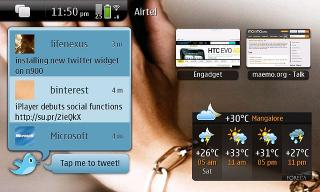
OMG, bro jloi will be super happy about this and it's developed by Nokia!

http://maemoarena.com/2010/05/twitter-widg...nokia/#more-835

Attached Image


This post has been edited by Andy214: May 29 2010, 09:33 AM
fai79ruz
post May 29 2010, 09:31 AM

Getting Started
**
Junior Member
92 posts

Joined: May 2010


aspire, u add my name twice in the n900 user list hehe

(46) fai79ruz
(47) Eiraku
(48) sweety8
(49) zeli
(50) dkliew
(51) wcshin
(52) scavenger_9
(53) alidan
(54) skeleton king
(55) mymac
(56) sesshoumaru7
(57) Josh_M
(58) fai79ruz
(59) hbau

kfthoo
post May 29 2010, 09:36 AM

Casual
***
Junior Member
410 posts

Joined: Apr 2008
From: Klang Valley


N900 sells 100,000 units in 5 weeks

This post has been edited by kfthoo: May 29 2010, 09:38 AM
jloi
post May 29 2010, 09:47 AM

SHIN-EVOLTO
*******
Senior Member
3,989 posts

Joined: Nov 2009


QUOTE(Andy214 @ May 29 2010, 09:30 AM)
OMG, bro jloi will be super happy about this and it's developed by Nokia!

http://maemoarena.com/2010/05/twitter-widg...nokia/#more-835

Attached Image
*
LOLLLLLLL THIS IS AWESOME biggrin.gif tongue.gif rclxms.gif flex.gif rclxm9.gif thumbup.gif icon_rolleyes.gif notworthy.gif

Edit : RAWRR! SAad ahh! phone cant enter ovi store sad.gif

This post has been edited by jloi: May 29 2010, 09:56 AM
Eiraku
post May 29 2010, 09:53 AM

Geeking since 1985!
*******
Senior Member
7,037 posts

Joined: Apr 2006


QUOTE(aspire2oo6 @ May 29 2010, 09:23 AM)
Btw everyone been keep asking about FMMS but i hardly see it works for anyone. Doesnt work for me too

Can i know its working for who and share the settings?
*
I'm on Celcom and my failure rate in sending/recieving has been acceptably low, most of my mmses go through. Keep in mind a few of the folowing, though:

1) My imange resize settings = small
2) Connection methods = havoc
3) I disconnect FROM all connections before attemping to download or upload MMSes.
3) I switch to 3G before sending/recieving.
4) Make sure your number is in the full, international format (+60123456789)

Most of this steps are not scientific at all, just mambo jumbo. But it works more often then not.
ccgenius
post May 29 2010, 09:55 AM

Regular
******
Senior Member
1,349 posts

Joined: Jun 2007
From: PJ


fmms works for me! o.o i have sent an received many mms since i received the phone o.o will post my config later for maxis.
TSaspire2oo6
post May 29 2010, 09:56 AM

Banned
*********
All Stars
35,468 posts

Joined: Oct 2006

QUOTE(Eiraku @ May 29 2010, 09:53 AM)
I'm on Celcom and my failure rate in sending/recieving has been acceptably low, most of my mmses go through. Keep in mind a few of the folowing, though:

1) My imange resize settings = small
2) Connection methods = havoc
3) I disconnect FROM all connections before attemping to download or upload MMSes.
3) I switch to 3G before sending/recieving.
4) Make sure your number is in the full, international format (+60123456789)

Most of this steps are not scientific at all, just mambo jumbo. But it works more often then not.
*
cool thanks hope someone else can test it with the latest version of FMMS. When i change the apn it will mess up my 3G settings then after tat i cant connect to the internet
ccgenius
post May 29 2010, 10:06 AM

Regular
******
Senior Member
1,349 posts

Joined: Jun 2007
From: PJ


user posted image
user posted image
user posted image

i using havoc settings, when im connecting to my wifi, the apps will connect to maxis 3.5g concurrently, and will close my 3.5g connection automatically after finished sending. As for image size, i have tried small, medium and large, all 3 works for me.

TSaspire2oo6
post May 29 2010, 10:12 AM

Banned
*********
All Stars
35,468 posts

Joined: Oct 2006

QUOTE(ccgenius @ May 29 2010, 10:06 AM)
user posted image
user posted image
user posted image

i using havoc settings, when im connecting to my wifi, the apps will connect to maxis 3.5g concurrently, and will close my 3.5g connection automatically after finished sending. As for image size, i have tried small, medium and large, all 3 works for me.
*
Cool thanks it finally works.
ccgenius
post May 29 2010, 10:12 AM

Regular
******
Senior Member
1,349 posts

Joined: Jun 2007
From: PJ


QUOTE(aspire2oo6 @ May 29 2010, 10:12 AM)
Cool thanks it finally works.
*
glad i can help biggrin.gif
TSaspire2oo6
post May 29 2010, 10:13 AM

Banned
*********
All Stars
35,468 posts

Joined: Oct 2006

QUOTE(ccgenius @ May 29 2010, 10:12 AM)
glad i can help  biggrin.gif
*
i found out i just need to change it to havoc then it works
ccgenius
post May 29 2010, 10:15 AM

Regular
******
Senior Member
1,349 posts

Joined: Jun 2007
From: PJ


oh okok, i only used havoc before, because i read in maemo talk forum, many said only havoc works for them.
fai79ruz
post May 29 2010, 10:16 AM

Getting Started
**
Junior Member
92 posts

Joined: May 2010


QUOTE(ccgenius @ May 29 2010, 10:06 AM)
user posted image
user posted image
user posted image

i using havoc settings, when im connecting to my wifi, the apps will connect to maxis 3.5g concurrently, and will close my 3.5g connection automatically after finished sending. As for image size, i have tried small, medium and large, all 3 works for me.
*
Do u know for celcom setting? i also have problem with it, thx!
ccgenius
post May 29 2010, 10:18 AM

Regular
******
Senior Member
1,349 posts

Joined: Jun 2007
From: PJ


QUOTE(fai79ruz @ May 29 2010, 10:16 AM)
Do u know for celcom setting? i also have problem with it, thx!
*
eikaru should be using "sialcom". eikaru help~~


Added on May 29, 2010, 10:20 amafter googling, i got these settings, you can try.


Provider Name Celcom Provider APN mms.celcom.net.my
Account
Password
Provider WAP Gateway 10.128.1.242
Provider MMSC http://mms.celcom.net.my/

seems like celcom doesnt need the username and password.


Added on May 29, 2010, 10:21 amnot sure about this settings though

This post has been edited by ccgenius: May 29 2010, 10:21 AM
TSaspire2oo6
post May 29 2010, 10:29 AM

Banned
*********
All Stars
35,468 posts

Joined: Oct 2006

i currently have maxis and digi. I ported my celcom to maxis already.

I will try test digi and make a tutorial
ccgenius
post May 29 2010, 10:32 AM

Regular
******
Senior Member
1,349 posts

Joined: Jun 2007
From: PJ


i though you posted this at frontpage is for digi?

http://forum.lowyat.net/index.php?showtopi...&#entry33105072


edit: oh well, that is old mms apps.

This post has been edited by ccgenius: May 29 2010, 10:33 AM
TSaspire2oo6
post May 29 2010, 10:41 AM

Banned
*********
All Stars
35,468 posts

Joined: Oct 2006

QUOTE(ccgenius @ May 29 2010, 10:32 AM)
i though you posted this at frontpage is for digi?

http://forum.lowyat.net/index.php?showtopi...&#entry33105072
edit: oh well, that is old mms apps.
*
that is old setting. So after u update your FMMS version it wont look like the latest one anymore.
Borneo928
post May 29 2010, 10:46 AM

Casual
***
Junior Member
417 posts

Joined: May 2008


QUOTE(aspire2oo6 @ May 29 2010, 09:23 AM)
Thanks noted and fixed


Added on May 29, 2010, 9:29 amBtw everyone been keep asking about FMMS but i hardly see it works for anyone. Doesnt work for me too

Can i know its working for who and share the settings?
*
yup i tried it for digi but it didnt work.
TSaspire2oo6
post May 29 2010, 11:12 AM

Banned
*********
All Stars
35,468 posts

Joined: Oct 2006

MMS setting for Maxis credit goes to ccgenius for screenshot and guide
user posted image


Setting
Resize image width : Medium
Connection mode : Havoc


Connection Setting

Accesspoint name : unet
MMSC : http://172.16.74.100:10021/mmsc
Username: maxis
Password : wap
Proxy : 202.75.133.49
Proxy Port : 80

Those not specified keep the setting unchange


This settings have been tested by aspire2oo6


This post has been edited by aspire2oo6: May 29 2010, 11:16 AM

125 Pages « < 98 99 100 101 102 > » Top
Topic ClosedOptions
 

Change to:
| Lo-Fi Version
0.0264sec    0.69    6 queries    GZIP Disabled
Time is now: 3rd December 2025 - 01:38 PM