

When you coming??
Display Calibration Fundamentals : My Take, Display Calibration
Display Calibration Fundamentals : My Take, Display Calibration
|
|
 Jul 12 2011, 11:37 AM Jul 12 2011, 11:37 AM
|
 
Junior Member
132 posts Joined: Aug 2009 
|
When you coming??
|
|
|
|
|
|
Jul 12 2011, 06:05 PM
|

Senior Member
3,858 posts Joined: Jan 2008
|
QUOTE(Docan @ Jul 12 2011, 11:37 AM) When you coming?? PM Sent. |
|
|
Jul 18 2011, 11:14 AM
|

Senior Member
1,161 posts Joined: Jan 2003
|
QUOTE(anfieldude @ Jun 30 2011, 04:42 PM) I recently completed the THX Video Calibration Certification. Will write more of the experience in the days to come. Haven't been following the forums lately. Congrats bro! ISF next? |
|
|
Jul 18 2011, 01:43 PM
|
|
Senior Member
3,858 posts Joined: Jan 2008
|
QUOTE(terranova @ Jul 18 2011, 11:14 AM) Haven't been following the forums lately. Congrats bro! ISF next? Yes terra.Will pm later since trip is confirmed. |
|
|
Aug 9 2011, 03:25 PM
|

Senior Member
1,201 posts Joined: Jan 2003 
|
guys....need some input from you regarding calibration for new TV
i plan to get the new Panasonic TH-P50U30k but from the shop, the black is very grey and compares to LED, it loses to LED in reproduction of dark image....is this due to the calibration?....i have alwaz thought Plasma has much better black than LCD or even LED? Has the technology of LED surpass Plasma for contrast ratio? i have the Spyder 3 TV for calibration...if i get the Panasonic, will this be enough to calibrate the monitor? |
|
|
Aug 10 2011, 01:17 PM
|
|
Senior Member
3,858 posts Joined: Jan 2008
|
QUOTE(Fusion @ Aug 9 2011, 03:25 PM) guys....need some input from you regarding calibration for new TV The blacks on the entry level Full HD Panny are not as good as some of the better LED backlit LCDs , but the viewing angles are motion is still better than most LEDs.i plan to get the new Panasonic TH-P50U30k but from the shop, the black is very grey and compares to LED, it loses to LED in reproduction of dark image....is this due to the calibration?....i have alwaz thought Plasma has much better black than LCD or even LED? Has the technology of LED surpass Plasma for contrast ratio? i have the Spyder 3 TV for calibration...if i get the Panasonic, will this be enough to calibrate the monitor? It all comes down to cost as well. If u are planning to pit a entry level plasma with a LED (which is normally much more expensive for the same size of plasma) its unfair. Also remember that the comparing blacks in a bright environment between plasma and LCD/LEDs is not reflective of how it will look in ur house. The technology of LED backlit LCDs for ANSI contrast have not surpassed a good plasma as yet. The Spyder is not really suitable, unless u r very lucky. |
|
|
|
|
|
Aug 11 2011, 10:53 AM
|
|
Senior Member
1,201 posts Joined: Jan 2003
|
bro ....thanks for the feedback....i will probably go for the P50VT20K...its looks much better in comparison to the U series....
Since i have the Spyder 3TV, mayb i should try to use Calman with the Spyder 3... I find that there is a problem with my Spyder 3 unit....after calibration, the image is very red and when i used it on my computer using Spyder 3 Pro software...the image is also a bit red ....is this due to the Spyder 3 unit? |
|
|
Aug 11 2011, 01:47 PM
|
|
Junior Member
132 posts Joined: Aug 2009
|
Fusion,, get Anfielddude to calibrate for you...."wow" factor.
|
|
|
Aug 11 2011, 01:48 PM
|
|
Senior Member
3,858 posts Joined: Jan 2008
|
QUOTE(Fusion @ Aug 11 2011, 10:53 AM) bro ....thanks for the feedback....i will probably go for the P50VT20K...its looks much better in comparison to the U series.... Yes, that is an indication that u got a bad probe...Did u buy it from Spectracal? If yes, did it come with the tables? Also, the VT20 would need CMS work, the Spyder would not be accurate for that.Since i have the Spyder 3TV, mayb i should try to use Calman with the Spyder 3... I find that there is a problem with my Spyder 3 unit....after calibration, the image is very red and when i used it on my computer using Spyder 3 Pro software...the image is also a bit red ....is this due to the Spyder 3 unit? |
|
|
Aug 11 2011, 02:23 PM
|
|
Senior Member
1,201 posts Joined: Jan 2003
|
if the spyder is not accurate, would it be better to just leave the VT20 to default value?...how is the performance of the default setting for this TV?
for the Spyder 3, i have actually bought it from Davis previously....is there any firmware update that could help solve the problem? |
|
|
Aug 11 2011, 05:31 PM
|
|
Senior Member
3,858 posts Joined: Jan 2008
|
QUOTE(Fusion @ Aug 11 2011, 02:23 PM) if the spyder is not accurate, would it be better to just leave the VT20 to default value?...how is the performance of the default setting for this TV? It is not an issue with the firmware but a hardware limitation. Pls PM me for specific display stuff.for the Spyder 3, i have actually bought it from Davis previously....is there any firmware update that could help solve the problem? |
|
|
Aug 20 2011, 12:19 PM
|
|
Senior Member
1,308 posts Joined: Oct 2004 From: Penang & Ipoh
|
I got a replacement P42X30K for my 4 years old PV60H which develop a black strip on the panel. Below is the calibration chart using the following setting:
Viewing Mode: Cinema Contrast:67 (to get 40ft/L for 100% White) Brightness: 0 Colour:48 Sharpness: 0 Tint: 0 Colour Balance: Warm Vivid Colour: Off Eco Mode: Off P-NR: Off Before Calibration: 

Cinema with Warm profile Calibration: 


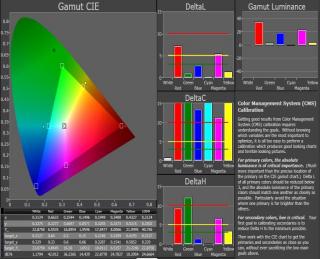
True Cinema Calibration: Greyscale is similar with Cinema mode. Color is much better and conform to THX. Need to dial down color by 2 clicks to pull down the luminance. Gamma slightly improve. 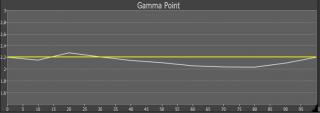
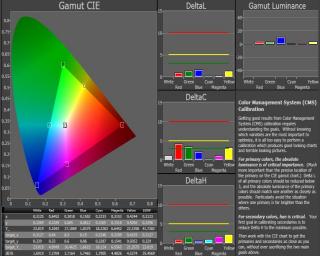
Black Level measure at 0.0305 ft/L White Level measure at 40.78 ft/L On/Off Contrast Ratio: 1337 Summary: No CMS and gamma selection limit the tuning option. This is expected for low end unit. Color is oversaturated for Green and you can see that the green grass doesn't look natural. Red luminance is too high. Overall picture quality is OK for non critical viewing and some people prefer over saturated color. I would prefer BENQ W6000 projector compare to P42X30K plasma TV for Hollywood movie. Second Update: Using True Cinema give me a much better color. THX color is achieved with very good result with some color luminance slightly higher. Green grass is natural compare to Cinema mode + warm temp. This post has been edited by pierreye: Aug 21 2011, 12:05 AM |
|
|
Aug 20 2011, 12:31 PM
|
|
Senior Member
3,858 posts Joined: Jan 2008
|
Pierreye, if there is s true cinema mode try that. Colour is slightly more accurate and u get better gamma tracking. Closer to 2.1.
|
|
|
|
|
|
Aug 20 2011, 12:39 PM
|
|
Senior Member
1,308 posts Joined: Oct 2004 From: Penang & Ipoh
|
I check both true cinema and cinema with warm temp and both is slightly too red. Problem with True Cinema mode is I can't tune the color temp in the service menu.
|
|
|
Aug 20 2011, 01:19 PM
|
|
Senior Member
3,858 posts Joined: Jan 2008
|
U shd be able to. Select true cinema and calibrate cinema in service menu. They r the same template.
|
|
|
Aug 20 2011, 02:58 PM
|
|
Senior Member
1,308 posts Joined: Oct 2004 From: Penang & Ipoh
|
I see. I'll try out True Cinema again. Thanks for info. As for color temp, do I select warm in the service menu?
Added on August 20, 2011, 5:26 pmManaged to do the second calibration with True Cinema mode. Anfieldude is right, it give me accurate THX color and need to slightly turn down the color control to pull down the luminance a bit. This post has been edited by pierreye: Aug 20 2011, 05:26 PM |
|
|
Aug 25 2011, 11:26 AM
|

Senior Member
1,136 posts Joined: Oct 2009
|
Is this any good?Greyscale and Color Calibration for Dummies http://www.curtpalme.com/forum/viewtopic.php?t=10457
Can I use the recommended software and hardware to get useful results? Is it hard to use?  |
|
|
Aug 25 2011, 02:25 PM
|
|
Senior Member
3,858 posts Joined: Jan 2008
|
QUOTE(klimal @ Aug 25 2011, 11:26 AM) Is this any good?Greyscale and Color Calibration for Dummies http://www.curtpalme.com/forum/viewtopic.php?t=10457 Doc, if ur willing spend the time and money u can do a good job calibrating displays. I would get a proper spectro and a good colorimeter if u r planning to calibrate projectors. Let me know if u need help with software/hardware options and any other advice regarding calibrations.Can I use the recommended software and hardware to get useful results? Is it hard to use? |
|
|
Aug 25 2011, 04:14 PM
|
|
Senior Member
1,136 posts Joined: Oct 2009
|
I am only thinking of calibrating my own projector.
Just like when I started with REW, it looks formidable now. How about the Eye One meter? Is it ok to start with this? Is rather affordable, and will help me to get to grips with the software and set-up. |
|
|
Aug 25 2011, 06:37 PM
|
|
Senior Member
3,858 posts Joined: Jan 2008
|
QUOTE(klimal @ Aug 25 2011, 04:14 PM) I am only thinking of calibrating my own projector. The i1 Display2 /LT is a entry colorimeter and will work for a start. U can use it with the freeware HCFR.Just like when I started with REW, it looks formidable now. How about the Eye One meter? Is it ok to start with this? Is rather affordable, and will help me to get to grips with the software and set-up. I would ask that you also check out X-Rite's new i1 Display 3 that is much better but not supported by HCFR. Still, they are both colorimeters and will degrade with time and since they use filters to work, might not be accurate for Colour Management Work. If u go with Chromapure/Calman, they support more meters and u can profile the colorimeter with a spectro (since u only use it for ur projector, it will work for longer time). I can setup the profile with my spectro, but would need to get temp licenses from Calman to support that. But they meters cost more and the software is not free. |
| Change to: |  0.0216sec 0.0216sec
 0.61 0.61
 6 queries 6 queries
 GZIP Disabled GZIP Disabled
Time is now: 3rd December 2025 - 10:52 AM |
 Quote
Quote