

best design got FREE HDPRO yangxi ? ....hahaha
The Official HDPro Media Player Owner's Thread, All about the HDPro Media Player
The Official HDPro Media Player Owner's Thread, All about the HDPro Media Player
|
|
 Aug 21 2010, 12:59 PM Aug 21 2010, 12:59 PM
|
 
Junior Member
503 posts Joined: Aug 2006 From: CatCity  
|
best design got FREE HDPRO yangxi ? ....hahaha
|
|
|
|
|
|
Aug 21 2010, 01:04 PM
|

Senior Member
1,221 posts Joined: Sep 2007
|
Hi Yangxi, got the package today. 1 day deliver from you, thanks a lot for the efficiency.
I have done some playing and found the following: 1. WIFI network key does not support any other alphanumerical key except for a-f, this is kinda disappointing thou. I haven;t really tested on the connectivity yet as this requires me to change my router's key to something simply. 2. Nothing I have change have effect. For example: - I have turn off File preview, but it still preview my files for me. - Subtitle is set to ON, but I still gotta manually select to on the subtitle each time I play a file. - I have tried to change the Video System too. The default is stuck at NTSC. I have tried to change it to 1080P 50HZ, 1080P, 60Hz, HDMI AUto, but once I did that, the whole screen become blank. I gotta restart the player to get back any display. I recheck again at the Video System menu and it already default back to NTSC. Please note that my TV does support 1080P, 60Hz, 50Hz 3. I got some serious problem with flickering. Screen will flicker without giving any warning. I am guessing the screen resolution does not match with the device output, hence the flickering. I tried to chance the resolution - please refer to point 2. 4. When I press the > button on the machine (not the remote control) when it is in the main scree, the machine just cut off the display. I waited for several minutes before restarting the machine. 5. Subtitle are hard to read. If you can enable the option of having white with shadow, it would be great. 6. Subtitle are displaying things wrong. I mean, wrong position. You know when some of the subtitles translated the background Japanese wording, they position it on top of the Kanji? Your machine position them in the wrong place, some did not even come up. I have only play around in 1 hour, so there might be more. I hope you can help me on these. Thank you very much |
|
|
Aug 21 2010, 01:49 PM
|

Senior Member
1,798 posts Joined: Sep 2004 From: Yuen Long, HK || Seremban || Kuala Lumpur
|
Dolby TrueHD or DTS-HD Master Audio nicer?
Do HDPRO+ support DTS-HD Master Audio? |
|
|
Aug 21 2010, 05:23 PM
|

Senior Member
4,189 posts Joined: Jan 2003 From: Age Quod Agis 
|
QUOTE(cybersim2 @ Aug 21 2010, 12:59 PM) best design got FREE HDPRO yangxi ? ....hahaha can .. free give normal type RMVB player ^.^ Added on August 21, 2010, 5:25 pm QUOTE(runemastertan @ Aug 21 2010, 01:04 PM) Hi Yangxi, got the package today. 1 day deliver from you, thanks a lot for the efficiency. 4.) did you take out plastic cover?I have done some playing and found the following: 1. WIFI network key does not support any other alphanumerical key except for a-f, this is kinda disappointing thou. I haven;t really tested on the connectivity yet as this requires me to change my router's key to something simply. 2. Nothing I have change have effect. For example: - I have turn off File preview, but it still preview my files for me. - Subtitle is set to ON, but I still gotta manually select to on the subtitle each time I play a file. - I have tried to change the Video System too. The default is stuck at NTSC. I have tried to change it to 1080P 50HZ, 1080P, 60Hz, HDMI AUto, but once I did that, the whole screen become blank. I gotta restart the player to get back any display. I recheck again at the Video System menu and it already default back to NTSC. Please note that my TV does support 1080P, 60Hz, 50Hz 3. I got some serious problem with flickering. Screen will flicker without giving any warning. I am guessing the screen resolution does not match with the device output, hence the flickering. I tried to chance the resolution - please refer to point 2. 4. When I press the > button on the machine (not the remote control) when it is in the main scree, the machine just cut off the display. I waited for several minutes before restarting the machine. 5. Subtitle are hard to read. If you can enable the option of having white with shadow, it would be great. 6. Subtitle are displaying things wrong. I mean, wrong position. You know when some of the subtitles translated the background Japanese wording, they position it on top of the Kanji? Your machine position them in the wrong place, some did not even come up. I have only play around in 1 hour, so there might be more. I hope you can help me on these. Thank you very much 5.) only can set bigger size, and color 6.) you can adjust angle or font size. This post has been edited by yangxi: Aug 21 2010, 05:25 PM |
|
|
Aug 21 2010, 10:53 PM
|

Senior Member
532 posts Joined: Oct 2009
|
simple design.... yangxi, i done my part....
 
|
|
|
Aug 22 2010, 12:50 AM
|
|
Senior Member
4,189 posts Joined: Jan 2003 From: Age Quod Agis
|
not bad ..pro ^.^ (but X word too dark .. looks Yang i
)email me : yangximusic@gmail.com (lowyat here upload got watermark >.<) This post has been edited by yangxi: Aug 22 2010, 12:53 AM |
|
|
|
|
|
Aug 22 2010, 08:29 AM
|
|
Senior Member
532 posts Joined: Oct 2009
|
QUOTE(yangxi @ Aug 22 2010, 12:50 AM) not bad ..pro ^.^ (but X word too dark .. looks Yang i logo is like that one... ha ha ha... just kidding. will send you .... )email me : yangximusic@gmail.com (lowyat here upload got watermark >.<) Added on August 22, 2010, 8:44 ammade a thicker x sign and sent to you too This post has been edited by tracktion3: Aug 22 2010, 08:44 AM |
|
|
Aug 23 2010, 09:34 PM
|
|
Junior Member
34 posts Joined: Aug 2006 
|
Hi YangXi,
please advice. Some movies cannot display full screen on my plasma but some ok? Does not full screen we will see two black bar? See below attach screen I capture One got black bar (i highlight with RED) the other full screen. I have Tried different setting of the 720P / 1080P yet still same results. Pls help No shock seeing movie with black bars  Many Thanks. This post has been edited by dottcomm: Aug 23 2010, 09:36 PM Attached thumbnail(s) 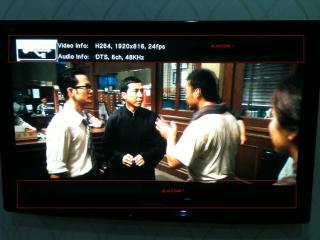

|
|
|
Aug 23 2010, 10:23 PM
|

Senior Member
993 posts Joined: Apr 2007 From: Gas Town, Sarawak
|
QUOTE(dottcomm @ Aug 23 2010, 10:34 PM) Hi YangXi, It's depend on the movie you're playing. If the movie was produced in 1.78:1(16:9) ratio, the it will display in full screen. Else the rest of the ratio will have the black bar either on top or side.. Most movie was in 2.35:1 ratioplease advice. Some movies cannot display full screen on my plasma but some ok? Does not full screen we will see two black bar? See below attach screen I capture One got black bar (i highlight with RED) the other full screen. I have Tried different setting of the 720P / 1080P yet still same results. Pls help No shock seeing movie with black bars Many Thanks. |
|
|
Aug 23 2010, 10:29 PM
|
|
Senior Member
4,189 posts Joined: Jan 2003 From: Age Quod Agis
|
1920x816 because of 2.35:1 aspect ratio, there's black bars added to the top and bottom when it's encoded into a 16:9 area like 1920x1080.
did u try set ratio output ? 4:3 (panscan, letterbox) , or 16:9 , 16:10 if still appear black bar, you can zoom it (x,y)% |
|
|
Aug 23 2010, 10:31 PM
|
|
Senior Member
4,189 posts Joined: Jan 2003 From: Age Quod Agis
|
new logo
thanks (tracktion3) This post has been edited by yangxi: Aug 23 2010, 10:31 PM Attached thumbnail(s) 
|
|
|
Aug 24 2010, 08:42 AM
|
|
Senior Member
1,798 posts Joined: Sep 2004 From: Yuen Long, HK || Seremban || Kuala Lumpur
|
Normally setting to 16:9, make sure the movie resolution is either 1280 x 720 or 1920 x 1080, then you can watch full screen movie without black bars.
Most of the 720p movie resolution is 1280 x 544, it will have black bars. This post has been edited by rstusa: Aug 24 2010, 08:44 AM |
|
|
Aug 25 2010, 10:02 AM
|

Senior Member
761 posts Joined: Jan 2003
|
I am using the HDPRO (HDMI out) to connect to my Pana LED TV (HDMI in).
I am having some screeching sound sometimes. Play 2 movies out of 10 will create the issue. To solve this, i need to turn the vol up/down to stop the sound issue. Please advise. BTW, i am using latest august firmware |
|
|
|
|
|
Aug 25 2010, 10:08 AM
|

Junior Member
64 posts Joined: Oct 2008 From: Subang Airport. 
|
QUOTE(yangxi @ Aug 23 2010, 10:31 PM) new logo cool.can u share more.... thanks (tracktion3)This post has been edited by jjoe: Aug 25 2010, 10:08 AM |
|
|
Aug 25 2010, 11:18 AM
|
|
Senior Member
532 posts Joined: Oct 2009
|
QUOTE(yangxi @ Aug 23 2010, 10:31 PM) new logo Didnt know you willa actually use it. Also, if you plan to have "1080p HD" and "Media Player" we may need to redesign to make it look more pro... thanks (tracktion3) |
|
|
Aug 25 2010, 11:25 AM
|
|
Senior Member
4,189 posts Joined: Jan 2003 From: Age Quod Agis
|
not yet sumit to them ^.^
trouble u so much ~.. Thanks This post has been edited by yangxi: Aug 25 2010, 11:25 AM |
|
|
Aug 25 2010, 01:57 PM
|
|
Senior Member
532 posts Joined: Oct 2009
|
Here is a quick design in my lunch break.. ha ha ha

|
|
|
Aug 25 2010, 07:26 PM
|
|
Senior Member
4,189 posts Joined: Jan 2003 From: Age Quod Agis
|
cool.. thanks
..help the bold brighter "x" . email me: yangximusic@gmail.com *tomorrow I can sumit to them ^.^ This post has been edited by yangxi: Aug 25 2010, 07:27 PM |
|
|
Aug 26 2010, 01:51 AM
|

Senior Member
1,467 posts Joined: Oct 2007 From: ✪Candy Land✪
|
QUOTE(tracktion3 @ Aug 25 2010, 01:57 PM) Here is a quick design in my lunch break.. ha ha ha This is so much better
 oh wait why there is no HDPRO mentioned at all? This post has been edited by Damonzero: Aug 26 2010, 01:52 AM |
|
|
Aug 26 2010, 09:23 AM
|
|
Senior Member
532 posts Joined: Oct 2009
|
QUOTE(Damonzero @ Aug 26 2010, 01:51 AM) This is so much better yangxi got other player also... not just HD Pro... oh wait why there is no HDPRO mentioned at all? |
| Change to: |  0.0249sec 0.0249sec
 1.00 1.00
 6 queries 6 queries
 GZIP Disabled GZIP Disabled
Time is now: 11th December 2025 - 08:59 PM |
 Quote
Quote