

TQ.

Nexus One LYN Official Review & Testing, Our very own testing playground on N1 :)
|
|
 Jan 18 2010, 08:32 PM Jan 18 2010, 08:32 PM
Return to original view | Post
#21
|
Senior Member
1,200 posts Joined: Jan 2009  
|
BTW : I am not a heavy FB user, so, I am not sure whether the N1's FB app is enough for you all. To me... mmm.. just as good as the basic web-based FB.
TQ. |
|
|
|
|
|
Jan 18 2010, 09:30 PM
Return to original view | Post
#22
|
|
Senior Member
1,200 posts Joined: Jan 2009
|
Navigation? ... mmm.. GMap can give DIRECTIONs and the purple line can be seen on the map. I don;t know whether it is good for navigation or not... but enough for route planning.
one thing for sure, the N1's GPS system is superb !:) . Very good sensitivity and with great accuracy. Outdoor/Open sky, N1 can gives 2m accuracy. Satellites locking also not bad all. Yeah, as I said, I am not a FB heavy user. .. But, one thing that iPhone's FB did not have is the 'MULTITASKING' or background notifications. http://www.betanews.com/article/Popular-ap...hone/1252510355 This post has been edited by bahathir: Jan 18 2010, 09:44 PM |
|
|
Jan 18 2010, 10:00 PM
Return to original view | Post
#23
|
|
Senior Member
1,200 posts Joined: Jan 2009
|
GMap = is just a map la... not like Garmin's Nuvi navigation mode.
|
|
|
Jan 19 2010, 10:55 AM
Return to original view | Post
#24
|
|
Senior Member
1,200 posts Joined: Jan 2009
|
The google navigation only works in USA. IMO
Ref: (RTFP : Read the Fine Print at the bottom of the page) http://www.google.com/mobile/navigation/#p=default This post has been edited by bahathir: Jan 19 2010, 11:22 AM |
|
|
Jan 19 2010, 08:37 PM
Return to original view | Post
#25
|
|
Senior Member
1,200 posts Joined: Jan 2009
|
Search for speedtest in Market.
Sending with N1 in ktm komuter. |
|
|
Jan 19 2010, 11:57 PM
Return to original view | Post
#26
|
|
Senior Member
1,200 posts Joined: Jan 2009
|
QUOTE(ivanlmh @ Jan 19 2010, 09:25 PM) For N1 owners..just wanna ask if everybody is facing the same problem? Wall charger provides 1000mA compared to 250mA from PC's USB. The higher current sometimes makes more heat tome this is acceptableOur N1 will get warm up when charging..i mean quite warm! I never felt so warm in any of the smartphones I am using..so I am kinda worried. Did some survey outside, it seems charging using USB will be much better..but is everyone facing the same issue..which is your N1 will get "hot" when charging  Dead pixels are very hard to find if any. They are too small. |
|
|
|
|
|
Jan 20 2010, 07:43 AM
Return to original view | Post
#27
|
|
Senior Member
1,200 posts Joined: Jan 2009
|
QUOTE(redzanime @ Jan 20 2010, 12:57 AM) After using N1 since yesterday evening, I noticed that my signal is E (for Egde) most of the time. Never had H signal (for HSDPA), unlike with my Hero previously. And the speed seems like a bit slower when using internet. Is it because I have reach the 5GB cap? 1) First of all, there is NO H icon to indicate HSDPA in N1.2) APN ? |
|
|
Jan 20 2010, 11:05 AM
Return to original view | Post
#28
|
|
Senior Member
1,200 posts Joined: Jan 2009
|
I not usre how much GMap data for Malaysian maps, but, if you want to save bandwidth, I suggest you to 'browse' entire Malaysian maps using WiFi
... Nayway, I don't know how much GMAP apps can store the maps chache and for how long it stores.Added on January 20, 2010, 11:06 amAbout the Market, I only cn search for FREE apps... no PAID apps. This post has been edited by bahathir: Jan 20 2010, 11:06 AM |
|
|
Jan 20 2010, 06:46 PM
Return to original view | Post
#29
|
|
Senior Member
1,200 posts Joined: Jan 2009
|
Oooo... I installed the 'hacked' GMap ... and I got this
Mm.... BTW, my Garmin Nuvi 755T looks much prettier, especially with MFM maps For basic navigation... IMO this is enough. Yes, it has TTS (Text to Speech) voice synth. TQ. Attached thumbnail(s) 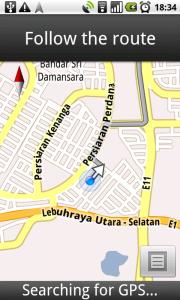
|
|
|
Jan 21 2010, 12:34 PM
Return to original view | Post
#30
|
|
Senior Member
1,200 posts Joined: Jan 2009
|
You are right. Actually, you can send multiple recipients but, in my case, not everyone in my contact list. There are several apps to send sms to masses, in Market, and the popular one is the 'Text Easy'. Yer la.. my Nokia hps are better in sms handling
Thank you. Added on January 21, 2010, 12:35 pmBTW, this smartphone is targeted for social networking via Internet. Why need to send multiple SMSes, if you can send once to twitter or facebook This post has been edited by bahathir: Jan 21 2010, 12:35 PM |
|
|
Jan 21 2010, 05:59 PM
Return to original view | Post
#31
|
|
Senior Member
1,200 posts Joined: Jan 2009
|
About the Chinese input, there are several Chinese IME in Market. The Android 2.1 SDK VM also using the Pinyin IME. So Chinese input will be not a problem with Android. I personally using OpenWnn/Plus for Japanese input.
Multitouch? N1 IS multitouch capable in hardware and OS level, but you must use multitouch enabled apps, such as the Dolphin browser. TQ. TQ |
|
|
Jan 22 2010, 05:04 PM
Return to original view | Post
#32
|
|
Senior Member
1,200 posts Joined: Jan 2009
|
Eventough I am VERY-VERY tempted to rooting my N1, but, I'll keep my N1 as is it, ie, 'un-rooted'. Someday or later, there will be a way to 'root' or privilege escalation on Adnroid 2.x or ways to 'oem lock' bootloader are found. . So, I not need to 'unlock' the bootloader which will void the warranty
After about a week exploring my N1, 1) In Malaysia, the 3G reception is about almost the same as any other phones. 2) Touch screen, is nice.. but you need to clean the screen and your fingers for optimum performance 3) No needs for multitouch, because, everything are acceptable without it. 4) 3G UL speed is around 250 kbps - 2Mbps, based on locations and time, Not bad. : Celcom3G, voice+unlimited data plan. 5) GPS is very good and sensitive. I can get 2m accuracy. 6) Yeah, it will get hot whem I use GPS/GMap navigation. Reasons is, the GPS, 3G and processing needs lots of power. BTW, I also tested my friend iPhone 3Gs running Papago navigation, and it;s also as warm as N1. Remember the 3Gs only use local data, not via 3G. 7) Once again, this phone REALLY LOOKs NICE and solidly build. 8) The speaker is loud enough to woke me up in morning. 9) I don't like fancy live wallpaper. mine is black/dark coloured background, as in the screenshot which I posted earlier. 10) AMOLED screen...... wow... magnificent!!! I converted movies to mp4 and played it on N1...and really nice and smooth Changes? no changes yet.. This post has been edited by bahathir: Jan 22 2010, 05:23 PM |
|
|
Jan 22 2010, 05:21 PM
Return to original view | Post
#33
|
|
Senior Member
1,200 posts Joined: Jan 2009
|
Yes... you only can buy the N1 ONLY from google... at least for time being.
|
|
|
|
|
|
Jan 23 2010, 12:05 PM
Return to original view | Post
#34
|
|
Senior Member
1,200 posts Joined: Jan 2009
|
Remember, to put battery in the N1 first.
, because, the N1 is shipped without battery installed. If you want to hand carry, 1) pickup the phone 2) install the battery, 2a) Put it in the pouch 3) Put the charger and USB cable into bag. That's it. |
|
|
Jan 23 2010, 10:30 PM
Return to original view | Post
#35
|
|
Senior Member
1,200 posts Joined: Jan 2009
|
Yes, default player, in Gallery is simple and good. I converted some HD movies using FFMPEG (command line) into H264 MP4 format, and it plays all without any problem.
BT transter: I can transfer files from/to my laptop running GNU/Linux. If my Linux laptop can did it in command line, then I am sure the ultra modern Windows 7 can also. . BT file transfer is not as fast the WiFi, it is around 200kByte/s. I also can transfer from/to to other handphones, and I use Bluetooth File Transfer apps (from Market). Very convenientFinger print? Nope, N1's screen is not a finger print 'magnet'. It stays clear all the time. If the screen is dirty or the sensitivity is not good, just wipe with clean cloth... Easy. This is my first touch screen phone, and my 4th touch screen devices. So I am quite satisfied with the screen. TQ |
|
|
Jan 23 2010, 11:02 PM
Return to original view | Post
#36
|
|
Senior Member
1,200 posts Joined: Jan 2009
|
Tethering means, to make your N1 as your GSM/HSDPA modem, via bluetooth, wifi or USB link. So you can share the N1's 3G connection with your computer.
Added on January 23, 2010, 11:57 pmThanlks for the Azilink tips. I tried it... good, at least I can browse and post this message using my laptop via the N1's 3G connection. This post has been edited by bahathir: Jan 23 2010, 11:57 PM |
|
|
Jan 24 2010, 12:07 AM
Return to original view | Post
#37
|
|
Senior Member
1,200 posts Joined: Jan 2009
|
Agreed.
... Anyway, USB tethering is good alternatives, if your are in very ;desperate' situation. Also agreed that, browsing with N1 is very nice experience, but the battery.... |
|
|
Jan 24 2010, 04:30 AM
Return to original view | Post
#38
|
|
Senior Member
1,200 posts Joined: Jan 2009
|
How about the eye-glasses or camera lenses cleaning cloth?
|
|
|
Jan 24 2010, 03:54 PM
Return to original view | Post
#39
|
|
Senior Member
1,200 posts Joined: Jan 2009
|
innard : Ever tried to set the N1 as Mass Storage, and Windows 7 and access the N1's SDcard as a drive?
Added on January 24, 2010, 4:06 pmReference : Nexus One User's Guide... page :70 http://www.google.com/support/android/bin/...=168464#1071902 Added on January 24, 2010, 5:24 pmBTW, if you use BT push method (PC -> N1), you only can send/push the N1's recognizable files' extensions . such as, txt, png, jpeg .... Other than these, N1 will denied the connection. This post has been edited by bahathir: Jan 24 2010, 05:24 PM |
|
|
Jan 25 2010, 12:29 AM
Return to original view | Post
#40
|
|
Senior Member
1,200 posts Joined: Jan 2009
|
shahz: Since you already rooted your N1, please report if you set 'conservative' and 'powersave' to cpufreq.
I may join the 'rooted' N1, in few months, and after Google/HTC publish the fix for 3G, just in case.... By the mean time, I hope 'xda' group already found the way to relock the bootloader. .TQ. Added on January 25, 2010, 2:34 amI have no poblem yet with the touchscreen, at this moment. For touch screen test, I used Android 2.1 SDK app (Developent.apk). Other than this, search for 'Multi touch' drawing tools in Market..In my tests, the touch registrations were precise, unless you accidentally touched the border of the screen. This post has been edited by bahathir: Jan 25 2010, 02:36 AM |
|
Topic ClosedOptions
|
| Change to: |  0.0429sec 0.0429sec
 0.95 0.95
 7 queries 7 queries
 GZIP Disabled GZIP Disabled
Time is now: 11th December 2025 - 08:16 PM |
 Quote
Quote