QUOTE(zwanvedder @ May 10 2010, 08:27 PM)
When the Australia units hit then that will be another nearer source for most people here then Hardware Apple iPad Discussion Thread | V1, Everything about iPad
Hardware Apple iPad Discussion Thread | V1, Everything about iPad
|
|
May 10 2010, 08:42 PM
Return to original view | Post
#81
|
![]() ![]() ![]() ![]() ![]() ![]()
Senior Member
1,381 posts Joined: Jan 2003 From: The Town of Arkham |
QUOTE(zwanvedder @ May 10 2010, 08:27 PM) When the Australia units hit then that will be another nearer source for most people here then |
|
|
|
|
|
May 10 2010, 09:31 PM
Return to original view | Post
#82
|
![]() ![]() ![]() ![]() ![]() ![]()
Senior Member
1,381 posts Joined: Jan 2003 From: The Town of Arkham |
QUOTE(little ice @ May 10 2010, 09:25 PM) if you do some research, you can use the ipad with ANY telco as long as they provide micro sim (or DIY by cutting the stardard sim), even the US ipads. So far Japan's iPad 3G is simlocked, well as reported online, doubt it will be the case here so the chance for maxis to apply the contract on the ipads will be 0.000001%, even if they DARE to do it, imagine how many people will boycott maxis. |
|
|
May 11 2010, 08:14 AM
Return to original view | Post
#83
|
![]() ![]() ![]() ![]() ![]() ![]()
Senior Member
1,381 posts Joined: Jan 2003 From: The Town of Arkham |
QUOTE(bluedream @ May 11 2010, 07:50 AM) Anyone experience crashes while launching video and iPod? Not sure what could be the issue, your iTunes account can be authorized up to 5 times on individual PCs like myself, and I synced with multiple PCs before but have to wipe app due to different media library but never had your issue of crashes.I did , =.= just because I authorized on a 2nd pc. When restoring from backup the same thing happen, had to do a fresh restore, now my virgin iPad is fixed but lost akk the saved games T_T |
|
|
May 11 2010, 06:01 PM
Return to original view | Post
#84
|
![]() ![]() ![]() ![]() ![]() ![]()
Senior Member
1,381 posts Joined: Jan 2003 From: The Town of Arkham |
|
|
|
May 11 2010, 06:18 PM
Return to original view | Post
#85
|
![]() ![]() ![]() ![]() ![]() ![]()
Senior Member
1,381 posts Joined: Jan 2003 From: The Town of Arkham |
QUOTE(zwanvedder @ May 11 2010, 06:04 PM) on my iPad using US acc, n my PC using Malaysia acc (currently sync with my iPhone), do i need to login with Malaysia acc on my iPad...? No need, you can sync both account apps onto your iPhone or iPad. Like Edoras mentioned, just login with the correct account when you need to download updates. Currently the iPad doesn't allow you to login to the iPad iTunes software with MY account as the device is not launched out of the US, probably only enabled when we get it here locally. So for iPad apps you download from MY store, just update on your mac or PC itunes then sync it over. |
|
|
May 11 2010, 06:27 PM
Return to original view | Post
#86
|
![]() ![]() ![]() ![]() ![]() ![]()
Senior Member
1,381 posts Joined: Jan 2003 From: The Town of Arkham |
QUOTE(naughtyz @ May 11 2010, 06:24 PM) Yeap. Example, if you have an iPod Touch/iPhone and buy apps exclusively via iTunes using MY account and you got an iPad and buy apps using both iTunes MY and US account, you can sync those apps to either device. Only thing is that at the moment, for the iPad, if you got MY purchased apps on it and the iPad iTunes app tells you to update that app, you have to update it on the PC first then sync it. Doing so on the iPad at the moment will only tell you "iTunes not supported in your country in the moment" or something like that. |
|
|
|
|
|
May 11 2010, 06:50 PM
Return to original view | Post
#87
|
![]() ![]() ![]() ![]() ![]() ![]()
Senior Member
1,381 posts Joined: Jan 2003 From: The Town of Arkham |
QUOTE(Edoras @ May 11 2010, 06:34 PM) Guys - how do you protect your Email from prying eyes? Not mistaken the only avenue is to jailbreak the device and use an app from Cydia called Lockdown.The moment you click Mail app, instantly you can view the contents. If some people use your iPad, you cannot prevent them from viewing the Emails... So, what's the solution? |
|
|
May 11 2010, 09:18 PM
Return to original view | Post
#88
|
![]() ![]() ![]() ![]() ![]() ![]()
Senior Member
1,381 posts Joined: Jan 2003 From: The Town of Arkham |
|
|
|
May 11 2010, 10:34 PM
Return to original view | Post
#89
|
![]() ![]() ![]() ![]() ![]() ![]()
Senior Member
1,381 posts Joined: Jan 2003 From: The Town of Arkham |
QUOTE(little ice @ May 11 2010, 09:55 PM) have you even try to buy apps from itunes on your PC? I have purchased most of my iPhone apps and iPad apps via the iTunes MY account. Have been doing this for a while. I only use my iTunes US account only if the apps do not appear in the MY store such as some Konami games and of course the Apple iWorks. For my US account I just iTunes credit via the gift cards.no go. i tried to buy ipad apps using MY account, it keep denying my billing/credit card info, although i make sure my details are 100% correct and triple checked, they still deny it. i think it's because they don't allow non-US credit card purchases. Added on May 11, 2010, 10:37 pm QUOTE(Lord_Ashe @ May 11 2010, 10:08 PM) I just buy the apps via skalominia's thread for iTunes gift cards. That's the only way its worked for me so far. The App Store is available to all countries (*listed by apple), but the iTunes client on the iPad currently only allows access to US based account. So you can buy apps from the MY store via your Mac or PC client and sync it to your iPad without issues. If the app is not available in MY store, just log into US account and purchase it with gift cards then sync as well.Basically just remember this- since the iPad isn't available internationally other app stores besides the US also won't be open. So just create a free US Account refer a few pages back, and you're set to go! EDIT I actually have no problem buying/getting free iPad apps via pc. This post has been edited by mAxPC: May 11 2010, 10:38 PM |
|
|
May 11 2010, 10:44 PM
Return to original view | Post
#90
|
![]() ![]() ![]() ![]() ![]() ![]()
Senior Member
1,381 posts Joined: Jan 2003 From: The Town of Arkham |
|
|
|
May 11 2010, 11:14 PM
Return to original view | Post
#91
|
![]() ![]() ![]() ![]() ![]() ![]()
Senior Member
1,381 posts Joined: Jan 2003 From: The Town of Arkham |
QUOTE(zwanvedder @ May 11 2010, 10:50 PM) Yes you can subscribe via credit card, when you try to subscribe it will take you to a webpage to perfom the transaction.Added on May 11, 2010, 11:17 pm QUOTE(sfotsy @ May 11 2010, 10:52 PM) May i know where i can get the gift cards? please share because i m going to get ready what to do when my ipad arrived. Thanks in advance. Gift cards only work with US iTunes account. If you do a search on the threads here you will find the steps required to create a US account without the need for a credit card, then you basically top up your account with the gift cards, or redeem them. If you search the Garage Sales thread, you will find a person by the name of skalominia whom is selling such a thing.Added on May 11, 2010, 10:55 pmthanks for the people's whom sharing here abt the itune account here while regarding on how or what to do while when want to get software app from itune. Indeed i can learn lots of things here. Hopefully can make some friend here. This post has been edited by mAxPC: May 11 2010, 11:17 PM |
|
|
May 12 2010, 06:34 PM
Return to original view | Post
#92
|
![]() ![]() ![]() ![]() ![]() ![]()
Senior Member
1,381 posts Joined: Jan 2003 From: The Town of Arkham |
My jailbroken iPad only has 1 Cydia app which is Lockdown to enable password access to the mail app (*or any app you want), other than that, not much else. Bought Real Racing today, got bored of NFS Shift.
|
|
|
May 12 2010, 10:57 PM
Return to original view | Post
#93
|
![]() ![]() ![]() ![]() ![]() ![]()
Senior Member
1,381 posts Joined: Jan 2003 From: The Town of Arkham |
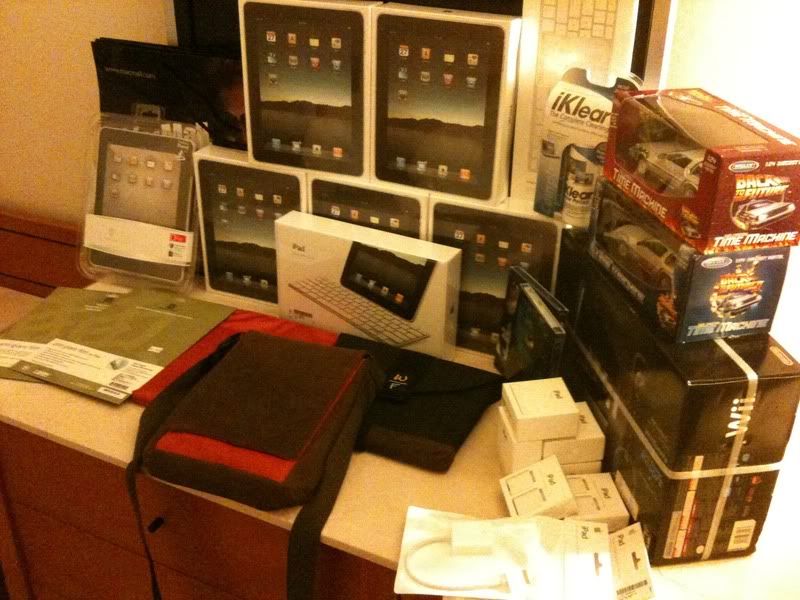
QUOTE(stringfellow @ May 12 2010, 10:36 PM) Last post before I go to sleep. One heck of a haul The damage from the LAX-TPE iPad/Shopping Hunt:- » Click to show Spoiler - click again to hide... « Good night everybody! REEDITED: Pic came out too big. |
|
|
|
|
|
May 13 2010, 05:19 PM
Return to original view | Post
#94
|
![]() ![]() ![]() ![]() ![]() ![]()
Senior Member
1,381 posts Joined: Jan 2003 From: The Town of Arkham |
QUOTE(naughtyz @ May 13 2010, 05:09 PM) Seem like everybody aiming for the 3G..is the speed fast enough? Think of it as flexibility. If there is a 3G signal you just use 3G, most cases you may not be around an area with Wi-Fi so it is useful. Then if you are in an area with Wi-Fi, turn off 3G and switch on Wi-Fi instead i think wifi is better. now most of everywhere provide free wifi. mcd, kfc, starbuck and etc..but why 3g?? if there is no 3g coverage..so is it gonna use edge connection to surf? Most people here seem to opt for the iPad Wi-Fi + MiFi kind of route. |
|
|
May 13 2010, 06:30 PM
Return to original view | Post
#95
|
![]() ![]() ![]() ![]() ![]() ![]()
Senior Member
1,381 posts Joined: Jan 2003 From: The Town of Arkham |
QUOTE(DarthMaus @ May 13 2010, 06:25 PM) Guys, Would usually cover the side but maybe not the top bezel, posted something similar in one of my posts when I applied something similar to my unit.Anyone of u using the zagg invisibleshield? It covers the front and back but does it cover the sides? Any other full body protection to recommend? Must cover the sides ideally Thanks. |
|
|
May 13 2010, 11:02 PM
Return to original view | Post
#96
|
![]() ![]() ![]() ![]() ![]() ![]()
Senior Member
1,381 posts Joined: Jan 2003 From: The Town of Arkham |
QUOTE(Eralus @ May 13 2010, 10:59 PM) not for apps store but for iPad..when 1st time on your iPad u need to register(but can register later)..so u guys register or not..if yes...u guys put US address or MY address? Think what he meant is when using the iTunes App store on the iPad itself you need to have a US account because you cannot browse MY store on the device yet though you are free to do so as per norm on your PC and Mac and then sync the stuff over. Kind of irritating though. I sync both MY and US store apps onto my iPad and when the MY apps have updates I cannot update from the device itself, have to update on the PC or Mac iTunes then sync it over. |
|
|
May 14 2010, 12:53 AM
Return to original view | Post
#97
|
![]() ![]() ![]() ![]() ![]() ![]()
Senior Member
1,381 posts Joined: Jan 2003 From: The Town of Arkham |
|
|
|
May 14 2010, 10:31 AM
Return to original view | Post
#98
|
![]() ![]() ![]() ![]() ![]() ![]()
Senior Member
1,381 posts Joined: Jan 2003 From: The Town of Arkham |
QUOTE(echothreealpha @ May 14 2010, 10:13 AM) I purchased:1) Keynote (*damn update still does not allow export to PPT) 2) Pages 3) Numbers (*damn update still does not allow export to Excel) 4) Todo (*nice alternative to Things which is bloody expensive) 5) WeatherHD (*free alternative is TWC Max and AccuWeather) 6) Desktop 7) Penultimate 8) Atomic Browser (*after seeing String mention it, decided to take the plunge and never regretted it) 9) Comic Reader Mobi (*best comic reading app, native.cbr reading ftw, unfortunately it was taken down by Apple due to some issues with the dev, sad) 10) Magic Piano 11)1 Password Pro (*free for me as I bought the iPhone version) 12) Zinio (*subscribed to Macworld) 13) TweetDeck (*free) 14) BBC News (*free) 15) New York Times (*free) 16) USA Today (*free) 17) Good Reader (*best app ever) 18) Paperdesk Games more or less: 1) NOVA HD (*or you could stick with the iPhone version if you have that) 2) Flight Control HD (*worth every penny for me eventhough I had the iPhone version) 3) NFS Shift 4) Real Racing 5) Diner Dash (*to placate the wife) 6) Dizzypad HD (*free) 7) We Rule (*free) 8) Uno (*not really worth it) 9) Scrabble (*very worth it if you have friends with iPhones and you can use the iPad as a board) 10) Underworlds Extreme (*not worth it if you have the iPhone version). 11) Air Hockey 12) Harbor Master (*free) 13) Tap Tap Radiation (*free) 14) Doodle HD (*purchased by mistake |
|
|
May 14 2010, 10:52 AM
Return to original view | Post
#99
|
![]() ![]() ![]() ![]() ![]() ![]()
Senior Member
1,381 posts Joined: Jan 2003 From: The Town of Arkham |
QUOTE(Dozz @ May 14 2010, 10:48 AM) Anyone using SplashID with iPad? This app got high rating. jUst not sure which one to purchase... SplashID or 1Password. I got 1Password because they had an offer for the iPhone version previously, and since it is an universal app all the more merrier for me. Both perform the same basic task but looks like 1Password has more ratings (*but SplashId has higher ratings) and comments as it has been around longer. But due to the universal nature of the app, 1Password Pro is more expensive than Splashid that's for sure. |
|
|
May 16 2010, 02:10 PM
Return to original view | Post
#100
|
![]() ![]() ![]() ![]() ![]() ![]()
Senior Member
1,381 posts Joined: Jan 2003 From: The Town of Arkham |
|
|
Topic ClosedOptions
|
| Change to: | 0.0508sec
0.94
7 queries
GZIP Disabled
Time is now: 14th December 2025 - 11:12 AM |