Welcome Guest ( Log In | Register )

11 Pages « < 5 6 7 8 9 > » Bottom

Outline · [ Standard ] · Linear+

 Astro byond spilts into 2 or 3 TVs

views
     
attap
post May 17 2010, 10:06 AM

Getting Started
**
Junior Member
199 posts

Joined: Sep 2005
QUOTE(jasdeep2jaz @ May 15 2010, 09:36 PM)
ive been through his thread, but im still blur, my house is still undergoing renovations, i will like to know how exactly cn i run asto beyond to all 4 tvs in my hse with hd quality, so far the shop people say only can use one tv hd, rest all sd, can someone please help me with this, with how exactly i need to run the wiring and what i need to buy, in order 4 all the 4 tvs to receieve hd. thank you
*
Get a HDMI splitter 1 in 4 out and wiring HDMI cable to all the tvs would solve your problem. Cost wise it would cost quite a bit.
mwirs77
post May 17 2010, 11:30 AM

Getting Started
**
Junior Member
79 posts

Joined: May 2010
QUOTE(GMNIMan @ Feb 1 2010, 02:28 PM)
If you are asking about the AV to RF converter, then it is RM38 here in Kota Kinabalu. Since it is Malaysian made, I bet it is quite a bit cheaper in Semananjung Malaysia.
*
Hi bro.. can u tell me where to buy this thing in KK.. & which shop u prefer that offer best electronic goods.. tks in adv.. thumbup.gif
Jimsee
post Jun 2 2010, 05:27 PM

Casual
***
Junior Member
340 posts

Joined: Dec 2007
From: Ipoh


is there any wireless HDMI product available yet.

i want to link up my current living room Astro beyond HD channel to my own bedroom TV (upstairs),

rayfoo
post Jun 4 2010, 08:34 PM

Look at all my stars!!
*******
Senior Member
2,562 posts

Joined: Jan 2003


giraffe brand got , few thousand ringgit
QUOTE(Jimsee @ Jun 2 2010, 05:27 PM)
is there any wireless HDMI product available yet.

i want to link up my current living room Astro beyond HD channel to my own bedroom TV (upstairs),
*
piras_tarabas
post Jun 5 2010, 11:42 PM

New Member
*
Junior Member
48 posts

Joined: Jun 2008


Do u know where can i but new remote control for astro byond?
Civic88
post Jun 7 2010, 07:33 PM

New Member
*
Newbie
1 posts

Joined: Jun 2010


Guys, I have learnt much from you all in this thread.
And the knowledge shared has enabled me to work on splitting my Byond to 2 tv's.
However, I am encountering problems, hope can get help here...

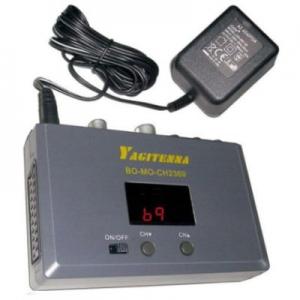
Problem: Just got a AV RF Converter (Yagitenna YT5050).
Connect RCA from Byond to Converter, then connect Coax from RF out port at converter to TV in bedroom.

Result: No audio and picture with small amount of noise.

Have tried direct RCA to bedroom TV (by moving the entire LCD down sweat.gif ), and that works - so should not be an issue with Byond box.
Have changed RCA cables, same results - so should not be the RCA cable issue.

Could it be the converter? I just bought it today and will be trying to do an exchange tomorrow.

Another question:
Saw an Astro Splitter at the hardware shop. Can this work with Byond?
Meaning the main cable from dish go to this Astro splitter, and split it to my Byond decoder and the other one go to my bedroom tv... will this method work?

Thanks a million.
podrunner
post Jun 8 2010, 08:26 PM

Look at all my stars!!
*******
Senior Member
2,214 posts

Joined: Feb 2009
Hello all,

Please bear with me (I hear a collective groan! smile.gif), but I sincerely honestly need advice.

Current Astro set-up:

One decoder with 2 tvs, one in living room, the other in bedroom. Wiring all concealed in roofs and between floors (I think!) and I use IR transmitter to change channels in bedroom. Additional decoder for supplementary package in in-laws room.

Question: I would like to run byond the same way. In-laws will stay put on SD. Will the cables run in similar fashion?

A million thanks in advance, and if this has been asked a gazillion times, a million apologies as well...smile.gif)
eMKs
post Jun 9 2010, 09:01 AM

On my way
****
Senior Member
647 posts

Joined: Jan 2010
From: Klang
QUOTE(Civic88 @ Jun 7 2010, 07:33 PM)
Problem: Just got a AV RF Converter (Yagitenna YT5050).
Connect RCA from Byond to Converter, then connect Coax from RF out port at converter to TV in bedroom.
Result: No audio and picture with small amount of noise.
Have tried direct RCA to bedroom TV (by moving the entire LCD down  sweat.gif ), and that works - so should not be an issue with Byond box.
Have changed RCA cables, same results - so should not be the RCA cable issue.
Could it be the converter? I just bought it today and will be trying to do an exchange tomorrow.
*

Did you connect audio cable (red/white RCA) to your AV to RF Converter?
Noise might be caused by long cable or interference with other device.

QUOTE(Civic88 @ Jun 7 2010, 07:33 PM)
Another question:
Saw an Astro Splitter at the hardware shop. Can this work with Byond?
Meaning the main cable from dish go to this Astro splitter, and split it to my Byond decoder and the other one go to my bedroom tv... will this method work?
*

This splitter works if you have 2 decoder but need to use 1 dish only, but it won't work with byond.


Added on June 9, 2010, 9:28 am
QUOTE(podrunner @ Jun 8 2010, 08:26 PM)
Current Astro set-up:
One decoder with 2 tvs, one in living room, the other in bedroom. Wiring all concealed in roofs and between floors (I think!) and I use IR transmitter to change channels in bedroom. Additional decoder for supplementary package in in-laws room.

Question: I would like to run byond the same way. In-laws will stay put on SD. Will the cables run in similar fashion?
A million thanks in advance, and if this has been asked a gazillion times, a million apologies as well...smile.gif)
*

If I understand correctly, your situation is like this.
1 dish, split into 2 decoder - 1 for you, another 1 for your in-laws.
Your decoder split into 2 TVs (using built-in RF converter or external converter?)

For splitting display, you can use current set up but need additional AV to RF converter with IR transmitter (but I think you have it now because you can use IR transmitter function).

The other thing since you have 2 decoder in your house, you need to run another cable from dish to byond decoder. You need to tell Astro about this when you subscribing to byond, they will install LNB with 2 output.

This post has been edited by eMKs: Jun 9 2010, 09:28 AM

podrunner
post Jun 9 2010, 11:44 AM

Look at all my stars!!
*******
Senior Member
2,214 posts

Joined: Feb 2009


Added on June 9, 2010, 9:28 am
If I understand correctly, your situation is like this.
1 dish, split into 2 decoder - 1 for you, another 1 for your in-laws.
Your decoder split into 2 TVs (using built-in RF converter or external converter?)

For splitting display, you can use current set up but need additional AV to RF converter with IR transmitter (but I think you have it now because you can use IR transmitter function).

The other thing since you have 2 decoder in your house, you need to run another cable from dish to byond decoder. You need to tell Astro about this when you subscribing to byond, they will install LNB with 2 output.
*

[/quote]

Thank you for your response! Will let contractor know accordingly.
rayfoo
post Jun 9 2010, 11:51 AM

Look at all my stars!!
*******
Senior Member
2,562 posts

Joined: Jan 2003


have you select channel 21 above? then u tune manually till get astro picture...is your model in the picture here?
QUOTE(Civic88 @ Jun 7 2010, 07:33 PM)
Guys, I have learnt much from you all in this thread.
And the knowledge shared has enabled me to work on splitting my Byond to 2 tv's.
However, I am encountering problems, hope can get help here...

Problem: Just got a AV RF Converter (Yagitenna YT5050).
Connect RCA from Byond to Converter, then connect Coax from RF out port at converter to TV in bedroom.

Result: No audio and picture with small amount of noise.

Have tried direct RCA to bedroom TV (by moving the entire LCD down  sweat.gif ), and that works - so should not be an issue with Byond box.
Have changed RCA cables, same results - so should not be the RCA cable issue.

Could it be the converter? I just bought it today and will be trying to do an exchange tomorrow.

Another question:
Saw an Astro Splitter at the hardware shop. Can this work with Byond?
Meaning the main cable from dish go to this Astro splitter, and split it to my Byond decoder and the other one go to my bedroom tv... will this method work?

Thanks a million.
*
This post has been edited by rayfoo: Jun 9 2010, 11:55 AM


Attached thumbnail(s)
Attached Image Attached Image
zlash
post Jun 11 2010, 09:40 PM

New Member
*
Junior Member
30 posts

Joined: Jun 2010


QUOTE(ssyam @ Jan 4 2010, 02:07 PM)
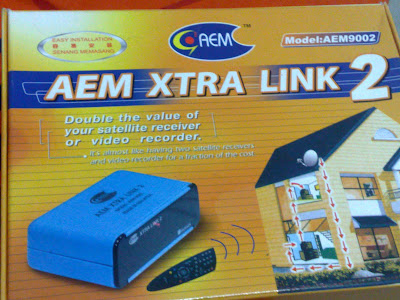
i'm using  AEM xtra link 2 to  view astro and change channel at 2nd tv in bedroom.
last time used this gadget for old astro decoder and now  use it to link  byond decoder.

user posted image
*
guys i just bought this item above, but i couldn't find any solution how to connect it to my astro byond..previous post said that 3 cable (RCA) from byond to this receiver but this item doesnt have 3 slot for RCA cable, how does it works..?? hope to hear from the experts~ gracias! icon_rolleyes.gif
aariz
post Jun 20 2010, 06:51 PM

New Member
*
Junior Member
38 posts

Joined: Feb 2010
Guys.. Got 1 prob.. I just bought wireless transmitter connecting 2 tv using byond.. Seems I can't change the channel from the receiver end.. I've tried different position of the IR from the decoder but still cannot..

Pls advise


Added on June 20, 2010, 6:59 pmHah.. I know what's the problem.. Seems that my mastro remote can't change the channel.. But it works on my byond remote..

Is the mastro remote faulty or the remote can't be used for byond?

Where can I get byond remote?

Tq

This post has been edited by aariz: Jun 20 2010, 06:59 PM
ellislo
post Jul 4 2010, 09:53 AM

New Member
*
Newbie
2 posts

Joined: Jun 2009


Hi

need some advise/comment from you guys on the following:

Equipment Used:
1. Astro Beyond
2. AEM8002 AV to RF Convertor

Setup:
I. Sony DVD Player OUTPUT to Convertor using {Audio LR (Red&White) + Video (Yellow)}, Convertor OUTPUT to TV using {Coaxial} ==> Video & Sound OK
II. Astro Beyond OUTPUT to Convertor using {Audio LR (Red&White) + Video (Yellow)}, Convertor OUTPUT to TV using {Coaxial} ==> Video - colour washout & Sound - noisy
III. Astro Beyond OUTPUT to TV using {Audio LR (Red&White) + Video (Yellow)} ==> Video & Sound - OK
IV. Astro Beyond OUTPUT to TV(1) using {Audio LR (Red&White) + Video (Yellow)}/{HDMI}, TV1 OUTPUT to Convertor using {Audio LR (Red&White) + Video (Yellow)}, Convertor OUTPUT to TV2 using {Coaxial} ==> Video - No picture & Sound - OK
V. DVD Player OUTPUT to TV(1) using {Audio LR (Red&White) + Video (Yellow)}/{HDMI}, TV1 OUTPUT to Convertor using {Audio LR (Red&White) + Video (Yellow)}, Convertor OUTPUT to TV2 using {Coaxial} ==> Video & Sound - OK


from the above, i can conclude that:
1. From SETUP I, convertor is working
2. From SETUP III, Astro Decoder {Audio LR (Red&White) + Video (Yellow)} output is working

So is it possible that the convertor not compatible with the Astro Beyond signal?? Any idea??

TQ

This post has been edited by ellislo: Jul 4 2010, 10:42 AM
meanmeanermeanest
post Jul 5 2010, 09:24 AM

New Member
*
Junior Member
6 posts

Joined: Aug 2006
QUOTE(accitzone @ Jan 4 2010, 02:35 PM)
my bros n me uses this too.. i use the wired 1, my elder bro uses the wireless 1.
bought it at my local electric shop...

we can change the astro channels via this  thing. my oni grouse is tht i hv the wired, but the wirelss is lousy a bit.

mine controls the astro via a small thing put at the IR receiver on the astro decoded. 1 decoder in the hall tv and the other in the family living tv.
*
Hi,

why i cannot remote the channel from my 2nd TV using the wired 1?

Please share. TQ.
Hudd
post Jul 12 2010, 06:33 PM

Getting Started
**
Junior Member
196 posts

Joined: Jul 2010


QUOTE(meanmeanermeanest @ Jul 5 2010, 09:24 AM)
Hi,

why i cannot remote the channel from my 2nd TV using the wired 1?

Please share. TQ.
*
You might need to adjust the infrared sensor to the correct spot. It just a bit right after the channel display on the decoder..


Added on July 13, 2010, 10:17 am
QUOTE(doey @ Feb 9 2010, 01:34 PM)
Guys,

I'm using the China made AV-RF converter. The picture is good except that it is noisy when it comes to bright light scene. There made quite an annoying buzzing sound when it displays the scene. Is there any way to eliminate this noise? Should I use booster or change to a better AV-RF converter?

Thanks.
*
I am having the same problem..anyone got any idea? or should I buy new converter..

This post has been edited by Hudd: Jul 13 2010, 10:17 AM
miqie
post Jul 21 2010, 05:07 PM

New Member
*
Junior Member
38 posts

Joined: Jun 2010
QUOTE(Hudd @ Jul 12 2010, 06:33 PM)
You might need to adjust the infrared sensor to the correct spot. It just a bit right after the channel display on the decoder..


Added on July 13, 2010, 10:17 am
I am having the same problem..anyone got any idea? or should I buy new converter..
*
Me too. I am going for this option -> http://forum.lowyat.net/index.php?showtopi...&#entry35100623
sulimc
post Aug 13 2010, 11:15 AM

New Member
*
Junior Member
21 posts

Joined: Dec 2009


QUOTE(miqie @ Jul 21 2010, 05:07 PM)
Hi miqie,

Could you share with us your experience with the hdmi extender that you provided the link? Is it working well? Picture and sound is clear, no distortion / interference? Can control astro from IR extender? How much it costs?

Many thanks.

Cheers!
kimyee73
post Aug 13 2010, 11:18 PM

Regular
******
Senior Member
1,007 posts

Joined: Oct 2006
From: island up north


I bought a rm12 Newpro NP2020 AV to RF converter and it works great. The PQ is quite good on 16" CRT TV in my bedroom. I've also installed AEM Xtra link 2 and able to remote control from bedroom as well. Got mine for rm45.
jooku1
post Sep 9 2010, 09:03 AM

Enthusiast
*****
Senior Member
704 posts

Joined: Apr 2005
From: Billboard Land


How about running a long RCA (red, yellow, white) cable from living room byond box to the bedroom tv upstairs? Not sure maybe 10m. PQ should still be ok right? Better than RF?

I've actually tried using an AV-RF converter (because I have existing RF wiring for my old Astro setup), but the signal was totally unwatchable. Ended up returning the damn unit!

So that's why considering connecting the RCA output directly to the bedroom via a long cable.

Anyone tried this before? Thanks
tanhks
post Sep 10 2010, 02:49 AM

On my way
****
Senior Member
608 posts

Joined: Aug 2008
QUOTE(attap @ May 17 2010, 10:06 AM)
Get a HDMI splitter 1 in 4 out and wiring HDMI cable to all the tvs would solve your problem. Cost wise it would cost quite a bit.
*
Agree ! for HD video, wiring HDMI is the best solution if you want to keep the High Definition video.
Astro byond is broadcast in High Definition (1920 x 1080 screen resolution).
If you use a AV-RF convertor, am wondering whether that AV-RF convertor able to handle the 1920 x 1080 screen resolution.
Even if the AV-RF convertor able to handle the 1920 x 1080 screen resolution, your TV also need a HD receiver/tuner.


11 Pages « < 5 6 7 8 9 > » Top
 

Change to:
| Lo-Fi Version
0.0295sec    0.48    6 queries    GZIP Disabled
Time is now: 2nd December 2025 - 06:26 PM