Outline ·
[ Standard ] ·
Linear+
Guide to BLOCK PPS without flash the firmware, Just want to share what i've discovered
|
ck_boon
|
 May 10 2012, 12:23 PM May 10 2012, 12:23 PM
|

|
QUOTE(Iwwstriker @ Mar 30 2011, 02:35 AM) Excuse me, I have recently bought a TP-Link W8960N modem router. It has the QoS feature, but how do i limit the bandwidth that my housemate is using? Because he's using pps for 24 hours, and i wish to just slow him down, no need to block everything. Please help. I can't find any solutions. bump this thread 2, how to Qos one user to watch at certain limit speed but not totally block it down? |
|
|
|
|
|
WilliamG
|
May 11 2012, 09:29 PM
|
Getting Started

|
Is the first post still usefull?
|
|
|
|
|
|
jackyyong
|
May 17 2012, 10:06 PM
|
|
|
For those using Unifi with stock DIR-615 router, it is very easy to block off PPS using the router. Just go to "Advanced" - "Filter Rules". Then get the MAC address of the client whom u wanna block. Block port from 1900 to 64430. Save Setting and Reboot router. They can now surf normally, but PPS will be blocked! Here's a screenshot: 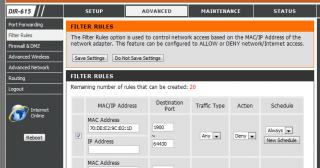
The best thing is during low-peak hour when you allow PPS you can always uncheck the tick box, and re-check whenever you need the bandwidth again, and act like nothing happened ......  Worked for me ......  |
|
|
|
|
|
BaDKiDz
|
Jun 2 2012, 05:43 PM
|
Getting Started
|
QUOTE(jackyyong @ May 17 2012, 10:06 PM) For those using Unifi with stock DIR-615 router, it is very easy to block off PPS using the router. Just go to "Advanced" - "Filter Rules". Then get the MAC address of the client whom u wanna block. Block port from 1900 to 64430. Save Setting and Reboot router. They can now surf normally, but PPS will be blocked! Here's a screenshot:
The best thing is during low-peak hour when you allow PPS you can always uncheck the tick box, and re-check whenever you need the bandwidth again, and act like nothing happened ...... Worked for me ...... block the port 1900-64430 what is restricted? can they download from hosting website? or only pps? |
|
|
|
|
|
johnlth93
|
Jun 4 2012, 01:09 PM
|
|
|
ppl can change port de ma  so no point to block like this i would suggest block port range if you really wan to block
Added on June 4, 2012, 1:15 pmi would advice to block port 1024~65535 and exceptionally allow port that u need to access to like 8443 or etc if you need those for other http services or like mysql on 3306 etc This post has been edited by johnlth93: Jun 4 2012, 01:15 PM |
|
|
|
|
|
jackdon
|
Jun 6 2012, 04:07 PM
|
|
|
QUOTE(johnlth93 @ Jun 4 2012, 01:09 PM) ppl can change port de ma so no point to block like this i would suggest block port range if you really wan to block
Added on June 4, 2012, 1:15 pmi would advice to block port 1024~65535 and exceptionally allow port that u need to access to like 8443 or etc if you need those for other http services or like mysql on 3306 etc Hi, I would suggest that you look at OpenDNS. Get a Free Home OpenDNS account and configure your network. Block DNS port on the router for those IP. Enable DNS relay on the Router to 208.67.222.222 and 208.67.220.220. A lot of School and Organization are using DNS to filter. Hope this works. |
|
|
|
|
|
johnlth93
|
Jun 6 2012, 11:57 PM
|
|
|
QUOTE(jackdon @ Jun 6 2012, 04:07 PM) Hi, I would suggest that you look at OpenDNS. Get a Free Home OpenDNS account and configure your network. Block DNS port on the router for those IP. Enable DNS relay on the Router to 208.67.222.222 and 208.67.220.220. A lot of School and Organization are using DNS to filter. Hope this works. errr sir, you suggesting to me because? |
|
|
|
|
|
liez
|
Oct 9 2012, 11:53 PM
|
|
|
block inbound or outbound?
|
|
|
|
|
|
general_odin
|
Jun 13 2013, 05:44 PM
|
|
|
anyone got port range for Qvod player?
|
|
|
|
|
|
chuahcs79
|
Jun 14 2013, 12:33 AM
|
Look at all my stars!!

|
QUOTE(general_odin @ Jun 13 2013, 05:44 PM) anyone got port range for Qvod player? QVOD very flexible as it have UDP/HTTP in their setting in port range though,. if u want fully block it,. try to block from 1024~65535,.. that's what i set in my router to block it  |
|
|
|
|
|
notausername
|
Jun 25 2013, 11:41 PM
|
Getting Started
|
I'm using unifi, how to block pps? i used the port 7201 and 7202,but cannot save the settings,dunno why. pps only 7201 and 7202 only?(i'm quite a dummy,so explain with more details id can  ) what to key in in the MAC/IP adress?? need help! thanks. Attached thumbnail(s)
|
|
|
|
|
|
notausername
|
Jun 26 2013, 12:32 AM
|
Getting Started
|
QUOTE(CrazyShadows @ Apr 16 2010, 02:02 AM) now the latest pps port is 8200~19999 just block on UDP and TCP 8200~19999 most of the router have firewall setting there i'm using SMC Router Modem so i set it like below  also thx for swgiant guided if we block such a wide range,will it block other access also?? other access as in web surfing. This post has been edited by notausername: Jun 26 2013, 12:57 AM |
|
|
|
|
|
notausername
|
Jun 26 2013, 01:00 AM
|
Getting Started
|
QUOTE(RangerRed @ Mar 28 2010, 08:29 PM) Just block the site addy.... doing this blocking port nonsense will cause ur roommate to screw around with the modem n such. Block the site... n when he ask why cannot access u tell him must be tm prob cause u cant access too... either that or assign QOS to PPS. my router only support qos speed reduction but wont block specific site, hot to do that? |
|
|
|
|





 Quote
Quote


 0.0207sec
 1.20
1.20
 6 queries
 GZIP Disabled