Welcome Guest ( Log In | Register )

3 Pages  1 2 3 >Bottom

Outline · [ Standard ] · Linear+

 Guide to BLOCK PPS without flash the firmware, Just want to share what i've discovered

views
     
TSswgiant
post Dec 16 2009, 04:00 AM, updated 16y ago

Extravagance RUINS Your Life !!!
******
Senior Member
1,414 posts

Joined: Jan 2003
From: 47300


First, you need to have the router's login password.

Just block the following ports for both of TCP & UDP.

64430
17788
1900 *
8400
3478 *
8800 *
7201 *

* you can choose not block this ports. As PPStream more depends on port 17788, 8400 & 64430

user posted image
My router is Dlink Di-524, with an original firmware

user posted image
PPS is buffering...

user posted image
Block the PPS Servers' ports

user posted image
Now try to watch another movie, makes it reconnects to the server

user posted image
Now, PPS failed on connecting to its server!


Tested on 2 pcs, which installed of the latest of PPS and they failed to stream the movie now... whistling.gif
NOTE: If it works, your skunk housemate may opted an alternative... So, please share with me what you have found... nod.gif

This post has been edited by swgiant: Dec 16 2009, 04:33 AM
bingozero
post Dec 16 2009, 04:41 AM

♥♥♥♥♥♥♥♥♥♥♥♥♥♥♥♥♥♥♥♥♥
*******
Senior Member
4,522 posts

Joined: Jan 2009
QUOTE(swgiant @ Dec 16 2009, 04:00 AM)
Just block the following ports for both of TCP & UDP.

64430
17788
1900 *
8400
3478 *
8800 *
7201 *

* you can choose not block this ports. As PPStream more depends on port 17788, 8400 & 64430

*
And also for UDP 7202, but TCP port is dynamic
TSswgiant
post Dec 16 2009, 05:00 AM

Extravagance RUINS Your Life !!!
******
Senior Member
1,414 posts

Joined: Jan 2003
From: 47300


Only 64430 falls on dynamic range. UDP is usually for streaming media purpose, so in this case i believed that TCP is prior than UDP.
Therefore we need to block the initial connections from it's server, to make them cant connect with each other.
leyley
post Dec 16 2009, 09:45 PM

Look at all my stars!!
*******
Senior Member
2,096 posts

Joined: May 2008
Does it really matter if the TCP port is dynamic ?
TSswgiant
post Dec 16 2009, 11:30 PM

Extravagance RUINS Your Life !!!
******
Senior Member
1,414 posts

Joined: Jan 2003
From: 47300


PPStream will connect to its server before itself connecting to p2p. So the ports of reaching to the server must be blocked and those ports are consistency, so no problem for here.
deogracias
post Jan 26 2010, 02:59 PM

Getting Started
**
Junior Member
74 posts

Joined: Oct 2008
From: miao......


if i block this port, will it be affecting the other streaming program?
Raki
post Jan 26 2010, 03:03 PM

Casual
***
Junior Member
311 posts

Joined: Jan 2009


QUOTE(deogracias @ Jan 26 2010, 02:59 PM)
if i block this port, will it be affecting the other streaming program?
*
example what other streaming program?
ieR
post Jan 27 2010, 08:03 PM

~Cursed Member~
Group Icon
Elite
3,928 posts

Joined: Jan 2003
From: Incheon, Korea.. currently in Miri, Soviet Sarawak
mainly block 7201 and 7202 UDP can already

at least i am not evil, i dont block it whole time, i block it when i need the internet... usually to be fair, 8pm to 12am... the rest of the time, she can watch all she wans

This post has been edited by ieR: Jan 27 2010, 08:04 PM
developer
post Jan 28 2010, 01:59 PM

Getting Started
**
Junior Member
285 posts

Joined: Jan 2006


well pps can choose to use port 80.
muslimz85
post Jan 31 2010, 02:13 AM

Getting Started
**
Junior Member
55 posts

Joined: Sep 2009


rclxms.gif
sai86
post Feb 28 2010, 02:48 PM

StilL LearninG
*******
Senior Member
4,934 posts

Joined: Sep 2008
From: Setapak


hi guys, juz wanted to know how to block d udp port using my modem(given by tmnut). Plz check d attachment whether its correct o not?? Im not good in this kinda thing. Tq for d tips ts and all d help here biggrin.gif

Attached Image

This post has been edited by sai86: Feb 28 2010, 02:51 PM
vccy118
post Mar 10 2010, 11:27 AM

Casual
***
Junior Member
374 posts

Joined: Mar 2005
From: Sarawak


Erm, block inbound or outbound? Coz my modem is DSL 2640T, has the same function but has inbound and outbound options.

EDIT: I just blocked 7201 to 64430 port outbound, both TCP and UDP and now PPS doesn't work anymore! Woohoo!

This post has been edited by vccy118: Mar 10 2010, 11:55 AM
razorboy
post Mar 22 2010, 07:39 AM

#winning
*******
Senior Member
2,634 posts

Joined: Dec 2008


cool info and guide, thanks a lot man
Casper85
post Mar 28 2010, 07:35 PM

Getting Started
**
Junior Member
81 posts

Joined: Aug 2007


will it block Qvod also?


vccy118

can u screen shot to let me c how u set?
RangerRed
post Mar 28 2010, 08:29 PM

Look at all my stars!!
Group Icon
Moderator
2,083 posts

Joined: Jan 2003
From: Penang

Just block the site addy.... doing this blocking port nonsense will cause ur roommate to screw around with the modem n such. Block the site... n when he ask why cannot access u tell him must be tm prob cause u cant access too... either that or assign QOS to PPS.


Attached thumbnail(s)
Attached Image
scph50004
post Mar 28 2010, 09:02 PM

Für die lulz
****
Senior Member
692 posts

Joined: Dec 2004
From: Soviet Sarawak


if i block the port range from 7401 to 64430, will it affect normal surfing? only p2p programs such as ppstream and QVOD blocked?
Sky.Live
post Mar 30 2010, 10:03 PM

Proctected Species
*******
Senior Member
4,390 posts

Joined: Oct 2004
From: Cheras, Malaysia


how does it works?

QoS on specifically PPS? I am not complaining since it's my sister watching, but tht damn program is uploading unlimitedly..
CrazyShadows
post Apr 16 2010, 02:02 AM

New Member
*
Newbie
1 posts

Joined: Dec 2006


now the latest pps port is 8200~19999
just block on UDP and TCP 8200~19999

most of the router have firewall setting there
i'm using SMC Router Modem so i set it like below
user posted image

also thx for swgiant guided


This post has been edited by CrazyShadows: Apr 16 2010, 02:04 AM
Patrick0527
post Apr 27 2010, 04:05 PM

New Member
*
Newbie
0 posts

Joined: Apr 2010
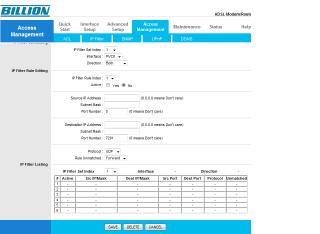
how to use my router to block PPS?

user posted image

which one i should choose?
Silpheed
post Apr 28 2010, 11:16 AM

Casual
***
Junior Member
419 posts

Joined: Jul 2006


QUOTE(Patrick0527 @ Apr 27 2010, 04:05 PM)
how to use my router to block PPS?

which one i should choose?
*
Access Control is the section you should look into.

3 Pages  1 2 3 >Top
 

Change to:
| Lo-Fi Version
0.0255sec    0.55    6 queries    GZIP Disabled
Time is now: 3rd December 2025 - 06:52 AM