

Here's a screenshot:
The best thing is during low-peak hour when you allow PPS you can always uncheck the tick box, and re-check whenever you need the bandwidth again, and act like nothing happened ......

Worked for me ......

Guide to BLOCK PPS without flash the firmware, Just want to share what i've discovered
|
|
 May 17 2012, 10:06 PM May 17 2012, 10:06 PM
Return to original view | Post
#1
|
 
Junior Member
431 posts Joined: Aug 2007 
|
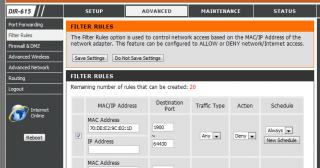
For those using Unifi with stock DIR-615 router, it is very easy to block off PPS using the router. Just go to "Advanced" - "Filter Rules". Then get the MAC address of the client whom u wanna block. Block port from 1900 to 64430. Save Setting and Reboot router. They can now surf normally, but PPS will be blocked!
Here's a screenshot:
The best thing is during low-peak hour when you allow PPS you can always uncheck the tick box, and re-check whenever you need the bandwidth again, and act like nothing happened ...... Worked for me ...... |
| Change to: |  0.0141sec 0.0141sec
 0.13 0.13
 7 queries 7 queries
 GZIP Disabled GZIP Disabled
Time is now: 8th December 2025 - 06:27 AM |
 Quote
Quote