

Hi all shifu,
Need recommendation for casing.
-Budget RM300 +-
-good cable management
-good airflow
-middle tower
Thanks thanks thanks.
Casing recommendations thread, What to buy, where to buy, how much?
Casing recommendations thread, What to buy, where to buy, how much?
|
|
 Feb 1 2014, 01:52 AM Feb 1 2014, 01:52 AM
|
 
Junior Member
423 posts Joined: Dec 2011 From: Kota Kinabalu, Sabah  
|
Hi all shifu,
Need recommendation for casing. -Budget RM300 +- -good cable management -good airflow -middle tower Thanks thanks thanks. |
|
|
|
|
|
Feb 9 2014, 04:13 PM
|

Junior Member
33 posts Joined: Jan 2014 From: Masjid Tanah Melaka
|
Hello Sifu, Im going to buy casing Xpredator X1... the casing price is rm165.. i like the design... is it ok?
Thanks  This post has been edited by anuar_mlk001: Feb 9 2014, 04:16 PM Attached thumbnail(s) 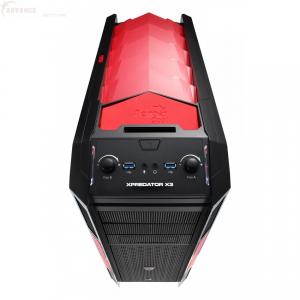

|
|
|
Feb 10 2014, 11:42 AM
|

Senior Member
8,746 posts Joined: Jul 2010 From: S.A.B.A.H
|
huhu long time never active and this is my first mission lol
QUOTE(ronron @ Feb 1 2014, 01:52 AM) Hi all shifu, Lotsa chassis fit your criteria, try looking these:Need recommendation for casing. -Budget RM300 +- -good cable management -good airflow -middle tower Thanks thanks thanks.  BitFenix Ronin Cooler Master 690II / III / Scout II Corsair 300R Thermaltake ms-1 there are more but I believe these will be the main ones for consideration unless you have a larger budget  QUOTE(anuar_mlk001 @ Feb 9 2014, 04:13 PM) Hello Sifu, Im going to buy casing Xpredator X1... the casing price is rm165.. i like the design... is it ok? reviews are hard to come by with this chassis, price wise it it cheap for the features but my advice is to go and take a look at how solid the chassis is before buying itThanks |
|
|
Feb 10 2014, 11:51 AM
|

Senior Member
2,906 posts Joined: Oct 2010 From: hurrr durrrrr?
|
QUOTE(Clem1982 @ Feb 10 2014, 11:42 AM) huhu long time never active and this is my first mission lol would recommend the Ronin if watercooling is taken into account. Lotsa chassis fit your criteria, try looking these: BitFenix Ronin Cooler Master 690II / III / Scout II Corsair 300R Thermaltake ms-1 there are more but I believe these will be the main ones for consideration unless you have a larger budget reviews are hard to come by with this chassis, price wise it it cheap for the features but my advice is to go and take a look at how solid the chassis is before buying it  It's able to fit a H100 with push & pull config, but mobo dependent - no thermal armor etc. CM Scout II is a great choice if you tends to move your PC a lot. Corsair 300R, a solid one but no good clearance for to radiator. Not much comment for the MS-1 from Thermaltake though, haven't tried one yet. lol This post has been edited by lucidlts: Feb 10 2014, 11:51 AM |
|
|
Feb 10 2014, 11:10 PM
|
|
Junior Member
423 posts Joined: Dec 2011 From: Kota Kinabalu, Sabah
|
QUOTE(Clem1982 @ Feb 10 2014, 11:42 AM) huhu long time never active and this is my first mission lol Lotsa chassis fit your criteria, try looking these: BitFenix Ronin Cooler Master 690II / III / Scout II Corsair 300R Thermaltake ms-1 there are more but I believe these will be the main ones for consideration unless you have a larger budget QUOTE(lucidlts @ Feb 10 2014, 11:51 AM) would recommend the Ronin if watercooling is taken into account. thank masters, and yes, I already bought the CM Storm Scout 2, a very solid build quality and cool grey color It's able to fit a H100 with push & pull config, but mobo dependent - no thermal armor etc. CM Scout II is a great choice if you tends to move your PC a lot. Corsair 300R, a solid one but no good clearance for to radiator. Not much comment for the MS-1 from Thermaltake though, haven't tried one yet. lol , only down side is it comes with only 1 led exhast fan.  |
|
|
Feb 11 2014, 08:24 AM
|
|
Senior Member
8,746 posts Joined: Jul 2010 From: S.A.B.A.H
|
QUOTE(ronron @ Feb 10 2014, 11:10 PM) thank masters, and yes, I already bought the CM Storm Scout 2, a very solid build quality and cool grey color lol yes, lotsa ppl complained about the fan package on the ScoutII but CM's fans are not the best out there after all so you have the option to add the ones you like , only down side is it comes with only 1 led exhast fan. |
|
|
|
|
|
Feb 11 2014, 09:13 AM
|

Senior Member
971 posts Joined: Mar 2007
|
QUOTE(ronron @ Feb 10 2014, 11:10 PM) thank masters, and yes, I already bought the CM Storm Scout 2, a very solid build quality and cool grey color Using the scout 2 as well. Love it. Been using it over a year and amazingly there's still no dust inside. Just opened it up 2 weeks back to install a new GPU. In addition to the kit fan, I've installed additional 3 xigmatek fans and dust filters to go with it. Didn't do anything about the top cover though. I left it unfiltered since it's the outflow , only down side is it comes with only 1 led exhast fan. |
|
|
Feb 11 2014, 10:42 AM
|
|
Junior Member
423 posts Joined: Dec 2011 From: Kota Kinabalu, Sabah
|
QUOTE(Clem1982 @ Feb 11 2014, 08:24 AM) lol yes, lotsa ppl complained about the fan package on the ScoutII but CM's fans are not the best out there after all so you have the option to add the ones you like yes, the 120mm stock red led fan is spinning very slow at full speed, I think only around 1000+- rpm showing in my software. feel like want to replace fan  QUOTE(redlyfs @ Feb 11 2014, 09:13 AM) Using the scout 2 as well. Love it. Been using it over a year and amazingly there's still no dust inside. Just opened it up 2 weeks back to install a new GPU. In addition to the kit fan, I've installed additional 3 xigmatek fans and dust filters to go with it. Didn't do anything about the top cover though. I left it unfiltered since it's the outflow wow cool, do you mind post some picture of your Scout 2 and fans installed? I am currently using 2pcs 120mm CM Sickle FlowX red led as front intake but it running at 2000rpm full speed, very load wind blow sound.  This post has been edited by ronron: Feb 11 2014, 10:46 AM |
|
|
Feb 11 2014, 10:55 AM
|
|
Senior Member
971 posts Joined: Mar 2007
|
QUOTE(ronron @ Feb 11 2014, 10:42 AM) yes, the 120mm stock red led fan is spinning very slow at full speed, I think only around 1000+- rpm showing in my software. feel like want to replace fan https://forum.lowyat.net/index.php?showtopi...&#entry58158430wow cool, do you mind post some picture of your Scout 2 and fans installed? I am currently using 2pcs 120mm CM Sickle FlowX red led as front intake but it running at 2000rpm full speed, very load wind blow sound. 1 back, 2 side, 1 front. Sides and back installed with filter. Top and front left unfiltered outflow. This picture was taken before long ago. |
|
|
Feb 11 2014, 11:11 AM
|
|
Junior Member
423 posts Joined: Dec 2011 From: Kota Kinabalu, Sabah
|
QUOTE(redlyfs @ Feb 11 2014, 10:55 AM) https://forum.lowyat.net/index.php?showtopi...&#entry58158430 1 back, 2 side, 1 front. Sides and back installed with filter. Top and front left unfiltered outflow. This picture was taken before long ago. |
|
|
Feb 11 2014, 04:06 PM
|
|
Senior Member
2,906 posts Joined: Oct 2010 From: hurrr durrrrr?
|
QUOTE(ronron @ Feb 11 2014, 10:42 AM) yes, the 120mm stock red led fan is spinning very slow at full speed, I think only around 1000+- rpm showing in my software. feel like want to replace fan Instead of high speed fans, why not invest on some quality fans that has low RPM but high static pressure?  Noctua fans, Noiseblocker fans, etc... |
|
|
Feb 11 2014, 04:28 PM
|

Senior Member
1,435 posts Joined: Apr 2011 From: Blank Space 
|
QUOTE(lucidlts @ Feb 11 2014, 04:06 PM) Instead of high speed fans, why not invest on some quality fans that has low RPM but high static pressure? For casing fan i think better opt for high CFM than high static pressure....IMHO Noctua fans, Noiseblocker fans, etc...  |
|
|
Feb 11 2014, 04:57 PM
|
|
Senior Member
2,906 posts Joined: Oct 2010 From: hurrr durrrrr?
|
QUOTE(kherel77 @ Feb 11 2014, 04:28 PM) For casing fan i think better opt for high CFM than high static pressure....IMHO for positive pressure setup perhaps? my 1 sen of course, still up to him to decide.  |
|
|
|
|
|
Feb 11 2014, 10:22 PM
|
|
Junior Member
423 posts Joined: Dec 2011 From: Kota Kinabalu, Sabah
|
QUOTE(kherel77 @ Feb 11 2014, 04:28 PM) For casing fan i think better opt for high CFM than high static pressure....IMHO yes, would prefer positive pressure. less dust  QUOTE(lucidlts @ Feb 11 2014, 04:06 PM) Instead of high speed fans, why not invest on some quality fans that has low RPM but high static pressure? wow, cool fan there, but is out of my budget. Noctua fans, Noiseblocker fans, etc...  |
|
|
Feb 12 2014, 12:22 AM
|

Senior Member
1,432 posts Joined: Aug 2010 From: Ipoh mali~~~
|
QUOTE(redlyfs @ Feb 11 2014, 10:55 AM) https://forum.lowyat.net/index.php?showtopi...&#entry58158430 do u mind sharing which header are u using to connect the fans? and how do u control the fan speed?1 back, 2 side, 1 front. Sides and back installed with filter. Top and front left unfiltered outflow. This picture was taken before long ago. |
|
|
Feb 12 2014, 09:00 AM
|
|
Senior Member
971 posts Joined: Mar 2007
|
QUOTE(ntw @ Feb 12 2014, 12:22 AM) do u mind sharing which header are u using to connect the fans? and how do u control the fan speed? What do you mean which header? You mean connectors? It's just the standard fan connectors. I didn't mod it. http://en.wikipedia.org/wiki/Fan_control And I didn't control the speed either. I've overclocked the CPU to 4.5ghz but the temp seems stable at 50-70C while gaming , thus I left the fan speed alone. For testing purposes I can use SpeedFan. Since I don't fool around with the speed much, I didn't bother getting a dedication fan control box. |
|
|
Feb 12 2014, 09:28 AM
|
|
Senior Member
1,435 posts Joined: Apr 2011 From: Blank Space
|
QUOTE(redlyfs @ Feb 12 2014, 09:00 AM) What do you mean which header? You mean connectors? It's just the standard fan connectors. I didn't mod it. His mean is which fan header on the mobo that you connect to the fans (which header to which fan) as Z77X-D3H have several fan header...http://en.wikipedia.org/wiki/Fan_control And I didn't control the speed either. I've overclocked the CPU to 4.5ghz but the temp seems stable at 50-70C while gaming , thus I left the fan speed alone. For testing purposes I can use SpeedFan. Since I don't fool around with the speed much, I didn't bother getting a dedication fan control box.  This post has been edited by kherel77: Feb 12 2014, 09:29 AM |
|
|
Feb 12 2014, 09:41 AM
|
|
Senior Member
971 posts Joined: Mar 2007
|
QUOTE(kherel77 @ Feb 12 2014, 09:28 AM) His mean is which fan header on the mobo that you connect to the fans (which header to which fan) as Z77X-D3H have several fan header... Yes I know. The motherboard does have multiple fan headers but these are all standard fan connectors, aren't they? Correct me if I'm wrong. I don't quite get the question. I just connect whichever connector is nearest to fan. Is there any other type of header/connectors for fan? Or a specific way or order to connect the fans in? This post has been edited by redlyfs: Feb 12 2014, 09:43 AM |
|
|
Feb 12 2014, 09:50 AM
|
|
Senior Member
8,746 posts Joined: Jul 2010 From: S.A.B.A.H
|
QUOTE(redlyfs @ Feb 12 2014, 09:41 AM) Yes I know. The motherboard does have multiple fan headers but these are all standard fan connectors, aren't they? Correct me if I'm wrong. should have 4-pin and 3-pin type of fan headers on the mobo.. usually the 4-pin are PWM type and is meant for the CPU cooler and most mobos will have at least 1I don't quite get the question. I just connect whichever connector is nearest to fan. Is there any other type of header/connectors for fan? Or a specific way or order to connect the fans in? |
|
|
Feb 13 2014, 03:41 AM
|
|
Senior Member
1,432 posts Joined: Aug 2010 From: Ipoh mali~~~
|
QUOTE(redlyfs @ Feb 12 2014, 09:00 AM) What do you mean which header? You mean connectors? It's just the standard fan connectors. I didn't mod it. http://en.wikipedia.org/wiki/Fan_control And I didn't control the speed either. I've overclocked the CPU to 4.5ghz but the temp seems stable at 50-70C while gaming , thus I left the fan speed alone. For testing purposes I can use SpeedFan. Since I don't fool around with the speed much, I didn't bother getting a dedication fan control box. QUOTE(kherel77 @ Feb 12 2014, 09:28 AM) His mean is which fan header on the mobo that you connect to the fans (which header to which fan) as Z77X-D3H have several fan header... QUOTE(redlyfs @ Feb 12 2014, 09:41 AM) Yes I know. The motherboard does have multiple fan headers but these are all standard fan connectors, aren't they? Correct me if I'm wrong. sorry for being out of thread topic. i asked because on the Z77X-D3H, only SYS_FAN_1 can be used to control the voltage(3pin fan); while SYS_FAN_2 and SYS_FAN_3 can only be used to control PWM fanI don't quite get the question. I just connect whichever connector is nearest to fan. Is there any other type of header/connectors for fan? Or a specific way or order to connect the fans in? |
|
Topic ClosedOptions
|
| Change to: |  0.0297sec 0.0297sec
 0.27 0.27
 6 queries 6 queries
 GZIP Disabled GZIP Disabled
Time is now: 2nd December 2025 - 01:34 AM |
 Quote
Quote